

Running a VPS is a lot like owning a house in a busy city. You might love the freedom and control, but if you forget to lock the doors or install an alarm, trouble can walk right in. As online threats continue to evolve, VPS security is no longer optional, it’s essential. If you want to secure your VPS properly, you need the right strategies in place. The good news? You don’t need to be a security expert to keep your server safe.
In this guide, we’ll walk through 10+ proven ways to secure your VPS, using clear language, practical steps, and real-world logic. Whether you’re managing a small website or a growing online project, these tips will help you sleep better at night knowing your VPS is protected.
What Is a VPS?
A VPS (Virtual Private Server) is a type of hosting where one physical server is divided into multiple independent virtual servers. Each VPS work like own private machine, with dedicated resources like CPU, RAM, storage. This means your website or application doesn’t get affected by what others are doing on the same physical server.
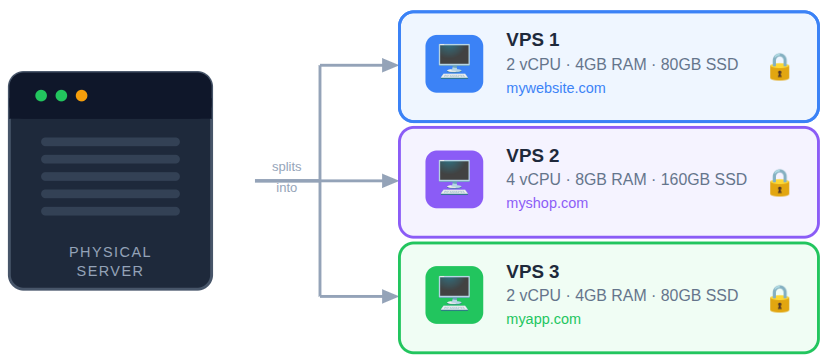
Think of it like living in an apartment building. Everyone shares the same building, but each person has their own locked apartment with separate rooms and utilities. A VPS gives you more control, better performance, and higher security than shared hosting, without the high cost of a dedicated server. This balance makes VPS hosting a popular choice for growing websites, applications, and online projects.
Key Features of a VPS
A Virtual Private Server (VPS) offers a perfect balance between performance, control, and affordability. Below are the key features that make VPS hosting a popular choice:
- Dedicated Resources
Your VPS comes with its own CPU, RAM, and storage, ensuring consistent performance without interference from other users. - Full Root or Admin Access
You get complete control over the server environment, allowing you to install software, configure settings, and manage security as needed. - Improved Security
Since your VPS is isolated from others on the same physical server, it provides better protection compared to shared hosting. - Customizable Server Environment
You can choose the operating system, software stack, and configurations that best suit your application or website. - Scalability
VPS resources can be upgraded easily as your traffic or workload grows, without downtime in most cases. - Stable Performance
Guaranteed resources help maintain reliable speed and uptime, even during high-traffic periods. - Cost-Effective Solution
VPS hosting delivers many benefits of a dedicated server at a much lower cost. - Support for Multiple Use Cases
Ideal for hosting websites, applications, databases, APIs, and development environments.
These features make a VPS a reliable and flexible hosting solution for businesses and individuals looking for more control and performance.
Why VPS Security Matters
Cyber threats are faster, smarter, and more automated than ever. Attackers no longer target only big platforms; small and medium VPS setups are often easier prey. A single security gap can lead to data theft, downtime, or even complete server loss.
Think of VPS security as brushing your teeth. Skipping it once might not hurt, but ignoring it regularly will cause serious problems. Strong security habits protect your data, your users, and your reputation.
VPS Security Best Practices You Should Follow
Securing your VPS isn’t about applying a single setting, it’s about building multiple layers of protection. From system updates and access control to firewalls and backups, every measure plays a critical role in protecting your server from modern threats. Below are essential VPS security best practices you should implement to keep your server safe and reliable.
1. Always Keep Your Server Updated
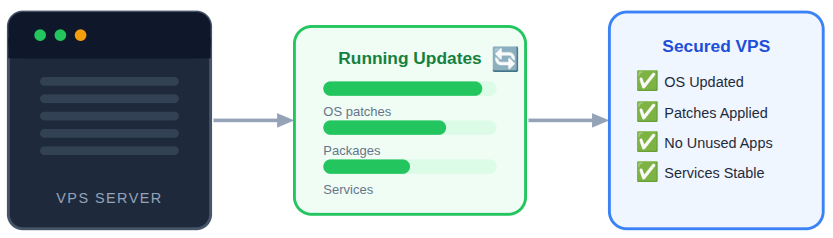
Keeping your server updated ensures known security gaps are patched before attackers can exploit them. Updates often include fixes for vulnerabilities that could otherwise expose your VPS to risks. Ignoring updates slowly weakens your server’s defense.
Key points to remember:
- Update the operating system regularly: Keeps your VPS protected by fixing known security flaws and vulnerabilities.
- Keep server packages and services current: Ensures all running services are secure and stable with the latest fixes.
- Remove unused software: Reduces unnecessary entry points that attackers could exploit.
Automatic updates can help, but it’s still wise to review changes manually from time to time.
2. Use Strong and Unique Passwords
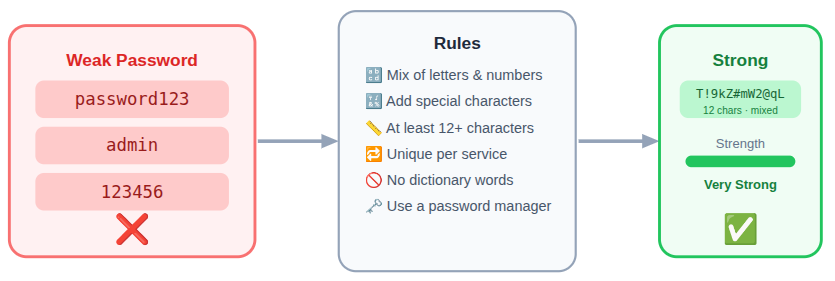
Weak passwords are one of the easiest ways for attackers to gain access to a VPS. Strong, unique passwords make unauthorized access far more difficult. Password strength is a basic but critical security layer.
Best practices include:
- Long passwords with mixed characters: Makes passwords harder to guess or crack using automated tools.
- Unique passwords for each service: Prevents attackers from accessing multiple services if one password leaks.
- Avoid dictionary words: Stops simple word-based password attacks.
A password manager can make this easier without driving you crazy.
3. Disable Root Login Access
Root access provides complete control over your VPS, which makes it a prime target for attackers. Disabling direct root login limits damage even if login credentials are exposed. This adds a vital layer of protection to your server.
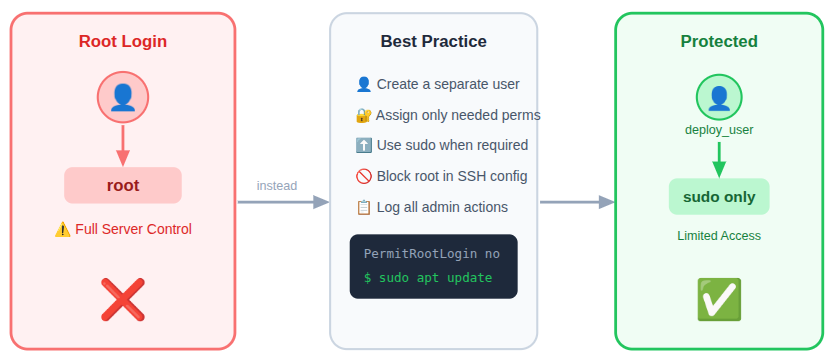
Instead of logging in as root:
- Create a separate user: Limits direct access to critical system controls.
- Assign only required permissions: Reduces the risk of accidental or malicious changes.
- Use privilege escalation when needed: Allows temporary admin access without constant root exposure.
This simple step reduces the risk of total server takeover.
4. Secure SSH with Key-Based Authentication
Password-based logins can be guessed or brute-forced over time. SSH keys offer a more secure way to access your VPS by relying on cryptographic verification. This significantly lowers the risk of unauthorized logins.
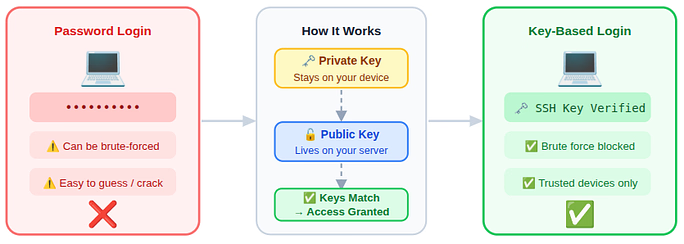
With key-based authentication:
- Allow only key-based logins: Prevents unauthorized access through password guessing.
- Block brute force attempts: Makes repeated login attacks ineffective.
- Control login sources easily: Restricts access to trusted devices only.
5. Change the Default SSH Port
Attackers often scan common ports to find vulnerable servers. Changing the default SSH port helps reduce automated attack attempts. While not foolproof, it adds an extra layer of obscurity.
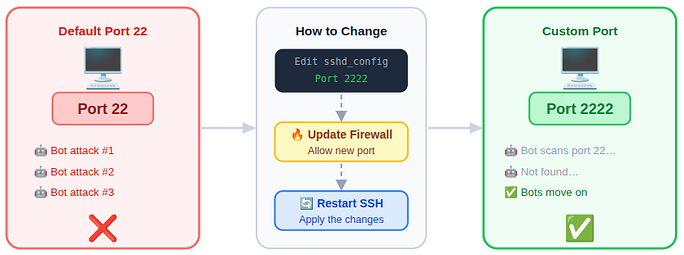
Why it helps:
- Reduce automated attack attempts: Keeps common bots from targeting your server.
- Lower unnecessary login traffic: Minimizes random SSH connection requests.
- Add an extra security layer: Makes your VPS less predictable to attackers.
Think of it as moving your front door from the main street to a side lane.
6. Server Security Protection
Modern VPS security goes beyond basic settings and requires active protection against both automated bots and human-driven attacks. By combining a properly configured firewall, brute-force protection, AI bot blocking, and an 8G firewall, you create a powerful security shield around your VPS. Together, these tools work continuously to filter traffic, stop attacks early, and keep unwanted access out.
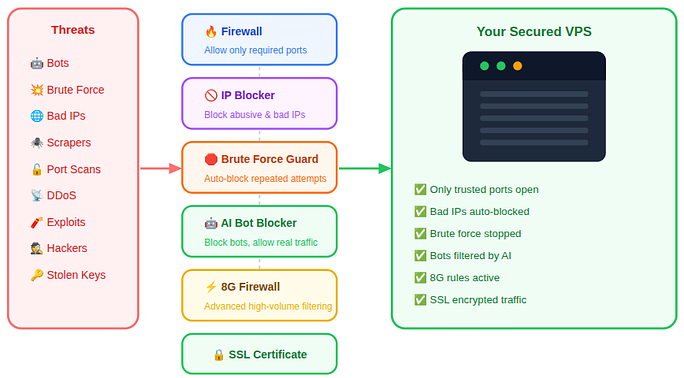
Key security measures include:
- Allow only required ports: Ensures that only essential services can communicate with your VPS.
- Block unused services: Closes unnecessary access points that attackers often target.
- Restrict access by IP: Limits server access to trusted networks and locations.
- Block abusive IP addresses: Automatically stops repeated failed login attempts before they cause damage.
- Reduce server load: Prevents excessive authentication and bot traffic from slowing down the server.
- Automate attack prevention: Protects your VPS without constant manual monitoring.
- Enable AI bot blocker: Detects and blocks malicious bots while allowing legitimate traffic.
- Use an 8G firewall: Provides advanced filtering rules to defend against complex and high-volume attacks.
- Install SSL certificates: Encrypts data between users and the server, protecting sensitive information during transmission.
Together, these layers act like a smart security system, checking every visitor, rejecting suspicious behavior, and locking the door the moment a threat appears.
7. Install Intrusion Detection Systems
Intrusion detection systems watch for suspicious activity on your server. They help identify potential threats before serious damage occurs. Early detection allows quicker and more effective responses.
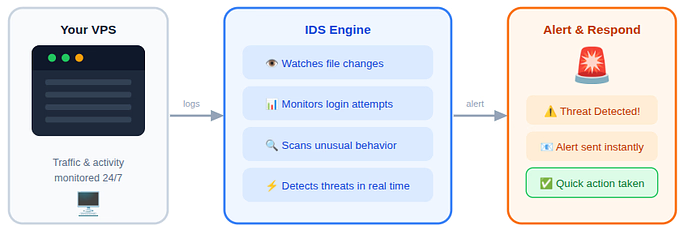
These systems:
- Monitor unusual behavior: Detects suspicious activity in real time.
- Send security alerts: Notifies you immediately when threats appear.
- Enable quick response: Helps stop attacks before serious damage occurs.
Early warnings can prevent small issues from becoming disasters.
8. Limit User Access and Permissions
Giving excessive permissions increases security risks. Restricting user access ensures that even if one account is compromised, the damage remains limited. This approach keeps your VPS more controlled and secure.
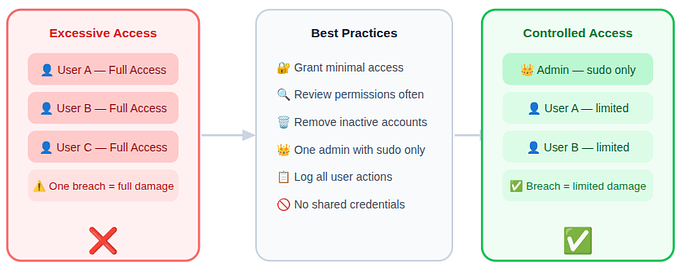
- Grant minimal access: Prevents users from modifying critical server settings.
- Review permissions regularly: Ensures access remains appropriate over time.
- Remove inactive accounts: Eliminates unnecessary security risks.
This reduces damage if one account is compromised.
9. Enable Automatic Backups
No security setup is complete without a recovery plan. Backups ensure your data can be restored if something goes wrong. They provide peace of mind during unexpected incidents.
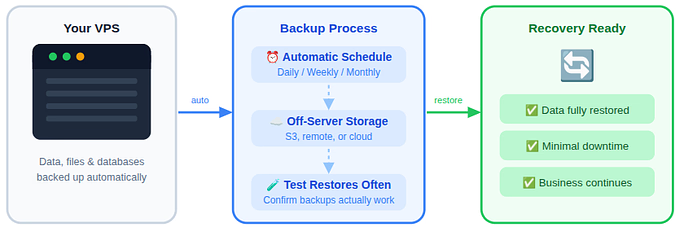
- Run backups automatically: Ensures data is saved without manual effort.
- Store backups off-server: Protects data even if the VPS fails.
- Test backups regularly: Confirms data can be restored when needed.
If something goes wrong, backups are your safety net.
10. Monitor Logs and Server Activity
Server logs reveal important details about logins, errors, and system behavior. Regular log monitoring helps catch unusual activity early. This keeps you informed and prepared.
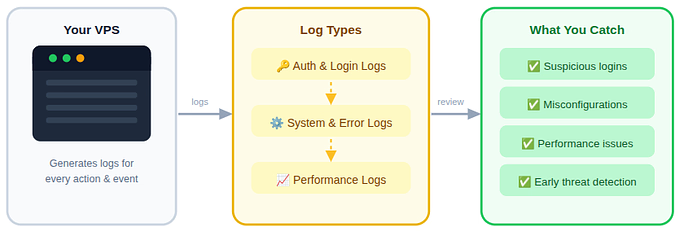
By reviewing them, you can:
- Track login attempts: Identifies suspicious access behavior.
- Detect configuration issues: Helps spot misconfigured services early.
- Monitor performance trends: Reveals unusual activity affecting server stability.
Regular monitoring turns you from reactive to proactive.
11. Secure Installed Applications
Outdated or unused applications can introduce vulnerabilities. Keeping software clean and updated reduces the attack surface. Every installed app should serve a clear purpose.
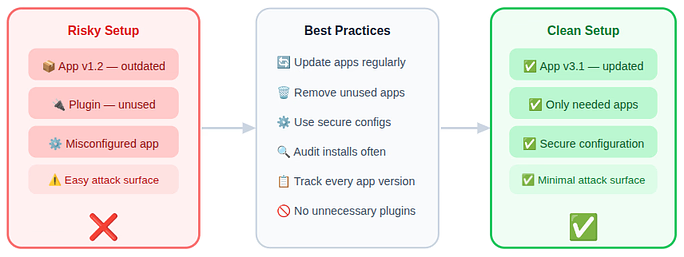
Best habits include:
- Update applications regularly: Fixes known security weaknesses.
- Remove unused apps: Reduces the server’s attack surface.
- Follow secure configurations: Prevents misconfigurations that expose data.
Even a small plugin can become a big problem if ignored.
12. Encrypt Data Wherever Possible
Encryption protects sensitive data even if unauthorized access occurs. It ensures that intercepted data remains unreadable. This is especially important for data transfers and stored information.
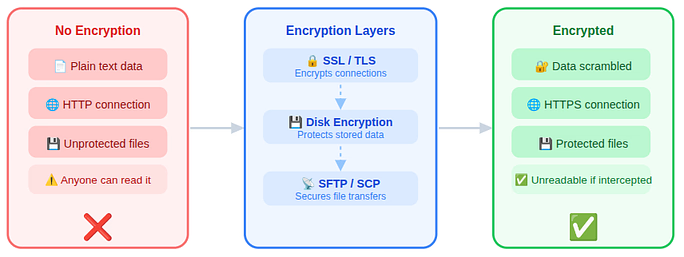
Focus on:
- Encrypt connections: Protects data during transmission.
- Encrypt stored data: Keeps sensitive information safe even if accessed.
- Secure data transfers: Prevents interception and data leaks.
Encryption is like sealing sensitive letters inside a locked envelope.
13. Perform Regular Security Audits
Security needs ongoing attention as threats evolve. Regular audits help uncover weaknesses and improve configurations. Consistent checks keep your VPS resilient over time.
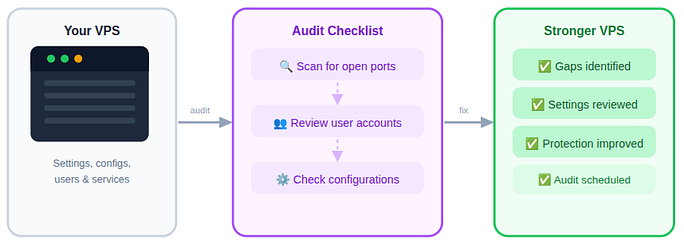
Audits help you:
- Identify security gaps: Finds weaknesses before attackers do.
- Review server settings: Ensures configurations follow best practices.
- Improve protection over time: Keeps your VPS security up to date.
Set a schedule and stick to it. Consistency matters more than perfection.
14. Enable Multi-Factor Authentication (MFA)
Multi-Factor Authentication adds an extra step to the login process, making your VPS far harder to break into. Even if a password is stolen, MFA ensures that access is blocked without additional verification. This simple step greatly strengthens overall server security.
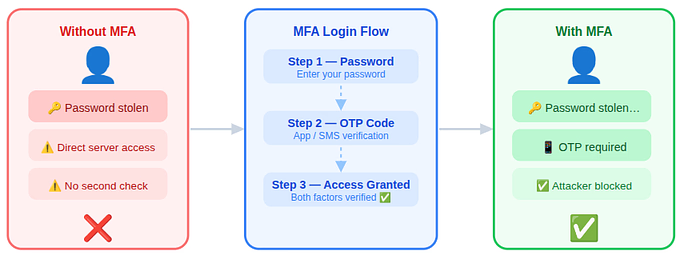
- Use an additional verification step: Adds an extra security layer beyond passwords to prevent unauthorized access.
- Protect against stolen credentials: Ensures attackers can’t log in even if passwords are compromised.
- Secure critical accounts: Strengthens protection for admin panels and server access points.
15. Manage Proper File Permissions
File permissions control who can read, write, or modify files on your VPS. Poorly configured permissions can expose sensitive data or system files. Proper permission management helps prevent unauthorized changes and accidental damage.
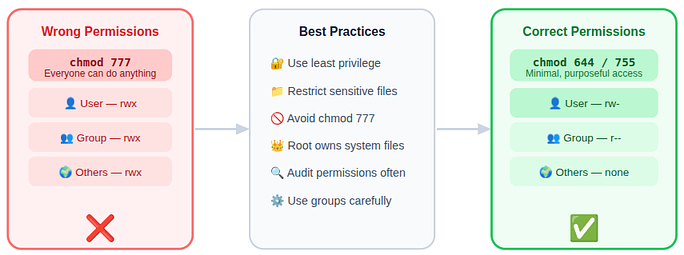
- Restrict file access: Prevents unauthorized users from modifying sensitive files.
- Apply least-privilege rules: Ensures files are only accessible to required users and processes.
- Avoid overly open permissions: Reduces the risk of accidental or malicious changes.
16. Use a VPS Management Tool
Managing a VPS manually can be time-consuming and error-prone. A VPS management tool simplifies server tasks and centralizes security controls. This makes it easier to maintain a secure and well-organized server environment.
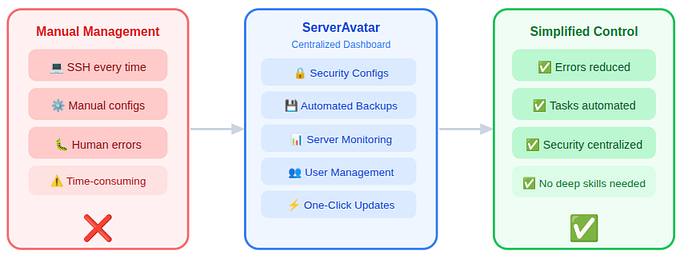
- Simplify server management: Makes handling updates, security, and configurations easier.
- Reduce human errors: Automation lowers the chance of misconfigurations.
- Improve overall security control: Centralized dashboards help monitor and secure the VPS efficiently.
Managing a VPS manually can be complex, but with ServerAvatar you get a centralized dashboard that handles everything from security configurations and backups to monitoring and user management. This reduces the risk of human error and speeds up server administration tasks, making secure and efficient server operation accessible even for users without deep technical skills.
17. Select a Reliable Hosting Company
The security of your VPS also depends on the hosting provider behind it. A reliable hosting company offers strong infrastructure, regular updates, and built-in security features. Choosing the right provider creates a solid foundation for long-term VPS protection.
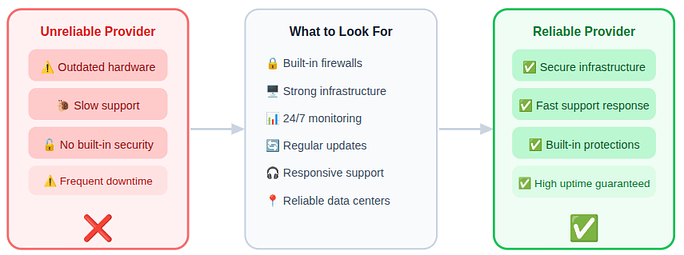
- Choose a security-focused provider: Ensures built-in protections like firewalls, monitoring, and timely updates.
- Look for strong infrastructure: Reliable hardware and networks reduce downtime and vulnerabilities.
- Ensure responsive support: Quick assistance helps resolve security issues faster.
Choosing the right platform for your VPS management matters. ServerAvatar blends powerful server control with intuitive management, meaning you get strong infrastructure features, automated security updates, and responsive systems all in one place. Whether you bring your own cloud server or use a fully managed solution, ServerAvatar’s focus on reliability and ease of use gives you confidence in your hosting foundation.

How ServerAvatar Simplifies VPS Security Management
Managing VPS security manually can quickly become overwhelming, especially as threats grow more advanced. This is where ServerAvatar helps simplify the process by bringing essential security controls into one easy-to-use dashboard.
What is ServerAvatar?
ServerAvatar is a platform to simplify the hosting and management of servers and applications. It simplifies the process of deploying and managing PHP and Node.js based web applications on servers.
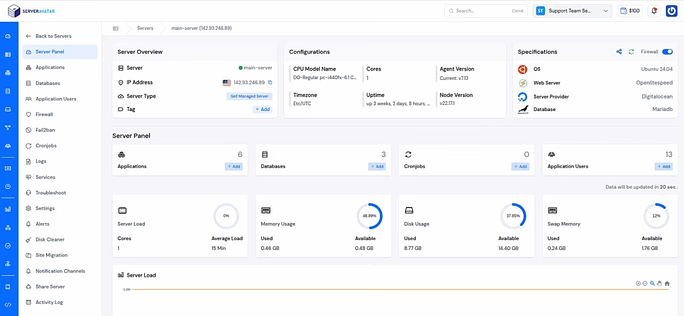
Instead of juggling multiple tools and manual commands, users can manage and monitor everything from a single platform.
For developers, businesses, and non-technical users alike, ServerAvatar makes VPS security more approachable without sacrificing control or flexibility.
Server Security Protection with ServerAvatar
ServerAvatar simplifies VPS security by bringing features like firewalls, Fail2Ban, SSL certificates, AI bot blocking, and advanced protection rules into one centralized dashboard. This reduces manual effort and minimizes the risk of configuration mistakes. As a result, users can focus on their applications while ServerAvatar handles security in the background.
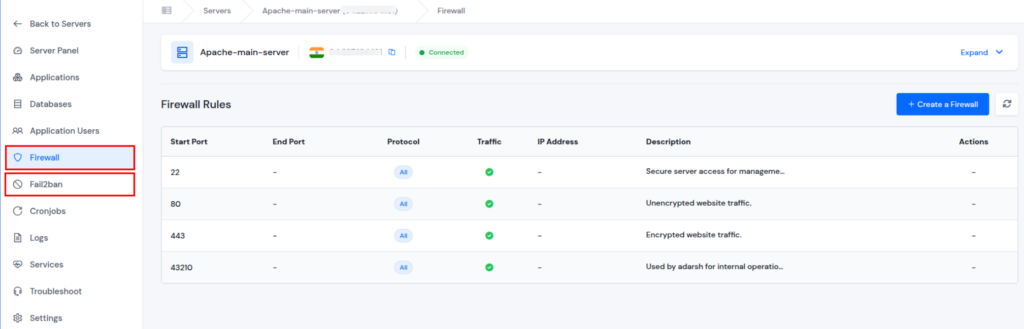
Key security features include:
- Firewall configuration: Controls incoming and outgoing traffic by allowing only required ports and services.
- Fail2Ban protection: Automatically blocks IP addresses after repeated failed login attempts to stop brute-force attacks.
- 8G firewall protection: Adds advanced, rule-based filtering to defend against large-scale and complex attack patterns.
- SSL certificate management: Encrypts data between users and the server to protect sensitive information during transmission.
- AI bot blocking: Detects and blocks malicious bots while allowing genuine user traffic.
- Centralized security management: Minimizes misconfigurations by managing all security features from a single dashboard.
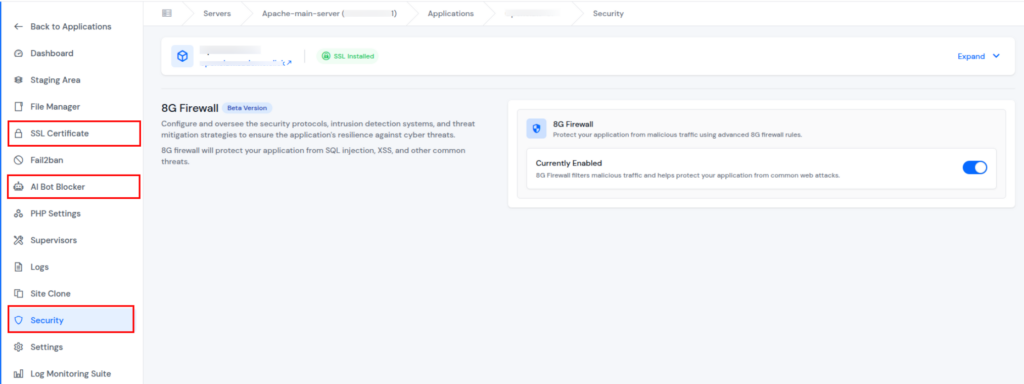
Change the Default SSH Port with ServerAvatar
Changing the default SSH port adds an extra layer of protection by reducing predictable entry points. With ServerAvatar, you can modify your SSH port easily from the Security Settings section without complex command-line configurations.
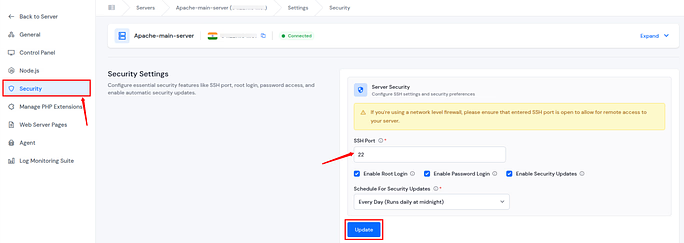
Key Features:
- Custom SSH Port Configuration: Change the default port 22 to any available port to reduce automated attack attempts.
- Reduced Brute-Force Attempts: Minimize login attempts from bots scanning standard SSH ports.
- Simple Dashboard Control: Update SSH port settings directly from the ServerAvatar Security Settings panel.
- Improved Server Obscurity: Make your VPS less predictable and harder for attackers to detect.
This small adjustment can significantly lower unnecessary login traffic and strengthen your overall VPS security posture.
Backup and Restore With ServerAvatar
Backups are a critical part of VPS security, but managing them manually can be time-consuming and error-prone. ServerAvatar simplifies this process with built-in backup and restore tools that help protect your data and applications. With automated options and quick recovery, restoring your server becomes stress-free.
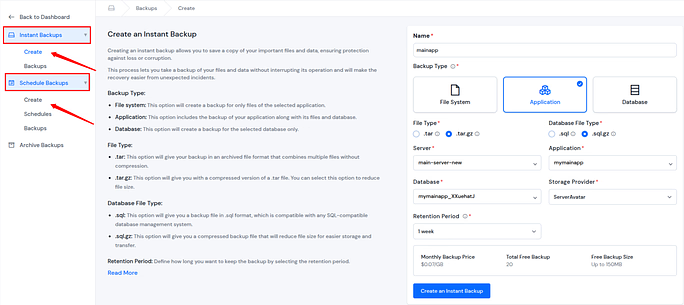
Key features include:
- Database backups: Safely back up databases without interrupting live applications.
- File system backups: Protect website files from data loss.
- Full application backups: Take a complete application backup for reliable recovery.
- Storage integration options: Integrate external storage locations from the provided and store backups securely.
- One-click restore: Quickly recover data, even on a different server.
Monitoring Logs with ServerAvatar
Keeping an eye on server activity is essential for maintaining performance and security. ServerAvatar offers log monitoring and a Log Monitoring Suite for advanced and detailed log insights. This helps you detect issues early and respond before they affect your VPS.
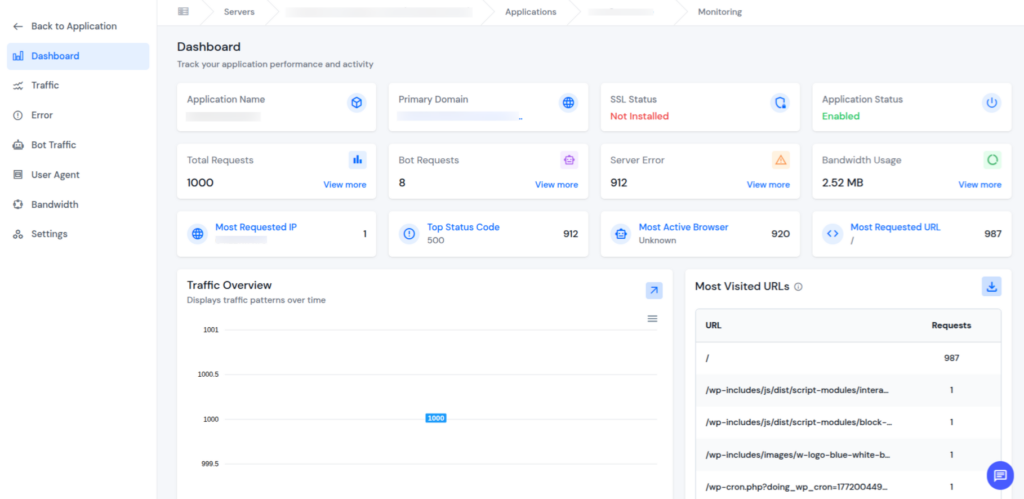
Key features include:
- Log viewer: View and analyze server logs from a centralized dashboard.
- Request and error tracking: Identify failed requests and application errors quickly.
- Bandwidth usage monitoring: Track traffic patterns and resource consumption.
- Bot and traffic analysis: Detect suspicious or unusual access behavior.
File Permissions with ServerAvatar
Proper file permissions are essential to protect sensitive data and system files. ServerAvatar makes permission management simple by providing a built-in File Manager and easy access to fix permissions. This ensures that only authorized users can access or modify critical files.
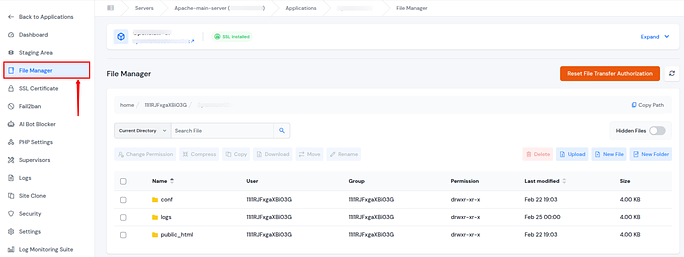
Key features include:
- Built-in File Manager: Easily view, edit, and manage files directly from the ServerAvatar dashboard.
- Quick permission fixes: Adjust file and folder permissions without using complex command-line commands.
- Reduced risk of misconfiguration: Prevent common permission errors that can lead to security issues.

Increase VPS Security and Scale Your Business with ServerAvatar
A secure VPS is not just about protection, it’s about creating a stable foundation for long-term growth. By combining strong access controls, regular backups, real-time monitoring, and automated security features, you reduce risks while improving overall server reliability. A well-managed VPS helps prevent downtime, data loss, and performance issues that can slow down your business.
ServerAvatar brings all these essentials together in a single platform, making VPS management simpler and more efficient. With centralized control over security, backups, logs, and permissions, users can focus on scaling their applications and services with confidence, knowing their server environment is consistently protected and optimized behind the scenes.
Conclusion
Securing your VPS is no longer optional, it’s a necessity for protecting your data, applications, and online reputation. By following layered security practices such as regular updates, strong passwords, SSH hardening, automated backups, and proactive monitoring, you can significantly reduce risks and maintain a reliable server environment. Tools like ServerAvatar make managing these security measures simpler, allowing you to focus on growing your projects while keeping your VPS safe and optimized. With a structured approach and the right platform, VPS security becomes manageable, efficient, and effective.
FAQs
1. Why is VPS security important?
VPS security is essential because cyber threats are becoming faster, smarter, and more automated. Even small vulnerabilities can lead to data loss, downtime, or unauthorized access, making proactive security measures critical.
2. Can I secure my VPS without advanced technical knowledge?
Yes, Platforms like ServerAvatar simplify VPS management by centralizing security settings, backups, SSH management, and monitoring, making it easy for beginners and non-technical users to maintain strong security.
3. What is the advantage of changing the default SSH port?
Changing the default SSH port reduces automated brute-force attacks by making it harder for bots to find your server’s SSH access, adding an extra layer of security.
4. Are backups necessary for VPS security?
Absolutely, backups protect against data loss, server failures, or security breaches, providing a reliable recovery option and ensuring business continuity.
5. How does ServerAvatar simplify VPS security management?
ServerAvatar centralizes tasks like firewall setup, SSH configuration, log monitoring, backups, file permission management, and bot protection, reducing human error and making VPS security efficient and manageable.