

Work can often feel endless. One task leads to another, small jobs pile up, and before you know it, most of your day is gone. A big reason for this is repetition. The same type of writing, planning, sorting, and organizing keeps showing up again and again. That is why many people now look for ways to automate your work using OpenClaw AI Assistant. It helps make everyday tasks easier, faster, and more manageable.
OpenClaw is more than just a chatbot or writing assistant. It is a personal AI assistant that can connect with tools, follow instructions, and help automate repeated work. Depending on how you configure it, OpenClaw can assist with content workflows, monitoring, summaries, task organization, internal operations, and routine digital work that usually eats up your time.
In this blog, we will look at practical OpenClaw use cases, where automation fits best, and why hosting it on a VPS makes sense for long-term reliability.
What Is OpenClaw and Why Are People Using It?
OpenClaw is an AI assistant designed to do more than generate text. It can be used to support workflows, process information, organize repeated tasks, and help users automate parts of their digital routine.
That is a big reason why interest in tools like OpenClaw is growing. People do not just want answers anymore. They want help with the work itself.
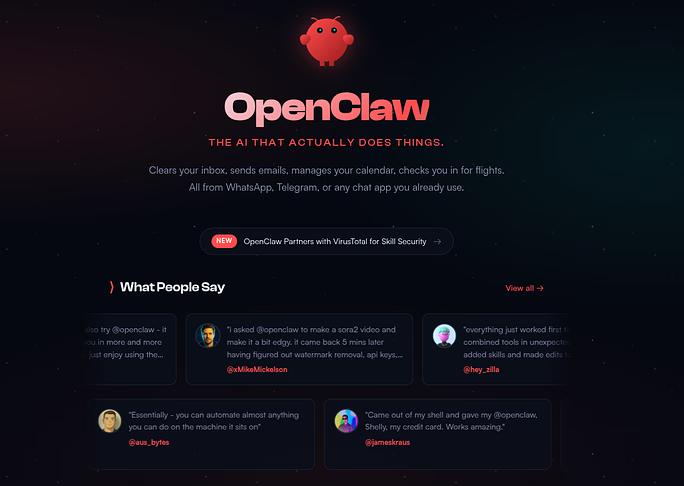
A personal AI assistant can reduce repetitive effort, assist with task flow, and handle the kinds of small digital jobs that often break concentration. Instead of jumping between tools again and again, users can create a more connected system where OpenClaw supports the process.
This can include content tasks, summaries, monitoring, organization, planning, and more. The exact use case depends on how the assistant is configured, what tools it connects to, and how much control the user wants.
Why Automation Is Becoming Important
Many daily tasks follow the same pattern. The wording may change slightly, the format may look different, but the process remains similar. Over time, these repeated actions take up a large part of the day. That is why automation matters.
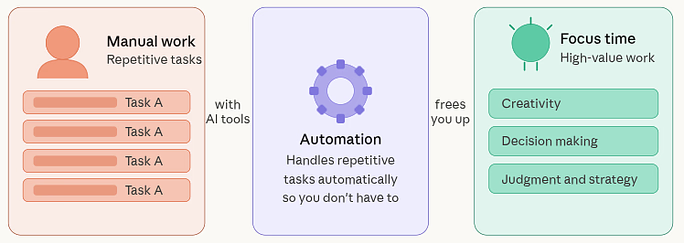
Automation helps reduce repeated effort, improve speed, and create more consistency. Instead of spending your energy on the same low-value actions again and again, you can focus on tasks that require attention, creativity, and judgment.
For many people, the problem is not only the amount of work. It is the number of small, repetitive tasks hidden inside that work. AI tools can help lighten that load.
How AI Assistants Help With Daily Tasks
AI assistants are useful because they support the flow of everyday work. They help turn rough input into a cleaner output. They can also make work feel less scattered. With OpenClaw AI Assistant, users can often get help with:
- Drafting text: Helps create written content quickly from a simple idea or prompt.
- Rewriting content: Improves existing text by changing its wording, tone, or clarity.
- Organizing information: Arranges scattered details into a more structured and readable format.
- Creating summaries: Condenses long content into shorter and easier-to-understand points.
- Building outlines: Creates a clear structure before writing full content.
- Structuring step-by-step plans: Breaks down a task or process into simple actionable steps.
These tasks may seem simple on their own, but together they can consume a lot of time. AI assistance helps speed up these processes while keeping your workflow more manageable.
Practical Tasks You Can Automate With OpenClaw
There are many types of tasks that can be supported by OpenClaw AI Assistant. The easiest place to begin is with work that feels repetitive and time-consuming. Some examples of automation-friendly tasks include:
1. OpenClaw for Content Planning and Draft Creation
One practical use of OpenClaw is helping with content creation workflows. Coming up with ideas, organizing outlines, and drafting rough content can take a surprising amount of time. OpenClaw can help simplify that early stage by turning broad ideas into more structured output.
It can assist with:
- Topic brainstorming: Generates fresh content or project ideas around a subject.
- Headline suggestions: Provides title ideas that are clearer, catchier, or more relevant.
- Outline generation: Builds a basic content framework to guide the writing process.
- First-draft support: Helps create an initial version of content faster.
- Content structure planning: Organizes sections and flow to make content more logical.
This does not mean the final content should be published without review. But it does make the process faster. Instead of starting from a blank page, you begin with a framework that can be reviewed and improved.
For teams that publish regularly, this kind of support helps reduce the time spent on repetitive writing preparation.
2. Using OpenClaw to Rewrite and Repurpose Content
Creating one piece of content is only part of the work. In many workflows, the same core idea needs to be reshaped for different formats. That is another area where OpenClaw can help.
It can take a longer piece of writing and help turn it into:
- Shorter summaries: Converts detailed content into a compact version with key points.
- Social post drafts: Adapts content into shorter formats for social media sharing.
- Email copy: Rewrites the main message into an email-friendly format.
- Alternative wording versions: Creates different ways to express the same idea.
- Simplified or more polished versions of the same message: Makes the text either easier to understand or more refined.
This makes OpenClaw useful for users who want to get more value from one piece of content without manually rewriting the same idea again and again. Repurposing content is often repetitive but necessary. AI support makes that process lighter.
3. Automating Summaries, Notes, and Information Sorting
A lot of work today involves information overload. Notes, transcripts, rough drafts, reports, documentation, and internal text can quickly become difficult to manage. OpenClaw can support these workflows by helping organize, summarize, and clean up large pieces of information.
Useful tasks may include:
- Turning long notes into short summaries: Converts lengthy notes into quick and useful overviews.
- Extracting key points: Pulls out the most important information from detailed content.
- Grouping similar information together: Sorts related ideas into organized sections.
- Creating structured notes from messy input: Turns scattered thoughts into clean, usable notes.
- Reducing long text into readable takeaways: Makes long content easier to scan and understand.
This is one of the most practical use cases because it supports many types of work without needing complex automation logic. When information becomes easier to digest, decision-making becomes easier too.
4. Using OpenClaw for Internal Task Organization
OpenClaw can also support planning and organization. Many users struggle not with the work itself, but with the lack of structure around that work. A large task can feel overwhelming when it is not broken down properly.
OpenClaw can help by turning broad goals into:
- Task lists: Converts big goals into smaller actionable items.
- Step-by-step breakdowns: Splits a process into a clear sequence of steps.
- Checklists: Creates simple lists to track completion of tasks.
- Structured workflows: Organizes tasks into a repeatable working process.
- Organized plans for repeated processes: Builds reusable plans for tasks that happen regularly.
This type of support is useful for solo users and teams alike. It reduces the friction of getting started and helps make workloads feel more manageable. In simple terms, it helps turn mental clutter into a clearer plan.
5. OpenClaw for Inbox and Communication Assistance
Communication is another area filled with repetition. Messages often follow similar patterns. Questions repeat. Responses need rewriting. Follow-ups get delayed. OpenClaw can help reduce the amount of manual effort involved in these communication-heavy tasks.
It can support work such as:
- Drafting replies: Helps write responses quickly for messages or emails.
- Rewriting messages in a clearer tone: Improves communication by making messages easier to understand.
- Summarizing long threads: Shortens lengthy conversations into the main points.
- Creating response templates: Builds reusable reply formats for common situations.
- Preparing follow-up drafts: Creates ready-to-send follow-up messages to save time.
This is useful because communication often feels small in the moment but adds up quickly across the day. By reducing repeated writing effort, OpenClaw helps save both time and attention.
6. Using OpenClaw for Monitoring and Alert-Based Workflows
Another strong use case for OpenClaw is support around monitoring-based tasks. In many workflows, users need to stay aware of events, updates, or changes. That could include status checks, repeated observation tasks, or information that needs to be surfaced when it matters.
In a server-based environment, OpenClaw can be part of workflows that focus on:
- Status monitoring: Keeps track of system or service health and activity.
- Report generation: Helps create structured reports from collected data or events.
- Alert-based summaries: Summarizes important updates triggered by alerts or warnings.
- Log review support: Assists in analyzing logs to identify useful patterns or issues.
- System-related notification handling: Helps manage and organize system notifications more efficiently.
This kind of automation works best when OpenClaw is hosted somewhere reliable, because monitoring loses value if the assistant itself is offline when it is needed. That is one more reason a VPS setup matters.
7. OpenClaw for Research and Structured Comparisons
Research is useful, but it can also be messy and time-consuming. OpenClaw can help organize comparison-based work by turning scattered inputs into structured summaries. When users are reviewing tools, ideas, options, or categories, the assistant can help simplify the process.
Possible support areas include:
- Comparison outlines: Creates a structured format for comparing different options.
- Pros and cons formatting: Arranges advantages and disadvantages in a simple readable way.
- Summary generation: Produces concise overviews from larger information sets.
- Readable information grouping: Organizes related details into easier-to-read sections.
- Turning rough notes into cleaner evaluations: Refines unorganized notes into clearer assessments.
This does not replace human judgment. It supports it. When the basic structure is handled for you, it becomes easier to review, compare, and decide.
8. How OpenClaw Reduces Repetitive Work
At its core, the biggest value of OpenClaw is simple: it reduces repetition. A lot of digital work is not difficult because it is highly complex. It is difficult because it is repeated too often. Small actions, repeated over and over, slowly consume time and mental energy.
That includes:
- Rewriting similar content: Updates repeated content without having to rewrite it manually each time.
- Sorting repeated information: Organizes recurring data into a cleaner format.
- Organizing common tasks: Structures routine work so it is easier to manage.
- Drafting recurring responses: Prepares repeated replies faster for common situations.
- Preparing structured outputs from unstructured input: Turns rough or messy input into organized results.
OpenClaw helps remove some of that weight. It does not replace human thinking, but it can take over the repetitive groundwork so the user can focus on higher-value work.
How Automation Saves Time and Effort
The biggest reason people use automation is simple: it saves time. But it also saves something else that matters just as much, mental energy.
Repeated tasks can be draining, especially when they do not require deep thinking but still need attention. OpenClaw AI Assistant can help reduce that drain by handling the repetitive structure of a task. You then focus on reviewing, adjusting, and making decisions.
That shift is important. It turns your role from doing every small step manually to guiding the process more intelligently. Over time, even small time savings can add up in a meaningful way.
How to Get Better Results From AI Automation
Using an AI assistant well is not about writing long instructions. It is about writing clear instructions. To get better results:
- Be specific about the task: Clear instructions help the assistant produce more accurate results.
- Mention the tone you want: Defining tone helps shape the response in the right style.
- Explain the format clearly: Stating the format makes the output easier to use directly.
- Say what to include and what to avoid: Adding boundaries improves relevance and accuracy.
- Review the result and refine the request if needed: Checking and adjusting the prompt helps improve future outputs.
A clear input usually leads to a better output. When instructions are too broad, the result may feel generic. The more direction you give, the more useful the response becomes.
Important Safety Points Before You Automate More
Automation is useful, but it should be handled carefully. The more access an AI assistant has, the more important it becomes to define limits clearly. If OpenClaw is connected to files, tools, or system-level functions, permissions should be managed with care.
Some important safety practices include:
- Give only the permissions that are actually needed: Limit access to reduce security risks.
- Review outputs before taking action: Check results manually before trusting or using them.
- Avoid overly broad access: Restrict unnecessary access to protect systems and data.
- Use controlled environments: Test automation in safe setups before wider use.
- Monitor behavior and logs where possible: Track activity to spot issues early and maintain control.
Powerful automation should always be matched with responsible configuration. A helpful assistant should not become a risky one.
Why OpenClaw Works Better on a VPS
OpenClaw can be tested in different environments, but long-term automation usually works better on a VPS. Why? Because automation depends on availability.
If your AI assistant needs to stay online, receive requests, process scheduled work, or support ongoing tasks, then it helps to run it in a server environment that is always available. A personal computer is fine for short experiments, but it is not ideal for dependable automation.
A VPS offers several advantages:
- Always-on access: Keeps your assistant available whenever needed.
- Better uptime for long-running workflows: Supports automation tasks more reliably over time.
- More stable performance: Provides a steadier environment for consistent operation.
- Dedicated resources: Gives your setup its own computing power and storage.
- Better control over files, tools, and permissions: Makes it easier to manage and secure your environment.
This matters even more when OpenClaw is part of repeated or important workflows. If the system is meant to work consistently, the hosting environment should be consistent too.
How ServerAvatar Simplifies OpenClaw Hosting
Firstly, OpenClaw is running on a VPS; the next challenge is server hosting and management. That is where ServerAvatar can make the setup and management process easier.
Instead of handling everything manually, ServerAvatar helps simplify the way you host and manage your VPS environment. It gives you a cleaner way to manage server-related tasks so you can spend less time dealing with infrastructure and more time focusing on your OpenClaw workflows.
What is ServerAvatar?
ServerAvatar is a platform to simplify the hosting and management of servers and applications. It simplifies the process of deploying and managing PHP and Node.js based web applications on servers.
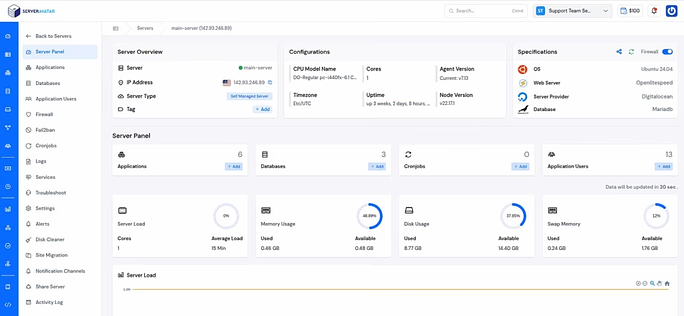
With ServerAvatar, users can manage their server environment more comfortably through a dashboard instead of relying only on manual system administration. This is especially useful for developers, agencies, founders, and users who want control without making server management harder than it needs to be.
If you are still setting up OpenClaw, you can follow our step-by-step guide on how to install and configure OpenClaw on a VPS. It covers the setup process clearly and helps you get started faster.
Why Reliable Hosting Matters for AI Automation
A personal AI assistant becomes much more useful when it is dependable. That is why hosting matters. If OpenClaw is going to support repeated workflows, summaries, monitoring, or structured tasks, it needs a hosting environment that stays available. Otherwise, automation becomes inconsistent, and inconsistent automation is hard to trust.
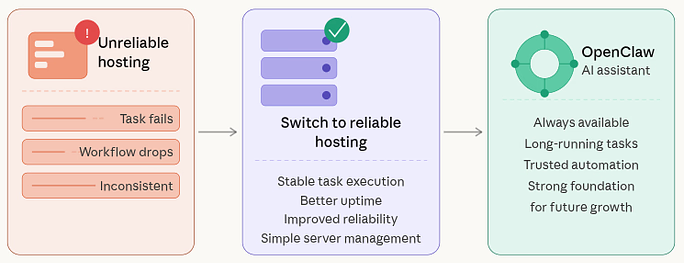
Reliable hosting supports:
- Stable task execution
- Better uptime for long-running workflows
- Improves reliability
- A stronger foundation for future automation
This is where pairing OpenClaw with a VPS and managing it through ServerAvatar creates a practical advantage. You get the flexibility of hosting your own AI assistant while also making server management simpler and more organized.
Common Mistakes to Avoid with OpenClaw
When users first start automating with OpenClaw, a few common mistakes usually appear. One is trying to automate too much too soon. Another is using vague instructions and expecting precise results. Some users also forget to review outputs, which can create avoidable errors.
Common mistakes include:
- Starting with too many permissions: Giving too much access too early can create unnecessary risks.
- Building workflows without testing them properly: Untested workflows can lead to avoidable errors.
- Skipping review of generated outputs: Not checking results can cause quality or accuracy issues.
- Trying advanced automation before mastering basic tasks: Starting too complex can make setup harder and less reliable.
- Focusing on complexity instead of usefulness: Simple, practical automation often works better than overly complicated setups.
The best approach is usually the simplest one. Start with small, low-risk tasks and expand only when the results are stable and predictable.

Why Human Review Still Matters
AI can help speed up work, but it should not replace judgment. Human review remains important because people understand meaning, tone, purpose, and context in a deeper way. OpenClaw AI Assistant may help create structure, wording, or summaries, but you are still the one responsible for the final result.
That is why the best way to use AI is as a helper. Let it handle the repeated groundwork. Then use your own thinking to review, improve, and finalize the output. This balance keeps the work both efficient and reliable.
The Long-Term Value of AI-Assisted Work
The value of AI automation goes beyond speed. It also improves the way work feels. When repetitive tasks become easier to manage, work becomes less exhausting. When planning becomes clearer, progress becomes easier to see. When writing starts with structure, the blank-page struggle becomes smaller.
That is the long-term value of tools like OpenClaw AI Assistant. They do not just help you do more. They help you work in a way that feels more organized, less stressful, and more sustainable over time.
Conclusion
OpenClaw AI Assistant can make daily work easier by helping with content creation, summaries, planning, communication, monitoring, and other repetitive tasks. The real benefit of automation is not just doing things faster, but reducing mental load and creating a smoother workflow. When combined with ServerAvatar, reliable hosting, and a management platform, OpenClaw becomes even more practical for long-term use. Start with simple tasks, review results carefully, and expand your automation gradually as your workflow becomes more stable.
FAQs
1. What is OpenClaw AI Assistant used for?
OpenClaw AI Assistant is used to help automate repetitive digital tasks such as drafting, rewriting, summarizing, organizing information, planning workflows, and supporting monitoring-based tasks.
2. Can OpenClaw replace human work completely?
OpenClaw is best used as a support tool. It can speed up repetitive tasks and create structured output, but human review is still important for accuracy, tone, and decision-making.
3. Why should I host OpenClaw on a VPS?
A VPS provides better uptime, stability, and control. This makes it more suitable for long-running or always-available automation workflows.
4. Is OpenClaw useful for content creation?
OpenClaw can help with brainstorming, outline generation, first drafts, rewriting, repurposing content, and summarizing long text.
5. How does ServerAvatar help with OpenClaw hosting?
ServerAvatar helps simplify VPS and application hosting and management through a user-friendly dashboard, making it easier to host and manage OpenClaw without relying entirely on manual server administration.