

Have you ever published a webpage and later wished it wasn’t visible on Google? You’re not alone. While most people focus on getting their website indexed, there are situations where you may want the opposite. If you’re looking to discourage search engines from indexing site content, it’s important to understand the right approach. Not every page on your website is meant for public visitors, right? Some areas are private, under construction, or simply not ready to be shown. In the same way, certain parts of your website shouldn’t be visible to search engines.
In this guide, we’ll break down how, when, and why to discourage search engines from indexing your site, using simple language and practical examples you can actually use.
What Does Indexing Mean?
Before we go further, let’s keep things simple. Indexing is when search engines like Google store your webpage in their database so it can appear in search results.
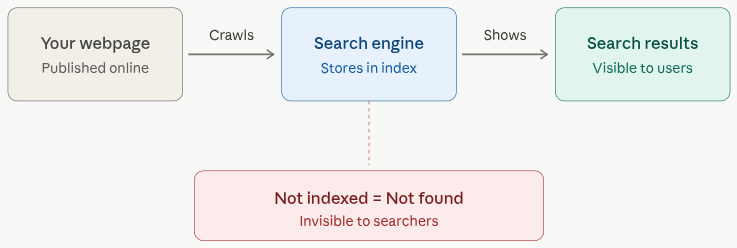
No indexing means no visibility in search results. So, if a page is not indexed, it’s basically invisible to people searching online.
Why You Might Want to Block Indexing
Not every page on your website is meant to appear in search results. Blocking indexing helps you keep private, unfinished, or low-value pages hidden from search engines. This ensures only relevant and polished content reaches your audience. Here are some common reasons:
- Private content (admin panels, dashboards)
- Duplicate pages that hurt SEO
- Under-construction pages
- Testing environments
- Thank you or confirmation pages
Imagine inviting people to a party before setting it up, awkward, right? That’s exactly what happens when unfinished pages get indexed.
When Should You Discourage Search Engines?
You should discourage search engines when your website or specific pages are not ready for public visibility. This is especially useful during development, redesign, or testing phases. It helps prevent incomplete content from appearing in search results. You should block indexing when:
- Your website is still being developed
- You’re redesigning your site
- Pages contain sensitive information
- You’re running A/B tests
- Content is not finalized
Pro tip: Always double-check before launching your site live. Many developers forget to remove “noindex” tags, leading to zero traffic!
How WordPress Handles Indexing Control
If you’re using WordPress, managing indexing is quite simple. There’s a setting called “Discourage search engines from indexing this site.” When you enable it, WordPress automatically takes care of a couple of things behind the scenes.
It updates your robots.txt file, which gives instructions to search engine bots about which parts of your site they should avoid. At the same time, it can add a noindex meta tag to your pages, signaling search engines not to include your content in search results.
- Log in to your WordPress admin dashboard, and navigate to the Settings >> Reading section.
- Find the Search engine visibility option and enable or disable it by selecting or deselecting the checkbox as per your requirement.
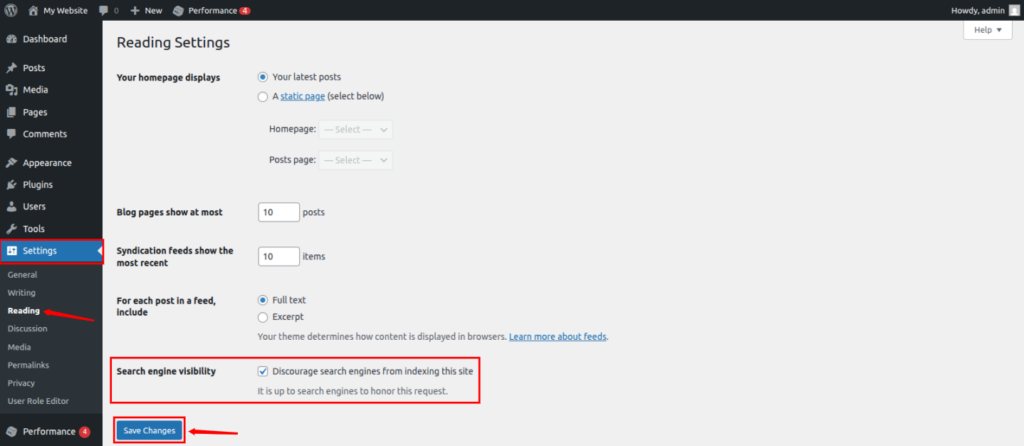
This is especially helpful when your site is under construction or when you want to keep it hidden temporarily.
However, keep in mind that this is more of a request than a strict rule. Search engines may still choose to index your content in some cases, so it shouldn’t be used as a security measure.
Better Alternatives to Blocking Indexing
Sometimes, simply discouraging indexing isn’t enough to protect your content. Using more secure methods can give you better control over who can access your pages. These alternatives are especially useful for sensitive or private content. Here are a few better options:
- Use a staging environment:
With a staging environment, you can build and test your website privately before making it live. It acts as a safe space where changes can be made without affecting your public site. This prevents unfinished work from being indexed. - Set pages to private:
Setting pages to private restricts access to selected users only. These pages won’t be visible to the general public or search engines. It’s a simple way to control content visibility within your website. - Add password protection:
Password protection adds an extra layer of security to your pages. Only users with the correct credentials can access the content. This is ideal for sensitive or client-specific information. - Meta Tags:
Meta tags are small pieces of code added to your webpage to communicate with search engines. They can instruct bots whether to index a page or not. This method is widely used for controlling search visibility. - Blocking Search Engines via HTTP Headers:
HTTP headers provide another way to control indexing at the server level. They send instructions directly to search engine bots before the page is even rendered. This approach is useful for advanced control and non-HTML files.
These methods give you stronger control, especially when dealing with confidential or unfinished content.
Noindex vs Nofollow: What’s the Difference?
These two terms often confuse beginners. Noindex and nofollow are directives used to control how search engines interact with your pages. They sound similar, but serve different purposes. Understanding both helps you manage visibility and link behavior effectively.
Noindex
- Noindex instructs search engines to not include a page in search results. The page can still be accessed directly but won’t appear on Google. It’s useful for hiding low-value or private pages.
Nofollow
- Nofollow tells search engines to not follow the links on a page. This means link authority won’t be passed to other pages. It’s commonly used for sponsored or untrusted links.
Example:
<meta name="robots" content="noindex, nofollow">Use both when you want complete control over a page.
Testing Whether Your Page Is Indexed
Checking if your page is indexed helps you understand its visibility on search engines. Simple search queries or tools can confirm whether your content is listed. Regular checks ensure everything is working as expected.
Use this simple trick:
Type in Google:
site:yourwebsite.com/page-urlIf it shows up: Indexed
If it not shows up: Not indexed
You can also use tools like Google Search Console for accurate results.
SEO Impact of Blocking Pages
Blocking pages can improve SEO when used correctly by focusing search engines on high-quality content. However, mistakes can lead to lost traffic or visibility. It’s important to apply indexing controls carefully.
Good impact:
- Improves content quality
- Avoids duplicate penalties
- Focuses ranking on important pages
Bad impact:
- Blocking important pages accidentally
- Losing traffic
It’s all about balance.
How to Remove Already Indexed Pages
If a page is already indexed, you can still remove it using specific methods. Adding noindex tags and requesting removal through search tools can help. Keep in mind that the process may take some time. Here’s what to do:
- Add a noindex tag
- Remove internal links
- Use Google Search Console’s URL Removal Tool
Removal isn’t instant, it may take a few days.
Best Practices for Managing Indexing
Managing indexing properly ensures your website stays organized and search-friendly. Regular audits and smart use of tags can improve overall SEO performance. It’s all about controlling what should and shouldn’t be visible.
Follow these tips:
- Audit your site regularly
- Use noindex for low-value pages
- Avoid duplicate content
- Keep robots.txt simple
- Test before publishing
Think of indexing like gardening, trim what doesn’t belong.
Common Mistakes Beginners Make
Many beginners accidentally block important pages or forget to update indexing settings. These small mistakes can significantly impact website traffic. Being aware of them helps you avoid unnecessary SEO issues.
- Blocking your entire website accidentally
- Forgetting to remove noindex tags after launch
- Using robots.txt incorrectly
- Assuming blocking is equal to security, but it’s not!
Important: Blocking indexing doesn’t mean your page is secure. Anyone with the link can still access it.

Tools to Manage Search Engine Indexing
Various tools are available to help you monitor and control how your site is indexed. They provide insights, error reports, and indexing status. Using these tools makes managing your website much easier and more efficient. Here are some helpful tools:
- Google Search Console
- SEO plugins (like Yoast SEO)
- Website audit tools
These tools help you:
- Monitor indexing
- Fix errors
- Submit pages
Think of them as your SEO control panel.
How to Discourage Search Engines from Indexing Your Site Using ServerAvatar
Managing search engine visibility becomes much easier when you’re using ServerAvatar. Whether you’re launching a new WordPress site or staging site for testing, ServerAvatar gives you the flexibility to control how your site appears in search engines.
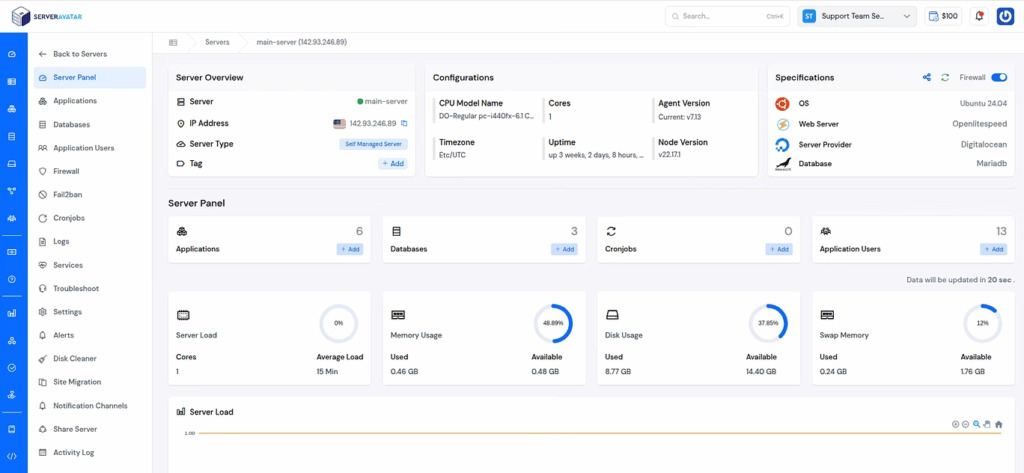
ServerAvatar is a platform to simplify the hosting and management of servers and applications. It simplifies the process of deploying and managing PHP and Node.js based web applications on servers.
Search Engine Visibility in ServerAvatar
When deploying a WordPress application through ServerAvatar’s One-Click Installer, you have full control over your site’s setup, including how it interacts with search engines.
For live websites, it’s generally recommended to keep indexing enabled so your site can appear in search results and attract traffic. However, if you’re working on a development or testing version, you may want to temporarily discourage search engines from indexing your site. With ServerAvatar, you can easily manage this while installing your WordPress site.
Steps to Discourage Search Engines from Indexing in ServerAvatar
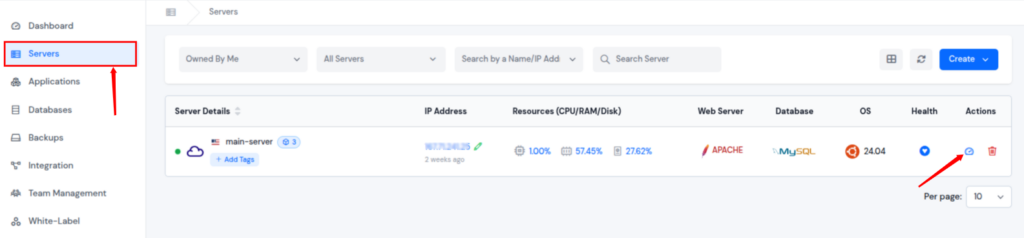
- Log in to your ServerAvatar dashboard, and navigate to your server panel by clicking on the server dashboard icon.
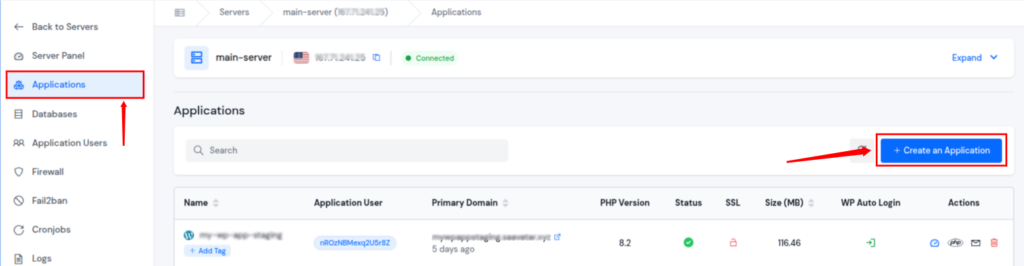
- Navigate to the Application section from the left sidebar, and click on the Create Application button.
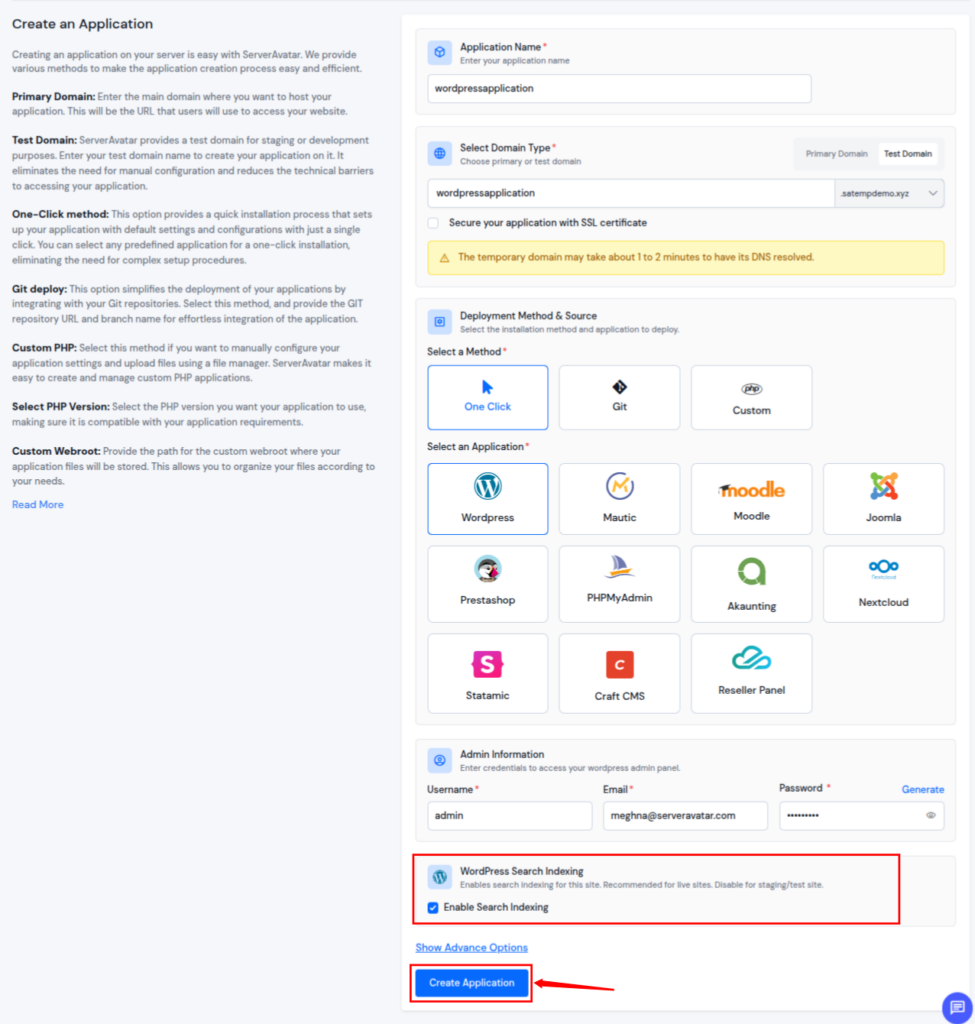
- Fill in all details for your application
- You can see the option of WordPress Search Indexing
- Select the Checkbox to enable the search indexing for your WordPress site.
- Please note: Enabling the search indexing is recommended for live sites and disable for staging or test sites.
- Click on the Create Application button to create your WordPress application.
Take Control of Your Servers and Websites with ServerAvatar
Controlling what search engines can and cannot index is an important part of managing any website. With ServerAvatar, you get a smooth and flexible environment to handle your WordPress applications efficiently.
By using the right settings at the right time, you can protect unfinished content, improve your SEO strategy, and ensure that only the right pages are visible to your audience.
Conclusion
Managing search engine indexing is an essential part of maintaining a well-structured and professional website. By understanding when and how to discourage indexing, you can ensure that only valuable and fully prepared content appears in search results. Whether you’re working on a staging site, handling sensitive pages, or optimizing your SEO strategy, using the right methods makes all the difference. With tools and platforms like ServerAvatar, controlling your website’s visibility becomes simple, allowing you to focus on growth while keeping everything organized and secure.
FAQs
1. What does it mean to discourage search engines from indexing a site?
It means telling search engines not to include certain pages or your entire website in search results. This helps keep private or unfinished content hidden from public view.
2. Is blocking indexing the same as securing a page?
Blocking indexing does not secure your page. It only prevents it from appearing in search results, but anyone with the direct link can still access it.
3. How long does it take to remove a page from Google?
It usually takes a few days to a couple of weeks, depending on how often search engines crawl your site and the method you use for removal.
4. Can I re-enable indexing after blocking it?
Yes, you can remove the noindex tag or update your settings to allow search engines to index your pages again at any time.
5. What is the safest way to hide a website during development?
Using a staging environment or password protection is the safest option, as it completely restricts access rather than just hiding it from search engines.