


You have heard about PHP and are curious, what exactly is it, and how do you even begin? If you want to start with PHP, don’t worry, you’re not alone. Starting something new, especially coding, can feel overwhelming at first. But here’s the good news: PHP is one of the easiest programming languages to get started with, even if you’ve never written a line of code before.
Think of PHP as the engine behind many websites, as websites need something to process data and interact with users, and that’s where PHP comes in.
In this guide, I will walk you through everything you need to know to get started with PHP in a simple, beginner-friendly way.
What is PHP?
PHP (Hypertext Preprocessor) is a server-side scripting language used to build dynamic websites and web applications.
In simple terms, PHP runs on a server and generates content that you see in your browser. For example, when you log into a website or fill out a form, PHP is often working behind the scenes.
Key Features
PHP comes with a range of powerful features that make it a popular choice for building dynamic websites and applications. Its flexibility, ease of use, and compatibility with different platforms make it ideal for beginners and professionals alike.
- Open-source and free to use
- Cross-platform compatibility (Windows, Linux, macOS)
- Easily integrates with HTML
- Supports multiple databases (MySQL, PostgreSQL, etc.)
- Fast execution for web applications
- Large community support and resources
- Built-in support for sessions and cookies
Pros
PHP has remained popular for years because of its simplicity and practicality. It allows developers to quickly build functional websites without needing deep technical expertise.
- Easy to learn and beginner-friendly
- Huge community and documentation
- Cost-effective (open-source)
- Works well with most hosting providers
- Flexible and versatile for different projects
- Strong ecosystem with frameworks and tools
Cons
While PHP is powerful, it’s not perfect. Like any technology, it has some limitations that you should be aware of before choosing it for your projects.
- Can lead to messy code if not structured properly
- Slower compared to some modern languages in certain cases
- Security issues if best practices are ignored
- Inconsistent function naming conventions
- Not ideal for very large or complex applications without frameworks
Why Should You Learn PHP?
Maybe you are thinking, “PHP is still worth learning?” This is one common question that comes in beginners mind. And the answer? Yes, if your goal is web development, PHP is still a solid choice. Here’s why:
- Easy to learn for beginners
- Widely used in web development
- Huge community support
- Works well with databases like MySQL
Many popular websites still rely on PHP, so learning it opens doors to real-world opportunities.
How PHP Works
PHP might sound technical at first, but the way it works is actually quite simple once you break it down. It acts as a middle layer between your browser and the server, handling requests and generating the final webpage you see. Let’s break it down simply.

When you open a website:
- Your browser sends a request: When you open a website, your browser asks the server for that page
- The server runs PHP code: The server processes the PHP scripts behind the scenes
- PHP processes the request: It may fetch data, handle logic, or interact with a database
- The result is sent back as HTML: The final output is converted into HTML and displayed in your browser
Where PHP is Used in Real Life
PHP isn’t just something you learn for practice, it’s actively used in real-world applications that millions of people interact with every day. From simple websites to complex platforms, PHP plays a key role behind the scenes.
Common use cases of PHP include
- Content Management Systems (CMS)
- E-commerce platforms
- Blogging websites
- User login and authentication systems
- APIs and backend services
For example, platforms like WordPress run on PHP and power a huge portion of the internet. So when you learn PHP, you’re building skills that are practical and widely used, not just theoretical knowledge.
Setting Up PHP on Your System
Before you start writing PHP code, you need a proper environment where your code can run. Don’t worry, it’s easier than it sounds, especially with beginner-friendly tools available.
Easy Setup Options:
Option 1: Use XAMPP
- Beginner-friendly and quick to install
- Comes with Apache, MySQL, and PHP in one package
Option 2: Use WAMP or MAMP
- Works well on Windows (WAMP) and Mac (MAMP)
- Simple setup with minimal configuration
Option 3: Online Editors
- No installation required
- Perfect for quick practice and learning basics
Writing Your First PHP Program
Now comes the fun part, writing your first PHP code!
Here’s a simple example:
<?php
echo "Hello, World!";
?>Save this file as index.php, run it in your browser, and you’ll see the output displayed on the screen.
That one line of code is your first step into PHP. From here, you can start experimenting, modifying it, and gradually building more complex programs.
Understanding PHP Syntax
PHP syntax is simple and clean.
- Starts with <?php and ends with ?>
- Statements end with a semicolon ;
Example:
<?php
echo "Welcome to PHP!";
?>Key Rules:
- Every statement ends with ;
- Code runs on the server
- Output is sent to the browser
PHP is designed to be simple, so you don’t need to memorize complex syntax at the beginning.
Variables and Data Types
Variables are like containers that store data.
<?php
$name = "John";
$age = 25;
?>Common Data Types
- String: “Hello”
- Integer: 10
- Float: 10.5
- Boolean: true/false
Think of variables like labeled boxes, you store something inside and use it later.
Conditional Statements
Conditions help your program make decisions.
<?php
$age = 18;

if ($age >= 18) {
    echo "You can vote";
} else {
    echo "You cannot vote";
}
?>Types of Conditional Statements
- If-else
- Switch
- Loops (for, while)
These are the building blocks of logic in programming.
Functions in PHP Made Simple
Functions are blocks of code that you can reuse whenever needed. Instead of writing the same code again and again, you can create a function once and call it multiple times.
<?php
function greet($name) {
    echo "Hello, " . $name;
}

greet("John");
?>Instead of repeating code, you just call the function again. It’s like having a shortcut for repetitive tasks.
Loops in PHP
Loops are used when you want to repeat a task multiple times without writing the same code again.
For Loop
A for loop runs a block of code a specific number of times.
<?php
for ($i = 1; $i <= 5; $i++) {
    echo $i;
}
?>This loop starts at 1 and keeps running until it reaches 5.
While Loop
While loop continues running as its condition remains true.
<?php
$i = 1;
while ($i <= 5) {
    echo $i;
    $i++;
}
?>Here, the loop continues until the value of $i becomes greater than 5.
Working with Forms
PHP is often used to handle data submitted through forms on a website.
HTML Form
This is a simple form where users can enter their name:
<form method="post">
  <input type="text" name="username">
  <input type="submit">
</form>PHP Handling
PHP collects the data entered by the user and processes it.
<?php
$username = $_POST['username'];
echo "Hello " . $username;
?>Think of forms as a way for users to send information, and PHP as the tool that receives and uses that information.
Connecting PHP with Databases
PHP works great with databases like MySQL. Because it allows you to:
- Store user data
- Retrieve information
- Build login systems
Example:
<?php
$conn = mysqli_connect("localhost", "root", "", "test");

if (!$conn) {
    echo "Connection failed";
}
?>This is the foundation of dynamic web apps. This allows you to store and retrieve data.
What is PHP Framework?
As you start getting comfortable with PHP, you’ll eventually hear people talking about PHP frameworks. However, what they actually are, and whether you really need framework?
Think of a framework like a ready-made structure or blueprint. Instead of building everything from scratch, you get a pre-built foundation that helps you create applications faster and more efficiently.
Why Use a PHP Framework?
When your project becomes bigger or more complex, writing everything manually can get messy and time-consuming. That’s where frameworks come in. Here’s what they help you with:
- Faster development: No need to reinvent the wheel
- Better code structure: Keeps your code organized
- Built-in features: Like routing, authentication, and security
- Improved security: Helps protect against common threats
- Scalability: Makes it easier to grow your application
Popular PHP Frameworks
Here are some widely used PHP frameworks you might come across:
- Laravel: Known for its clean syntax and powerful features, great for modern web apps
- Symfony: Flexible and reliable; often used for large-scale applications
- CodeIgniter: Lightweight and beginner-friendly; good for simple projects
Each framework has its own strengths, so the choice depends on what you’re building.
Laravel
Laravel is one of the most popular PHP frameworks today, and for good reason. It’s known for its clean syntax, modern features, and developer-friendly approach.
If you’ve ever wished coding could feel more organized and less repetitive, Laravel is designed exactly for that.
Key Features
- Elegant and clean syntax
- Built-in authentication and routing
- Blade templating engine
- Eloquent ORM for database handling
- Artisan CLI for automation
- Strong ecosystem and community
Pros
- Easy to write and maintain code
- Speeds up development with built-in tools
- Great for modern and scalable applications
- Extensive documentation and support
- Strong security features
Cons
- Steeper learning curve for beginners
- Can feel heavy for small projects
- Performance overhead compared to lightweight frameworks
Best for: Building modern web applications, SaaS products, and large-scale projects.
Symfony
Symfony is a highly flexible and robust PHP framework, often used for complex and enterprise-level applications.
Unlike Laravel (which feels more beginner-friendly), Symfony gives you more control and customization, but it may require a bit more learning effort.
Key Features
- Component-based architecture
- Highly flexible and customizable
- Reusable PHP components
- Advanced debugging and testing tools
- Strong support for large applications
Pros
- Ideal for complex and enterprise-level projects
- Highly stable and reliable
- Scalable for long-term applications
- Strong developer community
Cons
- More difficult to learn for beginners
- Requires more configuration
- Slower development speed compared to simpler frameworks
Best for: Large, complex, and long-term projects where flexibility and scalability matter.
CodeIgniter
CodeIgniter is a lightweight and simple PHP framework, perfect for beginners who want something easy to pick up.
It doesn’t force strict rules, which means you can build applications quickly without too much setup.
Key Features
- Lightweight and fast
- Minimal configuration required
- Simple MVC architecture
- Small footprint
- Easy setup and installation
Pros
- Very beginner-friendly
- Quick to build small applications
- Fast performance
- Minimal learning curve
Cons
- Limited built-in features
- Less modern compared to Laravel
- Smaller community compared to bigger frameworks
- Not ideal for large-scale applications
Best for: Simple web applications, quick prototypes, and developers who prefer a straightforward approach.
Quick Tip
If you’re just starting out, don’t rush into frameworks immediately. Learn core PHP first, then:
- Start with CodeIgniter for simplicity
- Move to Laravel for modern development
- Explore Symfony when you need advanced control
This way, you build your skills step by step without feeling overwhelmed.
When Should You Start Using a Framework?
If you’re just starting out, focus on learning core PHP first. Jumping into frameworks too early can feel overwhelming. A good time to explore frameworks is when:
- You understand PHP basics well
- You want to build larger or real-world projects
- You need faster development with better structure
Common PHP Errors and Fixes
Making mistakes while learning PHP is completely normal, it’s actually part of the learning process. The key is not to avoid errors, but to understand them and fix them quickly.
- Missing semicolons: Forgetting a semicolon at the end of a line can stop your code from running properly
- Wrong variable names: Using incorrect or mismatched variable names can lead to unexpected results
- Syntax errors: Small mistakes in code structure can cause PHP to fail to understand your instructions
Tip: Always read error messages carefully, they often tell you exactly what went wrong and where to fix it.
Best Practices for Beginners
Writing good PHP code from the beginning helps you avoid problems later and makes your code easier to understand and manage.
- Keep your code clean: Organize your code neatly so it’s easy to read and maintain
- Use meaningful variable names: Choose names that clearly describe what the variable stores
- Comment your code: Add simple explanations to help yourself and others understand your logic
- Avoid repeating code: Reuse code using functions instead of writing the same logic again
- Practice regularly: Consistent practice helps you improve faster and build confidence
Tools and Resources to Learn PHP
Learning PHP becomes much easier when you use the right tools and resources. They help you understand concepts faster and apply them in real scenarios.
- Online tutorials: Step-by-step guides that explain concepts in a simple way
- Documentation: Official references that provide detailed explanations of PHP functions
- Coding platforms: Interactive environments where you can practice coding instantly
- Practice projects: Real-world examples that help you apply what you’ve learned
Start with small tasks and gradually move to bigger projects as your confidence grows.
What to Do Next After Learning PHP
Once you’ve learned the basics of PHP, the next step is to apply your knowledge in practical ways. This is where real learning begins.
Next steps to follow:
- Build a simple website: Create a basic project to understand how everything works together
- Learn frameworks like Laravel: Use frameworks to build applications faster and more efficiently
- Explore APIs: Learn how PHP communicates with other applications and services
- Work on real projects: Gain hands-on experience by solving real-world problems
The more you build and experiment, the stronger your PHP skills will become over time.
Managing PHP Applications Made Easy with ServerAvatar
Setting up PHP on your local system is a great way to start learning. But when it comes to running real websites or applications, things can quickly become complicated, especially when dealing with servers, security, and performance. This is where ServerAvatar makes your life much easier.
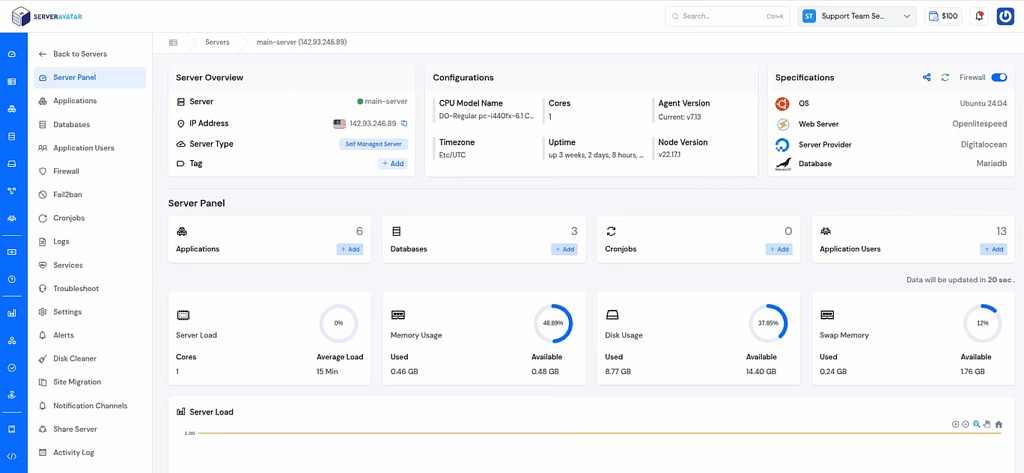
ServerAvatar is a platform to simplify the hosting and management of servers and applications. It simplifies the process of deploying and managing PHP and Node.js based web applications on servers. Instead of manually configuring everything, you get a clean dashboard to handle it all in just a few clicks.
Why Use ServerAvatar for PHP?
If you are planning to move from learning to building real projects, here’s how ServerAvatar helps:
- Easy PHP application deployment: Launch your PHP apps without complex setup and manual commands
- Multiple PHP versions support: Easily switch between different PHP versions
- Built-in server optimization: Get better performance without manual tuning
- Automated backups: Keep your data safe without extra effort
- Security features included: SSL, firewall, fail2ban, AI bot blocker, 8g firewall, and other protection handled for you
- User-friendly dashboard: No need to manage servers using command lines
Key Features of ServerAvatar
ServerAvatar offers a range of powerful features that simplify server and application management, making it easier for developers to focus on building rather than configuring.
- Managed and Self-Managed Server Infrastructure: Use fully managed servers directly provided by ServerAvatar, and connect your own custom self-managed servers from any cloud provider.
- Automated Backups: Schedule and manage backups to ensure your data is always safe and recoverable.
- Integrated Cloud Storage: Connect cloud storages form given options such as Google Drive, Wasabi, etc for storing backups securely.
- Performance Optimization: Pre-configured stack for better speed and smooth application performance.
- User-Friendly Dashboard: Manage servers, applications, databases, and settings from a clean interface.
- Database Management: Easily create, access, and manage databases without complex commands.
- File Manager Access: Upload, edit, and organize files directly from the dashboard.
- Log Monitoring: View and analyze server and application logs to troubleshoot issues quickly.
- Team Collaboration: Add team members and manage access with role-based permissions.
Perfect for Beginners and Developers
Whether you’re just starting with PHP or building production-ready applications, ServerAvatar removes the complexity of server management so you can focus on what really matters, writing code and building great projects.
Conclusion
Getting started with PHP may seem confusing in the beginning, but once you understand the fundamentals, it becomes much more approachable and even enjoyable. From handling simple tasks like form submissions to building complete web applications, PHP gives you the flexibility to grow at your own pace. The key is to stay consistent, practice regularly, and gradually explore advanced concepts like frameworks and server management tools. With time and hands-on experience, you’ll be able to turn your ideas into fully functional websites with confidence.
FAQs
1. Is PHP still relevant in 2026?
PHP is still widely used in web development, powering many websites and platforms, making it a valuable skill to learn.
2. Do I need to learn HTML before PHP?
It’s helpful to know basic HTML, as PHP is often used alongside it to create dynamic web pages.
3. Which PHP framework should I learn first?
Beginners can start with CodeIgniter for simplicity, then move to Laravel for more advanced and modern development.
4. Can I build real-world projects using PHP?
PHP is used to build websites, e-commerce platforms, APIs, and many real-world applications.
5. Do I need a server to run PHP?
PHP runs on a server, but you can easily set up a local server using tools like XAMPP, WAMP, or MAMP.