
ServerAvatar has been building quietly for a while. Here is a clear update on what is coming next, what it means for you, and how we are thinking about the road ahead.
This post covers three things:
- Our WordPress Toolkit and Blueprints launching this Wednesday (20 May 2026)
- How we are thinking about the AI era and where ServerAvatar goes from here
- How we are going to price the things we build so there are no surprises
Let us start.
WordPress Toolkit: Launching This Wednesday (20 May 2026)
We are launching WordPress Toolkit on 20 May 2026. It is a complete WordPress control panel built directly into ServerAvatar. If you manage WordPress sites, this is going to change how you work.
This is not a shallow plugin manager. It is a full-featured WordPress management interface that touches every part of your WordPress installation.
Here is everything that will be available from day one.
Site Overview
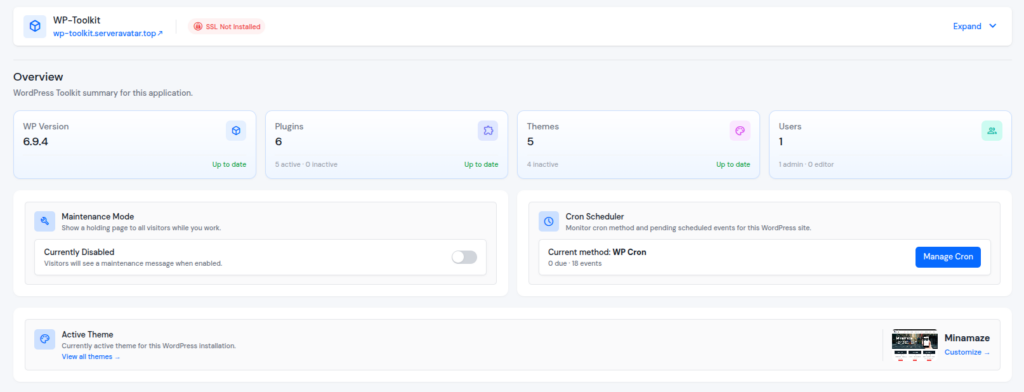
Everything about your WordPress site in one place:
- WordPress version
- Number of plugins installed and how many are active
- Number of themes and their status
- User count and roles
You see it all without opening a single tab.
Theme Management
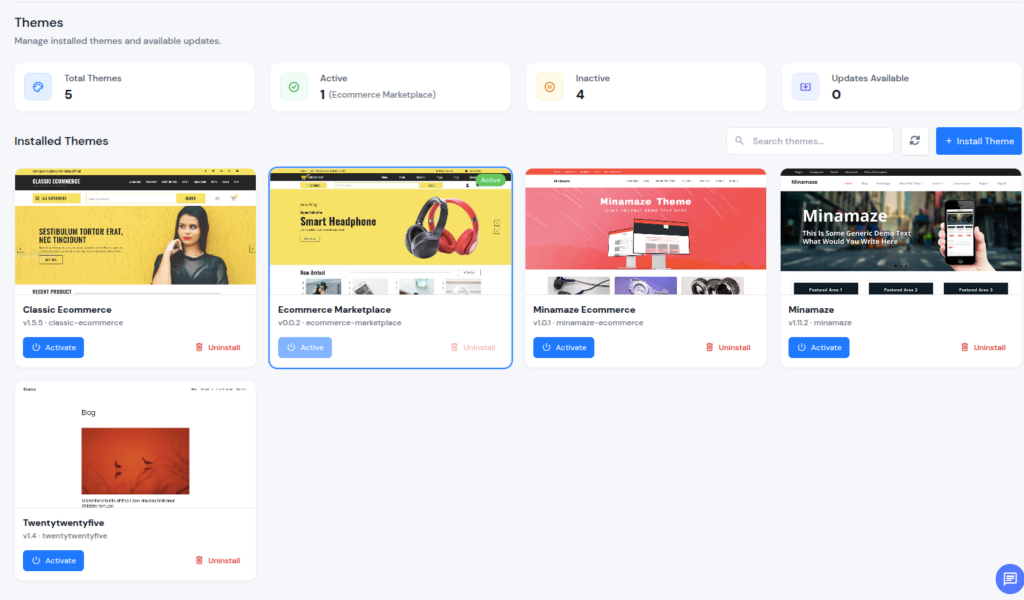
Install new themes. Activate them. Deactivate them. Uninstall them. Update them. Search through your installed themes.
All of it from ServerAvatar without touching the WordPress admin area, FTP, or WP-CLI.
Plugin Management
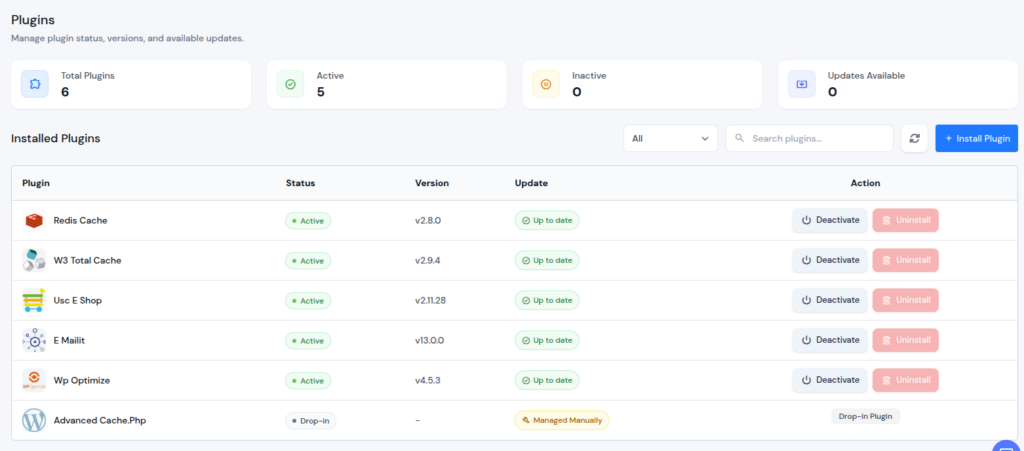
The same full control over plugins:
- Activate, deactivate, install, uninstall, update
- See which plugins are drop-ins and manage those separately
Whether you are running five plugins or fifty, you handle them all from the same place.
WordPress Updates
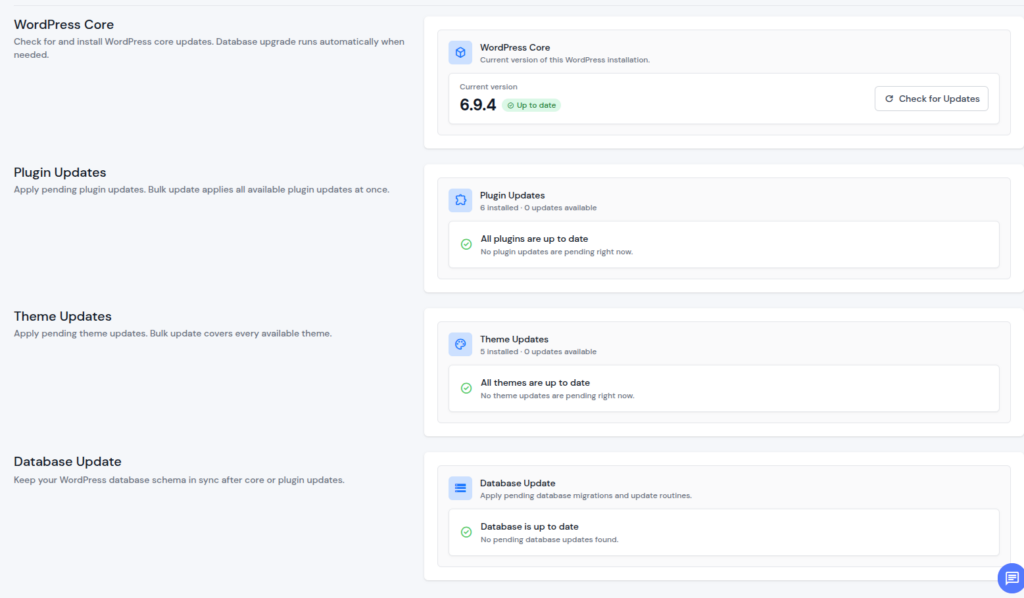
WordPress Core, plugins, themes, and the database are all available in one view.
- Check for updates individually
- Run bulk updates across all plugins and themes at once
- Database upgrades run automatically when needed
Basically, Everything you can do with CLI or WordPress admin.
Debug Mode
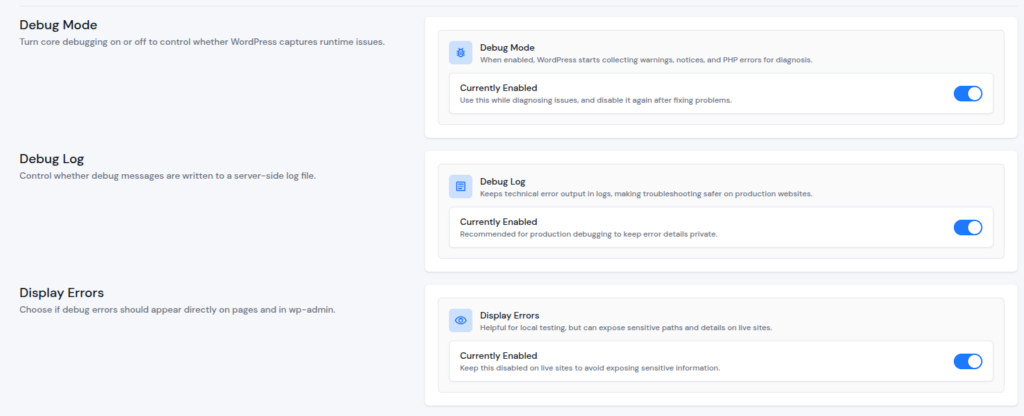
Three controls in one place:
- Debug Mode: switches on runtime warnings, notices, and PHP errors
- Debug Log: writes everything to a server-side file so error details stay private on production sites
- Display Errors: controls whether errors show directly on pages or stay hidden
You diagnose issues without editing wp-config.php, opening FTP, or running a single command.
WP-Cron & Server Cron
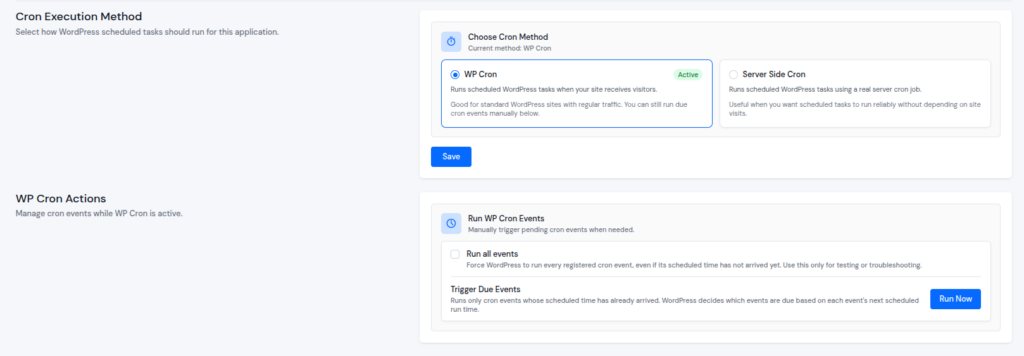
WordPress has its own internal job scheduler and it is often misunderstood. With WP-Cron inside WordPress Toolkit you see exactly how many events are scheduled.
- Run all events at once
- Trigger only the events that are due right now
- Disable WP-Cron entirely and use a real server cron job instead
The choice is yours and the control is complete.
Update: We have also added one-click server level cronjob setup for WordPress. So, You can simply disable default WP Cron and set up Server level cron with just a few switch buttons.
Cache and Rewrite Management
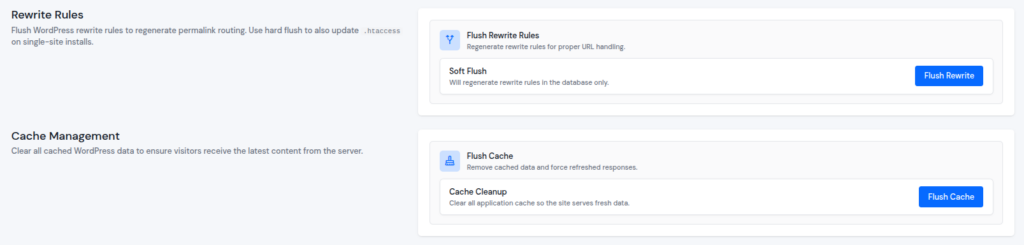
Flush your application cache without logging into the server.
Flush rewrite rules to regenerate permalink routing:
- Soft flush: touches only the database
- Full flush: rewrites your .htaccess file
No command line, no guessing which option you need.
Security Hardening
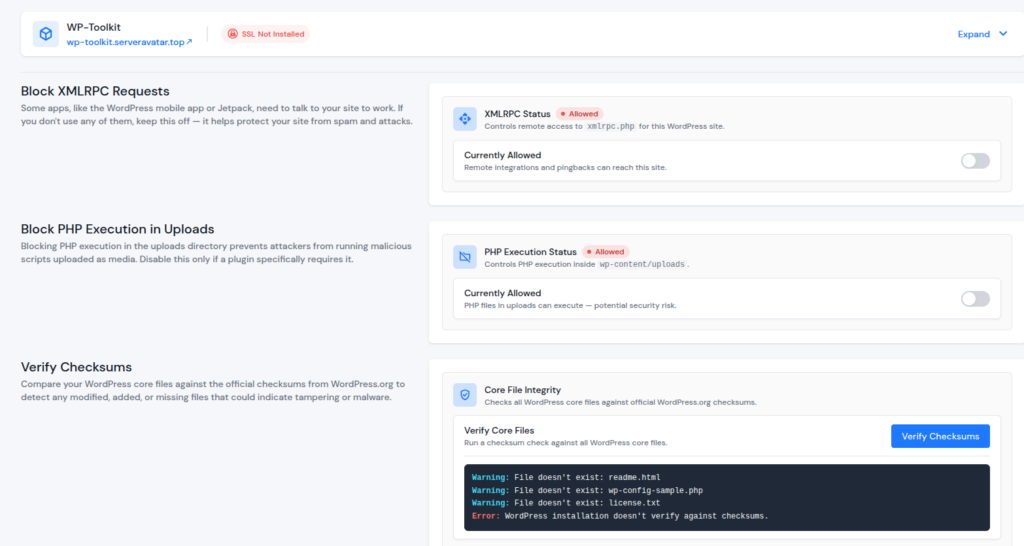
Three protections built in:
- Block XMLRPC: prevents spam and brute force attacks (disable if you need it for mobile apps or Jetpack)
- Block PHP in uploads: stops most WordPress malware from running even if an attacker uploads a malicious file
- Checksum verification: verifies WordPress core files against official WordPress.org checksums
Previously, any of it was not possible with ServerAvatar without technical know-how. Now, these are just a few options in WordPress Toolkit.
Database Tools
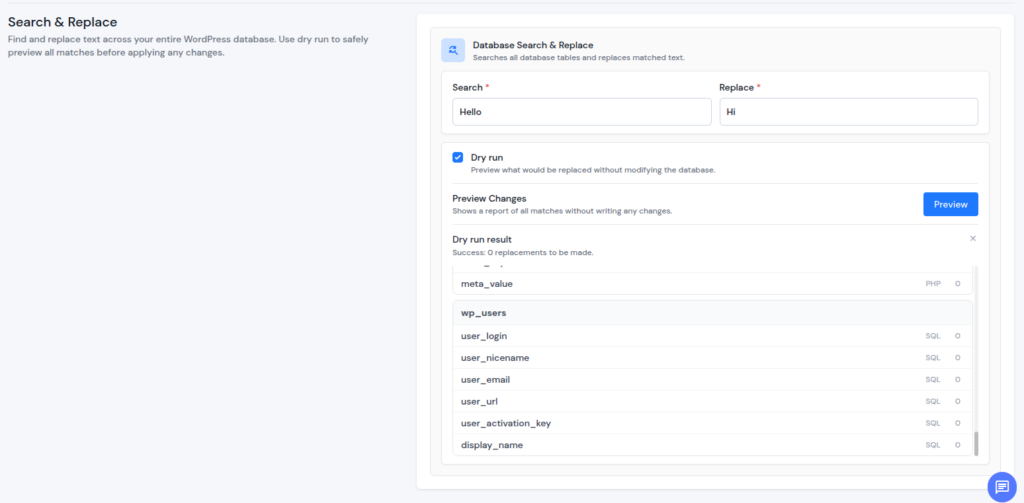
Search and replace text across your entire WordPress database:
- Preview every match before a single change is written
- Use dry run mode to see exactly which tables and fields will be affected
This is the kind of tool most developers reach for a plugin to do. But now it is built-in with the toolkit. Migrations and domain changes are now even more easier.
WordPress Settings
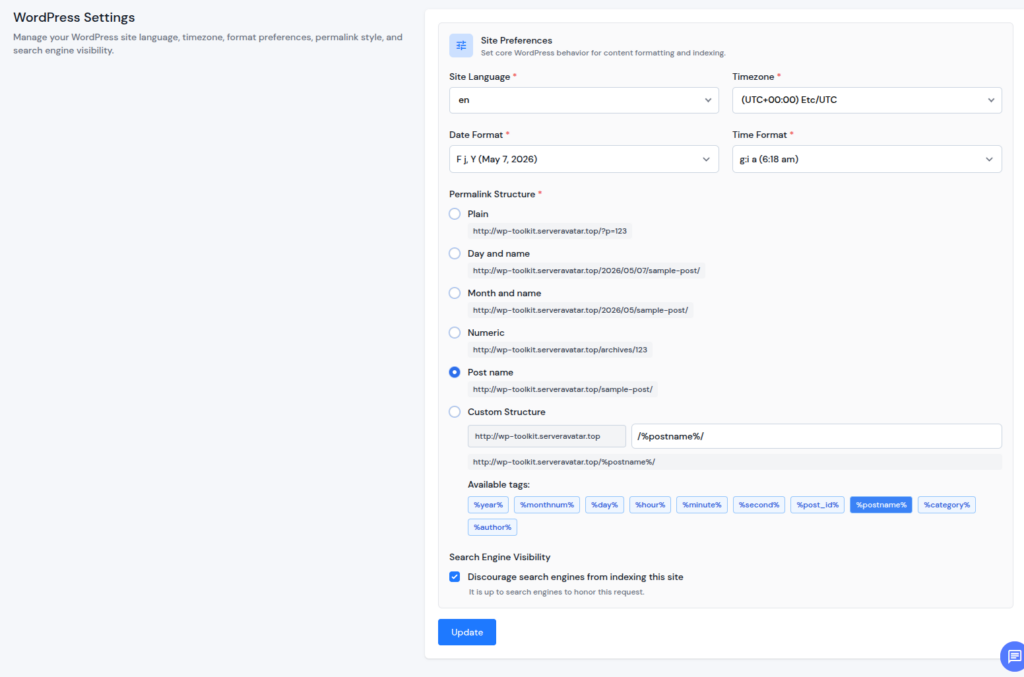
Change these from ServerAvatar without opening wp-admin:
- Language, timezone, date format, time format
- Permalink structure
- Search engine visibility
If you manage multiple WordPress sites and need to standardize settings across all of them, this is where you do it.
Blueprints (Part of the same Toolkit): For Agencies, Freelancers, and Repeat Deployments
Blueprints are where this gets interesting for anyone who sets up WordPress sites regularly.
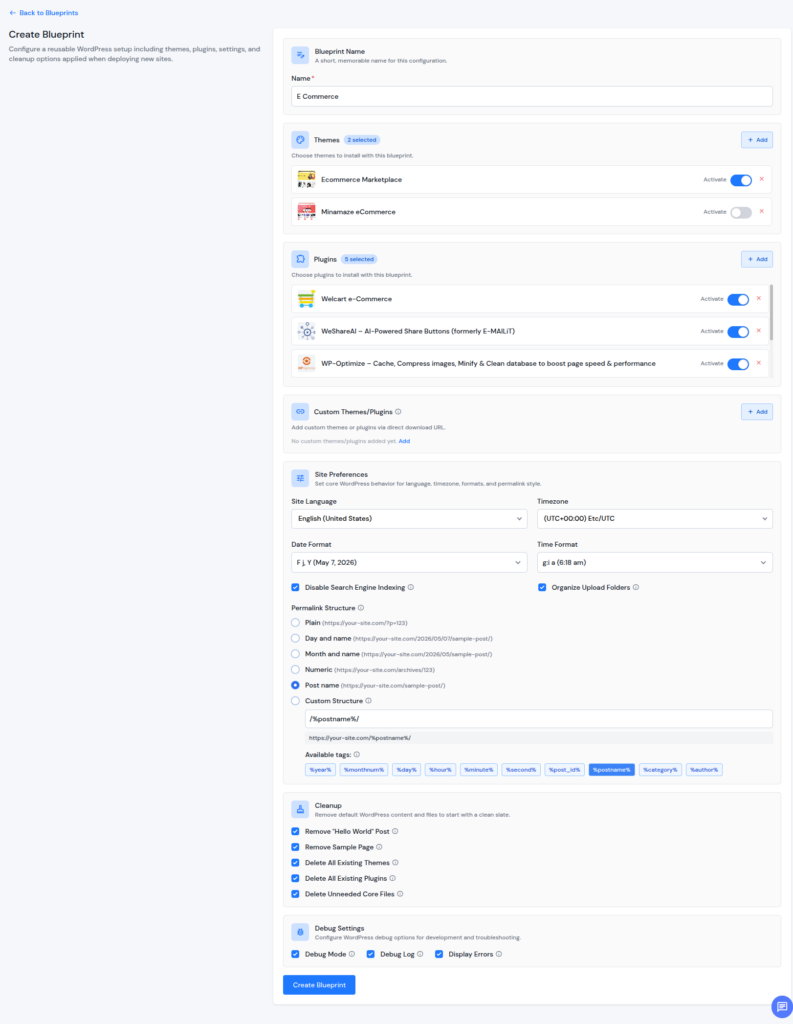
A Blueprint is a reusable template of a WordPress setup. You decide:
- Which themes should be pre-installed and activated
- Which plugins get installed
- Site preferences: language, timezone, permalink structure, search engine indexing
- Cleanup rules: skip the Hello World post, sample page, unnecessary core files
- Debug options pre-set
When you deploy a new WordPress site from a Blueprint, everything you configured is applied automatically. You get a fully configured WordPress installation in seconds, not an hour of manual setup.
WordPress Toolkit and Blueprints are launching Wednesday (20th May 2026). This is Version 1. We will add more features quickly.
How We Are Navigating the AI Era
The world is changing. We are adapting with it.
We Are Going 5x Faster
AI is not a buzzword in our roadmap. It is inside our development workflow right now.
Not just for writing documentation or brainstorming feature ideas. AI is in our code reviews, our testing pipeline, our deployment process, and our debugging loop.
The result is simple: we ship more, we ship faster. You will see updates arrive at a pace you have not seen from ServerAvatar before. WordPress Toolkit itself is a product of that speed.
WordPress Toolkit Is Phase 1
We are not stopping at WordPress. This toolkit is the first phase of something much larger.
We are building the same depth of toolkit for other popular frameworks like Node.js, Laravel and other things that help you manage your hosting environments.
Email management is coming up soon. Fully managed email setup and email hygiene tools built into ServerAvatar.
Malware scanning is coming as well: automatic and on-demand scanning for every application you host with us.
Each toolkit will be built with the same level of detail as WordPress Toolkit. Not a checklist of features. A real control panel that replaces the most common tasks you do across your stack.
This is a roadmap, not a one-time release. More toolkits will follow.
ServerAvatar Is Going Agentic: v8.0
Here is where things get serious.
We are building ServerAvatar to be agentic. This means you type what you want in plain language and our agent does it. Securely.
This is planned for ServerAvatar v8.0. The current version development must conclude first. There is no ETA yet. We will share more when the time is right. We are not rushing this.
When it is ready, the agent will be able to:
- Deploy a new application from scratch on your server
- Read logs, identify issues, suggest fixes, and apply them
- Troubleshoot server performance or downtime based on what you describe
- Change configurations across your servers and sites as you describe
- Help you troubleshoot the issues at lightning speed with AI scanning logs and fixing issues for you.
It will do everything the ServerAvatar dashboard can do today. The difference is that instead of clicking through menus and navigating the UI, you just describe what you want. In addition to that, It will also be able to manage workflows at you regularly use as it will remember your preferences on ServerAvatar.
Security is not an afterthought here:
- The agent operates within strict, defined permissions
- Every action it takes is logged
- You stay in full control at all times
This is not a wildcard AI running loose on our infrastructure. It is an agent we authorize, constrain, and monitor.
How Updates and New Features Will Be Priced
We are building a lot. Each thing we build costs differently to develop and differently to run. I want to be straightforward about how pricing works before any release, so there are no surprises.
Type 1: One-Time or Lifetime Deal
Some products cost us a significant amount to build but once they are built, they do not cost us anything to maintain or manage.
These will be available as one-time purchases or lifetime deals. You pay once, you own it forever.
WordPress Toolkit falls in this category.
Type 2: Recurring Billing
Some products cost us to build and also cost us money to run every single day.
- AI compute is not free
- Servers are not free
- Real-time malware scanning and active monitoring are not free
When a product has ongoing operational costs alongside its development costs, it will be priced as a recurring subscription. We will always be clear about what the price covers and why it is recurring. No hidden costs.
High Availability setups and Premium Support falls in this category.
Type 3: Server Management Features & Incremental Updates: Always Free
Any update that improves something we have already released is free:
- Bug fixes
- Performance improvements
- New options inside existing features
- UI refinements
- Generic server management features that are not application specific (For example, FastCGI Cache, Varnish, SSH Vault, New Auto-installers).
Incremental updates and generic new features are free regardless of how often they arrive or how significant they are. If you already use a product, you get every update for it without paying anything extra.
Ghost and some other auto-installers coming up next falls in this category.
Conclusion
This is just the start.
WordPress Toolkit and Blueprints go live and we immediately move to what is next:
- Email management toolkit
- Framework toolkits
- Malware scanning
- Eventually, the agentic version of ServerAvatar
We are building seriously. We are moving fast. If you manage servers or WordPress sites, this is the right time to pay attention to what we are doing.
Stay tuned.