

PHP remains one of the most widely used server-side technologies, powering around 70% of websites whose server-side programming language is known. That dominance also makes it a prime target. Every day, thousands of automated bots scan the web looking for vulnerable PHP applications, unpatched versions, insecure configurations, sloppy input handling. If you’re building or managing a PHP app today, learning how to secure PHP web application is essential to protect your application from potential security threats.
This isn’t a scare tactic. It’s the reality of deploying software on the internet in 2026. The good news: PHP has matured significantly, and modern PHP (8.x) offers security primitives that match any other server-side language. The bad news: security still depends almost entirely on how you write, configure, and maintain your code. Language-level protections only go so far.
This guide covers the essential layers of PHP application security, from php.ini hardening to SAST tooling, from SQL injection prevention to Content Security Policy headers. Whether you’re running a Laravel app, a WordPress site, or a custom PHP project, these practices apply.
TL;DR
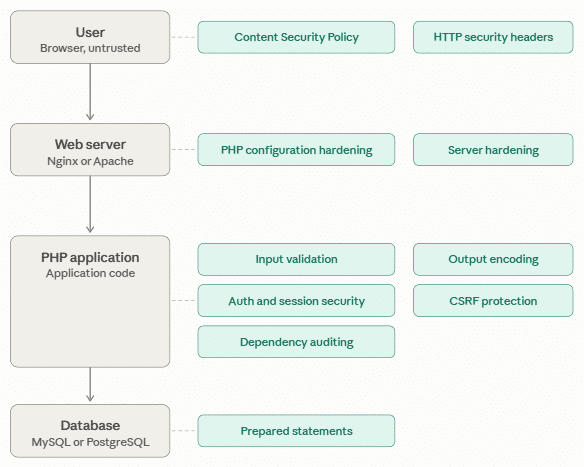
- Lock down
php.inibefore deploying, disable dangerous functions, hide PHP version headers, restrict file uploads - Use PDO prepared statements for every database query, no exceptions
- Escape every variable at output time with context-aware encoding,
htmlspecialchars()for HTML,json_encode()for JavaScript - Use CSP headers (Content Security Policy) to add an XSS defense layer beyond output encoding
- Hash passwords with
PASSWORD_ARGON2IDorPASSWORD_BCRYPT, never MD5 or SHA1, ever - Harden PHP sessions:
HttpOnly,Secure,SameSite=Lax, strict mode, and session ID regeneration on login - Add CSRF tokens to every state-changing form using
hash_equals()for timing-safe comparison - Run
composer auditin CI on every push, dependency vulnerabilities are low-effort attack vectors - Integrate SAST tools (Psalm, PHPStan) into your development workflow to catch security issues before they reach production
- Set HTTP security headers on every response:
X-Frame-Options,X-Content-Type-Options,Strict-Transport-Security, andPermissions-Policy
Why PHP Security Still Matters
PHP has changed considerably over the years. Many security problems associated with older PHP releases came from outdated features, weak defaults, poor development practices, or obsolete libraries.
Modern PHP applications can be highly secure when they are:
- Properly configured
- Regularly updated
- Developed using secure coding practices
- Protected by multiple security layers
- Continuously monitored for vulnerabilities
The bigger challenge is PHP’s enormous ecosystem. Attackers can automatically search the internet for applications containing:
- Outdated WordPress components
- Vulnerable Composer dependencies
- Exposed
.envfiles - Debug mode enabled in production
- Weak authentication
- Unsafe file upload functionality
- Poorly validated input
- Known vulnerable PHP versions
Security Is Also a Business Issue
A compromised application can cause more than technical problems. A successful attack may result in:
- Customer data exposure
- Account takeovers
- Website defacement
- Malware distribution
- Search engine reputation problems
- Loss of customer trust
- Downtime
- Regulatory or compliance problems
- Financial losses
The goal isn’t to make an application completely immune to attacks. Instead, build multiple security layers so that a single mistake doesn’t automatically become a successful compromise.
Let’s get into the actual hardening steps.
1. Harden php.ini Before Deploying
The php.ini configuration controls many aspects of PHP’s runtime behavior. Development-friendly defaults aren’t always appropriate for production environments. Before deploying a PHP application, review the following settings.
Disable Unnecessary Dangerous Functions
If your application doesn’t need operating-system command execution, consider disabling functions such as:
disable_functions = exec,passthru,shell_exec,system,proc_open,popen,curl_exec,curl_multi_exec,parse_ini_file,show_sourceThese functions can provide access to operating-system operations.
Recommended approach
- Disable functions your application doesn’t require.
- Review existing application dependencies before disabling anything.
- Don’t enable dangerous functions simply because they are convenient.
- Treat requirements for shell execution as an architectural security concern.
- Test the application after changing the configuration.
For a deeper look at which PHP functions can increase your application’s attack surface and when to disable them, see our guide to Top PHP Functions to Disable for Enhanced Server Security.
Here are the directives that matter most:
Hide Your PHP Version
Attackers use the X-Powered-By header to fingerprint your server stack and target known vulnerabilities for your specific PHP version:
expose_php = OffThis alone won’t stop a determined attacker, but it removes you from the low-hanging-fruit category.
Restrict Remote File Access
Remote file inclusion is one of the most devastating attack classes. Disable it entirely unless your application has a documented, controlled need:
allow_url_include = Off
allow_url_fopen = OffControl Error Reporting
Verbose error messages are a goldmine for attackers. They reveal file paths, database structure, and library versions. In production:
display_errors = Off
log_errors = On
error_log = /var/log/php_errors.logNever let PHP spill errors onto the page that your users see.
Limit File Uploads
If your application accepts uploads, set strict limits:
file_uploads = On
upload_max_filesize = 2M
max_file_uploads = 5And always validate uploads server-side, client-side restrictions are purely cosmetic.
If your application needs larger uploads, see our guide on how to increase
upload_max_filesizein PHP while keeping related upload settings properly configured.
Harden Session Configuration
Sessions are a prime attack target. Set these in php.ini or at runtime:
session.cookie_httponly = 1
session.cookie_secure = 1
session.cookie_samesite = Lax
session.use_strict_mode = 1
session.gc_maxlifetime = 1800We’ll dig deeper into session security later in this guide.
2. Prevent SQL Injection with PDO Prepared Statements
SQL injection has topped the OW ASP Top 10 for years running, and for good reason: it’s devastating and almost entirely preventable. The attack works by tricking your database query into executing attacker-supplied SQL instead of, or alongside, your intended query.
The basic rule is simple:
Never build SQL queries by directly concatenating user input.
The Wrong Way
<em>// VULNERABLE, never do this</em>

$email = $_POST['email'];
$query = "SELECT * FROM users WHERE email = '$email'";
$result = $pdo->query($query);An attacker submits ' OR '1'='1 as the email. The query becomes SELECT * FROM users WHERE email = '' OR '1'='1', and suddenly every user record is exposed.
The Right Way
<em>// SAFE, use prepared statements with bound parameters</em>

$stmt = $pdo->prepare('SELECT * FROM users WHERE email = :email');
$stmt->execute([':email' => $_POST['email']]);
$user = $stmt->fetch(PDO::FETCH_ASSOC);The database driver handles escaping automatically. Parameter binding separates the query structure from the data, making injection impossible.
Hardening PDO Further
$pdo = new PDO($dsn, $user, $pass, [
    PDO::ATTR_ERRMODE => PDO::ERRMODE_EXCEPTION,
    PDO::ATTR_DEFAULT_FETCH_MODE => PDO::FETCH_ASSOC,
    PDO::ATTR_EMULATE_PREPARES => false, <em>// use native database prepares</em>
]);Setting ATTR_EMULATE_PREPARES to false forces the database driver to handle parameterization natively. Emulated mode has edge-case bypass vectors that native mode closes.
SQL Injection Rules
- Never concatenate
$_GETinto SQL. - Never concatenate
$_POSTinto SQL. - Never trust HTTP headers.
- Never trust cookies.
- Use parameters for user-controlled values.
- Validate data types before processing.
- Apply authorization checks before returning sensitive records.
3. Escape Output to Prevent Cross-Site Scripting (XSS)
Cross-site scripting occurs when your application renders user-controlled data without proper encoding. An attacker injects JavaScript into a page, and every visitor’s browser executes it silently. The consequences range from session hijacking to credential theft to malware distribution.
XSS is the second-most-common vulnerability class after SQL injection. In 2026, it’s still everywhere, because output encoding is easy to get wrong or forget entirely.
The key principle is:
Validate input when it enters your application and encode output according to where it is being used.
HTML Context
For anything rendered inside HTML tags or attributes:
// Unsafe

echo $_GET['name'];

// Safe, always specify encoding and flags

echo htmlspecialchars($_GET['name'], ENT_QUOTES | ENT_HTML5, 'UTF-8');The ENT_QUOTES flag escapes both single and double quotes. ENT_HTML5 ensures correct handling of HTML5 documents. Never omit the flags.
HTML Attribute Context
If you’re putting a variable inside an attribute value, the same rule applies:
// Safe, htmlspecialchars handles attribute boundaries correctly

echo htmlspecialchars($value, ENT_QUOTES, 'UTF-8');JavaScript Context
Injecting variables into <script> blocks requires json_encode() with safe flags:
<script>
    var username = <?= json_encode($username, JSON_HEX_TAG | JSON_HEX_AMP) ?>;
</script>JSON_HEX_TAG converts < and > to \u003C and \u003E. JSON_HEX_AMP converts & to \u0026. These prevent the JavaScript context from breaking out into HTML.
Rich Text (When You Actually Need HTML)
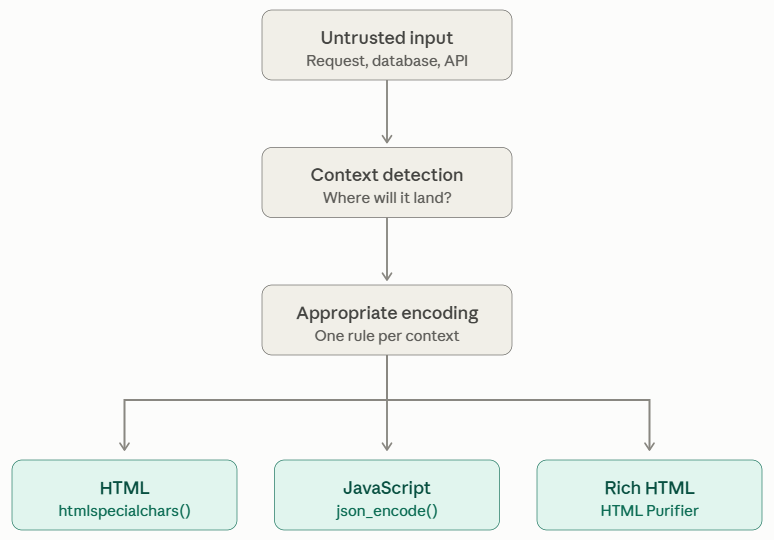
If your application needs to accept formatted text (a CMS, a comment system), use a whitelist library like HTML Purifier:
$config = HTMLPurifier_Config::createDefault();
$purifier = new HTMLPurifier($config);
$clean_html = $purifier->purify($dirty_html);Don’t try to sanitize HTML manually with regex, you will miss edge cases.
4. Add Content Security Policy (CSP) as an XSS Safety Net
Output encoding stops XSS at the application layer. CSP stops it at the browser layer. Together, they provide defense-in-depth: even if a single output encoding slip slips through, CSP can prevent the injected script from executing.
CSP is an HTTP response header that tells the browser which resources are allowed to load and execute on your page. It’s the most effective XSS mitigation available in 2026, and, according to ZeriFlow’s analysis of 12,400+ sites, 64% of sites don’t have one.
A Baseline CSP for PHP Applications
header("Content-Security-Policy: " . implode('; ', [
    "default-src 'self'",
    "script-src 'self'",
    "style-src 'self' 'unsafe-inline'", // Most PHP templates need inline styles
    "img-src 'self' data: https:",
    "font-src 'self'",
    "connect-src 'self'",
    "frame-ancestors 'none'",
    "form-action 'self'",
    "base-uri 'self'",
]));Start with report-only mode to catch violations without breaking functionality:
header("Content-Security-Policy-Report-Only: default-src 'self'; report-uri /csp-report");
Then build a handler for CSP violation reports:
$report = json_decode(file_get_contents('php://input'), true);
$violation = $report['csp-report'] ?? [];

error_log(sprintf(
    'CSP Violation: directive=%s, blocked=%s, page=%s',
    $violation['violated-directive'] ?? 'unknown',
    $violation['blocked-uri'] ?? 'unknown',
    $violation['document-uri'] ?? 'unknown'
));Deploy CSP in report-only mode for at least a week before switching to enforce mode. You’ll be surprised what third-party scripts and inline code your templates actually rely on.
5. Store Passwords Using Strong Password Hashing
Storing passwords is one of the most direct ways your application handles sensitive user data. If your database is breached and passwords are stored poorly, every account is immediately compromised, not just on your site, but everywhere your users reused that password.
The rules are straightforward:
- Never store passwords in plain text
- Never use reversible encryption for passwords
- Never use fast hashes like MD5 or SHA1 for passwords, they’re designed for speed, which makes brute-forcing trivial
Use Built-In Functions
PHP’s password_hash() and password_verify() handle this correctly:
// Hashing, PHP automatically uses a strong algorithm

$hash = password_hash($password, PASSWORD_ARGON2ID); // preferred in 2026

// Or: $hash = password_hash($password, PASSWORD_BCRYPT); // still secure

// Verification

if (password_verify($input, $hash)) {
    // Authenticated, now check for rehash
    if (password_needs_rehash($hash, PASSWORD_ARGON2ID)) {
        $newHash = password_hash($input, PASSWORD_ARGON2ID);
        <em>// Store $newHash</em>
    }
}PASSWORD_ARGON2ID is the winner, it’s resistant to GPU brute-forcing and is the algorithm recommended by the Password Hashing Competition. PASSWORD_BCRYPT remains secure but Argon2id is the modern choice for new applications.
You can also review the official PHP documentation for
password_hash()for supported password-hashing algorithms and configuration details.
Why Rehashing Matters
PHP’s PASSWORD_DEFAULT constant evolves as PHP versions advance. If you stored a hash five years ago using the algorithm of that time, password_needs_rehash() tells you when it’s time to upgrade to the current standard without forcing users to change their passwords.
6. Harden PHP Sessions
Sessions are how PHP tracks users across requests. Default session configuration leaves several attack surfaces open. Here’s what I always configure:
Runtime Session Hardening
ini_set('session.cookie_httponly', 1);  // Block JavaScript access to session cookie
ini_set('session.cookie_secure', 1);    // Only transmit over HTTPS
ini_set('session.cookie_samesite', 'Lax'); // Mitigate CSRF
ini_set('session.use_strict_mode', 1);  // Reject uninitialized session IDs
ini_set('session.gc_maxlifetime', 1800); // 30-minute idle timeout
session_start();Regenerate Session ID on Privilege Escalation
Every time a user’s privilege level changes, login, role change, admin action, regenerate the session ID:
session_regenerate_id(true); // true = destroy the old session
$_SESSION['user_id'] = $authenticated_user_id;
$_SESSION['role'] = $user_role;Destroy Sessions on Logout Completely
$_SESSION = [];
if (ini_get('session.use_cookies')) {
    $params = session_get_cookie_params();
    setcookie(session_name(), '', time() - 42000,
        $params['path'], $params['domain'],
        $params['secure'], $params['httponly']
    );
}
session_destroy();Failing to destroy the session on logout leaves it alive on the client side, a stolen cookie becomes a persistent backdoor.
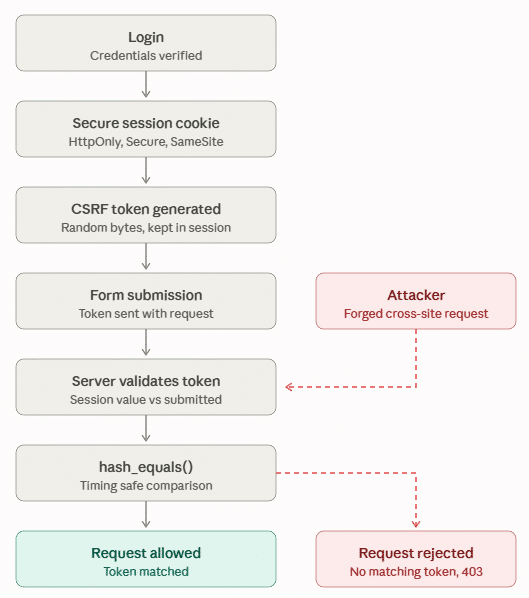
7. Protect State-Changing Requests Against CSRF
Cross-site request forgery (CSRF) tricks authenticated users into sending requests they didn’t intend, submitting a form, changing a password, transferring funds. The browser automatically sends cookies with every request, including forged ones from attacker-controlled pages.
The Synchronizer Token Pattern
Generate a token at session start and embed it in every state-changing form:
// Generate at session start

if (empty($_SESSION['csrf_token'])) {
    $_SESSION['csrf_token'] = bin2hex(random_bytes(32));
}

// Embed in form

echo '<input type="hidden" name="csrf_token" value="'
. htmlspecialchars($_SESSION['csrf_token']) . '">';Validate on Submission
function validate_csrf(string $token): bool {
    return isset($_SESSION['csrf_token'])
        && hash_equals($_SESSION['csrf_token'], $token);
}

if (!validate_csrf($_POST['csrf_token'] ?? '')) {
    http_response_code(403);
    exit('Invalid CSRF token');
}hash_equals() is timing-attack safe. PHP’s loose comparison operator == is vulnerable to timing attacks, which can leak the expected token value one character at a time.
8. Audit Your Dependencies
Modern PHP applications are built on Composer packages. Those packages have dependencies, which have dependencies, a chain that can run dozens deep.
A vulnerability anywhere in that chain is a vulnerability in your application.
Run composer audit regularly:
composer auditFor command options and dependency-audit behavior, see the Composer CLI documentation.
This checks your composer.lock against the PHP Security Advisories Database and fails the build on known CVEs.
Add it to your CI pipeline on every push, it’s the lowest-effort, highest-impact security practice in the PHP ecosystem.
For larger projects, dedicated SAST (Static Application Security Testing) tools go further:
# Psalm with taint analysis
composer require --dev vimeo/psalm
vendor/bin/psalm --taint-analysis src/

# PHPStan with security rules
composer require --dev phpstan/phpstan-strict-rules
vendor/bin/phpstan analyse src/ --level=8Add Dependency Checks to CI
Developer Push
      ↓
Composer Audit
      ↓
SAST
 ┌────┴────┐
Psalm   PHPStan
 └────┬────┘
      ↓
Automated Tests
      ↓
DeploymentRun dependency security checks:
- On pull requests
- On every push where practical
- During release builds
- On a scheduled basis
- After major dependency changes
Also keep composer.lock under version control for applications where reproducible dependency versions are required.
9. Set HTTP Security Headers
HTTP security headers are a fast, stateless defense layer. They don’t require application logic, set them once and they’re enforced by the browser on every response.
Add these to your bootstrap file, front controller, or server configuration:
header('X-Content-Type-Options: nosniff');
header('X-Frame-Options: DENY');
header('X-XSS-Protection: 1; mode=block');
header('Referrer-Policy: strict-origin-when-cross-origin');
header('Permissions-Policy: geolocation=(), microphone=(), camera=()');

// HTTPS enforcement
if (isset($_SERVER['HTTPS'])) {
    header('Strict-Transport-Security: max-age=31536000; includeSubDomains; preload');
}
What each header does:
X-Content-Type-Options: nosniffprevents the browser from guessing the MIME type, blocking drive-by downloadsX-Frame-Options: DENYprevents your site from being embedded in iframes, stopping clickjacking attacksStrict-Transport-Securityforces HTTPS for all connections, preventing protocol downgrade attacksPermissions-Policydisables browser features your application doesn’t use (camera, microphone, location)
10. Validate and Sanitize All Input
Input validation is the first line of defense. Before your code processes any data from the outside world, GET/POST parameters, headers, cookies, API request bodies, uploaded files, it must be validated against strict criteria.
The core principle: deny by default. Define what valid input looks like and reject everything else.
$validated = filter_input_array(INPUT_POST, [
    'email'   => FILTER_VALIDATE_EMAIL,
    'age'     => FILTER_VALIDATE_INT,
    'website' => FILTER_VALIDATE_URL,
]);

// For more complex validation

function validateEmail(string $input): string {
    $email = filter_var($input, FILTER_VALIDATE_EMAIL);
    if ($email === false) {
        throw new ValidationException('Invalid email address');
    }
    if (strlen($email) > 255) {
        throw new ValidationException('Email too long');
    }
    return $email;
}One common mistake: URL validation without checking the scheme. filter_var($url, FILTER_VALIDATE_URL) accepts javascript:// URLs in some configurations. Always check:
$url = filter_var($input, FILTER_VALIDATE_URL);
$scheme = parse_url($url, PHP_URL_SCHEME);
if (!in_array($scheme, ['http', 'https'], true)) {
    throw new ValidationException('Invalid URL scheme');
}Remember: client-side validation (JavaScript) is a user experience improvement. Always validate server-side, JavaScript validation is trivially bypassed by anyone with a browser’s developer tools.
11. Stay on a Supported PHP Version
Running an unsupported PHP release means security fixes may no longer be provided by the PHP project. Check the PHP Supported Versions page regularly. The moment a minor version reaches end of life, treat it as an emergency, schedule the upgrade, even if it’s inconvenient.
Before upgrading:
- Check the official PHP support schedule.
- Identify your current PHP version.
- Review framework compatibility.
- Check Composer dependencies.
- Run your automated tests.
- Review deprecated features.
- Upgrade in a staging environment first.
Avoid postponing upgrades indefinitely because of legacy code.
If you’re unsure which PHP release is appropriate for your application, read our guide on How to Choose the Right PHP Version for Your Server.
If an Upgrade Can’t Happen Immediately
For legacy systems:
- Isolate the application.
- Restrict network access.
- Place it behind appropriate security controls.
- Monitor it closely.
- Remove unnecessary services.
- Create an upgrade plan.
- Prioritize migration based on business risk.
Isolation reduces exposure, but it does not make an unsupported PHP version secure.

12. Deployment and Server-Level Hardening
Application security doesn’t end with code. How you deploy matters just as much.
Never Commit Secrets to Version Control
API keys, database passwords, encryption keys, and session secrets belong in environment variables, not in .env files that get committed to git. Use a secrets manager for production deployments.
// Good, reads from environment

$db_password = getenv('DB_PASSWORD');

// Bad, hardcoded, ends up in version control

$db_password = 'MySecretPassword123';Separate Configuration from Code
Keep environment-specific configuration (database credentials, API keys, debug flags) entirely outside your application code. This makes rotation easier and reduces the risk of accidental exposure.
If you’re hosting multiple PHP applications on the same server, application isolation is another important security layer to consider.
Keep Logs, But Protect Them
Log errors and suspicious activity. But ensure log directories are not publicly accessible, a publicly readable log file is an attacker’s reconnaissance goldmine.
Key Takeaways
- Lock down
php.inibefore deploying, disable dangerous functions, hide PHP version, restrict file uploads, control error reporting - Use PDO prepared statements for every database query, with
ATTR_EMULATE_PREPARES = false - Escape every variable at output time with context-appropriate encoding,
htmlspecialchars()for HTML,json_encode()for JavaScript - Deploy a CSP header in report-only mode first, then enforce once you’ve resolved violations
- Hash passwords with
PASSWORD_ARGON2IDand rehash whenpassword_needs_rehash()returns true - Harden sessions with
HttpOnly,Secure,SameSite=Lax, strict mode, and ID regeneration on privilege changes - Add CSRF tokens to every state-changing form, validated with
hash_equals() - Run
composer auditin CI on every push, dependency vulnerabilities are the path of least resistance for attackers - Integrate SAST (Psalm, PHPStan) into your development workflow to catch security issues before they reach production
- Set HTTP security headers on every response:
X-Frame-Options,X-Content-Type-Options,Strict-Transport-Security - Stay on a supported PHP version, treat end-of-life versions as security emergencies
Conclusion
Securing a PHP application requires consistent attention to code, configuration, dependencies, and infrastructure. Use prepared statements, validate input, protect sessions, hash passwords securely, configure security headers, and keep PHP and dependencies updated.
Security isn’t a one-time task. Regular audits, testing, monitoring, and timely updates help protect your application from evolving threats and keep your users’ data safe.
If you want a simpler way to manage your servers and applications, including php setting management, SSL certificates, firewall rules, and monitoring, platforms like ServerAvatar can streamline everything from a single dashboard.
FAQs
What is the most common PHP security vulnerability in 2026?
SQL injection and XSS remain the top two by a wide margin. Both are trivially preventable: SQL injection with PDO prepared statements, and XSS with consistent output encoding using htmlspecialchars() plus a CSP header. The hard part isn’t the fix, it’s the discipline of applying it everywhere, every time.
Should I use mysqli or PDO?
PDO is strongly preferred. It supports multiple database backends, enforces prepared statements more strictly with ATTR_EMULATE_PREPARES = false, and has a cleaner API. Avoid raw mysql_* functions, they were removed in PHP 7.
How do I store passwords securely in PHP?
Use password_hash($password, PASSWORD_ARGON2ID) to store and password_verify() to check. Never use MD5, SHA1, or any fast hash, they’re trivially brute-forced with modern GPU hardware.
How often should I audit PHP dependencies?
Run composer audit on every push in CI. For high-value applications, run penetration tests quarterly. SAST tools like Psalm with --taint-analysis should run on every pull request.
Is open_basedir worth setting?
Yes, Setting open_basedir to your application’s root directory prevents PHP from reading arbitrary files on the server via path traversal vulnerabilities. It’s an additional hardening layer, not a substitute for fixing the underlying path traversal bugs.
Do I need a WAF?
A Web Application Firewall adds defense-in-depth but doesn’t replace secure code. Think of it as a safety net, not the primary defense. Use Cloudflare WAF or ModSecurity as an additional layer, especially for known attack pattern blocking.
About the Author
Meghna Meghwani is a technical writer focused on Linux, Ubuntu, VPS hosting, server management, WordPress, PHP, Node.js, cloud hosting, and DevOps. She creates beginner-friendly tutorials, practical hosting guides, troubleshooting articles, and server security content designed to help developers and businesses manage applications and servers more efficiently.