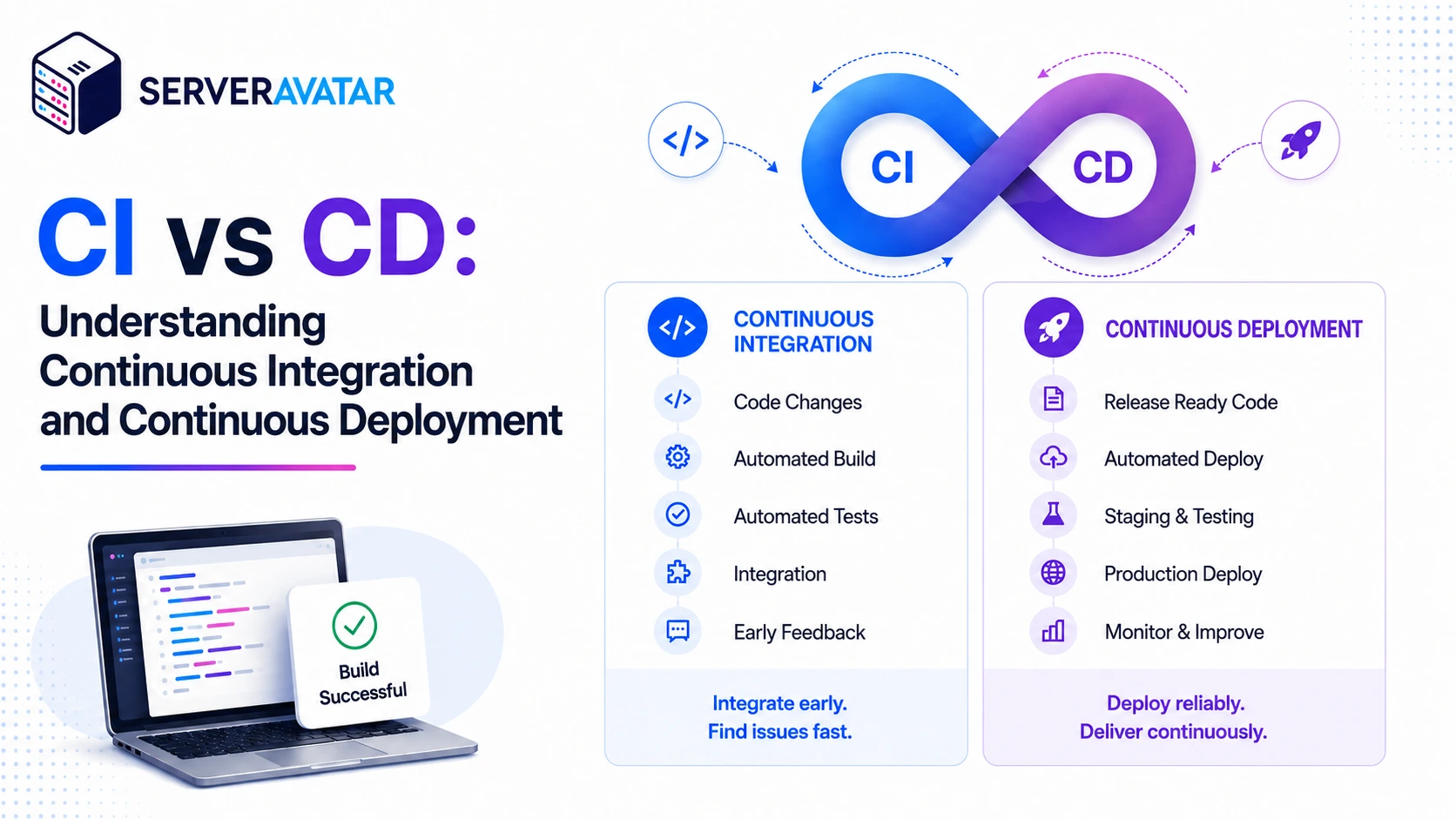

There’s a moment every developer eventually runs into: you’ve been working on a feature for a few days, the code makes sense on your machine, you push it to production, and something breaks. CI vs CD becomes especially important when changes from other team members create conflicts that remain unnoticed until deployment, even when your code works locally.
Continuous Integration helps teams integrate changes frequently, run automated checks, and detect issues before they reach production. The terms get conflated constantly. People say “CI/CD” like it’s a single thing, but CI and CD are two distinct practices solving two distinct problems. Let’s break it all down.
In simple terms: Continuous Integration (CI) automatically builds and tests code changes. Continuous delivery keeps validated code ready for release but requires approval before production. Continuous deployment automatically releases eligible changes to production.
TL;DR
- Continuous Integration (CI) helps developers frequently integrate code changes into a shared repository while automatically building, testing, and validating those changes.
- Continuous Deployment automatically releases validated code to production once it meets the required deployment conditions.
- Continuous Delivery sits between CI and continuous deployment. Code is automatically built, tested, and kept ready for release, but a person approves or triggers the production deployment.
- CI improves code quality and developer collaboration, while continuous delivery and continuous deployment make software releases faster and more consistent.
- Start with CI. Add continuous delivery or continuous deployment when your testing, monitoring, and rollback processes are reliable.
- Tools such as GitHub Actions, GitLab CI/CD, Jenkins, and CircleCI can help automate these workflows.
What Actually Happens When You Don’t Use CI or CD
Before we talk about what these practices are, it helps to understand what life looks like without them, because most small teams and solo developers are living it right now.
Here’s the typical scenario: Without CI/CD, developers often test code locally and manually transfer it to the server using FTP, SFTP, or shared repositories. These manual workflows can be slow, inconsistent, and more prone to errors.
The problems stack up fast:
- Bugs slip through because there’s no automated check between “I wrote this” and “it runs in production”
- Deployments may be slower or more error-prone because the release process depends on manual steps and can vary between team members.
- Rollbacks can be slower or more difficult when there is no documented and automated recovery process.
- Bottlenecks form around whoever “owns” the deployment process.
- Fear builds up around releases. The longer you go between deployments, the more changes pile up, and the bigger the risk surface when you finally push.
Sound familiar? Most teams operate in this mode for way too long because it “works fine” until it doesn’t. The real cost isn’t the occasional outage, it’s the slow drip of developer energy spent on anxiety and manual busywork instead of building.
That’s where CI and CD come in.
Continuous Integration
Continuous Integration (CI) is the practice of frequently integrating code changes into a shared repository and automatically building, testing, and validating those changes. Its goal is to identify integration issues early and keep the shared codebase stable.
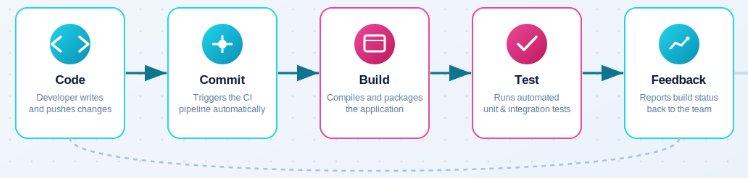
When a developer pushes a commit, a CI pipeline kicks in. The code gets pulled, built, and run through a suite of tests, everything from unit tests to integration tests to linting. If something fails, the team gets an immediate alert. If it passes, the code is cleared to move forward.
Why Frequent Merges Matter
Keeping code in a branch for too long can make integration more difficult as the main codebase continues to change. Frequent merges help teams:
- Reduce the risk of large and complex merge conflicts
- Identify integration issues earlier
- Keep code changes smaller and easier to review
- Resolve problems before they become harder to fix
- Maintain better alignment with the main codebase
CI supports frequent integration by automatically running checks when configured events, such as pushes, pull requests, or merges occur. This gives developers faster feedback and helps catch issues early.
What a CI Pipeline Actually Does
A typical CI workflow may include the following steps:
- A developer submits code or creates a pull request.
- The CI platform starts a workflow based on the repository’s configured triggers.
- The workflow installs dependencies and prepares an isolated build environment.
- It builds the application and runs automated checks, such as:
- Unit tests
- Integration tests
- Linting
- Code-quality checks
- Security or dependency scans
- The pipeline indicates whether the automated checks were successful or unsuccessful.
- When branch protection is active, changes may need a successful pipeline check before they can be merged into the main branch.
CI jobs can run on cloud-hosted or self-hosted runners. These isolated environments help create consistent builds instead of relying on each developer’s local computer setup.
What CI Doesn’t Do
CI focuses mainly on integrating and validating code. It can also:
- Build application artifacts
- Generate test reports
- Run code-quality checks
- Prepare software for release
However, CI does not automatically deploy code to production by default. Production deployment requires a separate delivery or deployment workflow, which may include:
- Manual approval
- Automated release checks
- Fully automated deployment
Continuous Deployment
Continuous deployment (CD) extends a reliable CI workflow by automatically releasing eligible code changes to production after they pass the required automated checks.
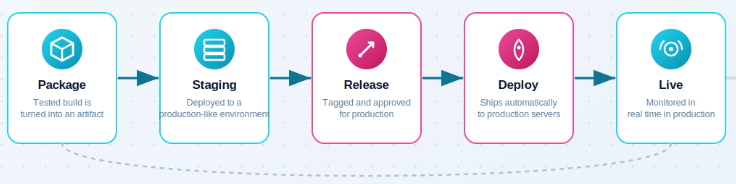
Depending on the deployment strategy, the code may first move through staging, canary, or other verification environments. Some teams deploy directly to production after validation. The defining feature is that production deployment does not require a manual approval step for every eligible change.
The Key Shift in Thinking
Continuous deployment is not just a technical decision, it requires trust in your automated processes. Before adopting it, consider:
- Are your automated tests reliable?
- Can your pipeline detect issues before production?
- Do you have monitoring and alerts in place?
- Can you quickly roll back a failed deployment?
Manual deployments can also introduce errors because they depend on people following the same steps consistently. The key question is not “Should deployment be manual or automated?”
It is: “Are our testing and deployment processes reliable enough to support automation?”
What Continuous Deployment Requires
If you want CD to work without terrifying your on-call team, a few things need to be true:
- Your test suite is comprehensive. Not perfect, nothing ever is. But good enough that you’re confident most bugs will be caught before production.
- Rollbacks are fast. If something slips through and you need to undo it, you should be able to do it in minutes, not hours.
- Production monitoring is active. Automated releases should be supported by application monitoring, error tracking, health checks, and alerts. Teams should be able to identify deployment-related problems quickly and respond using a tested rollback or mitigation process.
- Your team is comfortable with small, frequent changes. CD works best when the changes are small. Big, infrequent releases are exactly what CD is designed to prevent.
What CD Doesn’t Do
Continuous deployment does not mean skipping important checks. Before deployment, teams should complete:
- Code reviews
- Automated testing
- Security checks
- Deployment and release validations
Once a change meets the required conditions, it is automatically deployed to production without needing manual approval for each release.
CI vs CD: The Direct Comparison
Here’s the core difference is actually very simple.
| Feature | Continuous Integration | Continuous Deployment |
|---|---|---|
| Main purpose | Integrate and validate code changes | Automatically release validated code |
| Automated builds | Yes | Yes |
| Automated testing | Yes | Yes |
| Production deployment | Not included by default | Automatically deployed when requirements are met |
| Manual approval before production | Depends on the workflow | No approval for each eligible release |
| Main benefit | Early feedback and stable integration | Faster and more consistent releases |
| Relationship | Provides the automated validation foundation | Usually builds on a reliable CI process |
| Who it helps | Developers | End users (and developers) |
| When does it end? | Code is validated and merged | Code is live in production |
CI is generally the foundation for continuous deployment. A reliable automated validation process helps teams reduce the risk of releasing untested or incompatible changes. However, teams can use CI without implementing continuous deployment.
The Third Mode: Continuous Delivery
Continuous delivery extends CI by automatically building, testing, and preparing validated code for release. The software is kept in a deployable state, but a person or business process decides when to release it to production.
This approach gives teams many of the benefits of automation while keeping control over the timing of production releases.
| Feature | Continuous Integration | Continuous Delivery | Continuous Deployment |
|---|---|---|---|
| Automatically builds code | Yes | Yes | Yes |
| Runs automated tests | Yes | Yes | Yes |
| Keeps code ready for release | Not always | Yes | Yes |
| Can deploy to staging | Optional | Common | Common |
| Requires approval before production | Depends on the workflow | Usually yes | No |
| Automatically deploys to production | No | No | Yes |
| Main focus | Code integration and validation | Release readiness | Automated production releases |
How Continuous Integration, Continuous Delivery, and Continuous Deployment Work Together
CI helps developers integrate and validate code changes early. Continuous delivery builds on CI by keeping validated software ready for release. Continuous deployment extends the process further by automatically releasing eligible changes to production.
These practices support one another. As teams improve their automated tests, deployment checks, monitoring, and rollback processes, they can safely automate more of the software delivery lifecycle.
A simple workflow:
                               Developer Pushes Code
                                          │
                                          ▼
                              CI Builds the Application
                               & Runs Automated Tests
                                          │
                                          ▼
                                  Code Is Reviewed
                                     & Approved
                                          │
                                          ▼
                                  Changes Are Merged
                                  to the Main Branch
                                          │
                                          ▼
                            Application Is Prepared or
                          Deployed to a Testing Environment
                                          │
                                          ▼
                          ┌──────────────────────────────┐
                          │ How Will the Application Be  │
                          │     Released to Production?  │
                          └──────────────────────────────┘
                                          │
                            ┌─────────────┴─────────────┐
                            │                           │
                            ▼                           ▼
                      Manual Approval             Automatic Deployment
                   (Continuous Delivery)       (Continuous Deployment)
                            │                           │
                            ▼                           ▼
                 Production Deployment Is      Production Deployment
                     Manually Approved          Happens Automatically
                            │                           │
                            ▼                           ▼
                  Application Is Deployed      Application Is Deployed
to Production to ProductionSo Should You Use Both?
Start with Continuous Integration to automate builds, testing, linting, and code-quality checks. Once your Continuous Integration pipeline is reliable, consider Continuous Delivery or Continuous Deployment.
Consider continuous deployment when your team has:
- Reliable automated tests
- Strong production monitoring and alerts
- Fast and tested rollback procedures
- Small, frequent code changes
- Clear deployment health checks
- Confidence in automated release workflows
The goal is not to automate every step immediately. The goal is to automate the steps your team can operate reliably.
Common Mistakes Teams Make With CI and CD
After looking at how many teams approach this, a few patterns repeat themselves constantly:
Treating CI as optional. If your team ignores the CI pipeline because “it’s just a suggestion,” you’ve already lost. CI only works if everyone respects the signal it sends.
Treating automated tests as an afterthought. A CI pipeline is only as useful as the checks it runs. Add relevant tests and quality checks while developing features instead of waiting until just before release.
Skipping monitoring in CD. Automated deployments can introduce issues in production. Use monitoring and alerts to detect problems quickly instead of relying on users to report them.
Making deployments large and infrequent. CD supports smaller, more frequent releases, but teams must build this practice into their workflow. Avoid batching too many changes into a single deployment.
Not documenting the pipeline. CI/CD is infrastructure. It has behavior, it has failure modes, and it needs to be understood by more than one person on your team. Documentation isn’t optional.
Implementing CI/CD for WordPress: A Realistic Walkthrough
CI/CD can also improve WordPress development, especially when teams build custom themes, plugins, or managed WordPress applications.
A WordPress CI/CD workflow may include:
- Running PHP linting and coding-standard checks
- Running PHPUnit or other automated tests
- Checking JavaScript and CSS quality
- Building frontend assets
- Scanning dependencies for known security issues
- Creating a deployable build artifact
- Deploying changes to a staging environment
- Running smoke or health checks
- Releasing to production through manual approval or automated deployment
The exact workflow depends on the project. A small content-focused WordPress site may not need the same level of automation as a custom plugin, WooCommerce store, or multi-site application.
Example: A Simple CI/CD Workflow
Imagine a developer updates a Laravel application:
- The developer opens a pull request.
- The CI workflow runs PHP linting, automated tests, and code-quality checks.
- A team member reviews the code.
- The changes are merged into the main branch.
- The application is automatically deployed to staging.
- The team reviews the staging environment.
At this point:
- The automated build and testing process is Continuous Integration.
- If the application is ready for production but requires someone to approve the release, it uses Continuous Delivery.
- If the application is automatically deployed to production after passing the required checks, it uses Continuous Deployment.

Popular CI/CD Tools
- GitHub Actions: Integrated with GitHub and suitable for automating builds, tests, and deployments.
- GitLab CI/CD: Built into GitLab and designed for creating repository-based pipelines.
- Jenkins: Highly customizable and extensible but usually requires more setup and maintenance. Jenkins provides extensive documentation for creating and managing automated pipelines
- CircleCI: A cloud-based CI/CD platform with configurable workflows and integrations. CircleCI guides pipelines, workflows, jobs, and CI/CD configuration
The right tool depends on where your code is hosted, your team’s workflow, your infrastructure, and how much CI/CD infrastructure you want to manage.
Key Takeaways
- CI automatically builds and tests code, helping teams catch integration issues early.
- Continuous delivery keeps validated code ready for release but requires approval before production.
- Continuous deployment automatically releases eligible code to production without manual approval.
- CI improves code quality and team confidence, while CD enables faster and more reliable releases.
- Start with CI and add more automation as your testing, monitoring, and rollback processes mature.
- CI/CD also benefits WordPress projects, including custom themes, plugins, and multi-site environments.
Conclusion
CI, Continuous Delivery, and Continuous Deployment support different stages of software delivery. CI validates code changes, Continuous Delivery keeps them ready for release, and Continuous Deployment automatically moves eligible changes to production.
Start by building a reliable CI pipeline, then gradually introduce delivery and deployment automation as your workflow matures. Strong automated testing, monitoring, deployment checks, and rollback processes help teams release updates faster, reduce manual effort, and maintain greater confidence in every deployment.
FAQs
Is CI the same as CI/CD?
No. CI focuses on integrating and validating code changes. CI/CD is a broader term that describes CI together with automated delivery or deployment workflows.
How does continuous delivery differ from continuous deployment?
Continuous delivery keeps validated software ready for release but requires a person or business process to trigger production deployment. Continuous deployment automatically releases eligible changes to production.
Can you use CI without CD?
Yes. Many teams use CI for automated builds and testing while managing production deployments manually.
Is continuous deployment safe?
Continuous deployment can be reliable when supported by strong automated testing, deployment checks, monitoring, alerts, and fast rollback procedures. The appropriate level of automation depends on the application and the team’s operational maturity.
Do small teams need CI/CD?
Small teams can benefit from CI because automated checks provide fast feedback and reduce manual testing. Full continuous deployment may not be necessary for every project.