

If you’ve been working with Laravel for a while, you’ve probably hit that familiar wall. You need to add some interactivity, a live search, a dynamic form, or a counter that updates without a page reload. Your options often seem limited: build API endpoints, handle CORS and frontend state management with React or Vue, or stick with plain PHP and accept full page reloads. Laravel Livewire offers a simpler approach by letting you build dynamic, interactive interfaces using Laravel and Blade without the complexity of a separate JavaScript framework.
That’s the gap Laravel Livewire was built to fill. Livewire is a framework for Laravel that lets you build dynamic, reactive interfaces using nothing but PHP. You remain in Laravel ecosystem, write PHP, and Livewire will handle JavaScript behind the scenes. No separate frontend build step. No context switching. No API design for internal use cases.
In this guide, I will guide you with Laravel Livewire, its working, when it makes sense to use it, and what its honest limitations are. By the end, you’ll have a clear picture of whether Livewire is the right tool for your next project.
What Is Laravel Livewire?
Laravel Livewire is an open-source PHP framework that integrates directly with Laravel. It lets you build interactive, reactive frontend components using PHP classes and Blade templates, without writing a single line of JavaScript.
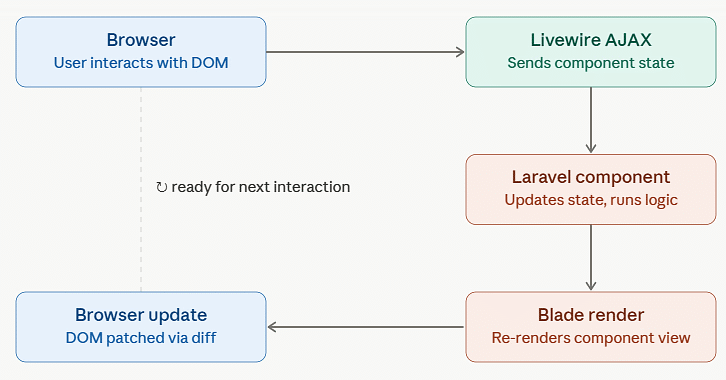
A Livewire component combines a PHP class with a Blade view. When users interact with the page, Livewire sends the request to the server, executes the PHP logic, and updates only the changed HTML, allowing the page to refresh dynamically without a full reload.
You get the reactivity of a JavaScript single-page application, but the logic lives entirely in your Laravel backend. If you know Laravel and Blade, you’re already halfway there.
How Does Laravel Livewire Work?
Here’s the mental model that makes everything click.
A Livewire component is made of two parts:
- A PHP class holds the component’s state (properties) and its behaviour (methods)
- A Blade template renders the UI and binds to the component’s properties and methods
When a user interacts with a Livewire component, Livewire sends the current state to the server, runs the required PHP logic, and re-renders the updated view. Only the changed HTML is returned and updated on the page, creating a smooth, app-like experience.
Since every interaction involves a server request, Livewire works well for most web applications but may not be ideal for highly real-time or latency-sensitive interfaces.
Core Concepts Every Beginner Should Know
Before you start building, a few concepts will help everything else click faster.
Properties
Properties in a Livewire class are the state of your component. You define them as class properties, and they automatically sync with the template.
class SearchUsers extends Component
{
    public string $query = '';
    public array $results = [];

    public function updatedQuery()
    {
        $this->results = User::where('name', 'like', "%{$this->query}%")->get();
    }
}In the Blade template, $query is referenced directly, no Vue-style binding syntax, no JavaScript. Just wire:model="query" and Livewire handles the rest.
Actions
Actions are public methods on your component class. You trigger them from the template using wire:click, wire:submit, or wire:change.
public function increment()
{
    $this->count++;
}

public function submitForm()
{
    $this->validate([
        'email' => 'required|email',
    ]);

    // Process the form...
}From the template: <button wire:click="increment">Add</button>.
Lifecycle Hooks
Livewire gives you hooks that run at specific moments in a component’s lifecycle:
mount()– runs once when the component is first createdupdated($name, $value)– runs after any property is updatedrender()– runs every time the component needs to re-render
These let you hook into the component lifecycle to run logic at exactly the right moment.
Directives
Livewire adds a few Blade directives that power the magic:
wire:model– binds an input to a property, syncing bidirectionallywire:click– calls a component method on clickwire:submit– handles form submission via Livewirewire:poll– re-renders the component on a timed intervalwire:init– runs a method once when the component first mounts
These directives work as a bridge between HTML and PHP.
A Practical Example: Building a Real-Time Search
Let’s make this concrete. Here’s a live user search component built entirely in PHP and Blade.
The PHP Class:
use App\Models\User;
use Livewire\Component;

class SearchUsers extends Component
{
    public string $query = '';
    public Collection $users;

    public function mount()
    {
        $this->users = collect();
    }

    public function updatedQuery()
    {
        if (strlen($this->query) < 2) {
            $this->users = collect();
            return;
        }

        $this->users = User::where('name', 'like', "%{$this->query}%")
            ->orWhere('email', 'like', "%{$this->query}%")
            ->limit(10)
            ->get();
    }

    public function render()
    {
        return view('livewire.search-users');
    }
}The Blade Template:
<div>
    <input
        type="text"
        wire:model="query"
        placeholder="Search users by name or email..."
        class="search-input"
    >

    @if($users->count())
        <ul class="results-list">
            @foreach($users as $user)
                <li>{{ $user->name }} — {{ $user->email }}</li>
            @endforeach
        </ul>
    @elseif(strlen($query) >= 2)
        <p>No users found matching "{{ $query }}"</p>
    @endif
</div>No JavaScript. No API route. No fetch call. The wire:model="query" directive handles the input sync, and updatedQuery() fires automatically when the property changes.
When Laravel Livewire Makes Sense
Livewire shines brightest in a few specific scenarios.
- Admin Panels and Dashboards: Build data-driven dashboards with sorting, filtering, and pagination quickly using Laravel and PHP.
- Dynamic CRUD Forms: Create interactive forms with real-time validation, conditional fields, and multi-step workflows with minimal effort.
- Search and Filtering: Implement responsive search and filter features without page reloads or custom JavaScript requests.
- Business Applications: Keep form processing, validation, and business logic in PHP, making development faster and easier to maintain.
- Laravel-First Projects: Add interactive functionality without learning or managing a separate JavaScript framework.
When Laravel Livewire Isn’t the Right Tool
Being honest about limitations is part of giving you a useful guide.
- Real-Time Applications: Livewire is not ideal for chat apps, collaborative tools, or rapidly updating dashboards that require instant, real-time communication.
- Advanced UI Interactions: Features like complex animations, drag-and-drop interfaces, and canvas-based graphics are better handled with JavaScript frameworks.
- High-Traffic Pages: Since every interaction triggers a server request, Livewire may increase server load and costs on heavily visited pages.
- Existing JavaScript Projects: If your application already relies heavily on React or Vue, adding Livewire can introduce unnecessary complexity.
Livewire vs Alternatives: A Quick Comparison
Here’s how Livewire stacks up against the most common alternatives.
| Feature | Laravel Livewire | React / Vue (Inertia) | Vue / React standalone |
|---|---|---|---|
| Language | PHP | JavaScript | JavaScript |
| Learning curve | Low for Laravel devs | Moderate to high | High |
| Setup complexity | Minimal | Moderate | High |
| State management | Server-side | Client-side | Client-side |
| JavaScript required | No (optional) | Yes | Yes |
| Best for | CRUD, dashboards, forms | Complex reactive UIs | Full SPAs |
| Performance (simple UI) | Excellent | Good | Good |
| Performance (complex UI) | Moderate | Excellent | Excellent |
If your project is a Laravel application with moderate interactivity needs, Livewire will get you there faster. If you’re building a complex, highly interactive, frontend-heavy application, a dedicated JavaScript framework is still the more appropriate choice.

Laravel Livewire in 2026: What’s Changed
Livewire has been around for a few years now, and the 2026 ecosystem looks meaningfully different from the early days.
Recent Improvements in Livewire
- Robust Ecosystem: Larger community and better documentation, more packages, and easier access to support, and solutions.
- Laravel Volt: Volt simplifies development by keeping component logic and templates together in a single file.
- Better File Uploads: Livewire now includes built-in support for drag-and-drop uploads and upload progress indicators.
- Improved Testing: Components can be tested directly with Laravel’s testing tools, without requiring JavaScript-based testing frameworks.
- Framework: Livewire is stable, widely used solution in 2026 for creating Laravel application.
Deploying a Livewire Application
- Use HTTPS: Secure connections are essential for reliable Livewire requests and browser compatibility.
- Configure Sessions Properly: For multi-server deployments, use shared session storage such as Redis or a database.
- Check PHP Compatibility: Livewire 3 requires PHP 8.1 or newer, so ensure your server meets the requirement.
Pros and Cons
What Livewire gets right
- Rapid prototype: Get a fully functional, interactive interface up and running in just minutes.
- Familiar ecosystem: Stay in Laravel, use Blade, write PHP. No new language to master
- Strong testing workflow: Test components the same way you would test a controller.
- Smaller codebase: No separate frontend repo, no build pipeline, no npm dependencies for basic features
Where it falls short
- Every interaction is a server round-trip: this is the fundamental trade-off
- Not built for real-time: polling is a workaround, not a solution
- Mental model takes adjustment: developers used to pure JavaScript frameworks sometimes struggle with the “it’s all PHP” approach initially
Understanding both sides helps you make better decisions for your specific project.
Key Takeaways
- Laravel Livewire lets you build reactive, dynamic interfaces using pure PHP, no JavaScript framework required
- It work by sending AJAX request from browser to Laravel backend and updating only HTML that changed
- Best suited for CRUD interfaces, dashboards, search/filter UIs, and form-heavy applications
- Not ideal for real-time apps, complex animations, or high-traffic pages where server round-trips become a bottleneck
- Requires PHP 8.1+, HTTPS, and a compatible Laravel version (Laravel 10 or 11 for Livewire 3)
- The ecosystem is mature and well-supported in 2026, with good community packages and documentation
- Deploys on any Laravel-compatible hosting, no special configuration needed beyond standard HTTPS and session setup
Official Laravel Livewire Resources
Here are the official docs to bookmark as you learn Livewire:
- Laravel Livewire Documentation – Quick start guide, component reference, and examples
- Laravel Official Documentation – Framework docs, Blade templates, and ecosystem overview
- Livewire GitHub Repository – Report issues, check releases, follow development
Conclusion
Laravel Livewire isn’t designed to replace JavaScript frameworks, it aims to simplify development for Laravel developers by allowing them to work entirely within the Laravel ecosystem. For a specific class of applications, data-driven, form-heavy, internal tools and dashboards, it genuinely does that job extremely well.
If you’re building a CRUD interface, an admin panel, or a dynamic Laravel application and you want to move fast without learning a separate frontend framework, Livewire is one of the best choices available in 2026. If you’re building a real-time collaborative tool or a highly interactive consumer app, look elsewhere.
FAQs
Is Laravel Livewire a replacement for Vue or React?
No, Livewire is built for Laravel developers who want interactive features like forms, filters, and live search without using a separate JavaScript framework
Does Livewire require a server to work?
Yes, every interaction sends a request to the server, so you need a PHP-compatible hosting environment with HTTPS enabled.
Can I use Livewire alongside Vue or React?
Yes, but combining multiple frontend approaches can increase complexity. For most projects, it’s better to choose one primary framework.
Is Livewire good for production applications?
Yes, Livewire 3 is stable, widely used, and well-suited for production Laravel applications.
Does Livewire work with Laravel Sanctum or Fortify for authentication?
Yes, Livewire integrates smoothly with both Laravel Sanctum and Fortify, making authentication easy to manage.
Continue Reading
- Core PHP vs Laravel: Which One Is Best for Your Project?
- Best PHP Testing Tools to Ensure Error-Free Web Development
- Best PHP CMS Platforms for Developers in 2026
Ready to deploy your Laravel application?
ServerAvatar lets you deploy and manage Laravel apps on your VPS without touching the command line, from SSL setup to security configuration, all in one dashboard.
About the Author
Meghna Meghwani is a technical writer focused on Linux, Ubuntu, VPS hosting, server management, WordPress, PHP, Node.js, cloud hosting, and DevOps. She creates beginner-friendly tutorials, practical hosting guides, troubleshooting articles, and server security content designed to help developers and businesses manage applications and servers more efficiently.