


Have you ever visited a slow website and left within seconds? You’re not alone. If you’re using Laravel, one of the most popular PHP frameworks, optimizing its performance can make a huge difference in user experience and business growth. Laravel performance is a critical factor in ensuring your application runs smoothly and efficiently. Your Laravel application may already be powerful, but without proper optimization, it can struggle to deliver consistent speed and efficiency.
A well-optimized Laravel application ensures faster response times, smoother interactions, and better handling of concurrent users. When your application performs efficiently, users are more likely to stay engaged and complete desired actions. Even small delays, however, can negatively impact user retention and overall satisfaction.
In this complete guide, you will learn how to optimize Laravel performance using simple, practical techniques, even if you’re not a hardcore developer.
What is Laravel?
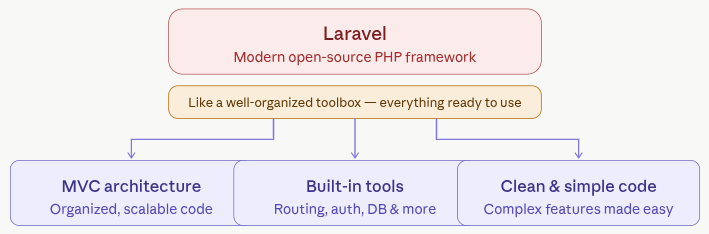
Laravel is a modern, open-source PHP framework used to build websites and web applications in a clean and structured way. Instead of writing everything from scratch, Laravel gives developers a ready-made foundation with built-in tools for common tasks like routing, authentication, database management, and more.
Think of Laravel like a well-organized toolbox. Instead of searching for individual tools every time you build something, everything you need is already arranged and easy to use. This helps developers save time, reduce errors, and focus on creating better applications.
One of the reasons Laravel is so popular is its simplicity. Even complex features can be implemented with relatively simple code. It follows the MVC (Model-View-Controller) pattern, which keeps your code organized and easier to manage as your project grows.
Laravel also comes with powerful features such as:
- Eloquent ORM for working with databases easily
- Blade templating engine for creating dynamic user interfaces
- Built-in security features to protect applications
- Queue system for handling background tasks efficiently
Whether you’re building a small website or a large-scale business application, Laravel provides the flexibility and performance needed to get the job done efficiently.
Understanding Laravel Performance Basics
Before optimizing your Laravel application, it’s important to understand what actually affects its speed and efficiency. Performance depends on multiple factors working together, from server setup to how your code and database are structured. Knowing these basics helps you make smarter optimization decisions.
Key factors include:
- Server speed: A faster server processes requests quicker, reducing overall response time.
- Database efficiency: Well-optimized queries and indexing ensure data is fetched without delays.
- Code quality: Clean and efficient code reduces unnecessary processing and improves execution speed.
- Caching: Storing frequently used data avoids repeated processing and speeds up responses.
Why it matters?
If your app takes more than 3 seconds to load, users will likely leave. That’s lost traffic, lost engagement, and lost revenue.
Why Laravel Performance Matters for Businesses
Laravel isn’t just used for simple websites, it powers many business-critical applications like dashboards, admin panels, and internal tools. These systems often support real-time decisions, so performance directly impacts how efficiently a business operates.
If your application is slow, it doesn’t just frustrate users, it can delay decisions, reduce productivity, and even affect revenue.
Even a well-built Laravel app can be improved further. Performance optimization ensures your application runs smoothly, scales easily, and delivers a better experience for everyone using it.
Key Benefits of Optimizing Laravel Performance
- Faster Business Growth: A quicker application keeps users engaged. When your platform performs smoothly, visitors are more likely to stay, interact, and convert, helping your business grow naturally.
- Better Development Efficiency: An optimized Laravel setup makes development easier. Developers spend less time fixing slow queries or debugging performance issues and more time building useful features.
- Improved Traffic Handling: As your app grows, traffic increases. With proper optimization (like queues and caching), your Laravel application can handle spikes without slowing down.
Methods to Optimize Laravel Performance
Optimizing Laravel performance involves improving different parts of your application, from server configuration to code execution. Each method plays a specific role in making your app faster, more efficient, and scalable. Let’s break down the most effective techniques.
1. Choose the Right Hosting Environment
Your hosting directly affects how fast your Laravel application responds to users. A reliable server with good resources ensures smooth handling of requests and consistent uptime.
Best practices:
- Use cloud providers like AWS, DigitalOcean, or Vultr
- Prefer SSD storage
- Ensure enough RAM and CPU
Pro Tip: Managed platforms like ServerAvatar can simplify server optimization without deep technical knowledge.
Why it works: Better infrastructure reduces delays in processing and improves overall speed.
2. Recommended Tech Stack for Laravel Performance
To get the best results, your Laravel application should run on a modern and well-balanced stack. Here’s a reliable setup you can follow:
- Laravel: Latest stable version
- PHP: PHP 8.2 or above
- Database: MariaDB or MySQL
- Server: Cloud-based VPS or managed hosting
Why it works: It takes care of configurations, updates, and performance tuning so you can focus more on building your application instead of managing infrastructure.
3. Enable Laravel Caching Mechanisms
Caching stores frequently used data so Laravel doesn’t have to process the same request repeatedly. This reduces the workload on your server and speeds up responses.
Types of caching in Laravel:
- Route Cache: Stores route definitions to speed up request routing.
- Config Cache: Combines all configuration files into one for faster loading.
- View Cache: Precompiles Blade templates to reduce rendering time.
Commands:
php artisan config:cache
php artisan route:cache
php artisan view:cacheWhy it works: Pre-stored data eliminates repeated computation, making your app faster.
4. Optimize Configuration and Routes
Laravel loads configuration files and routes on every request, which can slow things down if not optimized. Caching and organizing them properly reduces unnecessary processing.
Solution:
- Cache config files
- Combine routes into one file
Benefit:
Faster request handling and reduced server load.
Why it works: Fewer files to load means quicker request execution.
5. Use Efficient Database Queries
Database operations are often the slowest part of an application if not handled properly. Writing optimized queries ensures faster data retrieval and better performance.
Best practices:
- Use Eloquent eager loading
- Avoid N+1 query problems
- Index your database columns
Example:
User::with('posts')->get();Analogy:
Think of database queries like shopping, buy everything in one trip instead of going back again and again.
Why it works: Efficient queries reduce database load and return results faster.
6. Implement Queue Workers
Tasks like sending emails or processing files can slow down your app if handled instantly. Queues allow these tasks to run in the background without affecting user experience.
Use queues for:
- Sending emails: Processes emails in the background without delaying user requests.
- Processing uploads: Handles file operations asynchronously for smoother performance.
- Notifications: Sends alerts without blocking the main application flow.
Tools:
- Redis: A fast in-memory data store for efficient queue management.
- Database queues: Uses your database to manage queued jobs when Redis isn’t available.
Result:
Faster response times for users.
Why it works: Background processing keeps the main application fast and responsive.
7. Optimize Assets and Frontend
Large CSS, JavaScript, and images can increase page load time. Optimizing these assets ensures faster rendering on the user’s browser.
Tips:
- Minify CSS & JavaScript
- Use lazy loading for images
- Optimize images
Tools:
- Laravel Mix: Simplifies compiling and bundling frontend assets.
- Vite: Provides faster asset building and modern development workflow.
Why it works: Smaller files load quicker, improving overall page speed.
8. Use Latest PHP Version
New PHP versions come with performance improvements and better memory handling. Running Laravel on the latest version ensures maximum efficiency.
Why upgrade?
- Faster execution
- Better memory usage
- Improved security
Why it works: Updated engines execute code faster and more efficiently.
9. Reduce Unnecessary Packages
Every installed package adds extra code that needs to be loaded and executed. Removing unused ones keeps your application lightweight and faster.
What to do:
- Remove unused packages
- Audit dependencies regularly
Tip: Every package adds weight, keep your app lean.
Why it works: Less code means fewer processes, leading to better performance.
10. Enable OPcache
OPcache stores compiled PHP scripts in memory, so they don’t need to be recompiled on every request. This significantly improves execution speed.
Benefits:
- Faster execution
- Reduced CPU usage
How to enable:
Edit your php.ini file:
opcache.enable=1Why it works: Cached compiled code reduces processing time for each request.
11. Use CDN for Static Files
CDN distribute your files across servers worldwide. Users receive content from the nearest server, reducing load time.
Examples:
- Cloudflare
- AWS CloudFront
Why it works: Shorter distance between server and user speeds up content delivery.
12. Optimize Autoloading
Laravel uses Composer to load classes, and optimizing this process ensures faster file loading. This reduces delays when your app starts or handles requests.
Command:
composer install --optimize-autoloader --no-devWhy it works: Efficient class loading minimizes unnecessary file lookups.
13. Monitor Performance Regularly
Tracking your application’s performance helps you identify slow areas and fix them quickly. Regular monitoring ensures your app stays optimized over time.
Tools:
- Laravel Telescope: Monitors requests, queries, and application activity.
- New Relic: Provides deep performance insights and analytics.
- Blackfire: Profiles code to detect inefficiencies.
Track:
- Response time: Measures how quickly your app responds to users.
- Query performance: Identifies slow database operations.
- Errors: Helps detect issues affecting performance.
Why it works: Continuous insights allow you to detect and resolve issues early.
14. Use Laravel Octane for Speed
Laravel Octane keeps your application in memory instead of reloading it for every request. This improves speed and handles more users efficiently.
Supported servers:
- Swoole: High-performance server for handling concurrent requests.
- RoadRunner: Fast PHP application server with persistent workers.
Benefits:
- Handles more requests per second
- Reduces boot time
Why it works: Eliminating repeated bootstrapping reduces response time significant
15. Remove Unused Services
Laravel loads many service providers by default, even if they’re not needed. Disabling unused services reduces memory usage and improves performance.
Why it works: Fewer loaded services mean faster application startup and execution.
Benefits of Laravel Optimization
Optimizing Laravel isn’t just about speed, it improves the entire lifecycle of your application.
- Faster Load Times: By reducing unnecessary processing and optimizing resources, your app loads quicker, improving user satisfaction.
- Lower Server Costs: Efficient applications use fewer resources, meaning you can handle more traffic without upgrading your server frequently.
- Better Scalability: An optimized app can grow smoothly as your user base increases without breaking performance.
- Easier Maintenance: When your app is clean and optimized, it becomes easier to debug, update, and maintain over time.
Best Practices for Laravel Performance Optimization
Optimizing Laravel is not just about applying a few commands, it’s about building good habits. Following the right practices from the beginning can save you from major performance issues later.
- Keep Your Code Clean and Organized: Messy code slows everything down. Write simple, readable code and follow Laravel conventions. Clean code is easier to optimize and maintain.
- Use Caching Wherever Possible: If something doesn’t change frequently, cache it. This reduces repeated processing and improves response time significantly.
- Optimize Database Structure: Always use proper indexing and avoid unnecessary queries. A well-structured database is the backbone of a fast application.
- Avoid Overloading Controllers: Keep your controllers lightweight. Move heavy logic into services or jobs to improve performance and readability.
- Test Performance Before Deployment: Don’t wait for users to complain. Test your application under load conditions to identify bottlenecks early.

Common Laravel Performance Issues
Even experienced developers run into performance problems. The key is identifying them early and fixing them quickly.
1. N+1 Query Problem
Issue: Multiple unnecessary database queries
Fix: Use eager loading (with()) to fetch related data in one go
2. Too Many Packages Installed
Issue: Extra packages increase load time
Fix: Remove unused dependencies and keep your app lightweight
3. Missing Caching
Issue: Repeated processing slows down performance
Fix: Enable config, route, and query caching
4. Slow Database Queries
Issue: Poorly written queries increase response time
Fix: Add indexes, optimize queries, and avoid fetching unnecessary data
5. Not Using Queues
Issue: Heavy tasks block user requests
Fix: Move tasks like emails and file processing to queues
6. Outdated PHP Version
Issue: Slower execution and security risks
Fix: Always upgrade to the latest stable PHP version
How ServerAvatar Improves Laravel Performance
Managing a high-performing Laravel application is not just about writing optimized code, it also depends heavily on how your server is configured and maintained. This is where ServerAvatar comes into play.
ServerAvatar is a platform to simplify the hosting and management of servers and applications. It simplifies the process of deploying and managing PHP and Node.js based web applications on servers.
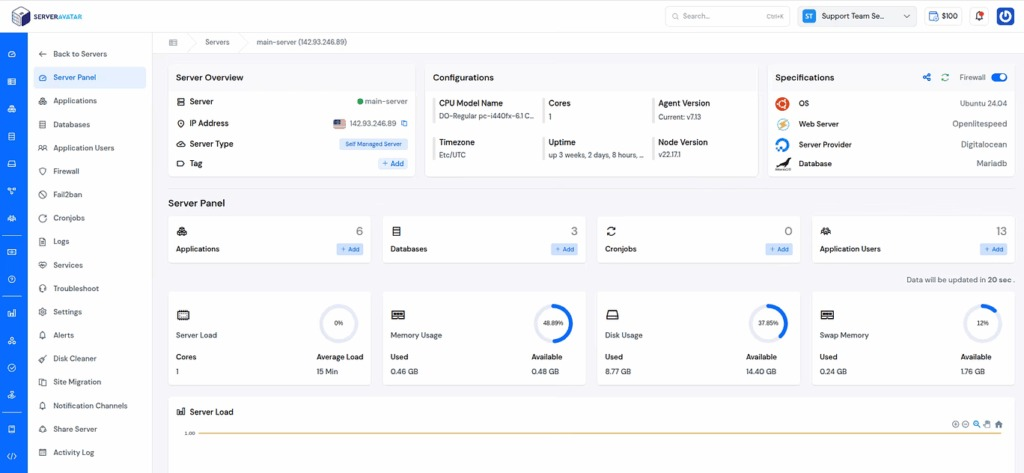
Instead of manually configuring web servers, databases, caching layers, and security settings, you get a streamlined environment that is already optimized for performance.
With ServerAvatar, developers and businesses can:
- Deploy Laravel applications quickly without complex setup
- Manage PHP versions, databases, and services from a single dashboard
- Enable performance features like caching, queue workers, and SSL with ease
- Monitor server health and application performance in real-time
- Scale resources as traffic grows without downtime
This reduces the chances of misconfiguration, which is one of the most common reasons for slow applications. It also saves time, allowing you to focus more on building features rather than managing infrastructure.
Why it works: A properly configured and continuously monitored server environment ensures that your Laravel application runs efficiently, handles traffic smoothly, and maintains consistent performance without manual intervention.
Conclusion
Optimizing a Laravel application is not a one-time task but an ongoing process that involves improving your server setup, refining your code, and making smart use of built-in features like caching and queues. By applying the techniques covered in this guide, you can significantly enhance your application’s speed, stability, and scalability. Whether you’re running a small project or a large business platform, consistent performance improvements lead to better user experiences, higher engagement, and more reliable growth. With the right approach and tools like ServerAvatar, managing and maintaining high performance becomes much simpler and more efficient.
FAQs
1. What is the easiest way to speed up a Laravel application?
Enabling caching (config, route, and view cache) is one of the quickest ways to improve performance, as it reduces repeated processing and speeds up response times.
2. How does caching improve Laravel performance?
Caching stores frequently accessed data or configurations so the application doesn’t need to process the same request repeatedly, which reduces server load and improves speed.
3. Which PHP version is best for Laravel performance?
Using the latest stable version of PHP (such as PHP 8.2 or above) is recommended because it offers better execution speed, memory handling, and security improvements.
4. How do queues help in Laravel optimization?
Queues move time-consuming tasks like sending emails or processing files to the background, allowing the main application to respond to users quickly without delays.
5. Can server configuration affect Laravel performance?
Yes, server configuration plays a major role. Properly configured servers with optimized resources, caching layers, and monitoring tools can significantly boost performance.
6. How does ServerAvatar help improve Laravel performance?
ServerAvatar simplifies server management by handling configurations, monitoring, and optimization tasks, helping your Laravel application run faster and more efficiently without complex manual setup.