


A cache is supposed to remove work. Yet an application can have Redis installed, a CDN enabled, and a page-cache plugin active while still rebuilding the same responses again and again. To reduce cache misses, you must ensure the application can consistently reuse cached data. The problem usually isn’t a missing cache, it’s a cache that the application can’t reuse effectively.
Learning how to reduce cache misses starts with finding out why a lookup failed. A short lifetime, an unstable key, an undersized memory limit, and an intentional bypass can all increase the miss counter, but they require very different fixes. Increasing memory won’t repair a key that changes on every request. A longer TTL won’t help when authenticated traffic bypasses the page cache by design.
This guide is for developers, WordPress administrators, and teams running PHP, Laravel, or Node.js applications on a VPS. You’ll learn how to read the right metrics, classify misses, improve cache reuse safely, and verify that the changes reduce real response time rather than merely producing a prettier hit-rate percentage.
TL;DR
- Measure hit rate, misses, evictions, latency, memory, and origin work together.
- Separate expected cold or bypassed requests from avoidable misses before tuning anything.
- Normalize cache keys so equivalent requests map to the same entry.
- Assign TTLs according to the cost and volatility of each data type, not one global number.
- Prevent cache stampedes with request coalescing, locks, early refresh, or stale-while-revalidate.
- Invalidate the smallest affected cache area after a write; avoid routine full-cache flushes.
- Confirm improvements with p95 response time, database load, and field Core Web Vitals.
Why a Cache Miss Is Only the Beginning
A cache hit occurs when the requested value is present, valid, and reusable. A miss means the application has to obtain or compute that value elsewhere. The fallback might be a database query, an API call, a rendered HTML page, or an expensive calculation.
The basic hit-rate formula is:
Cache hit rate = hits / (hits + misses) × 100If a cache records 72,000 hits and 18,000 misses, its hit rate is 80%. That number is useful, but it isn’t a verdict. A cache protecting a slow third-party API may deliver major savings at 80%, while an edge cache for versioned CSS files should normally reuse far more requests. Context matters.
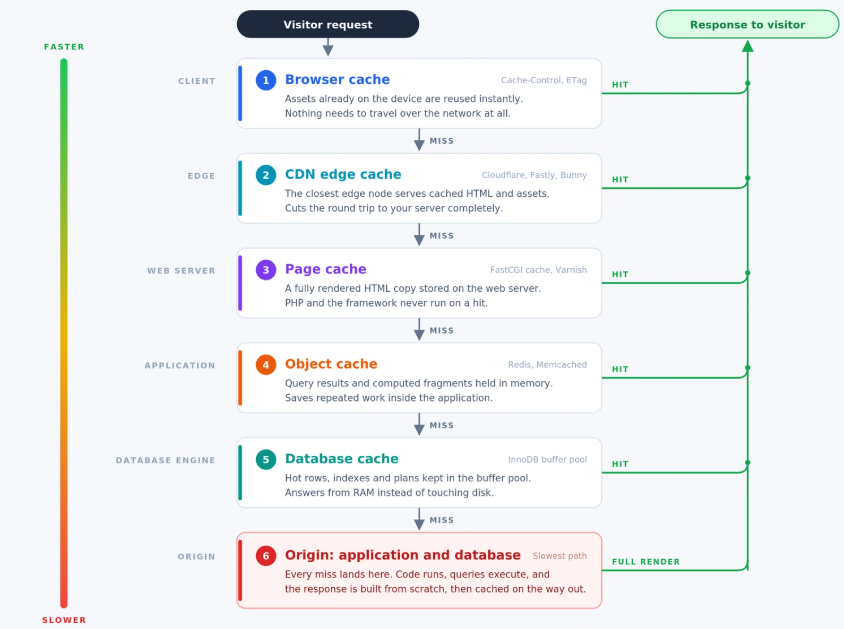
You also need to distinguish the layer being measured. Browser cache, CDN cache, NGINX page cache, PHP OPcache, Redis object cache, and an application-level memoization cache do different jobs. Combining their counters into one ratio hides the bottleneck.
The practical question is not “How do I make the hit rate 100%?” It is: Which expensive operations are repeated, and why can’t the existing cache answer them?
That framing prevents two common mistakes: caching data that should remain dynamic and optimizing cheap lookups while a slow database query remains untouched.
Classify the Cache Miss Before Changing Configuration
Most application cache misses fit one of five operational categories. Identify the category first; then choose the remedy.
| Miss pattern | What it looks like | Likely cause | Useful response |
| Cold miss | Spike after deploy, restart, or purge | Entry has never been created | Warm only critical keys or accept the brief cold period |
| Expired miss | Entries disappear on a predictable schedule | TTL ends before the next reuse | Revisit TTL by data type and add jitter |
| Capacity miss | Evictions rise as memory fills | Working set is larger than available cache | Remove low-value entries, tune policy, or add capacity |
| Key-fragmentation miss | Similar requests create many near-duplicate keys | IDs, parameters, locale, or ordering aren’t normalized | Redesign and version the key format |
| Intentional miss | Logged-in, checkout, preview, or personalized requests bypass cache | Safety rule or application requirement | Keep the bypass and optimize the underlying path |
A sixth pattern deserves special attention: invalidation churn. Here the cache is populated correctly but broad purge events remove useful entries too often. Publishing one article should not force every unrelated page, tenant, or product to become cold.
Start with one slow request path
Don’t begin with server-wide tuning. Pick one route that is both frequent and expensive, such as a product category page, an API endpoint, a dashboard widget, or a WordPress archive.
Record:
- p50 and p95 response time
- requests per minute
- cache status or application cache outcome
- database query count or duration
- upstream API time
- CPU and memory during the same interval
Then compare the same route for a cold request and a repeated request. If both take roughly the same time, either the response isn’t cacheable, the key changes, the write fails, or a bypass rule is active.
Measure Cache Behavior Without Disturbing Production
Redis provides cumulative counters that are safer for routine diagnosis than streaming every command in real time.
Start with:
redis-cli INFO stats | grep -E 'keyspace_hits|keyspace_misses|evicted_keys|expired_keys'redis-cli INFO memory | grep -E 'used_memory_human|maxmemory_human|maxmemory_policy|mem_fragmentation_ratio'If authentication is enabled, avoid placing the password directly in shell history. Use the connection method already configured for your application or an appropriately protected Redis CLI configuration.
Capture the hit and miss counters, wait through a representative traffic window, and capture them again. Calculate the rate from the difference between the two samples. Using lifetime totals can conceal a problem that began after the last deployment.
For HTTP caches, expose a cache-status response header in a non-sensitive environment or inspect the header your CDN already provides. For example, an NGINX FastCGI configuration can return its cache result during testing:
add_header X-Cache-Status $upstream_cache_status always;Typical values include HIT, MISS, BYPASS, EXPIRED, and UPDATING. Remove or restrict diagnostic headers if they reveal details you don’t want to expose publicly.
Avoid running redis-cli MONITOR casually on a busy production server. It streams every command and can create unnecessary overhead as well as expose sensitive values. Likewise, FLUSHALL is not a troubleshooting shortcut. On a multi-application server, it can empty unrelated databases and create a synchronized burst of expensive regeneration.
Read related metrics as a group
A rising hit rate is good only when the rest of the system improves. Watch these signals together:
- Evicted keys: rising evictions suggest memory pressure or a poor eviction policy.
- Expired keys: high expiration volume may be normal, but synchronized expiration can trigger load spikes.
- Redis latency: a remote or overloaded cache can cost more than a cheap computation.
- Origin response time: p95 and p99 reveal tail latency hidden by averages.
- Database load: query time and connection pressure should fall for paths protected by object caching.
- Error rate: timeouts and connection errors can make a healthy cache appear ineffective.
Make Equivalent Requests Share the Same Cache Key
Key design is often the highest-leverage fix because a fragmented keyspace wastes both memory and compute. Two requests that should return the same data must resolve to the same canonical key.
Suppose an endpoint accepts these URLs:
/api/products?category=shoes&page=1/api/products?page=1&category=shoes/api/products?category=shoes&page=01&utm_source=emailIf parameter order, number formatting, or tracking parameters are included naively, the application may store three entries for one response. Normalize the request before hashing it:
- Keep only parameters that change the response.
- Sort parameter names.
- Normalize case, Unicode, booleans, and numeric formats.
- Include tenant, locale, currency, role, or permission scope only when each changes the result.
- Add a schema or deployment version so incompatible entries can be retired safely.
A practical key might look like:
catalog:v3:tenant_42:locale_en-IN:category_shoes:page_1
Never include secrets, full authorization tokens, or raw personal data in cache keys. Even when values aren’t returned to users, keys can appear in logs, dashboards, and debugging output.
Don’t over-personalize the key
Including a user ID in every key eliminates reuse between users. Sometimes that isolation is required, for example, account balances or private dashboards. Public product data, country-level tax tables, and shared feature configuration may instead be cached by the smallest safe audience segment.
The rule is simple: vary the key on everything that changes the response, but nothing else. Underspecifying a key can leak or serve incorrect data. Overspecifying it creates avoidable misses.
A Practical Framework for Choosing TTLs
A time to live (TTL) is a freshness decision, not simply a performance setting. Set it too short and useful entries expire before reuse. Set it too long without a reliable invalidation path, and users may see stale data.
Use three questions for each cache family:
- How expensive is regeneration?
A 400 ms database aggregate deserves more protection than a 1 ms lookup. - How often does the source change?
Configuration may remain stable for hours; inventory can change within seconds. - What is the cost of staleness?
A stale blog archive is inconvenient. Stale authorization data can be dangerous.
This produces a policy rather than one global TTL:
| Data type | Starting approach | Invalidation trigger |
| Versioned static asset | Long browser/CDN lifetime | New filename or content hash |
| Public article or documentation page | Moderate page-cache lifetime | Publish or update event |
| Expensive shared query | Moderate object-cache lifetime | Model or record change |
| Product availability | Short lifetime or event-driven update | Inventory write |
| Permission or security decision | Very short lifetime or no cache | Role, session, or policy change |
| Empty or missing result | Brief negative-cache lifetime | Creation event or short expiry |
Treat these as policy categories, not universal durations. Your correct numbers depend on traffic, update frequency, and acceptable staleness.
Add jitter to avoid synchronized expiry
If thousands of keys receive the same 15-minute TTL during a deployment, they may expire together 15 minutes later.
Add a small random offset so regeneration is spread over time:
$baseTtl = 900;              // 15 minutes
$jitter  = random_int(0, 120);
$cache->put($key, $value, $baseTtl + $jitter);Jitter doesn’t reduce the total amount of future work. It prevents that work from landing on the database in one sharp burst.
Cache “not found” briefly
Repeated requests for a missing record can bypass a cache if the application treats null as “no cached value.” Use a distinct sentinel and a short TTL for negative results. That helps absorb bot traffic, typo-heavy searches, and repeated checks for unavailable resources without preserving absence for too long.
Stop One Miss from Becoming a Traffic Spike
When a popular entry expires, many workers can miss it at the same moment. Each worker then performs the same expensive query or API request. This is a cache stampede, and it can overload the origin even when the cache is healthy most of the day.
Four patterns are useful:
Request coalescing
Allow one worker to regenerate the value while the others wait briefly for that result. A distributed lock must have a short expiry and a unique owner token so a crashed worker can’t hold it forever or release another worker’s lock.
value = cache.get(key)
if value exists:
return value
if lock.acquire("lock:" + key, ttl=10 seconds):
try:
value = cache.get(key)
# check again after acquiring lock
if value is missing:
value = origin.load()
cache.set(key, value, ttl_with_jitter)
return value
finally:
lock.release_if_owner()
wait briefly, then retry cacheThe second lookup inside the lock matters. Another worker may have populated the value while this worker was waiting.
Stale-while-revalidate
Serve a slightly stale response for a bounded period while one background task refreshes it. This works well for public content and shared API responses where brief staleness is acceptable. It is usually unsuitable for authorization checks or data that must be current.
Early refresh
Refresh a hot entry shortly before it expires. Trigger refresh based on remaining lifetime, request frequency, or a scheduled job. Use this selectively; warming every possible key merely shifts load and stores data nobody requests.
Graceful fallback
Decide what happens if Redis or the CDN is unavailable. The application might query the origin, return a last-known value, shed nonessential work, or apply a short circuit breaker. A cache should improve resilience, not become a mandatory single point of failure unless the architecture explicitly accepts that tradeoff.
Invalidate Precisely Instead of Purging Everything
Cache invalidation is where performance and correctness meet. The safest design links a source-data change to the smallest predictable group of affected keys.
For example, changing one product may require invalidating:
- that product’s detail entry
- category pages containing the product
- a price or inventory fragment
- selected API representations
It probably doesn’t require clearing user sessions, unrelated article pages, or every object stored by another application.
Useful techniques include namespace versioning, cache tags, dependency maps, and event-driven invalidation. Namespace versioning is especially simple: increment catalog:v3 to catalog:v4 after a format change and let older keys expire naturally. This avoids a blocking scan-and-delete operation during deployment.
After a write, decide whether to use delete-on-write or update-on-write. Deleting is simpler and lets the next reader rebuild from the source of truth. Updating can avoid the next miss but introduces more paths where cached and canonical data can diverge.
Whatever you choose, make invalidation observable. Log the event type, namespace or tags affected, number of entries removed, and duration. If the miss rate jumps every time an editor publishes a post, the purge scope is probably too broad.
Match the Technique to the Application Layer
Cache tuning is most effective when each layer has a clear responsibility.
WordPress: separate page caching from object caching
A page cache stores rendered HTML for reusable public requests. An object cache stores reusable results such as options, query results, and computed objects. One doesn’t replace the other.
Logged-in sessions, carts, checkout pages, previews, and personalized fragments commonly bypass full-page caching to preserve correctness. Treat those bypasses as expected. Optimize their database work with a persistent object cache, better queries, and PHP OPcache rather than trying to force every response into the page cache.
WordPress’s official caching overview distinguishes browser, object, and server caching and notes that cached data should be replaceable and regenerable.
ServerAvatar users can follow the existing Redis Object Cache setup guide; Redis is already installed and configured on newly connected ServerAvatar servers, while the WordPress plugin and application credentials still need to be connected correctly.
Use a different Redis database or a reliable key prefix for each site where supported. Avoid a server-wide flush. After plugin, theme, or schema changes, purge only the cache the change invalidates and verify both a logged-out and logged-in request.
Laravel: cache the expensive boundary, not the whole controller
Laravel’s cache-aside pattern is useful for shared queries:
use Illuminate\Support\Facades\Cache;
$key = "product-summary:v2:{$storeId}:{$categoryId}";
$summary = Cache::remember(
$key,
now()->addMinutes(10),
fn () => $service->buildCategorySummary($storeId, $categoryId);The hard part isn’t Cache::remember; it’s invalidation. When a product affecting the summary changes, remove or version the relevant key. For high-concurrency regeneration, use Laravel’s atomic locks with an expiry and handle lock timeouts rather than allowing every PHP-FPM worker to rebuild the same result.
Don’t cache an entire authenticated controller response unless the key includes every permission and personalization dimension. Caching the expensive shared service result is usually easier to reason about.
Node.js: don’t let per-process memory fragment the cache
An in-memory Map can be effective inside one process, but multiple Node.js workers each build a separate cache. After a restart or scale-out, every worker begins cold. Use a shared cache such as Redis for entries that must be reused across processes, while keeping tiny process-local caches only where duplication is acceptable.
Normalize keys before serialization, avoid unbounded Maps, and make concurrent promise coalescing part of the loader. Also measure event-loop delay. A higher hit rate won’t rescue an application that blocks the event loop while serializing very large values.
Fix Cache Waste Before Adding Memory
Adding RAM can reduce capacity misses, but it should follow key and value cleanup. First check:
- Are duplicate key variants storing the same response?
- Are values much larger than the data actually read?
- Are one-off results cached despite never being reused?
- Are abandoned namespaces lingering after deployments?
- Is the cache sharing memory with queues, sessions, or another workload?
Then choose an eviction policy that matches the role of the Redis instance. A cache-only instance can evict data under pressure; an instance containing sessions, queues, or durable-looking state requires much more careful separation and policy selection. Don’t assume every Redis key is disposable simply because Redis is being used “as a cache.”
Large values also have hidden costs: serialization time, network transfer, allocator overhead, and longer blocking operations. Caching a smaller projection often improves latency and effective capacity more than adding memory.
Use a Safe Test Plan for Every Cache Change
A cache adjustment should be treated like an application change because it can affect correctness, privacy, and load.
- Record a baseline. Capture route-level latency, hit and miss deltas, evictions, database time, CPU, memory, and errors.
- Change one cache family. Adjust one key pattern, TTL policy, invalidation event, or memory setting at a time.
- Test correctness. Check anonymous, authenticated, privileged, localized, and personalized requests where applicable.
- Test cold behavior. Restart or invalidate the chosen test namespace and observe regeneration under controlled load.
- Test failure behavior. Confirm the application has an acceptable response when the cache is slow or unavailable.
- Compare the same traffic window. Look for improvement in p95 response time and origin load, not only hit rate.
- Keep a rollback. Preserve the previous configuration and document the namespace or setting changed.
For public web pages, also measure field data after deployment. Google says its systems aim to reward helpful, reliable, people-first content and an overall good page experience, not a single isolated metric. Its current Core Web Vitals guidance defines “good” as LCP within 2.5 seconds, INP below 200 ms, and CLS below 0.1 at the 75th percentile. See Google’s Core Web Vitals guidance.
Caching can improve server response time and reduce work feeding into LCP and INP, but it doesn’t automatically fix render-blocking CSS, large images, JavaScript execution, or layout shifts. Validate those separately with PageSpeed Insights and Search Console field data.

A Practical Cache-Miss Troubleshooting Checklist
Work through this sequence when the miss rate rises unexpectedly:
- Confirm which cache layer produced the metric.
- Limit analysis to a route, key family, tenant, or application.
- Compare counter deltas over a representative period.
- Separate MISS, BYPASS, EXPIRED, and cache errors.
- Check whether a deploy, restart, purge, or content update preceded the change.
- Inspect key cardinality and normalization.
- Compare TTL with actual reuse intervals.
- Check evictions, maximum memory, and eviction policy.
- Look for synchronized expiry and concurrent regeneration.
- Review invalidation scope after writes.
- Verify that cache reads and writes use the same key, prefix, database, and serialization format.
- Test anonymous and personalized paths independently.
- Confirm lower p95 latency, database time, and CPU after the fix.
If the hit rate remains low but origin cost and response time are already small, caching that path may not be worthwhile. Removing a low-value cache can simplify the system and eliminate invalidation risk.
Key Takeaways
- A cache miss counter tells you what happened, not why it happened.
- Stable, correctly scoped keys usually matter more than a blanket TTL increase.
- TTLs should reflect regeneration cost, update frequency, and the risk of stale data.
- Locks, coalescing, early refresh, and stale-while-revalidate prevent popular keys from overwhelming the origin.
- Precise invalidation preserves useful entries and avoids post-publish traffic spikes.
- Hit rate must be evaluated beside tail latency, database work, evictions, errors, and user-facing performance.
Conclusion
The best cache isn’t the one with the biggest number on a dashboard. It’s the one that removes meaningful work while keeping responses correct.
Begin with a single expensive route. Measure it, classify its misses, then fix the narrowest cause, key design, TTL, invalidation, memory pressure, or regeneration concurrency. Once the result is visible in p95 latency and origin load, apply the same method to the next route.
If you manage WordPress, Laravel, PHP, or Node.js applications across VPS instances, ServerAvatar can simplify deployment and ongoing server management. Its application dashboards, file access, Redis-ready server stack, and Log Monitoring Suite give you a practical place to operate and observe the systems around your cache without turning this article into a product pitch.
FAQs
What is a good cache hit rate for an application?
There is no universal target. A good rate depends on the cache layer, request mix, data volatility, and cost of a miss. Evaluate hit rate beside p95 latency, origin load, evictions, and correctness. A lower rate on highly dynamic traffic may be healthy, while frequent misses for versioned static assets indicate a configuration problem.
How do I reduce Redis cache misses?
Measure keyspace_hits, keyspace_misses, expirations, evictions, latency, and memory over the same traffic window. Then normalize keys, remove low-value entries, tune TTLs by data type, narrow invalidation, and prevent concurrent regeneration. Add memory only when the useful working set genuinely exceeds available capacity.
Can increasing the cache TTL cause stale data?
Yes. A longer TTL improves the chance of reuse but extends the period in which old data may be served. Pair longer TTLs with precise invalidation for data that changes, and keep security-sensitive or rapidly changing values on short lifetimes or out of the cache.
Why does my cache hit rate drop after a deployment?
A restart may clear process-local caches, while a new namespace or full purge makes shared caches cold. Key-format changes can also make old entries unreachable. Version keys deliberately, warm only critical paths, add TTL jitter, and monitor regeneration load during deployment.
Do cache misses directly hurt Google rankings?
Google doesn’t publish cache hit rate as a ranking factor. Cache misses matter indirectly when they make real pages slower or less reliable. Google recommends a good overall page experience and currently uses LCP, INP, and CLS to describe loading, responsiveness, and visual stability. Optimize caching for users and application health, then confirm the effect with field performance data.
Explore Related Guides
- How To Use Redis Full-Page Caching To Speed Up WordPress
- Install Redis Object Cache Plugin into WordPress
- How to speed up a WordPress website: 12 performance optimization methods
About the Author
Meghna Meghwani is a technical writer focused on Linux, Ubuntu, VPS hosting, server management, WordPress, PHP, Node.js, cloud hosting, and DevOps. She creates beginner-friendly tutorials, practical hosting guides, troubleshooting articles, and server security content designed to help developers and businesses manage applications and servers more efficiently.