

When you’re building a WordPress website, choosing the right page builder can feel a bit like deciding between iPhone and Android, both are powerful, both are popular, and both have strong communities behind them. And that’s exactly why the Divi vs Elementor debate is so common among WordPress users.
Divi and Elementor are two of the most widely used WordPress page builders today. They both offer drag-and-drop editing, beautiful templates, and complete design freedom. But they also come with key differences that can shape your workflow, site speed, creativity, and budget.
Let’s break everything down in a simple, easy-to-understand way so you can confidently choose the right tool for your website.
What Are WordPress Page Builders?
WordPress page builders let you create websites visually using drag-and-drop tools, no coding needed. Instead of dealing with HTML or CSS, you simply grab elements like text, images, buttons, or forms and arrange them on the page.
Think of it like playing with digital Lego blocks: you snap things together to build your ideal website.
Both Divi and Elementor fall into this category, offering powerful visual editors used by millions.
What Makes Divi and Elementor So Popular?
Before we compare them, it’s important to understand why these two dominate the market.
- They make website building easy, even for beginners
- No coding required
- Full visual editing
- Huge template libraries
- Compatible with most WordPress themes
- Perfect for designers, freelancers, and agencies
In short, they help you build professional websites faster and easier.
Overview of Divi
Divi, built by Elegant Themes, is both a theme and a page builder. That’s one of its biggest attractions, everything works together seamlessly. Divi is known for its sleek interface and powerful customization controls, making it popular among designers.

Key Features
- Drag-and-drop builder
- Thousands of templates
- Global styles system
- Built-in A/B testing
- Lifetime pricing option
- Highly customizable theme builder
Pros
- Lifetime access available
- Beautiful built-in templates
- Strong theme builder
- Excellent design flexibility
- Built-in split testing (rare in builders)
Cons
- No free version
- Can be slow on some sites
- Learning curve can be high
Overview of Elementor
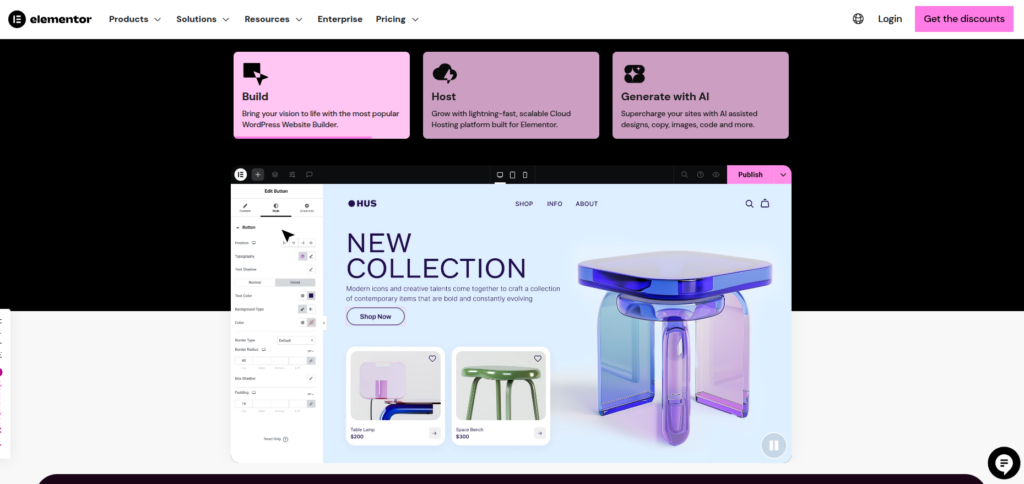
Elementor is one of the most widely used page builders in the world, with millions of active installations. Elementor is lightweight, easy to use, and offers a free version, something Divi doesn’t.
Key Features
- Fast drag-and-drop editor
- Massive library of widgets
- Theme builder
- WooCommerce builder
- Popup builder
- Extensive third-party add-on ecosystem
Pros
- Free version available
- Huge widget library
- Popup builder included
- Great performance
- Highly intuitive editor
Cons
- No lifetime plan
- Can require premium add-ons
- Costs rise for multi-site usage
Divi vs Elementor: Feature Comparison
To make things easy, here’s a quick comparison of the major features:
| Feature | Divi | Elementor |
| Visual Builder | Yes | Yes |
| Theme Builder | Yes | Yes |
| Popup Builder | No | Yes |
| Free Version | No | Yes |
| Inline Editing | Yes | Yes |
| Template Library | Large | Very Large |
| Third-Party Add-ons | Moderate | Huge |
Both are strong, but Elementor has an edge in flexibility due to third-party add-ons and a powerful popup builder.
Divi vs Elementor: Ease of Use
Divi
Divi’s interface is stylish but can feel overwhelming to beginners. It hides most settings inside collapsible menus that may take time to get used to.
Divi takes a slightly different approach. Instead of a fixed sidebar panel, your editing happens visually in real time, right on the page. Some users love this immersive editing mode, while others feel it takes time to get used to.
Elementor
Elementor’s sidebar editor is extremely intuitive. Everything you need sits neatly on the left side, making it easier for new users to understand.
Everything feels clean, smooth, and beginner-friendly. Elements appear on the left panel, and you drag them onto your page. Even someone who has never built a website can understand it in minutes.
Final Verdict:
Elementor has a smoother learning curve.
Design Flexibility & Templates
Both builders come loaded with beautiful templates and allow deep customization.
Divi
Divi shines in design customization. It offers massive control over styling, animations, spacing, shadows, and effects.
- Over 2,000 pre-made layouts
- 200+ layout packs
- Strong focus on modern, elegant designs
Divi is a favorite among agencies for its polished visuals.
Elementor
Elementor offers great design flexibility, especially with the Pro version. It allows custom positioning, global colors, and responsive design adjustments.
- 100+ full website kits
- Hundreds of page templates
- Better compatibility with third-party template libraries
Final Verdict:
Divi offers stronger native designs, and Elementor has more expandability.
Theme Builder Capabilities
Theme builders allow you to design headers, footers, blog layouts, and WooCommerce pages. Both Divi and Elementor offer powerful theme-building tools, but they work in slightly different ways.
Divi
Divi’s Theme Builder is deeply integrated within its visual editor, giving you full control over your site’s design without needing any third-party tools.
You can visually design:
- Global headers and footers
- Custom blog post templates
- Category and archive pages
- WooCommerce product and shop layouts
- Custom 404 pages
- Search results pages
- Author pages
Elementor
Elementor’s Theme Builder is known for being extremely organized and user-friendly. It provides a dashboard where you can manage all your templates from one place.
You can design templates for:
- Single posts
- Pages
- Headers & footers
- Product pages (WooCommerce)
- Shop and archive layouts
- Category pages
- Search pages
- 404 pages
Final Verdict:
Both Divi and Elementor offer powerful theme-building capabilities, but Elementor provides a cleaner, more organized interface with stronger dynamic content support.
Divi vs Elementor: Speed & Performance
Website speed plays a major role in user experience, SEO rankings, and overall site performance. Both builders add extra code, but performance varies.
Divi Performance
Divi has made noticeable improvements in performance over the past couple of years. Earlier versions were heavier, but Elegant Themes introduced several optimizations to improve loading speed and reduce file size. Some of these upgrades include:
- Dynamic CSS that loads only what’s needed
- Smart Styles that reduce duplicate code
- Lazy loading for resources
- Faster rendering for modules and layout packs
Elementor Performance
Elementor also focused heavily on performance optimization in recent updates. It still loads faster out of the box in most setups, mainly because of its structured code and optimized asset loading system. Elementor’s improvements include:
- Reduced DOM output for cleaner, faster pages
- Improved JavaScript and CSS loading
- Selective widget loading so unused elements don’t slow down the site
- Better compatibility with performance plugins
Final Verdict:
Both builders have made strong progress in performance, but Elementor generally produces faster, lighter pages with less effort, especially for beginners

Divi vs Elementor: Pricing Comparison
Price plays a major role when choosing a page builder, especially if you manage multiple client websites. Both Divi and Elementor offer competitive pricing, but their models work very differently.
Divi Pricing
- Yearly Access: ~$89/year
- Lifetime Access: ~$249 one-time
This makes Divi a great long-term investment.
Elementor Pricing
- Essential: ~$60/year
- Advanced solo: ~$79/year
- Advanced: ~$90/year
- Expert: ~$164/year
Elementor is cheaper for single sites but expensive for agencies unless using add-ons.
Final Verdict:
Divi’s lifetime plan offers unbeatable value.
Plugin Compatibility & Integrations
Both builders support major WordPress plugins, but Elementor has a far larger ecosystem of third-party extensions. These add-ons extend functionality with new widgets, templates, marketing tools, animations, and dynamic features.
Divi
Divi works smoothly with most popular plugins like WooCommerce, Yoast, RankMath, WPForms, and more. While its add-on ecosystem is smaller than Elementor’s, several high-quality extensions exist.
Elementor
Elementor has the largest third-party ecosystem of any page builder. Countless developers build extensions specifically for Elementor, making it unstoppable when it comes to flexibility.
Final Verdict:
Elementor’s add-on ecosystem is unmatched.
Support & Community
Divi
- 24/7 chat support
- Massive Facebook groups
- Helpful knowledge base
- Users often praise Divi’s live chat support.
Elementor
- Ticket support
- Large global community
- Many tutorials available
- Support is good, but response times vary depending on your plan.
Final Verdict:
Both have excellent support systems.
Add-Ons & Ecosystem
Divi
Divi also has add-ons, but the ecosystem is smaller compared to Elementor’s.
Popular Divi Add-ons & Extensions:
- Divi Supreme Pro
- Divi Essential
- Divi Toolbox
- Divi Pixel
- Divi Carousel Maker
- DiviMega Pro (Mega Menu Builder)
Elementor
Elementor has a huge third-party add-on ecosystem. From extra widgets to marketing tools, its marketplace is rich and constantly growing.
Popular Elementor Add-on Packs:
- Essential Addons for Elementor
- PowerPack for Elementor
- Crocoblock JetPlugins (JetEngine, JetSmartFilters, etc.)
- Qi Addons for Elementor
- Unlimited Elements for Elementor
Which Page Builder Should You Choose?
Here’s a simple way to decide:
Choose Elementor if:
- You want a free version
- You prefer a clean, beginner-friendly interface
- You need a huge collection of third-party addons
- You want an intuitive theme builder
Choose Divi if:
- You want unlimited website usage
- You prefer a one-time purchase instead of yearly fees
- You want a massive template library
- You love deep design customization
Which One Is Best for Beginners?
If you’re new to website building and want something easy, Elementor is the better choice. Its interface is straightforward and beginner-friendly.
But if you want long-term savings plus beautiful designs, Divi is excellent, especially for agencies or freelancers.
Final Verdict: Divi vs Elementor
So, Divi vs Elementor, who wins?
Honestly, it depends on what you value most.
- Choose Elementor if you want speed, ease of use, and a powerful free version.
- Choose Divi if you want stunning designs, lifetime pricing, and deep customization.
Both builders are powerful, both can create beautiful websites, and both are trusted by millions. No matter which one you choose, you’ll have a reliable, flexible tool to bring your WordPress website to life.
FAQs
1. Which builder offers better performance?
Elementor usually performs better out of the box and loads pages faster. Divi has improved significantly but may still feel heavier on some websites.
2. Which one is more affordable in the long run?
Divi is more cost-effective over time because it offers a one-time lifetime purchase. Elementor requires annual renewals, especially if you build multiple sites.
3. Can I switch from Divi to Elementor (or vice versa) later?
You can, but switching page builders often leaves behind shortcode or layout issues. It’s best to choose your builder early and stick with it for the site’s lifetime.
4. Is Elementor better for WooCommerce?
Elementor has a dedicated WooCommerce builder with many advanced widgets, making it slightly better for ecommerce sites.
5. Which should I choose if I want maximum design control?
Divi provides deeper styling and design customization options, making it great for designers who want full creative freedom.
Stop Wasting Time on Servers. Start Building Instead.
You didn’t start your project to babysit servers. Let ServerAvatar handle deployment, monitoring, and backups — so you can focus on growth.
Deploy WordPress, Laravel, N8N, and more in minutes. No DevOps required. No command line. No stress.
Trusted by 10,000+ developers and growing.