

Have you ever opened your WordPress site and wondered why it takes forever to load? It feels like waiting for a slow elevator, you press the button and just stand there, hoping something moves. The truth is, slow websites push visitors away, harm SEO, and hurt conversions, which is why solutions like Redis Full-Page Caching are becoming essential for speeding up WordPress performance.
One of the smartest ways to fix this is by using Redis full-page caching. It’s like storing a ready-made copy of your webpage so your server doesn’t have to rebuild it from scratch every time someone visits.
In this guide, I’ll walk you through how Redis full-page caching works, how to set it up, and how to make the most out of it, using simple, human-friendly language.
What Is Redis?
Redis (Remote Dictionary Server) is an ultra-fast in-memory data store commonly used for caching data. Think of it like a super quick notebook your server keeps on the side. Instead of rewriting pages repeatedly, it stores the final output temporarily so it can serve it instantly.
What Is Full-Page Caching in WordPress?
Full-page caching means saving a pre-rendered copy of your entire webpage. So when a visitor comes in, WordPress doesn’t rebuild the page, it simply sends the saved version.
Why Use Redis for WordPress Caching?
Redis offers several benefits:
- Super-fast response time: Pages load instantly because Redis serves cached content directly from memory instead of rebuilding it.
- Reduced database queries: Redis minimizes repeated database requests by storing frequently used data in memory.
- Lower CPU usage: The server does less processing since cached pages don’t need to be generated every time.
- Great for high-traffic sites: Redis handles multiple visitors smoothly without slowing down your website.
- Improves Core Web Vitals: Faster load times help improve key performance metrics like LCP and overall user experience.
If you’re running WooCommerce, membership websites, or news portals, Redis (especially object caching) is a blessing.
How Redis Full-Page Caching Works
Here’s what happens behind the scenes:
- A user visits your page.
- If Redis has the cached page, it serves it instantly.
- If not, WordPress builds the page, and Redis stores a copy.
- The next visitor gets the faster, cached version.
It’s like having a “recently visited pages” memory.
Why Use Redis with ServerAvatar
ServerAvatar is a server and application hosting and management platform that allows you to host and manage Ubuntu servers and PHP-based and Node.js-based applications without deep technical knowledge.
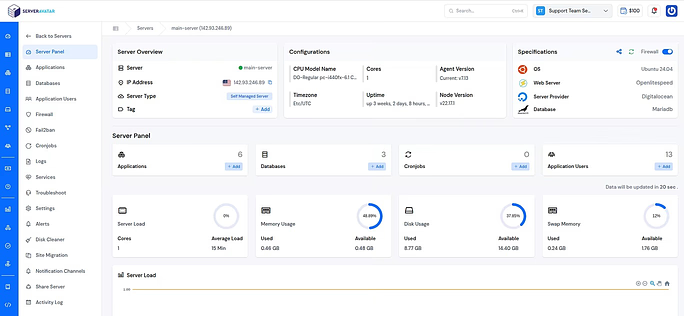
When it comes to Redis:
- Redis is automatically installed and set up at the server level while deploying the server with ServerAvatar.
- No risky manual server commands and complex setup.
- You can easily find out and update the Redis Password from the ServerAvatar dashboard
- Optimized stack for website performance
Instead of struggling with complex configurations, ServerAvatar helps you set up Redis in a safe, production-ready environment. This is where ServerAvatar shines.
How ServerAvatar Simplifies Redis Setup
When deploying a server with ServerAvatar, Redis is automatically installed and configured.
Benefits of using Redis with ServerAvatar
- Redis-ready server: ServerAvatar servers are pre-optimized to run Redis smoothly without manual configuration.
- Optimized database & PHP settings: Database and PHP configurations are fine-tuned to work efficiently with Redis caching.
- Easy cache management: Redis cache can be managed easily through supported plugins without complex server commands.
- No manual server tuning: ServerAvatar handles server-level tuning so users don’t need deep technical knowledge.
- Ideal for WordPress and other websites: The server environment is optimized for high-traffic websites.
Instead of struggling with complex commands, ServerAvatar lets you focus on growing your website.
Deploy WordPress with ServerAvatar
You can easily install WordPress with ServerAvatar’s one-click application installer. You can follow this step-by-step guide to install WordPress quickly using ServerAvatar: https://serveravatar.com/install-wordpress-quickly-on-vps/
Set up Full-Page Caching in WordPress (Using W3 Total Cache)
Redis is commonly used for object caching in WordPress, but it can also be configured for full-page caching using the W3 Total Cache plugin. Full-page caching means storing the entire generated HTML page in a cache so that WordPress does not need to:
- Run PHP
- Execute database queries
- Load WordPress core files
When Redis is used for page caching:
- The HTML output of a page is stored in Redis memory
- Future requests are served directly from Redis
- Page load time is significantly reduced
Note: Redis page caching is not always the best option, but it is useful when server-level caching (Nginx FastCGI, LiteSpeed, Varnish) is not available.
If you prefer not to use W3 Total Cache, you can explore other reliable WordPress caching plugins here:
https://serveravatar.com/best-wordpress-caching-plugins/
Step 1: Install W3 Total Cache Plugin
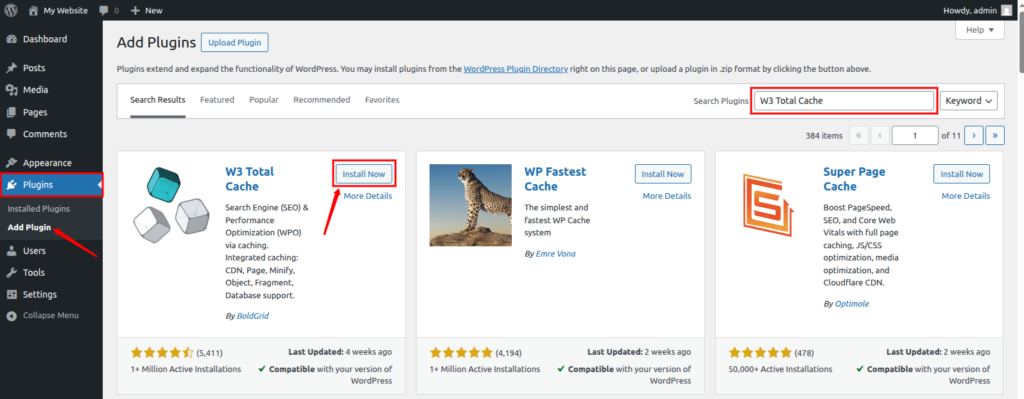
- Log in to your WordPress dashboard
- Go to the Plugins section, and click on Add New
- Search for W3 Total Cache
- Click Install Now, then Activate the plugin
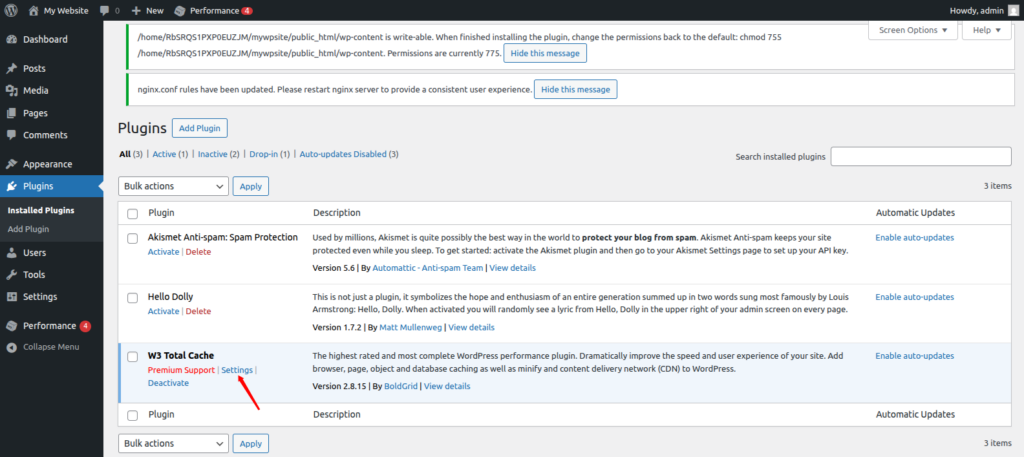
Once activated, navigate to the plugin settings by clicking on the settings from the dashboard.
Step 2: Enable Page Cache with Redis
- Go to Performance → General Settings
- Locate the Page Cache section
- Enable Page Cache
- Set Page Cache Method to Redis
- Click Save All Settings
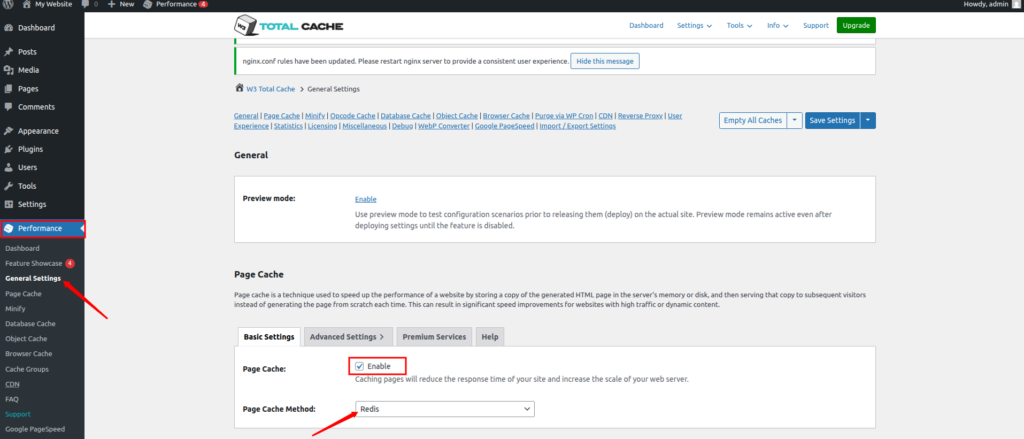
This tells WordPress to store full HTML pages in Redis instead of disk or memory.
Step 3: Configure Redis Connection Details
| Setting | Value |
| Redis hostname:port | 127.0.0.1:6379 |
| Redis Database ID | 0 |
| Password | Redis Password (Leave empty if none) |
Tip:
If you also use Redis for object caching, use:
- DB 0 for page cache
- DB 1 for object cacClick Save All Settings.
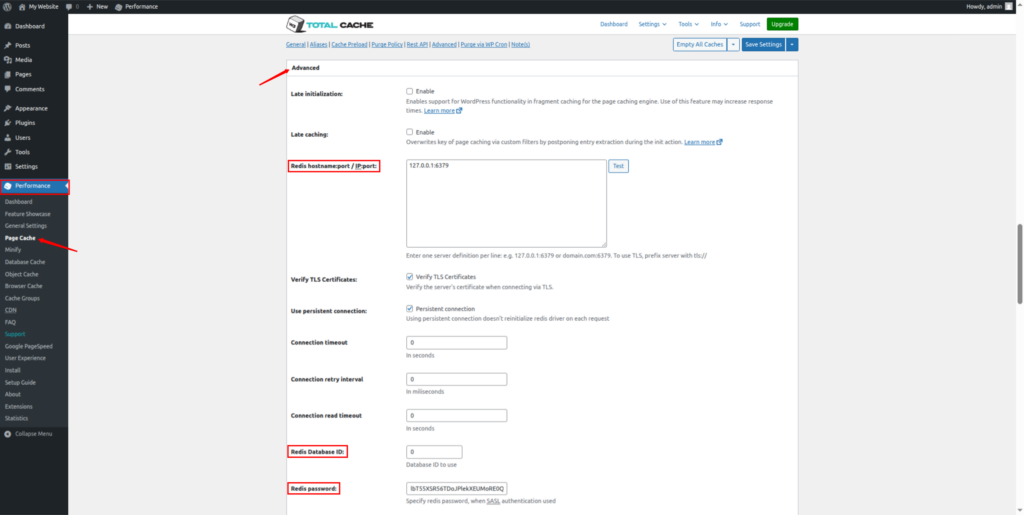
Get your Redis password using ServerAvatar:
If you are using ServerAvatar, you can easily get your Redis password from the ServerAvatar dashboard without any hassles.
- Navigate to the server panel by clicking on the Server Dashboard icon.

- Navigate to the Settings section, and then the Security section from the left-hand sidebar.
- Find the Redis Settings section. You can copy the Redis password from there and paste it.
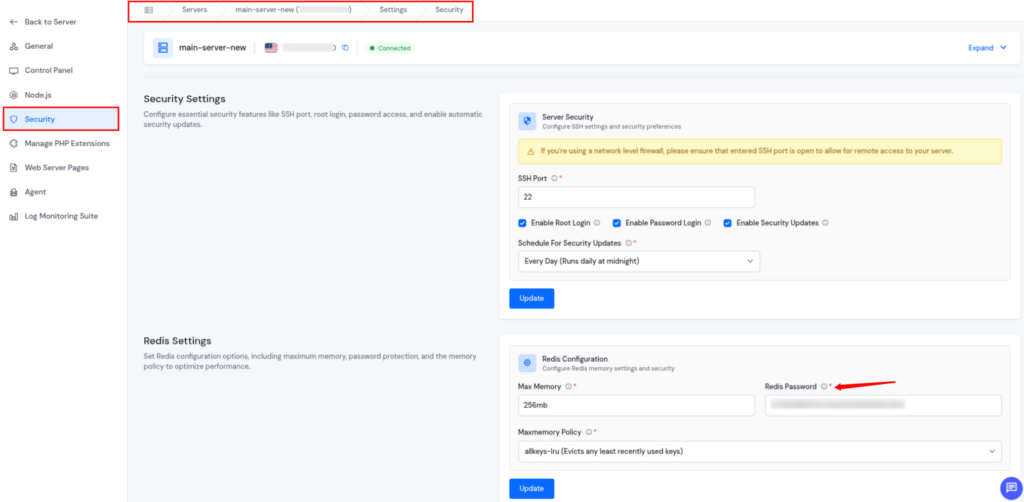
Step 4: Enable Object Cache (Recommended)
Redis page caching works best when combined with object caching.
- Go to Performance → General Settings
- Find the Object Cache section and enable the Object Cache
- Set Object Cache Method as Redis
- Save settings
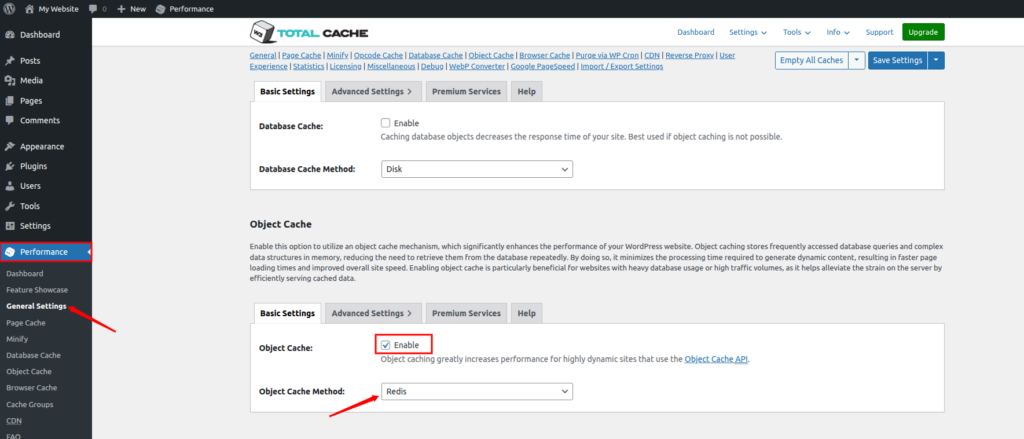
Step 5: Configure Page Cache Rules (Important)
Go to Performance >> Page Cache and apply these recommended settings:
Enable:
- Cache front page
- Cache feeds
- Cache SSL (HTTPS) requests
- Don’t cache pages for logged-in users
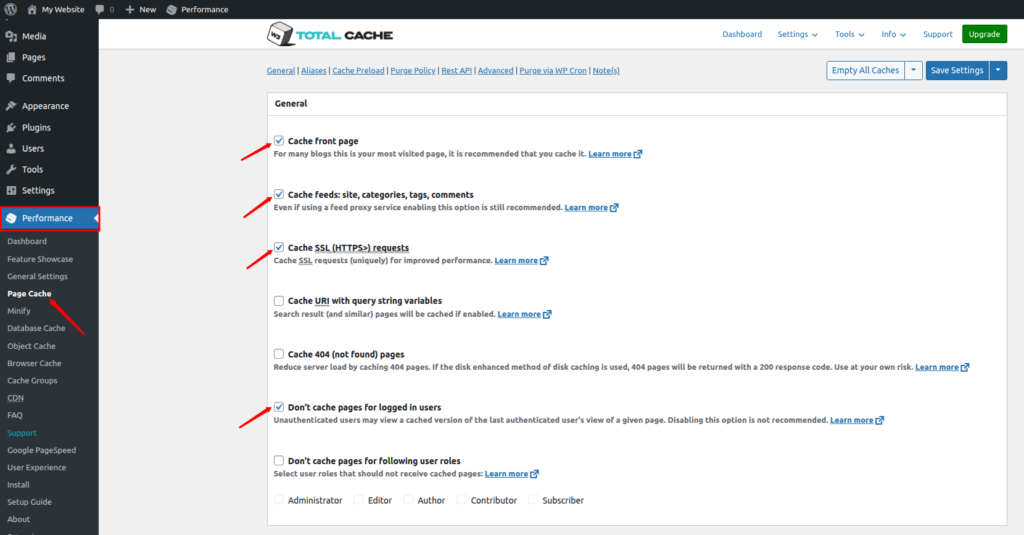
This prevents broken sessions and user-specific data from being cached.
Step 6: Exclude Sensitive Pages
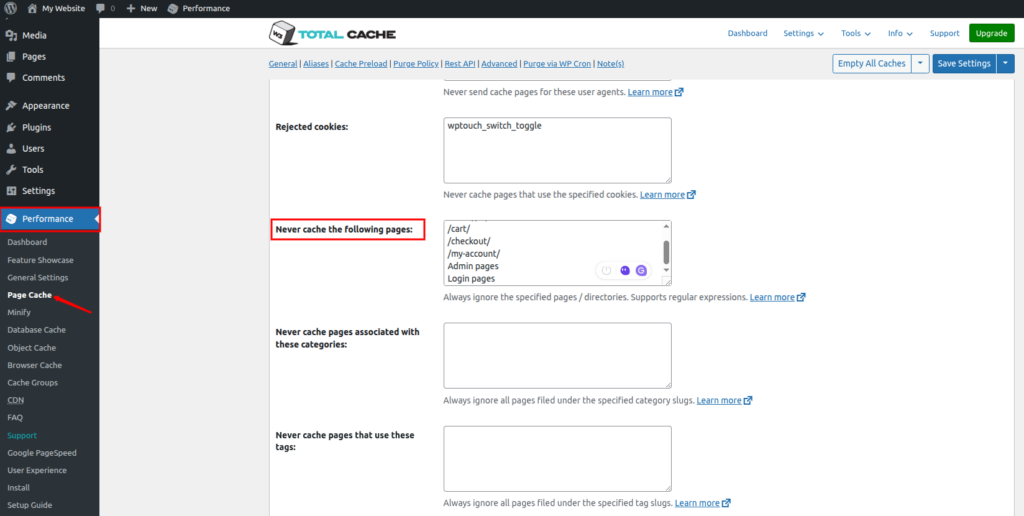
- Go to Performance → Page Cache
- Find the Advanced section and navigate to the Never cache the following pages
- Exclude pages that should never be cached, as mentioned below, and save settings.
- /cart/
- /checkout/
- /my-account/
- Admin pages
- Login pages

Advantages of Redis Full-Page Caching
- Faster page load times: Pages are served directly from memory, allowing visitors to see content almost instantly.
- Reduced PHP and database load: Cached pages eliminate repeated PHP execution and database queries, lowering server stress.
- Useful when server-level caching is unavailable: Redis full-page caching works well as an alternative when Nginx, LiteSpeed, or Varnish caching is not available.
Limitations to Keep in Mind
- Higher memory usage: Storing full HTML pages in Redis consumes more RAM compared to object caching.
- Not ideal for WooCommerce or logged-in users: Dynamic and user-specific pages can cause data inconsistency if cached improperly.
- Less efficient than Nginx or LiteSpeed page caching: Server-level caching solutions are generally faster and more resource-efficient than Redis-based page caching.
Redis vs Other WordPress Caching Methods
| Caching Type | Speed | Best Use Case |
| Redis Cache | Very High | High-traffic WordPress sites |
| File-Based Cache | Medium | Small blogs |
| Browser Cache | Medium | Client-side performance |
| CDN Cache | High | Global visitors |
Redis works best when combined with proper server management, something ServerAvatar excels at. Redis is the fastest and most scalable option.
Common Redis Issues and Fixes
| Issue | Solution |
| Redis not connecting | Check PHP Redis extension |
| Cache not refreshing | Clear Redis + WordPress cache |
| WooCommerce issues | Exclude dynamic pages |
| High memory usage | Increase Redis memory |
ServerAvatar support helps troubleshoot these issues quickly.
Conclusion
A slow WordPress website can quietly damage your traffic, SEO rankings, and conversions. Redis full-page caching offers a powerful way to speed things up by serving pre-rendered pages directly from memory instead of rebuilding them on every request. When implemented correctly, it can significantly reduce server load, improve Core Web Vitals, and deliver a smoother user experience.
With ServerAvatar, setting up Redis becomes much simpler and safer. Redis is pre-installed, optimized, and managed at the server level, removing the need for risky manual configurations. While Redis full-page caching is not always the best choice, especially for highly dynamic or logged-in user sites, it works well when server-level caching options are unavailable. Used wisely and combined with object caching, Redis can be a reliable performance booster for many WordPress websites.
FAQs
1. What is the difference between Redis object cache and Redis full-page cache?
Object caching stores database query results and reusable objects, while full-page caching stores the entire HTML output of a page. Object caching is generally safer and recommended for most WordPress sites.
2. Does Redis replace Nginx or LiteSpeed caching?
Server-level caching like Nginx FastCGI or LiteSpeed cache is usually faster and more efficient. Redis full-page caching is a good alternative when those options are not available.
3. How much memory does Redis full-page caching use?
It uses more memory than object caching because entire HTML pages are stored in RAM. Proper memory allocation is important to avoid performance issues.
4. Do I need technical knowledge to set up Redis on ServerAvatar?
Not really. ServerAvatar installs and configures Redis automatically, and you can manage credentials and settings directly from the dashboard.
5. Which plugin is best for Redis full-page caching in WordPress?
W3 Total Cache is a popular and reliable option that supports Redis for both page caching and object caching.