


Have you ever clicked on a website, waited a few seconds, and then, boom, an error message shows up saying “408 Request Timeout Error”? Annoying, right? It feels like knocking on a door, waiting patiently, and then walking away because no one answered in time.
The good news is that this error is common, and in most cases, it’s easy to fix. You don’t need to be a tech expert or speak computer language to understand what’s going on. In this guide, I’ll walk you through everything step by step. Let’s fix it together.
What Is a 408 Request Timeout Error?
A 408 Request Timeout Error happens when a server waits too long for a request from your browser and gives up. That’s exactly what the server does when it doesn’t hear back from your browser in time.
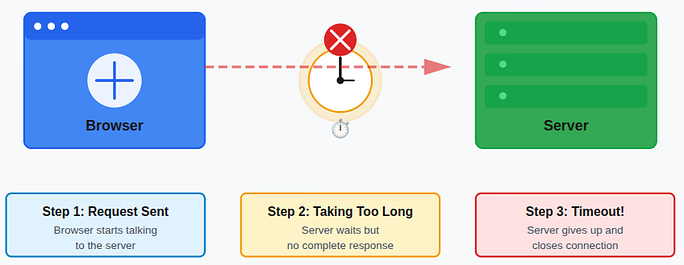
In simple terms:
- Your browser started talking to the server: Your browser sent a request to the server asking for a webpage or data.
- The conversation took too long: The server did not receive a complete response from your browser within the allowed time.
- The server ended the connection: The server closed the request because it waited too long and timed out.
What Does a 408 Error Look Like?
A 408 error can appear in different formats depending on the browser or website you are using. Even though the wording may change, the message always points to the same issue, a request took too long to complete.
- 408 Request Timeout: Indicates the server stopped waiting because the request was not completed in time.
- HTTP Error 408: A technical version of the timeout message shown by some browsers or systems.
- Request Timeout (The Server Timed Out Waiting for the Request): A more descriptive message explaining that the server ended the connection due to delay.
Each version may look different, but they all signal a timeout between the browser and the server.
Why Does a 408 Request Timeout Error Happen?
A 408 Request Timeout Error usually occurs due to a combination of small delays rather than a single major issue. These delays interrupt communication between your browser and the server, causing the request to expire.
- Slow internet connection: The request takes too long to reach the server because of low internet speed.
- Unstable network: Frequent connection drops prevent the request from completing properly.
- Heavy server traffic: The server is overloaded and unable to respond within the allowed time.
- Server misconfiguration: Incorrect server settings cause requests to time out too quickly.
- Firewall or security rules blocking requests: Security systems mistakenly block or delay valid connections.
- VPN or proxy interference: Extra routing layers slow down communication between the browser and server.
Most of the time, this error is temporary and not a serious problem.
Is the 408 Error Your Fault or the Server’s?
A 408 error can originate from either the user’s side or the server’s side, depending on the situation. Identifying where it occurs helps determine the right fix.
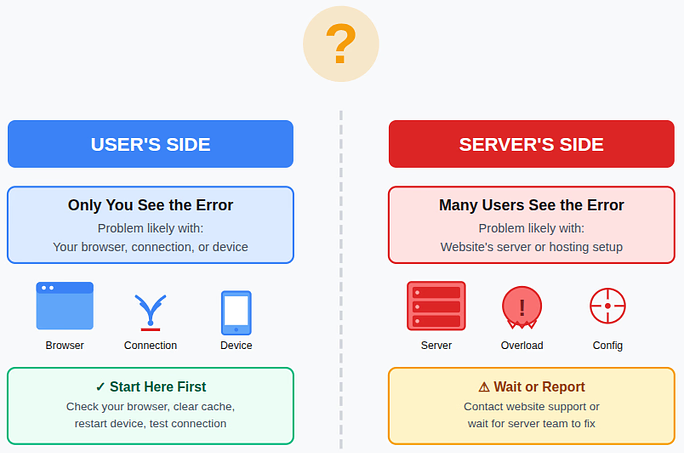
- If only you see the error: The issue is likely related to your browser, internet connection, or device.
- If many users see the error: The problem is probably caused by the website’s server or hosting setup.
Because of this, it’s best to start troubleshooting with basic checks on your own system before assuming a server issue.
Quick Fixes for Users
If you’re simply visiting a website and encounter a 408 Request Timeout Error, don’t panic. In many cases, the issue can be resolved quickly by trying a few basic troubleshooting steps on your side.
Refreshing the Page the Right Way
Refreshing the page is often the fastest and easiest solution, as it forces the browser to request fresh data from the server.
- Click the refresh button: Reloads the page and retries the request instantly.
- Press Ctrl + F5 (Windows/Linux): Performs a hard refresh by ignoring stored data.
- Press Cmd + Shift + R (Mac): Forces the browser to load the page from scratch.
This method works surprisingly often because it removes temporary loading issues.
Check Your Internet Connection
An unstable or slow internet connection can delay requests and cause timeout errors.
- Switch networks: Changing between Wi-Fi and mobile data can improve stability.
- Restart your router: Refreshes the connection and fixes minor network glitches.
- Pause heavy usage: Stopping downloads or streaming frees up bandwidth.
If the connection struggles, the server may stop waiting for a response.
Clear Browser Cache and Cookies
Cached files help websites load faster, but corrupted data can interfere with requests.
- Open browser settings: Access the option to manage stored data.
- Clear cache and cookies: Removes outdated or damaged temporary files.
- Restart the browser: Ensures the changes take effect properly.
This process often resolves hidden loading problems.
Try a Different Browser or Device
Sometimes the issue is limited to a specific browser or device.
- Use another browser: Testing with Firefox, Edge, or Safari helps isolate the issue.
- Check from another device: Opening the site on your phone confirms whether the problem is local.
If it works elsewhere, the issue is likely related to your original setup.
Disable VPN or Proxy Temporarily
VPNs and proxies can slow down connections by adding extra routing layers.
- Turn off the VPN or proxy: Removes the additional network step.
- Reload the page: Checks if the server responds faster without interference.
- Re-enable after testing: Turn it back on once the issue is identified.
In many cases, disabling these tools instantly fixes a 408 Request Timeout Error.
Fixes for Website Owners
If you own the website and visitors are encountering a 408 Request Timeout Error, there’s no need to panic. Since the issue is on the server side, you have the ability to adjust settings and improve performance to resolve it effectively.
Increase Server Timeout Settings
Servers allow requests only for a limited time, and short limits can cause slow connections to fail.
- Increase timeout values in server settings: Allows the server to wait longer for incoming requests.
- Adjust PHP or web server timeout limits: Prevents scripts from stopping before completing tasks.
- Review application-level timeouts: Ensures apps don’t close connections too quickly.
These adjustments give users more time to connect successfully.
Check Server Load and Performance
An overloaded server may struggle to respond within the required timeframe.
- High CPU usage: Indicates the server is handling too many tasks at once.
- Low memory: Limits the server’s ability to process requests efficiently.
- Too many active connections: Slows down response times for all users.
Optimizing resources or upgrading your hosting plan can significantly improve response speed.
Review Firewall and Security Rules
Security systems protect your server, but can sometimes block legitimate traffic.
- Firewall rules: Ensure valid requests are not being mistakenly denied.
- Rate-limiting settings: Check that normal users aren’t restricted by strict limits.
- DDoS protection tools: Confirm protection measures are not interfering with real visitors.
The goal is to maintain strong security without preventing genuine users from accessing your site.
How ServerAvatar Helps Prevent 408 Request Timeout Errors
What is ServerAvatar?
ServerAvatar is a platform to simplify the hosting and management of servers and applications. It simplifies the process of deploying and managing PHP and Node.js based web applications on servers.
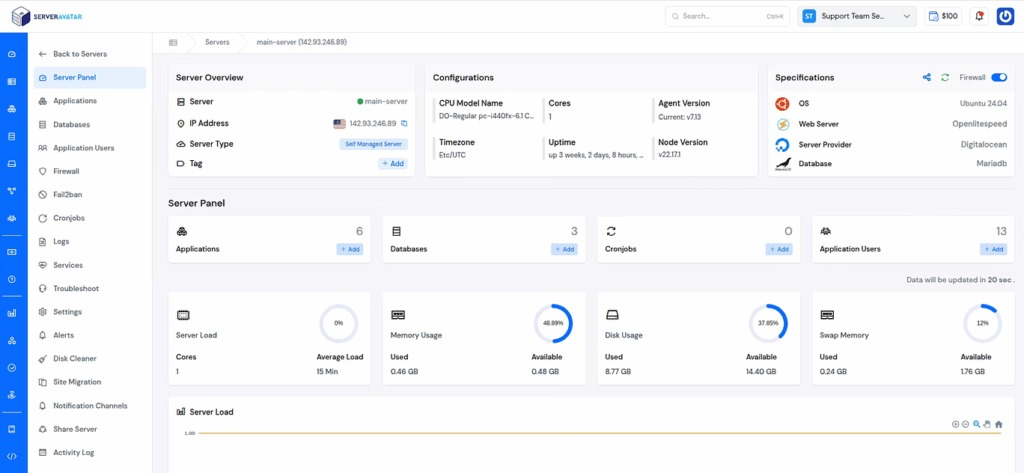
ServerAvatar simplifies server management by bringing all essential performance, security, and configuration tools into one easy-to-use dashboard. By proactively managing these areas, website owners can significantly reduce the chances of 408 Request Timeout Errors.
- Real-Time Server Monitoring: ServerAvatar provides live insights into CPU usage, memory consumption, disk usage, and active processes, helping you identify performance bottlenecks before they cause request timeouts.
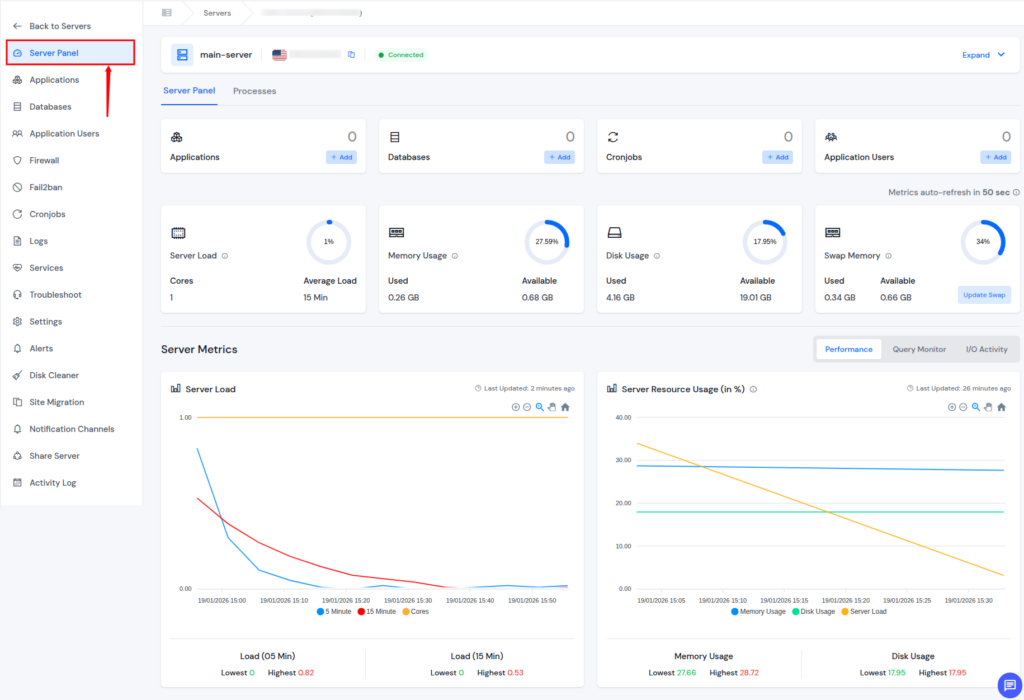
- Server Services Management: With ServerAvatar, you can easily start, stop, restart, or monitor critical services like Nginx, Apache, MySQL, and PHP-FPM, ensuring they are always running properly and responding to requests on time.
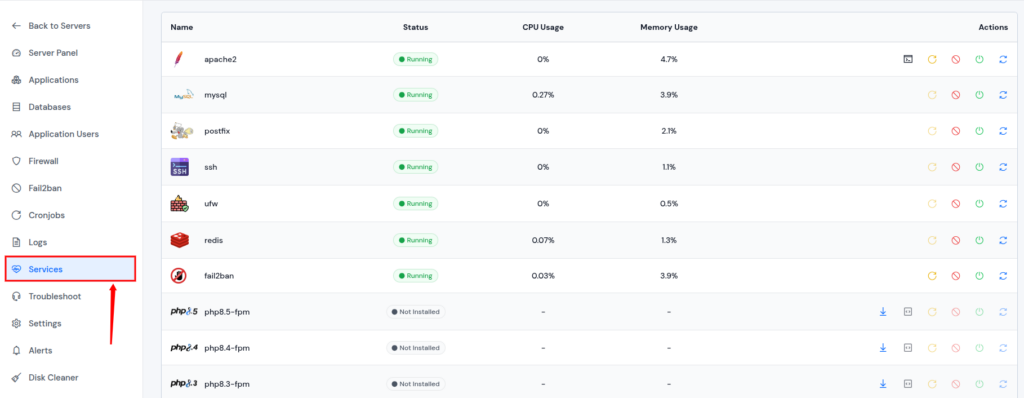
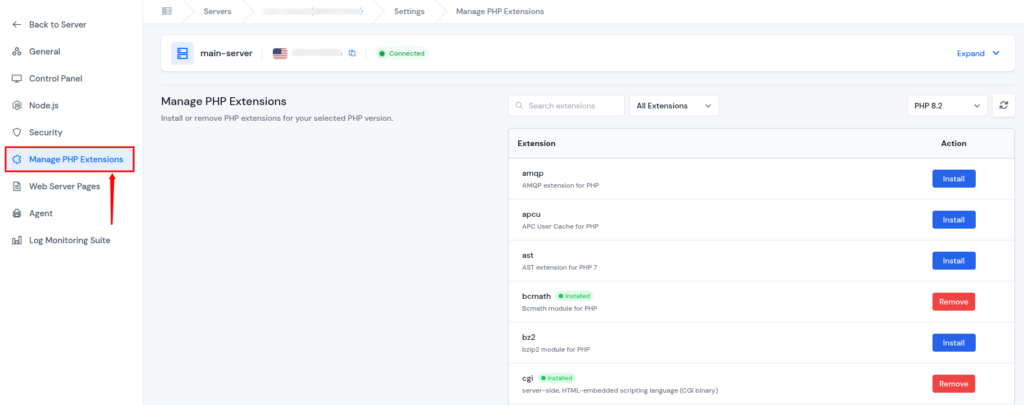
- PHP Version and Settings Management: ServerAvatar allows you to install, switch, and configure PHP versions per server or application, preventing slow script execution and timeout issues caused by misconfigured PHP settings.
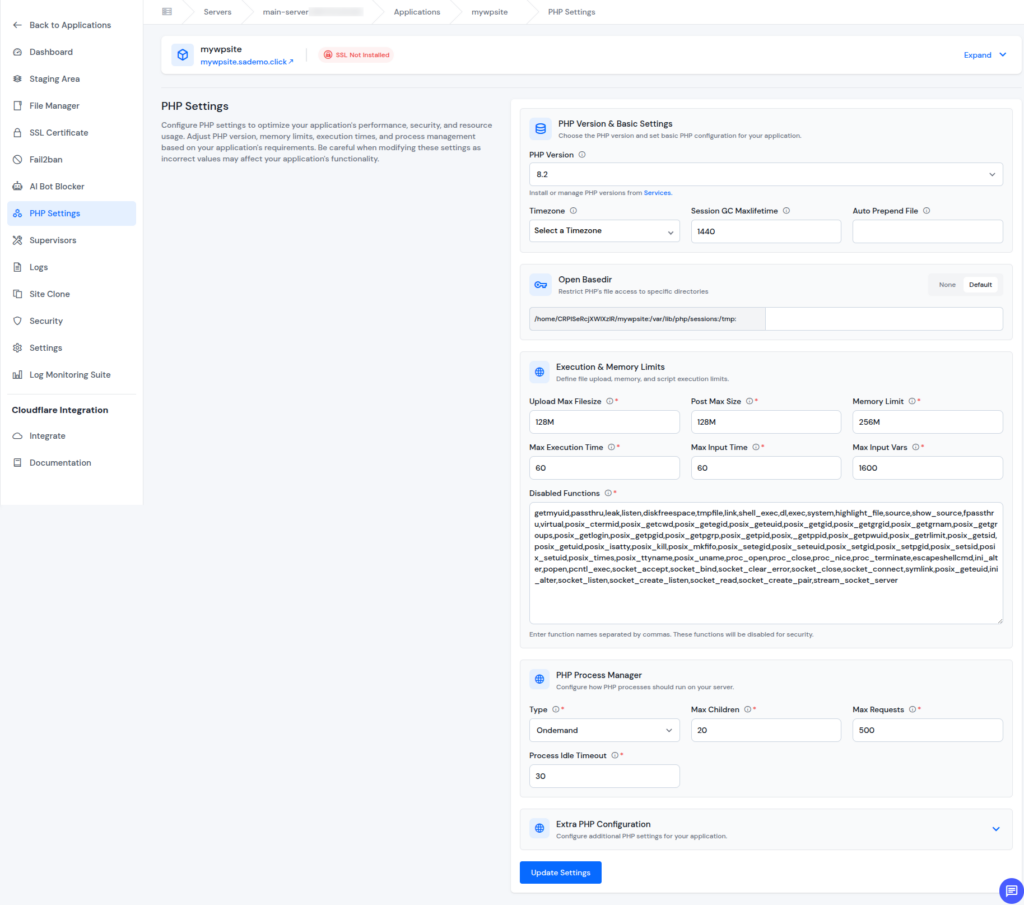
- Application-Level Optimization: ServerAvatar lets you manage individual applications efficiently, making it easier to optimize performance, manage resources, and reduce delays that can lead to request timeouts.
- Server Resource Optimization: By providing clear visibility into server resource usage, ServerAvatar helps you balance workloads and avoid server overload, which is a common cause of 408 errors.
- Simplified Troubleshooting: ServerAvatar’s centralized dashboard makes it easier to identify and fix issues quickly, reducing downtime and preventing repeated timeout errors. Additionally, ServerAvatar technical experts are available 24/7 to provide you with the best level of support and to assist you with your queries and issues.
By giving you full control and clear visibility over your server environment, ServerAvatar helps ensure faster response times, stable connections, and a smoother experience for your website visitors.

How to Prevent 408 Errors in the Future
Preventing 408 Request Timeout Errors is far easier than fixing them after they disrupt users. By keeping your server optimized, monitored, and properly configured, you can maintain smooth communication between browsers and your server.
- Use ServerAvatar for reliable hosting and management: Choosing a stable hosting environment along with a server management platform helps ensure consistent performance and faster request handling.
- Optimize your website speed: Faster websites respond more quickly to server requests, reducing the chance of timeouts during page loads or script execution.
- Monitor server performance regularly: With ServerAvatar’s real-time server monitoring, you can track CPU usage, memory consumption, and active connections to catch performance issues before they cause timeout errors.
- Keep server and application software updated: Regular updates improve stability, security, and efficiency, helping servers process requests without unnecessary delays.
- Avoid overly strict security rules: Using ServerAvatar’s firewall management, you can maintain strong security while ensuring legitimate traffic isn’t blocked or slowed down.
A well-maintained server, supported by ServerAvatar, works like a well-organized things, requests move quickly, resources are balanced, and no one is left waiting too long.
Conclusion
A 408 Request Timeout Error can be frustrating, but it’s usually a temporary issue caused by delays in communication between your browser and the server. In most cases, simple steps like refreshing the page, checking your internet connection, or clearing browser data are enough to fix it. For website owners, maintaining server performance, adjusting timeout settings, and managing security rules properly can significantly reduce the chances of this error. With proactive monitoring and the right server management tools, such as ServerAvatar, you can ensure faster responses, stable connections, and a smoother experience for your visitors.
FAQs
1. What exactly triggers a 408 Request Timeout Error?
A 408 error occurs when a server waits too long for a browser request and ends the connection before it completes.
2. Is a 408 Request Timeout Error harmful to my website or data?
This error does not cause data loss or security risks; it only stops an incomplete request.
3. Can refreshing the page really fix a 408 error?
In many cases a simple refresh forces a new request and resolves temporary connection delays.
4. How can website owners reduce 408 errors long term?
By optimizing server performance, increasing timeout limits when needed, monitoring resources, and reviewing firewall rules regularly.
5. Does ServerAvatar help in preventing 408 Request Timeout Errors?
ServerAvatar provides real-time monitoring, server service management, PHP configuration, firewall control, and expert support to keep servers fast, stable, and responsive.