

Have you ever visited a website only to see a blank screen or an error message staring back at you? Frustrating, right? Now imagine how your visitors feel when your website goes down. To prevent website downtime, businesses must treat uptime as a top priority. Website downtime is like locking the front door of your shop during business hours, customers show up, find it closed, and quietly leave. Some may never return.
The good news? Most website downtime is preventable. You don’t need to be a tech wizard or spend a fortune to keep your site running smoothly. With the right habits, tools, and mindset, you can drastically reduce downtime and keep your website available when people need it most.
In this guide, I will walk through simple and proven tips to help you prevent website downtime and protect your online presence.
What Is Website Downtime?
Website downtime is the period when your website is unavailable or not working as expected. This could mean the site won’t load, show errors, or respond very slowly.
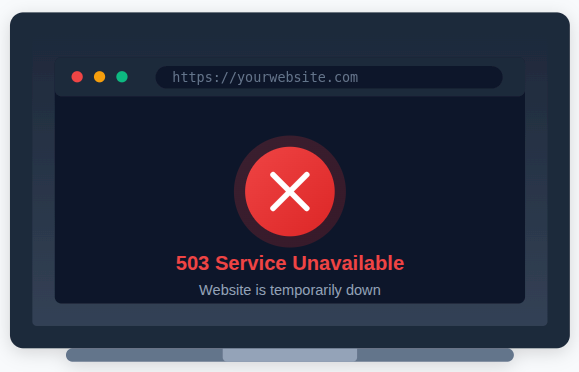
Downtime can last a few seconds, minutes, or even hours. And yes, even a few minutes can hurt, especially if your site handles sales, leads, or critical information.
Why Website Downtime Is a Serious Problem
Website downtime is more than a technical glitch. When your site goes offline, it directly affects your business performance and the trust people place in your brand. Even short outages can leave a lasting negative impression.
When visitors can’t access your website, they don’t usually wait around. Instead, they move on to competitors, and that lost opportunity can be hard to recover.
Key impacts of downtime include
- Lost visitors and sales: Users leave immediately when a site doesn’t load, resulting in missed conversions.
- Lower search engine rankings: Search engines may rank your site lower if it’s frequently unavailable.
- Damaged brand reputation: Repeated downtime makes your business look unreliable.
- Poor user experience: Broken pages frustrate users and reduce engagement.
- Reduced customer trust: Visitors are less likely to return to a site that fails often.
Think of your website like a bridge. If it’s closed too often, people will find another route and stop checking if it’s open again.
Common Causes of Website Downtime
To prevent downtime, you first need to understand what causes it. Many website outages happen due to avoidable mistakes or weak infrastructure.
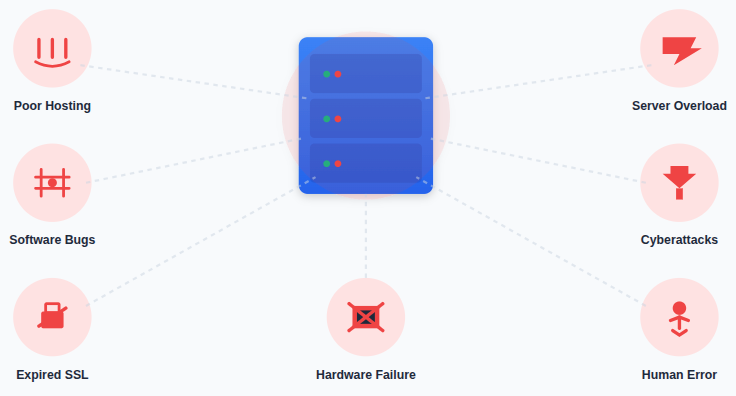
Most downtime issues are not sudden accidents. They are usually the result of overlooked maintenance, poor planning, or outdated systems.
Most downtime happens due to
- Poor-quality hosting: Unreliable servers increase the risk of frequent outages.
- Server overload: High traffic can crash servers that aren’t properly scaled.
- Software bugs or failed updates: Broken updates can disrupt website functionality.
- Cyberattacks: DDoS attacks and malware can take websites offline without warning.
- Expired domains or SSL certificates: Missed renewals can instantly block site access.
- Human errors: Small configuration mistakes can cause major disruptions.
- Hardware failures: Aging or faulty equipment can stop servers from working.
The good news is that most of these issues can be prevented with proper planning, regular maintenance, and the right tools in place.
Fixes for Website Downtime
Monitor Your Website
You can’t fix a problem if you don’t know it exists. Website monitoring helps you stay informed about your site’s health at all times, so issues are caught early instead of after users complain.
With monitoring tools in place, you receive alerts the moment something goes wrong, allowing you to act quickly and reduce downtime.
Benefits of website monitoring
- Instant downtime alerts: Get notified immediately when your site becomes unavailable.
- Performance insights: Track loading speed and response times to spot slowdowns early.
- Uptime history reports: Review past uptime data to identify recurring issues.
It’s like having a watchful guard keeping an eye on your website day and night.
Keep Your Software Updated
Outdated software is a hidden risk that often leads to downtime and security breaches. Regular updates keep your website stable, secure, and compatible with modern systems.
Updates usually fix bugs and close security gaps, making them essential for smooth website operation.
Always keep these components updated
- Content management systems: Prevent core issues and compatibility problems.
- Themes and templates: Avoid layout breaks and outdated code.
- Plugins and extensions: Reduce conflicts and security vulnerabilities.
- Server software: Ensure better performance and stability.
Skipping updates is like ignoring car maintenance, eventually, something is bound to fail.
Use a Content Delivery Network (CDN)
A Content Delivery Network, or CDN, helps distribute your website content across multiple locations worldwide. This reduces pressure on your main server and improves availability.
Even if one server faces issues, the CDN keeps your website accessible from another location.
How a CDN helps prevent downtime
- Reduces server load: Distributes traffic across multiple servers.
- Improves website speed: Delivers content from the nearest location to users.
- Ensures availability during failures: Keeps your site online if one server goes down.
It’s a smart way to add reliability without extra complexity.
Optimize Server Performance
Slow or overloaded servers are more likely to crash when traffic increases. Performance optimization keeps your server running efficiently and reduces the risk of failure.
A well-optimized server handles requests smoothly and stays stable even under pressure.
Simple server optimization steps
- Remove unused plugins: Reduce unnecessary resource usage.
- Optimize images: Improve load times and reduce server strain.
- Use caching: Serve content faster without repeated processing.
- Clean up databases: Eliminate clutter that slows down operations.
A clean, optimized setup is easier to manage and less likely to break.
Secure Your Website Against Attacks
Cyberattacks are a major cause of sudden and unexpected website downtime. Without proper security, even a small vulnerability can bring your site offline.
Strong security measures protect your server and ensure uninterrupted access for users.
Ways to secure your website
- Use firewalls: Block unauthorized access to your server.
- Enable SSL certificates: Encrypt data and improve trust.
- Limit login attempts: Prevent brute-force attacks.
- Use strong passwords: Reduce the risk of unauthorized entry.
- Scan for malware regularly: Detect threats before they cause damage.
Security isn’t optional, it’s a core part of uptime protection.
Take Regular Website Backups
No system is perfect, and unexpected issues can still happen. Website backups ensure you can recover quickly without losing important data.
With backups in place, downtime becomes a temporary inconvenience rather than a disaster.
Backups help by providing
- Fast recovery after failure: Restore your site quickly.
- Minimal data loss: Protect important content and user data.
- Peace of mind: Know your site can be restored at any time.
Think of backups as insurance, you hope you won’t need them, but they’re priceless when you do.
Plan for Traffic Spikes
Sudden increases in traffic can overwhelm servers that aren’t prepared. Planning ahead ensures your website stays online even during peak demand.
Traffic spikes often happen unexpectedly, especially during successful campaigns.
Common causes of traffic spikes include
- Viral content: Sudden popularity can drive massive traffic.
- Sales and promotions: High user activity in a short time.
- Media mentions: Increased attention from external sources.
Using scalable hosting and caching helps absorb these spikes without downtime.
Reduce Single Points of Failure
A single point of failure means one small issue can shut down your entire website. Removing these risks improves reliability and resilience.
Redundant systems ensure that one failure doesn’t bring everything to a halt.
Examples of single points of failure
- One server handling all traffic: A crash means total downtime.
- One database: Data access stops if it fails.
- One power source: Power loss leads to server shutdown.
Redundancy keeps your website running even when something goes wrong.
Perform Routine Maintenance
Regular maintenance prevents small issues from turning into serious problems. It keeps your website healthy and running efficiently over time.
Routine checks help identify warning signs before they affect uptime.
Important maintenance tasks include
- Checking error logs: Spot issues early.
- Testing website features: Ensure everything works as expected.
- Removing unused files: Free up server resources.
- Reviewing performance data: Track changes over time.
Always schedule maintenance during low-traffic periods to minimize disruption.
Create a Downtime Response Plan
When downtime occurs, quick action matters. A clear response plan helps teams act calmly and efficiently instead of panicking.
Preparation reduces recovery time and limits user impact.
A strong downtime response plan includes
- Defined roles and responsibilities: Everyone knows what to do.
- Emergency contact information: Faster coordination.
- Step-by-step recovery actions: Clear guidance during outages.
- User communication strategy: Keep users informed and reassured.
A plan turns a stressful situation into a manageable process.
How ServerAvatar Helps Prevent Website Downtime
What is ServerAvatar?
ServerAvatar is a platform to simplify the hosting and management of servers and applications. It simplifies the process of deploying and managing PHP and Node.js based web applications on servers.
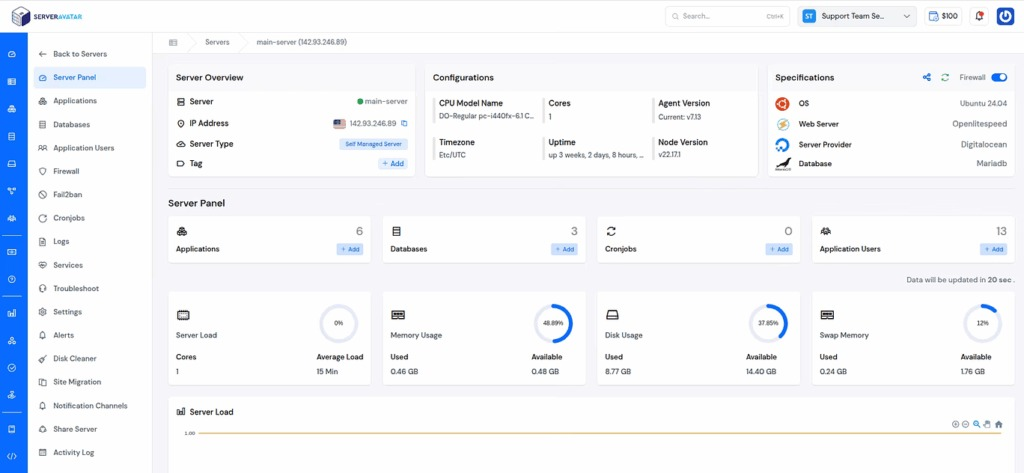
Preventing website downtime is not just about choosing good hosting. It also depends on how well your server is monitored, maintained, and secured on a daily basis. Managing all of this manually can be time-consuming and error-prone, especially as your website grows.
ServerAvatar simplifies server management by giving website owners and developers a single dashboard to monitor and control their servers. With better visibility and easier management, potential issues can be detected early, before they turn into downtime.
Ways ServerAvatar helps reduce website downtime:
Centralized Server Management
ServerAvatar provides a single dashboard to manage all your servers, services, and configurations. This reduces confusion and minimizes mistakes that often lead to unexpected downtime.
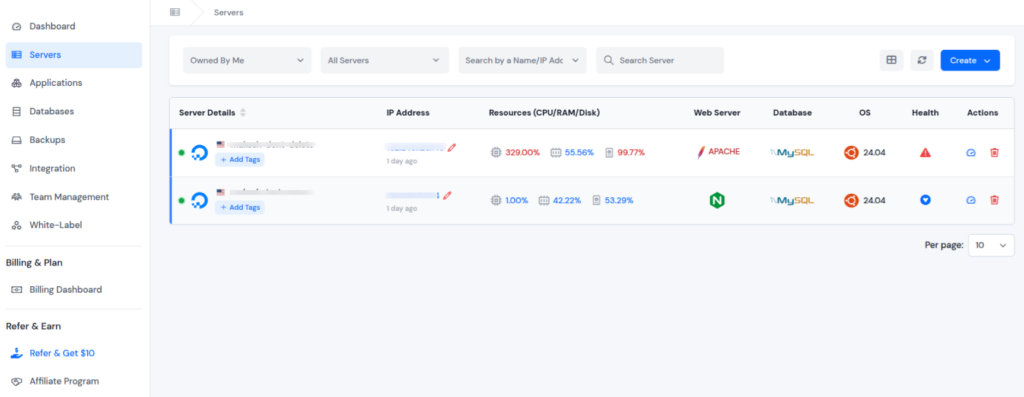
Real-Time Server Monitoring
With real-time monitoring, ServerAvatar helps you keep an eye on server load, health, and resource usage. Early detection of issues allows you to fix problems before they impact website availability.

Optimized Server Setup
ServerAvatar optimizes your server during the installation and setup process itself. This ensures essential services, configurations, and system settings are properly tuned, helping your server perform efficiently from day one.
Performance Optimization Made Easy
ServerAvatar simplifies performance management by giving clear insights into server resources. This helps prevent slowdowns and crashes caused by high CPU, memory, or disk usage.
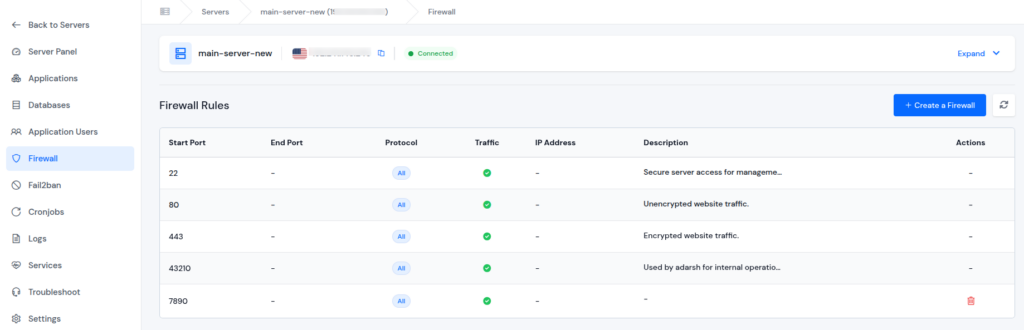
Firewall and Security Control
ServerAvatar allows you to manage firewall rules directly from the panel. Better security control reduces the risk of downtime caused by unauthorized access or malicious attacks.
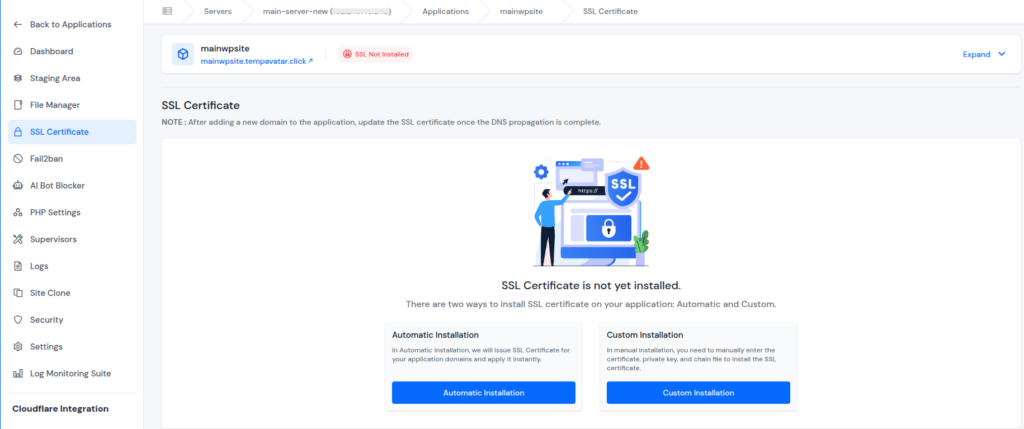
SSL Management for Secure Connections
ServerAvatar makes it easy to install automatic and custom SSL certificates for your websites. Secure connections not only protect user data but also prevent downtime caused by expired or misconfigured SSL certificates.
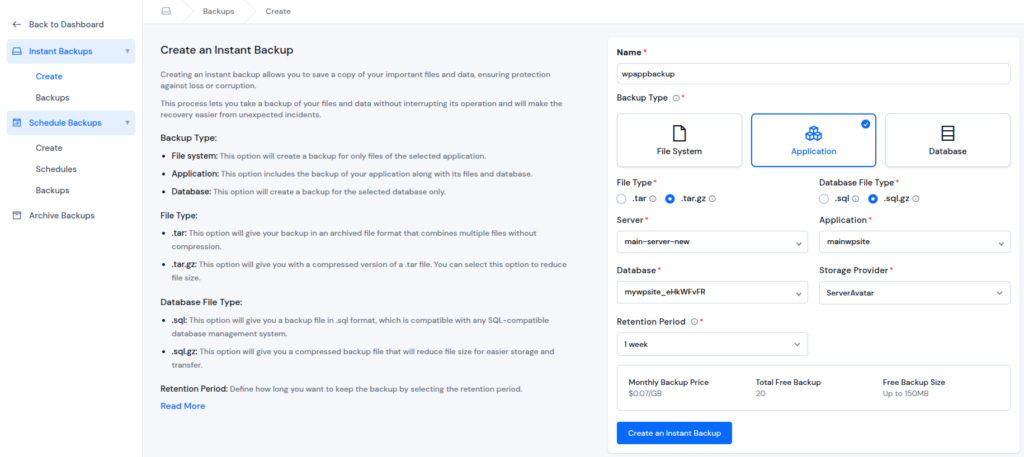
Backup Management for Quick Recovery
ServerAvatar supports easier application, file system, and database backup management. Having reliable backups in place ensures one click, faster recovery, and no data loss if something goes wrong.
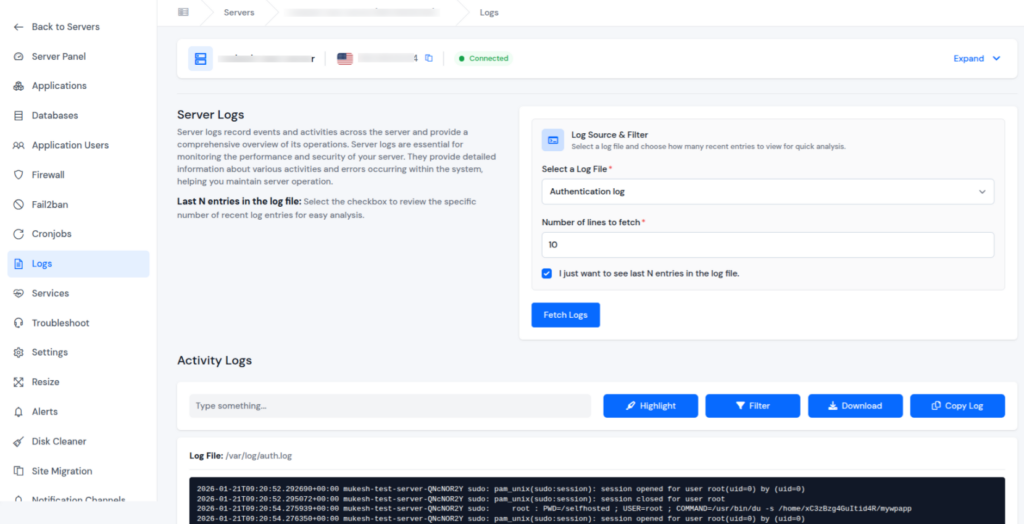
Proactive Issue Detection Through Logs
By checking server and application logs, ServerAvatar helps you spot early warning signs. Addressing these signals early prevents small issues from escalating into major outages.
Simplified Server Maintenance
Routine server tasks are easier to manage with ServerAvatar’s user-friendly interface. Reduced manual effort lowers the chances of human error that can take websites offline.
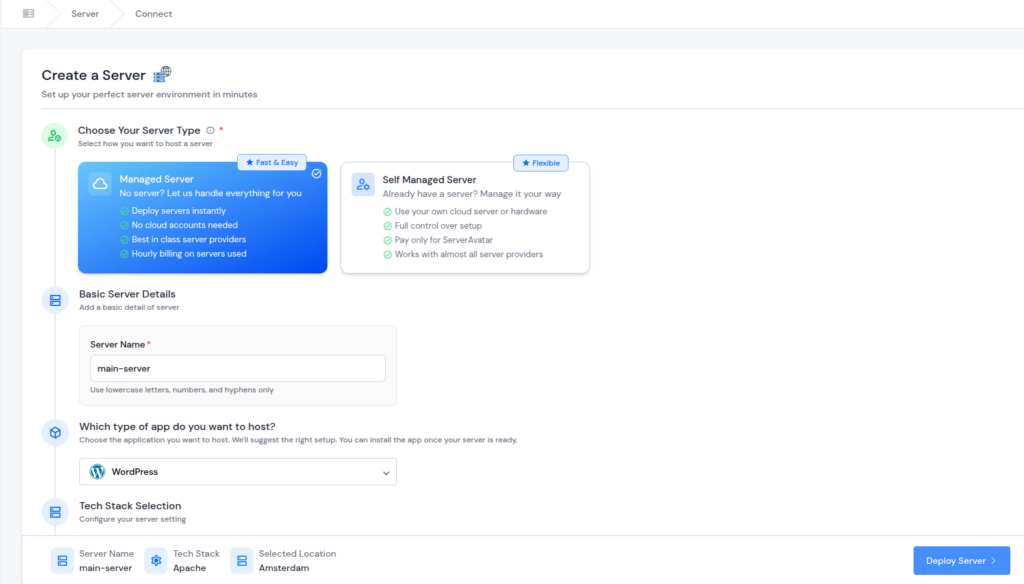
Support for Managed and Self-Managed Servers
ServerAvatar supports both managed and self-managed server setups. This flexibility ensures better control and stability regardless of how your server infrastructure is configured.
Reliable Support When It Matters Most
Even with the best setup, unexpected issues can still arise. ServerAvatar’s technical team is available 24/7 and helps you resolveyour issues quickly, reducing the risk of extended downtime.
Whether it’s a configuration issue, performance concern, or troubleshooting help, timely guidance ensures problems are addressed before they impact your website’s availability.

Learn from Past Downtime
Every downtime incident provides valuable insights. Reviewing past issues helps prevent the same mistakes from happening again.
Learning from experience strengthens your website over time.
After resolving downtime, ask
- What caused the issue?
Identify the root problem. - How long did it last?
Measure the impact. - How can it be avoided next time?
Improve future prevention.
Documenting lessons learned helps build a more stable and reliable website.
Conclusion
Website downtime can affect more than just your site’s availability, it impacts user trust, search visibility, and overall business growth. While downtime can happen for many reasons, most causes are preventable with proactive monitoring, regular updates, strong security, performance optimization, and proper planning. By combining these best practices with a reliable server management platform like ServerAvatar, managing servers becomes simpler and more efficient, helping you detect issues early and recover faster when problems arise. In the end, a well-maintained and well-monitored server is the key to keeping your website online, reliable, and ready for users at all times.
FAQs
1. What is website downtime and why does it matter?
Website downtime refers to periods when a website is unavailable or not functioning properly. It matters because even short outages can lead to lost visitors, reduced trust, and missed business opportunities.
2. What are the most common causes of website downtime?
Common causes include unreliable hosting, server overload, outdated software, cyberattacks, expired SSL certificates, human errors, and hardware failures.
3. How can I detect website downtime quickly?
Using website and server monitoring tools helps you receive instant alerts when your site goes down, allowing you to take action before users are affected.
4. How does ServerAvatar help prevent website downtime?
ServerAvatar simplifies server management by offering centralized control, real-time monitoring, optimized server setup, security management, backups, log monitoring, and reliable support to address issues early.
5. Are backups really necessary if my website is well-maintained?
Even with good maintenance, unexpected issues can still occur. Regular backups ensure fast recovery, minimal data loss, and peace of mind during emergencies.