

Website speed plays a major role in how a WordPress site performs. If you want to speed up a WordPress website, improving page load time is one of the most effective ways to keep visitors engaged and improve search engine rankings. When pages load slowly, users often lose interest, and search engines may reduce visibility. A fast-loading website feels smoother, more responsive, and easier to navigate.
This guide explains how to speed up a WordPress website using clear, practical methods. The steps shared here are easy to follow, suitable for beginners, and focused purely on performance improvements without technical complexity.
What Is WordPress?
WordPress is the world’s most popular open-source content management system (CMS), used to build websites, blogs, and e-commerce stores. It offers flexibility through themes and plugins, making it suitable for beginners, developers, and businesses of all sizes.
How ServerAvatar Simplifies WordPress Deployment & Management
What is ServerAvatar?
ServerAvatar is a platform to simplify the hosting and management of servers and applications. It simplifies the process of deploying and managing PHP and Node.js based web applications on servers.
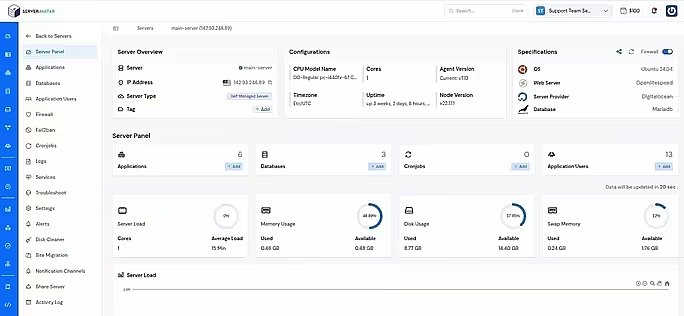
ServerAvatar makes WordPress and other popular applications, such as Mautic, N8N, UptimeKuma, etc, deployment effortless with its one-click WordPress application installer, allowing you to launch a fully configured WordPress site in minutes. It removes the complexity of server setup by providing an intuitive dashboard to manage servers, applications, databases, PHP versions, SSL, and performance settings from one place.
ServerAvatar supports multiple cloud providers and gives users full control over their infrastructure while eliminating the need for deep server administration knowledge. You can refer to the ServerAvatar documentation and the detailed blog to install WordPress effortlessly.
ServerAvatar does not directly provide WordPress Multisite, but our technical experts can help you set up a WordPress Multisite environment
The ServerAvatar support team is available 24/7 to assist you with any issues or questions you may have.
Key Benefits of Using ServerAvatar for WordPress
- One-click WordPress installer: Deploy WordPress instantly without manual configuration.
- Unified management panel: Manage servers and WordPress applications from a single dashboard.
- Performance optimization: Easily configure services, PHP, and server resources.
- Redis caching support: ServerAvatar comes with built-in Redis integration that helps speed up WordPress by storing frequently accessed data in memory.
- Enhanced security: Includes firewall, SSL management, and secure access controls.
- Easy scalability: Upgrade server resources as your WordPress site grows.
ServerAvatar is an ideal solution for users who want the power of cloud servers without the operational complexity. It simplifies WordPress hosting by automating server setup, streamlining application management, and providing performance and security optimizations out of the box.
Whether you’re a developer, agency, or business owner, ServerAvatar allows you to deploy, manage, and scale WordPress websites confidently while focusing on growth instead of infrastructure management.
What Website Speed Means for WordPress
Website speed refers to how quickly a page loads and becomes usable. In WordPress, speed is affected by hosting, themes, plugins, media files, and code structure.
A faster website improves navigation, reduces page abandonment, and supports better visibility in search engines. Speed optimization is not optional; it is a core requirement for a well-performing WordPress website.
How to Measure WordPress Performance
Before making changes, it is important to understand current performance levels. Speed testing tools provide insights such as loading time, page size, and improvement areas.
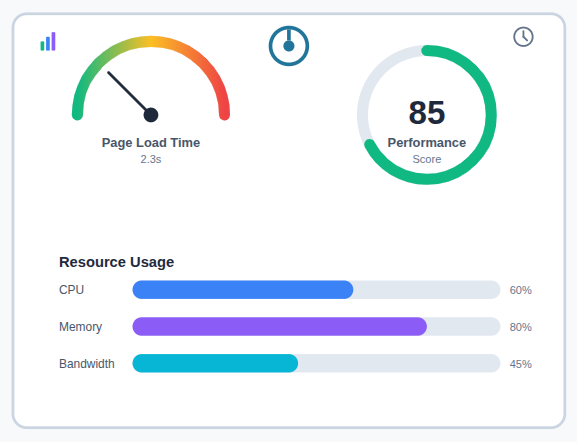
Key performance indicators include:
- Page load time: Shows how quickly a page becomes fully usable.
- Performance score: Gives an overall speed rating based on best practices.
- Resource usage: Indicates how much server and browser resources are used.
These metrics help identify areas that need optimization.
Method to speed up a WordPress website
1. Choose a Reliable Hosting Provider
Server performance plays a critical role in how fast a WordPress website loads. Poorly configured servers often limit resources, leading to slower response times and inconsistent performance. Managing these configurations manually can be complex and time-consuming.
ServerAvatar helps simplify server-level performance management by offering:
- Optimized server configurations: Ensures WordPress and other applications runs on well-tuned servers without manual setup.
- Efficient resource management: Helps manage CPU, memory, and storage effectively for better performance.
- Improved server response times: Reduces delays when handling website requests.
- Stable and monitored uptime: Maintains consistent availability through server health monitoring.
Using a platform like ServerAvatar provides a structured approach to managing server performance, creating a strong technical foundation for WordPress speed optimization.
2. Use a Fast and Lightweight Theme
Themes define the structure and appearance of a WordPress site. Heavy themes often include unnecessary code that slows down performance.
When selecting a theme:
- Prefer minimal design structures: Reduces extra code and load time.
- Avoid excessive built-in scripts: Prevents unnecessary processing.
- Choose themes optimized for speed: Ensures faster page rendering.
A lightweight theme reduces code execution and improves performance.
3. Keep WordPress Core Updated
Regular update improve website performance, fixes bugs, and strengthen the website security. Running outdated versions can negatively impact website speed.
Always update:
- WordPress core: Keeps the platform efficient and secure.
- Installed themes: Prevents compatibility and speed issues.
- Active plugins: Ensures smooth and optimized functionality.
Running outdated software can negatively affect speed and stability.
4. Optimize Images for Faster Loading
Images usually take up the most space on a webpage. Unoptimized images slow down page loading and increase resource usage.
Image optimization includes:
- Resizing images before upload: Prevents oversized files.
- Compressing files without quality loss: Reduces file size efficiently.
- Using modern image formats: Improves loading speed and performance.
Optimized images significantly reduce load time.
5. Enable Page Caching
Caching stores static versions of pages so they load faster for visitors. This reduces repeated processing on the server.
Caching benefits include:
- Faster page delivery: Displays pages more quickly.
- Reduced server processing: Lowers server workload.
- Improved overall performance: Enhances website responsiveness.
Caching is one of the most effective WordPress optimization techniques.
6. Reduce the Number of Plugins
Each plugin adds scripts and processes that can slow down a website. Too many plugins increase loading time and complexity.
Best practices for plugins:
- Remove inactive plugins: Eliminates unnecessary resource usage.
- Avoid overlapping features: Prevents duplicate functionality.
- Use performance-optimized plugins: Maintains speed and stability.
Fewer plugins result in better performance and easier maintenance.
7. Activate GZIP Compression
GZIP compression reduces the size of files sent from the server to the browser, improving load speed.
Advantages of GZIP compression:
- Faster file transfer: Loads content more quickly.
- Lower bandwidth usage: Reduces data transfer size.
- Improved loading speed: Enhances overall performance.
This method enhances performance without affecting content quality.
8. Use a Content Delivery Network (CDN)
A CDN delivers website content from multiple servers, improving loading efficiency.
CDN benefits include:
- Faster content delivery: Reduces content loading delays.
- Reduced server load: Distributes traffic efficiently.
- Improved performance consistency: Maintains stable speed.
Using a CDN helps maintain speed across different locations.
9. Optimize the WordPress Database
Databases collect unnecessary data over time, which can affect performance. Cleaning them improves backend efficiency.
Database optimization involves:
- Removing unused data: Clears unnecessary records.
- Cleaning old revisions: Reduces database size.
- Optimizing database tables: Improves query performance.
A clean database processes requests faster and improves backend efficiency.
10. Minify CSS, JavaScript, and HTML
Minification removes extra characters from code files without affecting functionality.
Benefits of minification:
- Smaller file sizes: Reduces page weight.
- Faster loading: Improves page speed.
- Improved performance: Enhances browser efficiency.
This process reduces the amount of data browsers need to load.
11. Reduce External Resource Requests
External resources add extra loading requests from third-party sources, which can slow down pages.
Reducing external requests helps by:
- Lowering page load time: Fewer external calls improve speed.
- Reducing dependency on third-party servers: Increases reliability.
- Improving stability: Ensures consistent performance.
Only essential external resources should be used.
12. Enable Lazy Loading for Media
Lazy loading delays media loading until it is required, improving initial page speed.
Lazy loading advantages:
- Faster initial page load: Loads essential content first.
- Reduced data usage: Avoids unnecessary loading.
- Better performance on long pages: Improves overall efficiency.
This feature improves loading efficiency without removing content.

Track Performance Consistently
Performance optimization requires regular monitoring to maintain speed improvements.
Ongoing tracking helps to:
- Detect speed issues early: Identifies problems quickly.
- Maintain consistent performance: Keeps the website optimized.
- Ensure updates do not reduce speed: Prevents performance drops.
Regular checks keep a WordPress website optimized over time.
Tips for Maintaining WordPress Speed
Speed optimization is not a one-time task. As your WordPress website grows with new content, plugins, and users, performance needs regular attention. Periodically reviewing themes, plugins, media files, and server settings helps prevent slowdowns before they impact visitors. Keeping things simple, updated, and well-monitored goes a long way in maintaining long-term performance.
Best Practices to Follow Going Forward
To keep your WordPress website consistently fast:
- Monitor performance after every major update
- Avoid adding unnecessary plugins or features
- Optimize media and database regularly
- Choose reliable tools and platforms that simplify performance management
Following these best practices ensures your website remains responsive and scalable over time.
Conclusion
Speed optimization is essential for maintaining a high-performing WordPress website. By focusing on server efficiency, optimized themes, clean code, media optimization, caching, and regular performance monitoring, website owners can achieve faster load times and improved stability. Using a structured platform like ServerAvatar further simplifies server and application management, making it easier to maintain consistent performance while allowing users to focus on content and growth rather than infrastructure complexity.
FAQs
1. Can WordPress speed optimization be done without technical expertise?
Many optimization methods such as caching, image optimization, and theme selection can be implemented without deep technical knowledge, especially when using managed platforms.
2. How does server performance impact WordPress speed?
Server performance determines how quickly requests are processed. Well-optimized servers reduce response times and provide a stable foundation for WordPress performance.
3. How often should WordPress performance be monitored?
Performance should be checked regularly, especially after updates, plugin changes, or content additions, to ensure speed and stability are maintained.
4. Does using a platform like ServerAvatar help with WordPress performance?
ServerAvatar helps manage server configurations, resources, and performance settings, making it easier to maintain a fast and optimized WordPress environment.
5. Does optimizing WordPress speed help with scalability?
A well-optimized WordPress website uses server resources more efficiently, which makes it easier to handle increased traffic and scale smoothly as the website grows.