


WordPress performance often becomes a challenge as websites grow. More plugins, traffic, and dynamic content can increase server load and slow down page delivery. While page caching helps with static content, it does not reduce database queries. This is where Object Cache Pro helps by storing frequently accessed data in memory, reducing database load, and improving WordPress performance.
Object Cache Pro uses Redis to store frequently accessed database query results in memory, allowing WordPress to retrieve data instantly instead of repeatedly querying the database. The result is lower server load, faster response times, and improved scalability.
In this guide, I’ll walk you through how Object Cache Pro works as part of ServerAvatar’s WordPress Toolkit, how to set it up in under five minutes, what kind of performance improvements you can actually expect, and how it fits into your broader WordPress caching strategy.
TL;DR
- Object Cache Pro stores database query results in Redis memory.
- It reduces repetitive database requests.
- Dynamic WordPress websites benefit the most.
- ServerAvatar includes Object Cache Pro integration inside WordPress Toolkit.
- Simply add your Object Cache Pro license key and enable the feature.
- It can improve backend performance and reduce server resource usage.
What Is Object Cache Pro?
Object Cache Pro is a premium Redis-powered object caching solution designed specifically for WordPress. Unlike page caching, which stores complete HTML pages, object caching stores individual database query results and PHP objects in memory.
When WordPress requests the same data again, the information is served directly from Redis instead of making another database query. This significantly reduces:
- Database workload
- Query execution time
- CPU usage
- Response latency
Object Cache Pro is widely used on:
- WooCommerce stores
- Membership websites
- Learning Management Systems (LMS)
- Community platforms
- High-traffic blogs
- Dynamic business websites
How Object Cache Pro Works
Without object caching, WordPress follows this process:
- Visitor requests a page.
- WordPress runs multiple database queries.
- MySQL returns results.
- PHP processes the data.
- The page is generated.
With Object Cache Pro enabled:
- Visitor requests a page.
- WordPress checks Redis first.
- Cached query results are found.
- Data is returned immediately.
- Fewer database queries are executed.
This reduces the amount of work required to generate pages.
Page Cache vs Object Cache
Many users confuse page caching with object caching. Here’s a quick comparison:
| Feature | Page Cache | Object Cache Pro |
|---|---|---|
| Stores HTML Pages | Yes | No |
| Stores Database Queries | No | Yes |
| Uses Redis | Optional | Yes |
| Helps Dynamic Content | Limited | Excellent |
| Reduces Database Load | No | Yes |
| Improves Admin Dashboard Speed | Minimal | Significant |
The best results usually come from using both together.
Prerequisites Before Enabling Object Cache Pro
Before enabling Object Cache Pro through ServerAvatar:
1. Redis Must Be Installed: Object Cache Pro relies on Redis for storing cached objects.
2. WordPress Must Be Managed Through ServerAvatar: To enable Object Cache Pro from WordPress Toolkit, your WordPress application must be deployed with ServerAvatar, and the WordPress Toolkit add-on must be enabled.
3. Valid Object Cache Pro License: A valid Object Cache Pro license key is required.
How to Enable Object Cache Pro Using ServerAvatar WordPress Toolkit
ServerAvatar simplifies the setup process by providing a dedicated Object Cache Pro section within the WordPress Toolkit.
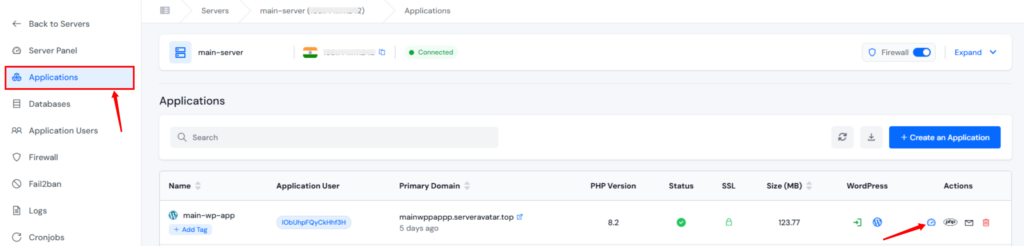
- Log in to your ServerAvatar account and navigate to your server panel by clicking on the server dashboard icon.
- Navigate to the Applications section and click on the application dashboard icon for your WordPress application.
- Navigate to the WP Toolkit section from the left sidebar and go to the Object Cache Pro section. You will see a screen similar to the following:
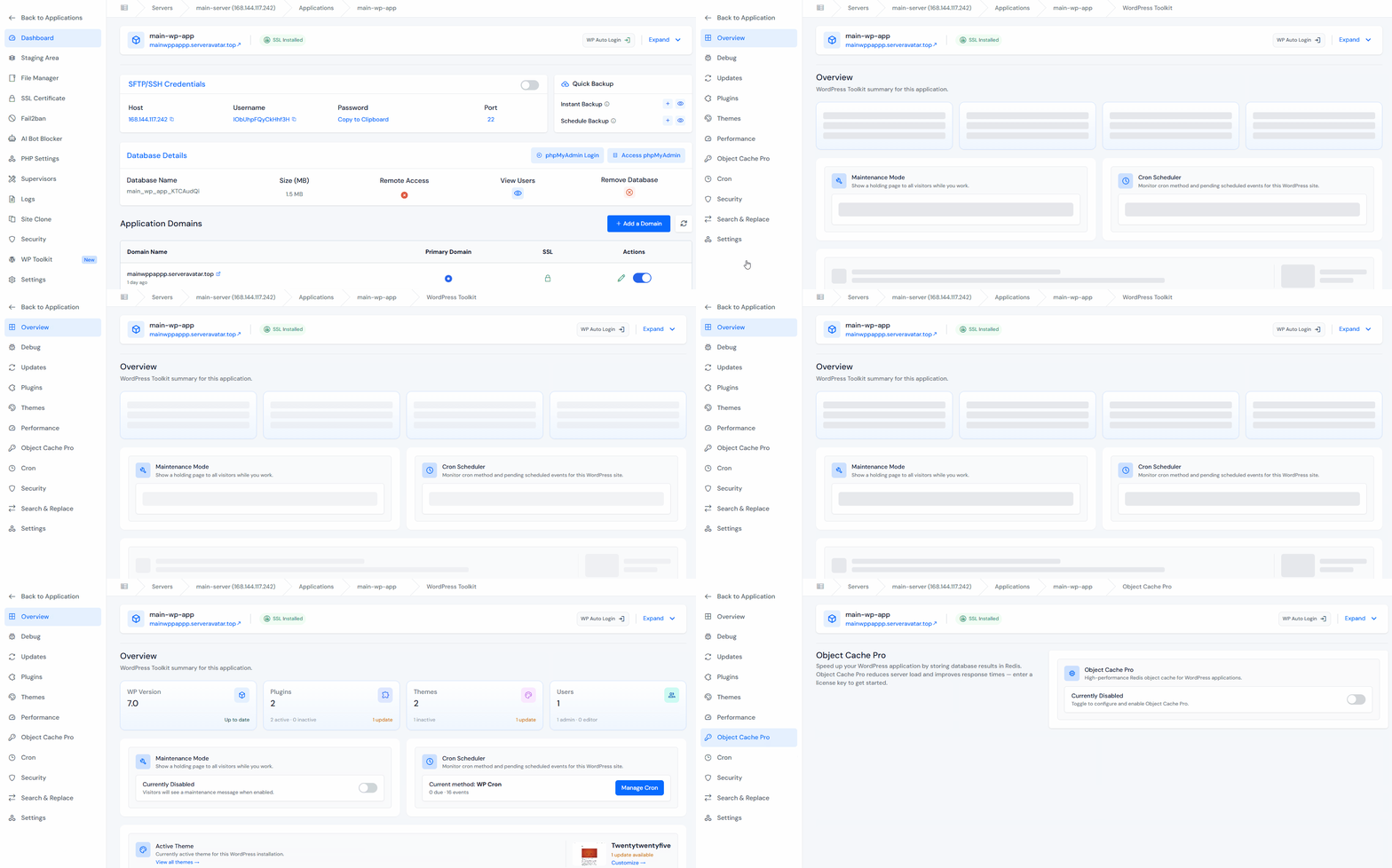
- Turn on the toggle button to enable the Object Cache Pro. This activates Object Cache Pro support for the selected application.
- Enter the valid Object Cache Pro License Key from your Object Cache Pro account, in the given field and click on the Enable button.
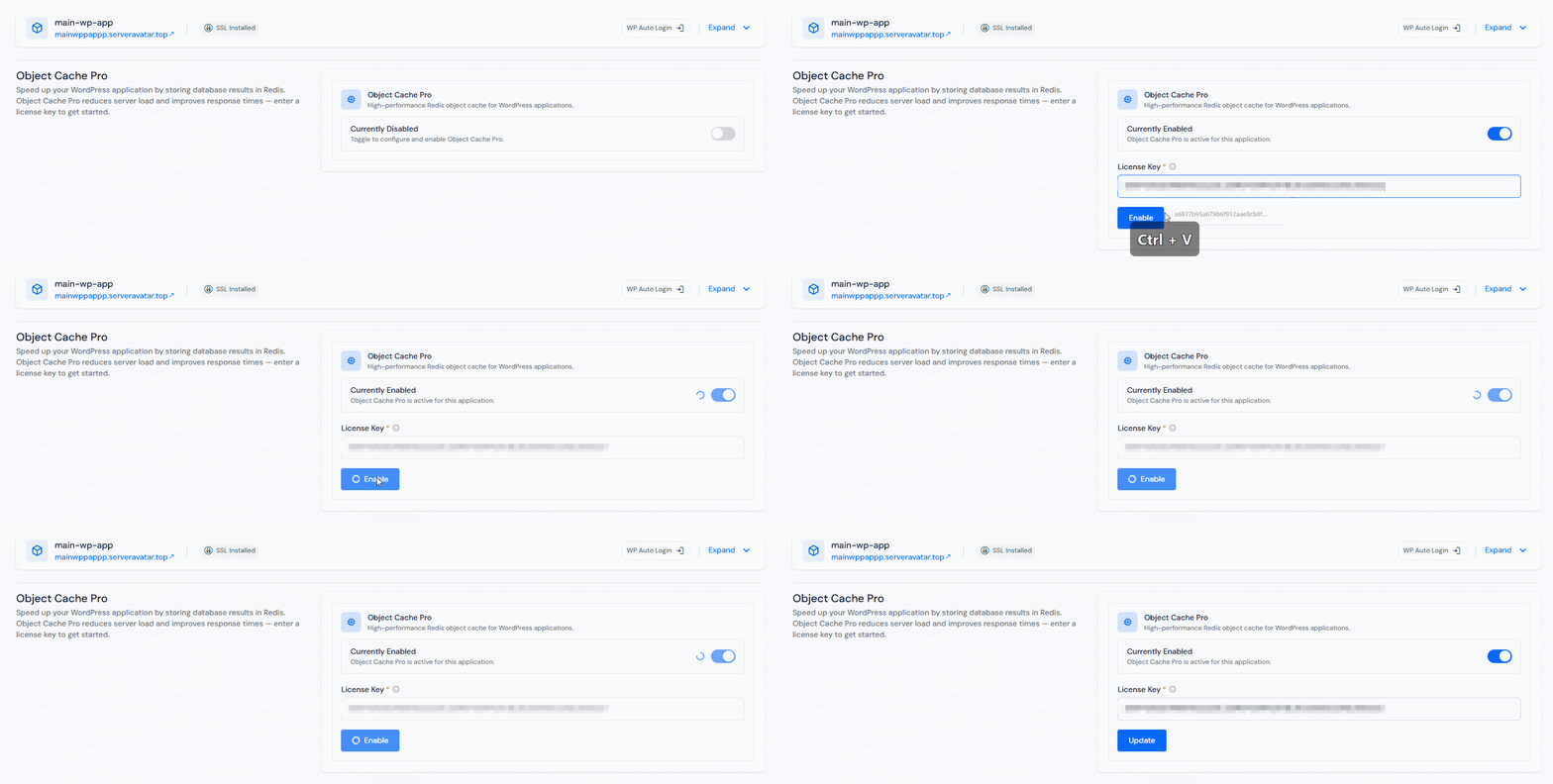
ServerAvatar does not sell or supply Object Cache Pro license key.
- Once enabled, ServerAvatar will configure Object Cache Pro for your WordPress application. The integration process typically takes a few seconds.
- Object Cache Pro will connect to Redis.
- WordPress will begin storing objects in memory.
- Cached queries will start serving faster responses.
- You can verify functionality through:
- WordPress admin
- Object Cache Pro dashboard
- Performance monitoring tools
How to Confirm Object Cache Pro Is Working
After activation, you should verify the cache is functioning correctly. Look for:
- Cache Hits: A growing number of cache hits indicates Redis is serving requests successfully.
- Reduced Database Queries: Monitoring tools should show fewer database requests.
- Improved Response Times: Pages and admin screens should load more quickly.
Benefits of Using Object Cache Pro in WordPress
- Faster WordPress Performance: Frequently accessed database queries are stored in memory, allowing WordPress to respond faster.
- Lower Database Load: MySQL receives fewer repetitive requests, reducing overall server strain.
- Better WooCommerce Performance: WooCommerce generates many database queries for:
- Products
- Inventory
- Orders
- Customer sessions
- Object Cache Pro helps reduce query execution time.
- Improved Scalability: As traffic grows, object caching helps maintain performance without immediately requiring server upgrades.
- Faster Admin Dashboard: Large WordPress sites often experience slow admin areas. Object Cache Pro can improve:
- Post editing
- Product management
- Dashboard navigation
- Plugin operations
When Should You Use Object Cache Pro?
Object Cache Pro is especially useful if your website:
- Receives moderate to high traffic
- Uses WooCommerce
- Has a large database
- Uses membership plugins
- Runs dynamic content
- Experiences high database usage
It may not provide significant benefits for:
- Small brochure websites
- Low-traffic blogs
- Very simple landing pages
Best Practices for Object Cache Pro
- Use Redis on Production Servers: Redis delivers the best performance when installed directly on the server.
- Combine with Page Caching: Object caching and page caching solve different performance problems. Using both provides the best results.
- Monitor Cache Usage: Occasionally review:
- Redis memory usage
- Cache hit ratio
- Server resource utilization
- Keep WordPress Updated: Updated WordPress versions often include performance improvements that work well alongside object caching.
- Test Before and After: Measure performance before enabling Object Cache Pro and compare results afterward. Useful metrics include:
- TTFB (Time to First Byte)
- Query count
- CPU usage
- Response time

Why ServerAvatar Makes Object Cache Pro Easier
Configuring Redis and Object Cache Pro manually often involves:
- SSH access
- Redis installation
- WordPress configuration
- Plugin setup
- Server-level tuning
ServerAvatar simplifies this workflow by integrating Object Cache Pro directly into the WordPress Toolkit.
Instead of managing multiple tools and command-line configurations, you can enable and manage object caching from a single dashboard.
This is especially useful for agencies, developers, and businesses managing multiple WordPress applications.
Key Takeaways
- Object Cache Pro uses Redis to store WordPress objects in memory.
- It reduces repetitive database queries.
- Dynamic websites benefit the most.
- WooCommerce stores often see noticeable improvements.
- ServerAvatar WordPress Toolkit simplifies setup and management.
- Combining page caching and object caching delivers the best performance.
Conclusion
As WordPress websites grow, database performance becomes increasingly important. While page caching remains essential, it doesn’t eliminate the cost of repeated database queries happening behind the scenes.
Object Cache Pro addresses this challenge by storing frequently accessed data in Redis memory, allowing WordPress to retrieve information much faster and reducing pressure on your database server.
With ServerAvatar’s WordPress Toolkit, enabling Object Cache Pro becomes a straightforward process that takes only a few minutes. Once configured, your website can handle dynamic content more efficiently, improve response times, and scale more comfortably as traffic increases.
FAQs
What is Object Cache Pro in WordPress?
Object Cache Pro is a Redis-based object caching solution that stores database query results in memory to improve WordPress performance.
Does Object Cache Pro replace page caching?
No, Object Cache Pro complements page caching by reducing database queries rather than caching full HTML pages.
Is Redis required for Object Cache Pro?
Yes, Redis is the underlying storage engine used by Object Cache Pro.
Can Object Cache Pro improve WooCommerce performance?
Yes, WooCommerce websites often benefit significantly because of their database-heavy operations.
Do I need technical knowledge to enable Object Cache Pro in ServerAvatar?
No, ServerAvatar provides a simple interface where you can activate Object Cache Pro by entering your license key and enabling the feature.
Next Steps
Managing WordPress sites on a VPS becomes much easier when theme updates, server management, SSL, backups, and application controls are available from one dashboard. ServerAvatar helps simplify those everyday tasks without adding extra complexity.
You should also read:
- WordPress Toolkit for WordPress Management in ServerAvatar
- How to Create WordPress Blueprints Easily in ServerAvatar
- How to Update WordPress Core, Plugins, Themes, and Database from One Place
About the Author
Meghna Meghwani is a technical writer focused on Linux, Ubuntu, VPS hosting, server management, WordPress, PHP, Node.js, cloud hosting, and DevOps. She creates beginner-friendly tutorials, practical hosting guides, troubleshooting articles, and server security content designed to help developers and businesses manage applications and servers more efficiently.