

If you have ever configured a website, managed a VPS, or set up a server, you have probably encountered the terms Hostname vs Domain Name. Although hostname and domain name are often mentioned together, they don’t mean the same thing. Understanding Hostname vs Domain Name is essential for managing websites, configuring servers, and troubleshooting DNS-related issues effectively.
This confusion is common because both are used to identify systems on a network, and in many cases they appear together in web addresses. It’s easy to assume they are interchangeable, but understanding the difference becomes important when you’re configuring DNS records, setting up email, installing SSL certificates, or deploying applications.
For example, if you are hosting a website on your own server, you’ll typically assign a hostname to the machine while pointing a registered domain name to its IP address. Knowing which one serves which purpose helps avoid configuration mistakes and makes troubleshooting much easier.
In this guide, you will learn what hostnames and domain names are, how they differ, how they work together, where each is used, and which one matters in different real-world scenarios.
TL;DR
- A hostname identifies a specific device or service on a network.
- A domain name identifies an internet namespace that users can access.
- A hostname can exist without a public domain.
- A domain can contain multiple hostnames.
- Websites commonly use both together, such as “blog.example.com”.
- Understanding the difference helps with DNS management, server administration, email configuration, and website hosting.
Hostname vs Domain Name: Quick Comparison
If you’re short on time, here’s the simplest way to understand the difference between a hostname and a domain name.
While hostnames and domain names often appear together, they solve different problems. A hostname identifies a specific system or service, whereas a domain name provides a memorable internet address that groups related services under one identity.
| Feature | Hostname | Domain Name |
|---|---|---|
| Purpose | Identifies a specific device, server, or service | Identifies a website or internet namespace |
| Scope | Usually local or internal, but can also be public | Globally unique on the internet |
| Registration | No registration required | Must be registered through a domain registrar |
| Uniqueness | Needs to be unique within its network or domain | Must be globally unique |
| Changes | Can usually be changed by the system administrator | Can be changed, but ownership remains with the registered domain |
| DNS Requirement | May or may not require DNS | Relies on DNS for internet access |
| Typical Examples | web01, mail, db-prod, server-east | example.com, mycompany.io, myblog.org |
| Primary Users | System administrators, DevOps engineers, IT teams | Businesses, website owners, developers, individuals |
| Used for Websites | Only as part of a complete address | Yes |
| Can Exist Without the Other? | Yes | Yes |
What Is a Hostname?
A hostname is the name assigned to a specific device, server, virtual machine, or network resource. Instead of identifying a machine by its numerical IP address, people can use a hostname that’s much easier to recognize and remember.
Think of a hostname as the label attached to an individual computer. For instance, imagine a company with several servers:
- Application Server
- Database Server
- Backup Server
- Monitoring Server
Each server needs its own identity, even if they’re all part of the same infrastructure. Instead of referring to them by IP addresses like 192.168.10.25, administrators assign meaningful names such as:
- app-server
- db-server
- backup-node
- monitor-01
These names simplify server management, documentation, monitoring, and troubleshooting. Hostnames are commonly used inside private networks and don’t always need to be publicly accessible.
Where Are Hostnames Used?
You will encounter hostnames in many environments, including:
- Linux servers
- Windows systems
- Cloud virtual machines
- Docker containers
- Kubernetes nodes
- NAS devices
- Routers and firewalls
- Internal enterprise networks
Whenever a new server is created, assigning a descriptive hostname is considered a best practice because it makes infrastructure easier to understand as it grows.
Need to rename a server? Follow our step-by-step guide on How to Change the Hostname on Linux Easily to update your system hostname safely.
Why Hostnames Matter
Although a hostname may seem like a simple label, it plays an important role in daily system administration. A clear naming convention can help administrators:
- Identify servers quickly
- Reduce deployment mistakes
- Simplify monitoring dashboards
- Improve log analysis
- Organize infrastructure across multiple environments
For example, compare these two server names:
“server01” vs. “production-api-us-east”
The second hostname immediately tells you what the server does and where it’s located. Small improvements like this become increasingly valuable as your infrastructure scales from a handful of servers to dozens, or even hundreds.
How to Check Your System Hostname in Linux
If you’re using Linux, you can quickly view your system’s hostname using the command line. This is useful when managing servers, troubleshooting network issues, or verifying your system configuration.
Display the Current Hostname
hostnameThis command prints the hostname currently assigned to your system.
Example output:
web-serverView Detailed Hostname Information
To display additional details, including the static hostname, operating system, kernel version, and hardware information, run:
hostnamectlExample output:
Static hostname: web-server
Operating System: Ubuntu 24.04 LTS
Kernel: Linux 6.x
Architecture: x86-64Display the Fully Qualified Domain Name (FQDN)
If your server is configured with DNS, you can display its Fully Qualified Domain Name (FQDN) using:
hostname -fExample output:
web-server.example.comNote: The
hostname -fcommand works only when your system’s hostname is properly configured in DNS or the/etc/hostsfile.
What Is a Domain Name?
A domain name is the human-friendly address people use to reach websites and internet services. Rather than remembering a server’s IP address, users simply type a recognizable name into their browser. For example:
- example.com
- mybusiness.net
- myportfolio.dev
When someone enters a domain name, the Domain Name System (DNS) translates it into the IP address of the server hosting the website. This lookup happens in the background and usually completes in milliseconds.
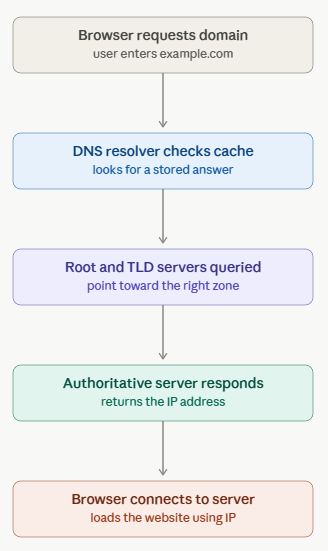
If you’d like to understand what happens behind the scenes during this process, check out our guide on How DNS Works: Step-by-Step Resolution Process, which explains how DNS queries travel from your browser to the correct server.
Unlike a hostname, a domain name isn’t tied to a single machine. Instead, it acts as an internet identity that can point to one or many services depending on how its DNS records are configured. For example, the same domain can direct users to:
- a company website
- an online store
- an email service
- a customer portal
- an API
- a blog
This flexibility makes domain names the foundation of almost every public-facing online service.
Why Domain Names Are Important
Without domain names, every website visitor would need to remember numerical IP addresses, a task that’s both impractical and error-prone.
A domain name also offers benefits beyond accessibility. It helps establish a recognizable online identity, supports professional email addresses, and allows businesses to move websites between hosting providers without changing the address users visit. If you’re still using a free email service for your business, learn why a Professional Domain Email Address improves your brand image, credibility, and customer trust.
Because ownership is managed through domain registrars, a registered domain becomes a unique online asset that can represent a business, personal brand, application, or organization for years.
Hostname vs Domain Name: The Core Difference
At first glance, both seem to identify something on the internet, but they serve different purposes.
- A hostname identifies an individual device or service.
- A domain name identifies an internet namespace that can contain one or many services.
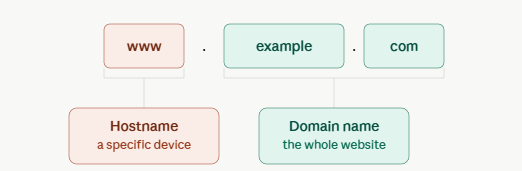
You can think of it this way:
Imagine a corporate office building.
- The building’s street address is like the domain name.
- The individual rooms inside the building are like hostnames.
Visitors first arrive at the building using its address. Once inside, they locate the specific room they need.
Networking works in much the same way:
A domain provides the overall identity, while hostnames distinguish the individual services operating under that domain.
How Hostnames and Domain Names Work Together
The easiest way to understand their relationship is to look at a website URL.
Consider the address:
https://blog.example.comThis address contains multiple parts.
| Part | Meaning |
|---|---|
| https | Protocol |
| blog | Hostname (or subdomain used to identify a service) |
| example.com | Registered domain name |
In this example:
- example.com represents the registered domain.
- blog identifies a particular service running under that domain.
The same domain can host several independent services:
| URL | Purpose |
|---|---|
| www.example.com | Main website |
| blog.example.com | Blog |
| shop.example.com | Online store |
| api.example.com | Backend API |
| mail.example.com | Mail server |
| docs.example.com | Documentation |
Although each service has a different hostname, they all belong to the same domain. This structure keeps services organized while maintaining a consistent brand identity.
If you’re troubleshooting network issues on a Linux server, it can also be helpful to Find Your DNS Server IP Address in Linux to verify that your system is using the correct DNS resolver.
Understanding Fully Qualified Domain Names (FQDN)
One of the concepts that often confuses is the Fully Qualified Domain Name (FQDN). An FQDN specifies the complete location of a host within the DNS hierarchy.
For example:
api.example.comBreaking it down:
- api – Hostname
- example – Second-level domain
- com – Top-level domain (TLD)
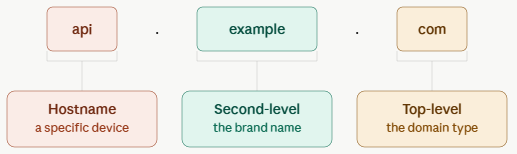
Together, they uniquely identify a single host on the internet. Think of an FQDN as providing the “full address” instead of just the street name. Because it’s complete, DNS can resolve it directly to the correct IP address.
You’ll commonly encounter FQDNs when:
- Configuring web servers
- Generating SSL certificates
- Setting up reverse proxies
- Connecting applications to APIs
- Creating DNS records
- Deploying services in cloud environments
Real-World Examples
Let’s look at a few practical scenarios.
Example 1: Hosting a Business Website
Suppose you register:
myagency.comThis is your domain. You then create:
www.myagency.comto serve your homepage. Later, you launch a blog:
blog.myagency.comand a customer portal:
portal.myagency.comHere:
- myagency.com is the domain.
- www, blog, and portal identify different services hosted under the same domain.
Example 2: Internal Company Network
Many organizations operate private networks that aren’t accessible from the public internet., Servers might have hostnames such as:
finance-server
hr-system
storage-node
backup01Employees can use these names internally without needing a publicly registered domain. This simplifies communication between systems while keeping the infrastructure private.
Example 3: Cloud Infrastructure
Imagine deploying an application on a VPS. You might assign the server a hostname such as:
production-appThen, after configuring DNS, visitors access the application using:
app.company.comInternally, administrators identify the server by its hostname, while customers interact with the domain name. This separation makes server management more organized without affecting the user experience.
Common Misconceptions
Many beginners mix up these terms because they often appear together. Let’s clear up some of the most common misunderstandings.
Misconception 1: A Hostname and Domain Name Are the Same
Not quite. A hostname identifies an individual machine or service, and a domain name identifies an internet namespace.
One complements the other, they don’t replace each other.
Misconception 2: Every Hostname Is Public
False. Many hostnames exist only inside private networks and are never exposed to the internet. Examples include:
- Internal file servers
- Development environments
- Test servers
- Local databases
Misconception 3: A Website Uses Only a Domain Name
Behind every public website is at least one server with its own hostname. Visitors typically interact only with the domain, while administrators manage the underlying systems using hostnames.
Misconception 4: Buying a Domain Includes Hosting
Purchasing a domain simply reserves your chosen web address. To make a website accessible, you’ll also need:
- A hosting provider or VPS
- A web server
- DNS configuration
- Your website files or application
Without hosting, the domain exists but doesn’t serve web content.
Common Mistakes When Using Hostnames and Domain Names
When configuring servers, DNS, or web hosting, it’s easy to confuse hostnames and domain names. Avoiding the following mistakes can save time and prevent common configuration issues.
Assuming a Domain Name Is the Same as a Hostname
A domain name represents your internet identity, while a hostname identifies a specific device or service within that domain. For example, in blog.example.com, example.com is the domain name and blog is the hostname.
Believing That Buying a Domain Includes Web Hosting
A domain registration only secures your website’s address on the internet. To make a website accessible, you still need web hosting or a VPS, a web server such as Apache or Nginx, and properly configured DNS records.
Using Generic Hostnames
Hostnames like server1, server2, or test may seem convenient initially, but they quickly become difficult to manage as your infrastructure grows. Using descriptive names such as web-prod, db-primary, or backup-node makes server administration much easier.
Forgetting to Configure DNS Records
Registering a domain alone does not make a website available online. DNS records such as A, AAAA, or CNAME records must point your domain or hostname to the correct server.
Ignoring the Fully Qualified Domain Name (FQDN)
Many services, including SSL certificates, reverse proxies, mail servers, and enterprise applications, rely on a Fully Qualified Domain Name (FQDN). Using only a hostname where an FQDN is required can lead to connection or certificate errors.
Not Following a Consistent Naming Convention
As your infrastructure expands, inconsistent hostname naming can make monitoring, automation, and troubleshooting more difficult. Adopting a clear naming convention helps teams identify systems quickly and reduces operational errors.
When Should You Use a Hostname?
You’ll typically work with hostnames when you’re managing infrastructure rather than browsing websites. Common situations include:
- Naming Linux servers
- Configuring virtual machines
- Managing Kubernetes clusters
- Setting up Docker containers
- Identifying database servers
- Organizing monitoring systems
- Creating development or staging environments
Choosing descriptive hostnames helps teams quickly identify the purpose of each system, especially in larger environments.

When Should You Use a Domain Name?
Domain names come into play whenever users need to access your services over the internet. Typical use cases include:
- Launching a website
- Creating professional email addresses
- Hosting an API
- Publishing documentation
- Running an online store
- Providing customer portals
- Building a personal portfolio
A well-chosen domain is also valuable for branding, trust, and long-term recognition.
Best Practices
Whether you’re naming servers or registering domains, a few habits can save time later.
For Hostnames
- Use clear, descriptive names.
- Follow a consistent naming convention.
- Avoid generic labels like
server1whenever possible. - Include environment or location if helpful (for example,
prod-api-usorstaging-db). - Keep names concise and easy to recognize.
For Domain Names
- Choose a short, memorable name.
- Prefer well-known TLDs when appropriate.
- Enable domain privacy and registrar security features.
- Renew your domain before it expires.
- Configure DNS records carefully to avoid service interruptions.
Conclusion
Although the terms hostname and domain name are frequently used together, they serve different purposes in networking and web hosting.
A hostname gives an identity to a specific device or service, making systems easier to organize and manage. A domain name, on the other hand, provides a memorable public address that allows users to access websites and online services without remembering numerical IP addresses.
Once you understand how these two concepts fit together, tasks such as configuring DNS, deploying applications, setting up email, and managing servers become much easier. Whether you’re launching your first website or maintaining a growing infrastructure, knowing the role of each helps you make better decisions and troubleshoot with confidence.
FAQs
Is a hostname the same as a domain name?
No, A hostname identifies a specific device or service within a network, while a domain name identifies an internet namespace. They often work together, for example, in mail.example.com, mail is the hostname, and example.com is the domain name.
Can I have a hostname without a domain name?
Yes, Many private networks use hostnames without owning or registering a public domain name. For instance, an internal development server can simply be named dev-server and still be accessible within the local network.
Can a domain name exist without hosting?
Absolutely, Registering a domain reserves the web address, but it doesn’t automatically host a website. You can purchase a domain today and connect it to a hosting server later.
What is the difference between a hostname and a subdomain?
A subdomain is a DNS entry created under a registered domain, such as blog.example.com. In many web hosting scenarios, the subdomain also functions as the hostname for a particular service. However, the term “hostname” has a broader meaning, as it refers to any named device or service on a network, whether public or private.
Is www a hostname?
Yes. Technically, www is a hostname (and commonly implemented as a subdomain) under a registered domain. While many websites can be accessed with or without www, they can be configured differently depending on DNS and web server settings.
Why do servers need hostnames?
Hostnames make infrastructure easier to manage. Instead of remembering IP addresses, administrators can identify servers by descriptive names, simplifying monitoring, troubleshooting, automation, and documentation.
Key Takeaways
- A hostname identifies an individual device, server, or network service.
- A domain name identifies your presence on the internet and is registered through a domain registrar.
- Multiple hostnames can exist under a single domain.
- DNS connects hostnames and domain names to their corresponding IP addresses.
- Understanding the distinction helps when configuring servers, DNS records, SSL certificates, email services, and web applications.
- Using descriptive hostnames and a memorable domain improves infrastructure management and user experience.
Simplify Server and Website Management with ServerAvatar
Understanding networking concepts like hostnames and domain names is only one part of managing a server. You’ll also need to configure web servers, install SSL certificates, manage applications, monitor resources, and keep your infrastructure secure.
If you prefer spending less time on repetitive server administration and more time building your projects, ServerAvatar provides a straightforward way to manage servers and applications from a single dashboard. You can deploy PHP applications, WordPress websites, Node.js apps, Git applications, and other workloads while handling common server management tasks through an intuitive interface, without losing the flexibility of your preferred cloud provider.
About the Author
Meghna Meghwani is a technical writer focused on Linux, Ubuntu, VPS hosting, server management, WordPress, PHP, Node.js, cloud hosting, and DevOps. She creates beginner-friendly tutorials, practical hosting guides, troubleshooting articles, and server security content designed to help developers and businesses manage applications and servers more efficiently.