

When I’m consider Redis vs Memcached, I start with question that has little to do with speed: “what happens to application if cache is empty tomorrow morning?” If database can rebuild everything without struggle, I have option to choose based on simplicity and performance. If restart wipes out data, application depends on, so need to rethink what I’m putting there.
That distinction matters whether you run WordPress site, manage WooCommerce stores for clients, or build Laravel app. I will walk through what each backend store, how it behaves when memory fills, and what I would measure before switching.
TL;DR
- Choose Redis when your application benefit from native data structure, configurable eviction, or optional disk persistence. It’s also where I would start for new WordPress setup with supported Redis integration.
- Choose Memcached for disposable key-value caching when your client support it and you can tolerate rebuilding cache.
- Compare whole request. I would look at application latency, database query time, cache hits, and eviction together. A quick cache lookup only tells about one part of request.
What Redis and Memcached actually store
How cache hit saves work
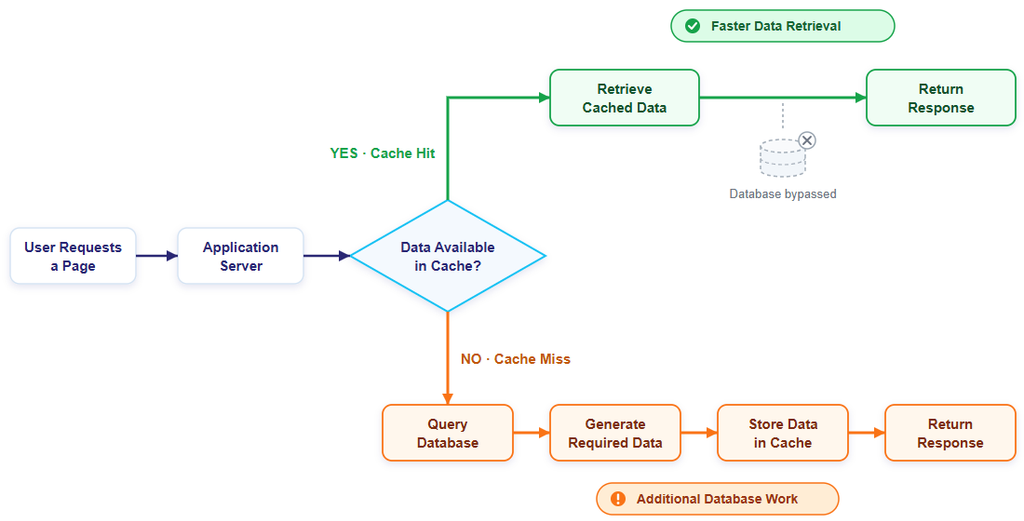
Imagine product page that needs category list. Application look for list under cache key. On hit, it read saved value. On miss, it queries database, builds list, and save it for later request. Time to live, or TTL, tells cache when entry should expire. If categories can change while key is still valid, I would also invalidate key when underlying list change. Otherwise, quick response could still show stale data.
Where Redis gives more options
Redis stores strings and provides native structures such as hash, set, sorted set, and stream. Redis supports several built-in data structures, including strings, hashes, lists, sets, sorted sets, and streams, allowing applications to perform operations directly on stored data instead of handling everything as serialized key-value objects
Where Memcached keeps things simple
Memcached fits when you have value you can rebuild and want to fetch by key. Think of API response that takes several database queries to assemble. I can store serialized response and reuse it for short period. If entry expires or gets evicted, next request regenerates it. I’d keep large response size in mind too. A workload made up of thousand of small object can behave differently from one with few bulky responses.
Key differences
| Feature | Redis | Memcached |
| Data model | Strings and native structures such as hash and sorted set | Key-value item that application can serialize |
| Memory pressure | Configurable eviction policy, including recency- and frequency-based option | Slab allocation by item size with LRU-based eviction within slab class |
| Restart behavior | Optional RDB snapshot or append-only file persistence | Typically start with an empty cache. Optional warm restart is available for compatible clean restart. |
| Concurrency | Command execution is generally centered on main thread, with threading for some I/O and background work | Multiple worker thread handle client request |
| Scaling | Redis Cluster shards keys across nodes and can use replicas | Independent cache nodes are commonly selected by client or proxy |
| Typical fit | Object caching and workloads that use richer Redis operations | Rebuildable values accessed primarily by key |
Memory Limits, Expiration, and Eviction
Memory management plays important role in maintaining cache performance. Although expiration and eviction both remove cached data, they work differently:
- Expiration: Occurs when cached key reaches its configured Time-to-Live (TTL).
- Eviction: Happens when cache runs out of available memory and needs to free up space.
- Short TTL: If frequently unchanged data expires too quickly, increasing cache memory may not solve problem.
- Frequent evictions: If frequently accessed objects are repeatedly removed, consider increasing memory allocation, reviewing object size, or adjusting the eviction policy.
Redis and Memcached Memory Management
Both Redis and Memcached provide different approaches to handling memory pressure.
Redis:
- Configure maxmemory directive to cap the amount of memory Redis is allowed to use.
- Select eviction policy based on your application’s caching requirement.
Redis provides multiple eviction policies, including LRU, LFU, random, and TTL-based approaches, allowing administrators to decide which keys should be removed when configured memory limit is reached.
- “allkeys-lru” is useful starting point when recently accessed keys are more likely to be requested again.
- With noeviction policy, Redis reject write operation that would exceed configured memory limit instead of removing existing key.
Memcached:
- Organize store item into slab class base on their size.
- Evict older item within relevant slab class when additional memory is required.
- Monitor eviction by item size to identify memory pressure that may not be obvious from overall statistics.
Managing Redis Memory Through ServerAvatar
For servers managed through ServerAvatar, Redis memory settings can be adjusted from:
Server Dashboard >> Settings >> Security >> Redis Settings
Important settings to review include:
- Max Memory: Define memory limit allocated to Redis.
- Maxmemory Policy: Determines how Redis handle memory usage when the configured limit is reach.
- Redis Password: Allows you to configure or update Redis authentication credentials.
Before increasing Redis memory limit, ensure sufficient RAM remain available for PHP process, database, and operating system.
After making change, monitor Redis eviction and database load to understand whether updated configuration improves performance.
When changing Redis password, also update credential in application that connect to Redis and verify that all connections are working correctly.
Persistence and Restart Behavior
Cache persistence determine whether stored data survive Redis restart. Redis provide multiple persistence option, while Memcached generally designed to operate as temporary storage layer.
Redis Persistence Options
Redis support following approach:
- RDB (Redis Database): Create point-in-time snapshot of dataset
- AOF (Append Only File): Record write operation so changes can be reconstructed after restart
- No Persistence: Disable disk-based persistence when cached data can regenerated from original data source
Redis allows administrators to configure snapshot-based RDB persistence, Append Only File (AOF) logging, or combination of both, depending on application’s recovery and data durability requirements.
Choose appropriate option based on:
- How important it is to retain cached data after restart
- Acceptable amount of data loss
- Available disk space and storage performance
- Additional resource overhead associated with persistence
Memcached Restart Behavior
- Memcached is commonly deploy as temporary cache where application can rebuild data when needed.
- Its warm-restart feature can preserve cache entries across compatible clean restarts when properly configured.
According to Memcached’s documentation, warm restart is supported in compatible versions and configurations, but changes to certain startup parameters or an incompatible restart can still result in empty cache.
- Application should still be tested to ensure they can handle empty cache without affecting normal operation.
Why Cold Cache Performance Matters
Cold cache occur when cached entries are unavailable, forcing application to retrieve required information from original data source.
This can create additional database load, particularly when multiple request attempt to rebuild same cached object simultaneously.
For example:
- Popular product page require several database queries to generate its content.
- When cached value expires or disappears, incoming request may all trigger same database operation.
- This increase query volume and can affect application response time.
- Monitoring database activity during cache warm-up helps identify potential performance bottleneck.
Concurrency, Scaling, and Shared Workloads
Redis and Memcached handle concurrent request and horizontal scaling differently. Understanding these difference help when selecting right caching architecture for application with growing traffic.
Memcached Concurrency and Scaling
- Memcached use multiple worker thread to process client request concurrently.
- In traditional Memcached deployment, the client library typically determine which server store particular key.
- When node become unavailable, request for key assigned to that node may result in cache misses.
- Application should have suitable fallback mechanism to retrieve missing data from original source.
Redis Cluster and Scaling
- Redis Cluster distribute key across multiple hash slot.
- It support data distribution across multiple node to handle larger workload.
- Replica can help provide failover when primary node become unavailable.
- Before deployment, verify your application and Redis client support selected cluster configuration.
- Test node failure and recovery scenario to ensure application handles connectivity change correctly.
Managing Multiple Workloads
When Redis is use for more than caching, such as storing application session or managing queue, separating workload can help improve resource management.
Consider these practices:
- Separate Redis instances: Use dedicated instance for caching, queue, and session storage when their operational requirement differ.
- Configure memory independently: Allocate appropriate memory limit based on each workload.
- Choose suitable persistence: Session data and queue data may require different persistence and recovery setting compared with disposable cache entries.
- Use key prefixes: Organize key with different prefix to make application data easier to identify and manage. However, remember that prefix do not provide separate memory limit.
- Restrict network access: Expose Redis only through private interface or network accessible to authorized application.
- Review access controls: Configure authentication and other security measures to protect Redis from unauthorized access.
A well-planned Redis or Memcached setup should account for memory usage, persistence requirement, concurrency, scalability, and network security rather than focusing on cache speed alone.
Redis vs Memcached performance
A benchmark may show you how many cache command backend can answer per second. WooCommerce shopper feel how long it takes product filter to return. That include network trip, time PHP spend decoding value, query that still hit database, and everything else request does. I’d use backend benchmark to understand limit and application test to make decision.
Run same workload on both backends
- Pick representative request. I’d start with public product page, common product filter, and signed-in account page. I’d record which public response come from full-page cache. That tells me which requests actually exercise object cache.
- Start with baseline. Measure existing setup on staging. Then run both candidate with same application data, similar memory budget, and same request mix and concurrency. Record version, client setting, test duration, and whether Redis persistence is enabled.
- Record warm run and cold run. Let each backend warm up before measuring steady traffic. Start separately with empty cache on staging and watch how long it takes database workload to settle.
- Compare same metric. Capture requests per second, median and p95 response time, hit and miss count, eviction, memory use, and database query time. The p95 is response time that 95% of request met or beat. On shared cache, I’d also check whether my plugin exposes site-level data because instance-wide counters blend traffic from multiple apps.
Read the numbers together
If database query time fall while p95 stay flat, I’d look at rest of request. PHP rendering or a call to external service may still dominate it. If eviction rise and database traffic rebound, I’d check whether frequently reused entries fit in memory and whether TTLs or invalidation are generating misses. That gives me concrete issue to investigate before I reach for different backend.
Understanding why cache misses occur is equally important when optimizing application, as issues such as short TTL, memory limitation, and inconsistent cache key can prevent frequently requested data from being reused
Which cache Should You choose for WordPress, WooCommerce, and Laravel?
Right caching solution depend on your application architecture, workload, and performance requirement. Redis and Memcached can both improve application performance, but certain feature make one more suitable than other.
WordPress and WooCommerce
For new WordPress or WooCommerce installation, Redis is good starting option when hosting environment and caching plugin support it.
If you want to understand how Redis can be configured to cache complete WordPress pages, you can also explore process of setting up Redis full-page caching with compatible caching plugin.
To speed up performance, WordPress relies on object caching, which temporarily saves frequently requested database information. By default, this cache generally lasts only for duration of single request. Connecting persistent object cache backend allows eligible cached objects to be reused across multiple request.
Why consider Redis for WordPress and WooCommerce?
- Persistent object caching: Reuses eligible cached objects across different page request.
- Reduced database queries: Help avoid repeatedly fetching same information from database.
- Improved dynamic page performance: Can benefit product search, logged-in user page, and other request that require PHP processing.
- Better resource utilization: Reduces unnecessary database operations for frequently accessed objects.
However, object caching does not improve every page equally. Page already delivered as complete HTML through page cache may experience little additional benefit.
WordPress users who want to implement persistent object caching can follow our guide to installing and configuring the Redis Object Cache plugin.
When should you continue using Memcached?
Memcached is still practical option for existing WordPress installation where it is already configured and performing reliably.
Consider switching only when there is clear technical reason, such as:
- Better compatibility with your preferred caching plugin.
- Specific memory eviction requirement.
- Need for Redis feature that Memcached does not provide.
- Infrastructure change that make Redis easier to maintain.
Before changing caching backend on live WordPress or WooCommerce website, test new configuration in staging environment. Verify plugin compatibility, cache behavior, and important website functionality before deploying it to production.
Laravel and Custom PHP Applications
For Laravel and other custom PHP applications, choice between Redis and Memcached should depend on application’s caching requirement and infrastructure your development team can maintain.
Choose Memcached when:
- Application mainly store temporary data.
- You should cache the results of database queries that run repeatedly.
- API response are stored for faster retrieval.
- Simple and lightweight caching backend meets application’s requirement.
Choose Redis when:
- Your software needs complex data structures, like sorted sets, to function properly.
- Redis Stream are part of application architecture.
- Project use Redis-backed queue.
- Additional Redis capability are needed beyond basic key-value caching.
One important consideration is that not all cached data has same importance.
For example:
- Cached product response can usually be regenerated from database.
- Queued background job may represent important application task.
- Losing session information can affect active user experience.
Therefore, configure persistence, memory limit, and recovery strategy according to purpose of each workload rather than applying same caching policy everywhere.

How to check whether cache is working effectively
Simply setting up Redis or Memcached won’t instantly make your site faster. After configuration, verify that application is connected to correct backend and that cached data is actually being reused.
1. Check WordPress Object Cache Configuration
For WordPress websites, begin by reviewing caching plugin’s diagnostics and connection information. Important checks include:
- Backend connection: Confirm that plugin successfully connects to Redis or Memcached.
- Object cache drop-in: Verify that expected “wp-content/object-cache.php” file is present and active.
- Cache activity: Check whether plugin report successful cache operation and recorded hits.
- Database selection: If multiple website share Redis instance, confirm that each website use intended Redis database.
- Key prefixes: Use appropriate key prefix to keep cached object from different website distinguishable.
2. Monitor Cache Hits and Misses
Once backend connection is confirmed, test request that actively use WordPress object caching. For Redis, following command can help inspect cache statistics:
redis-cli INFO statsRedis INFO command provides server statistic covering memory usage, persistence, replication, CPU activity, and general cache operation, making it useful for investigating cache performance
Pay attention to below metrics:
- keyspace_hits: Indicate how often Redis successfully retrieve requested key.
- keyspace_misses: Show how often requested key are not available in the cache.
- evicted_keys: Reports number of key removed to make room for other data.
Compare values before and after testing same application request to understand how cache is behaving.
If multiple website share one Redis instance, use application-level or plugin-level metrics whenever possible. These provide better visibility into cache activity of individual website.
3. Measure Database Load and Application Performance
Cache statistics alone do not tell complete story. Main objective is to reduce unnecessary database operation and improve application response time.
After enabling caching, evaluate following:
- Check whether repeated request generate fewer database query
- Compare application response time before and after enabling cache
- Monitor database CPU and resource utilization
- Review cache miss and eviction activity
- Test important dynamic page, including product search and logged-in page
- Verify that application data remain accurate after update
4. Confirm Overall Performance Improvement
Successful caching implementation should provide measurable benefits rather than simply showing that Redis or Memcached is connected.
For example, if repeated product request result in fewer database queries and improved response times, caching configuration is doing its intended job.
Best approach is to monitor cache statistic alongside database activity and application performance. This help identify whether additional configuration change are necessary or whether current setup is already delivering expected results.
Key Takeaways
- Redis is more flexible option. It support native data structure, configurable eviction policy, and optional disk persistence.
- Memcached is good fit for simple caching. It works well for values your application can rebuild, such as query results and API responses.
- Plan for empty cache. Restart or spike in evictions can send more requests to database. Evaluate how well your app performs under that increased traffic.
- Measure performance where it matters. Compare application response times, database query time, cache hits, and evictions under representative traffic.
- For WordPress and WooCommerce, test dynamic request. Product search or signed-in account page can show whether object caching reduce database work.
Conclusion
Start with Redis for new WordPress or WooCommerce site when host and plugin support it. For Laravel application that only caches query results or API responses, comfortable using Memcached. If existing setup is reliable and already reducing database load, keep it until have specific reason to switch.
Before making decision, Look for fewer database queries or less time spent on them, alongside faster responses. If you manage your server through ServerAvatar, you can review Max Memory and Maxmemory Policy in the panel, then check your WordPress plugin diagnostics to confirm that cache hits are being recorded.
FAQs
Is Redis faster than Memcached?
Either can be faster under particular workload. Value size, concurrency, network latency, and client can all change result. I would choose based on application response time and database load under representative traffic.
Can Redis or Memcached retain cached data after restart?
Redis can reload data when RDB or AOF persistence is enabled. Memcached can preserve cache content across compatible clean restart with its optional warm-restart feature. For either backend, I would check how app handle empty cache.
Which uses less memory, Redis or Memcached?
It depend on size of your key and value, how application serializes them, and how each backend allocates memory. I would run both with same representative data and see how many useful entries fit before evictions increase.
Which is better for WordPress or WooCommerce?
Redis is starting point for fresh installation with supported plugin. Existing Memcached integration can work well if it lowers database work and stays reliable under traffic. For WooCommerce, I would measure dynamic request where WordPress actually runs.
How do I tell if cache is working?
Confirm connection and then repeat request that can reuse cached value. Look for new cache hits and less work in database. For WordPress site, also check that expected object-cache drop-in is active.
About the author
Meghna Meghwani is a technical writer focused on Linux, Ubuntu, VPS hosting, server management, WordPress, PHP, Node.js, cloud hosting, and DevOps. She creates beginner-friendly tutorials, practical hosting guides, troubleshooting articles, and server security content designed to help developers and businesses manage applications and servers more efficiently.