

If you’re planning to host a website, app, or side project on AWS, chances are you have stumbled upon two popular options: AWS Lightsail vs EC2. And then comes the confusion. Both promise power, scalability, and reliability, but which one actually fits your needs?
One is simple, predictable, and quick to move into. The other gives you endless freedom, but also more responsibility. In this guide, I will explain everything simply so you can confidently decide between AWS Lightsail vs EC2, without feeling overwhelmed.
What Is AWS Lightsail?
AWS Lightsail is Amazon’s simplified cloud platform designed for beginners and small projects. It bundles everything you need, such as compute, storage, networking, and a fixed monthly price, into one neat package.
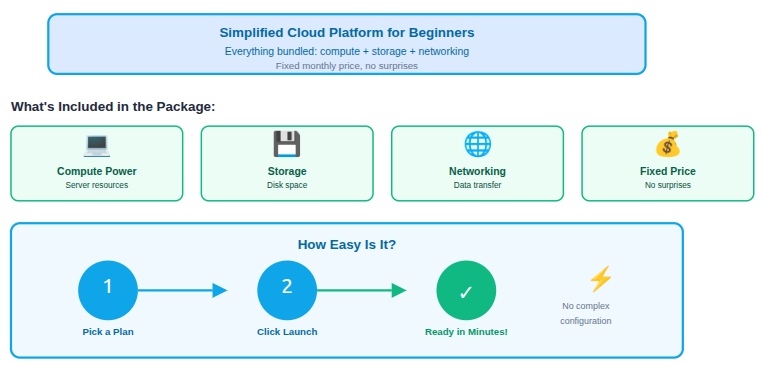
You don’t need to worry about configuring dozens of options. Instead, you pick a plan, click launch, and your server is ready in minutes.
Key highlights of AWS Lightsail
AWS Lightsail is designed to make cloud hosting simple and approachable, especially for beginners and small projects. It removes much of the technical complexity so you can focus on launching and running your application quickly.
- Fixed monthly pricing: You pay a predictable flat fee each month, which makes budgeting easy and avoids surprise bills.
- Simple dashboard: The interface is clean and easy to navigate, allowing you to manage servers without deep technical knowledge.
- Pre-configured blueprints: Ready-made setups like WordPress, Node.js, and LAMP help you launch applications in just a few clicks.
- Minimal cloud knowledge required: You don’t need to understand advanced AWS concepts to get started and keep things running.
Lightsail is perfect if you just want things to work without diving deep into cloud architecture.
What Is Amazon EC2?
Amazon EC2 (Amazon Elastic Compute Cloud) is AWS flagship compute service. It gives you raw power and total control over your virtual servers.
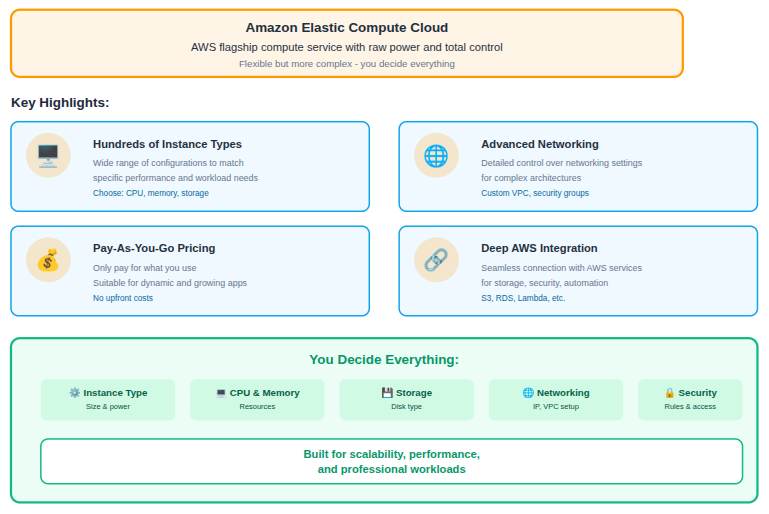
With EC2, you decide everything: instance type, CPU, memory, storage, networking, and security rules. It’s incredibly flexible, but also more complex.
Key highlights of Amazon EC2
Amazon EC2 offers powerful and flexible computing options for users who need full control over their infrastructure. It is built for scalability, customization, and handling complex workloads.
- Hundreds of instance types: You can choose from a wide range of configurations to match specific performance and workload needs.
- Advanced networking: EC2 allows detailed control over networking settings for more complex architectures.
- Pay-as-you-go pricing: You only pay for what you use, making it suitable for dynamic and growing applications.
- Deep AWS service integration: EC2 works seamlessly with other AWS services for storage, security, and automation.
EC2 is built for scalability, performance, and professional workloads.
Core Difference Between Lightsail and EC2
The biggest difference comes down to simplicity vs flexibility.
- AWS Lightsail hides complexity and focuses on ease.
- Amazon EC2 exposes everything and lets you customize it all.
If Lightsail is like driving an automatic car, EC2 is a manual sports car. Both get you places, but the experience is very different.
1. Ease of Use and Learning Curve
AWS Lightsail is beginner-friendly. The interface is clean, actions are guided, and common tasks like backups and static IPs are straightforward.
Amazon EC2 has a steeper learning curve because it exposes you to many core AWS components. Understanding these elements is essential for managing and securing EC2 instances properly.
- VPCs: Virtual Private Clouds let you create isolated network environments for better control and security.
- Security groups: These act as virtual firewalls that control incoming and outgoing traffic to your instances.
- Key pairs: Key pairs are used for secure login access to your EC2 instances instead of passwords.
- Load balancers: Load balancers distribute traffic across multiple instances to improve availability and reliability.
If you’re new to cloud hosting, Lightsail feels far less intimidating.
2. Pricing and Cost Transparency
AWS Lightsail pricing is predictable. You pay a fixed monthly fee that includes bandwidth, storage, and compute.
Amazon EC2 pricing is flexible but complex. Costs vary by:
- Instance hours: Charges are based on how long your instances are running.
- Storage usage: Costs depend on the type and amount of storage attached to your instances.
- Data transfer: Data moving in and out of AWS can add to your overall bill.
- Additional services: Features like load balancers and monitoring tools increase total costs.
If you like knowing your bill upfront, Lightsail wins. If you want cost optimization at scale, EC2 offers more control.
3. Performance and Scalability
AWS Lightsail is suitable for small to medium workloads where traffic and resource demands are predictable. However, it has defined limits that may restrict long-term growth.
- Lightsail limitations: It performs well for basic projects but is not ideal for heavy or rapidly growing workloads.
Amazon EC2 is built to handle large-scale applications and sudden demand changes with ease.
- Auto-scale instances: Automatically adds or removes servers based on traffic levels.
- Powerful CPUs and GPUs: Supports high-performance computing for demanding applications.
- Massive traffic spikes: Handles sudden increases in visitors without downtime.
For long-term growth and high performance, EC2 is the stronger option.
4. Networking and Customization
AWS Lightsail focuses on simplicity, offering basic networking features that are easy to manage. This approach works well for straightforward hosting needs.
- Basic firewall rules: Simple security settings help protect your server without complex configuration.
- Static IPs: Provides a fixed IP address for consistent access to your application.
Amazon EC2 provides advanced networking options for users who need greater control and flexibility.
- Custom VPCs: Allows full control over network design and isolation.
- Multiple subnets: Enables separation of resources across different network layers.
- Load balancers: Improve performance and availability by spreading traffic evenly.
- Private networking: Secure communication between services without exposing them to the public internet.
If you need fine-grained control, EC2 is unmatched.
5. Security and Control
Both services are secure, but EC2 offers deeper control.
AWS Lightsail handles many security defaults for you, which is great for beginners.
Amazon EC2 lets you customize everything, from IAM roles to network isolation, making it ideal for compliance-heavy or enterprise projects.
6. Backup & Disaster Recovery
Backup and disaster recovery play a critical role in protecting your data from accidental deletion, system failures, or unexpected outages. While both AWS Lightsail and EC2 offer backup options, the level of control and flexibility differs significantly.
AWS Lightsail provides a simple snapshot-based backup system that allows you to manually or automatically create backups of your instance. These snapshots are easy to manage and restore, making them suitable for small projects that need basic protection.
Amazon EC2 offers advanced disaster recovery options using EBS snapshots, AMIs, and automated backup workflows. This makes EC2 a better choice for applications that require high availability, data redundancy, and complex recovery strategies.
7. Monitoring & Management Tools
Monitoring helps you understand how your server is performing and identify issues before they affect users. The depth of monitoring available is one of the key differences between Lightsail and EC2.
AWS Lightsail includes built-in basic monitoring for metrics like CPU usage, memory, and network traffic. These simple insights are usually enough for small websites and personal projects.
Amazon EC2 integrates deeply with AWS CloudWatch, allowing detailed monitoring, custom alerts, logs, and automated responses. This makes EC2 more suitable for production environments where performance tracking and proactive management are essential.
8. Traffic & Bandwidth Limits
Understanding traffic and bandwidth limits is important when choosing a hosting solution, especially if your website expects growth. Lightsail and EC2 handle data transfer in very different ways.
AWS Lightsail includes a fixed amount of data transfer with each plan. This makes costs predictable, but exceeding the limit can result in additional charges or performance considerations.
Amazon EC2 charges separately for data transfer based on usage. While this provides more flexibility for high-traffic applications, it also requires careful monitoring to avoid unexpected costs.
9. Operating System & Software Flexibility
The ability to choose operating systems and software configurations can significantly impact how much control you have over your server environment.
AWS Lightsail offers a limited selection of operating systems and pre-configured application blueprints. This approach simplifies setup but restricts customization.
Amazon EC2 allows complete freedom to choose operating systems, install custom software, and configure the server at a low level. This makes EC2 ideal for advanced users who need full control over their environment.
10. Ideal Use Cases
AWS Lightsail is best for:
AWS Lightsail is ideal for projects that need quick deployment without complex server management. It works best when simplicity, speed, and predictable costs are more important than deep customization.
- Personal websites: A reliable and easy option for hosting portfolios, resumes, or hobby projects.
- WordPress blogs: Perfect for bloggers who want fast setup and smooth performance without technical hassle.
- Small business sites: Supports business websites that need stability without advanced infrastructure.
- MVPs and prototypes: Allows rapid testing of ideas before investing in more complex cloud setups.
- Developers who want simplicity: Ideal for developers who prefer focusing on code rather than server configuration.
If your project is small and speed matters, Lightsail is a great start.
Amazon EC2 is best for:
Amazon EC2 is designed for projects that require scalability, flexibility, and advanced configuration. It is a strong choice for long-term and high-demand workloads.
- Large-scale applications: Supports complex systems with heavy processing needs.
- High-traffic websites: Handles large volumes of users and requests efficiently.
- SaaS platforms: Ideal for subscription-based applications that grow over time.
- Custom architectures: Allows complete freedom to design unique infrastructure setups.
- Enterprise workloads: Meets the reliability and performance needs of large organizations.
If flexibility and growth are priorities, EC2 is the way to go.

Lightsail vs EC2: Feature Comparison
| Feature | AWS Lightsail | Amazon EC2 |
| Ease of Use | Very beginner-friendly with a simple interface | Requires AWS knowledge and technical setup |
| Pricing Model | Fixed monthly pricing | Pay-as-you-go with variable costs |
| Scalability | Limited scalability | Highly scalable with auto-scaling |
| Performance Options | Suitable for small to medium workloads | Supports high-performance CPUs and GPUs |
| Networking | Basic firewall and static IPs | Advanced VPCs, subnets, and load balancers |
| Backup Options | Simple snapshot-based backups | Advanced snapshots, AMIs, and automation |
| Monitoring | Basic built-in metrics | Deep monitoring with CloudWatch |
| Traffic Handling | Fixed bandwidth limits | Flexible, usage-based data transfer |
| OS & Software Control | Limited OS and blueprint choices | Full OS and software customization |
| Best For | Beginners, blogs, small websites | Large apps, SaaS, enterprise workloads |
Which One Should You Choose?
Choosing between AWS Lightsail and EC2 depends on your experience level and project requirements. Both are powerful, but both have different purposes.
Choose Lightsail if:
- You want simplicity: You prefer an easy setup without complex configurations.
- You’re new to AWS: You want to learn cloud hosting without feeling overwhelmed.
- You need predictable pricing: You want clear monthly costs with no surprises.
Choose EC2 if:
- You need full control: You want to customize every part of your server environment.
- You expect rapid growth: Your application may scale quickly over time.
- You’re building complex systems: You require advanced networking and integrations.
There’s no wrong answer, only the right tool for your specific needs.
How ServerAvatar Helps You Manage these instances easily?
What is ServerAvatar?
ServerAvatar is a platform to simplify the hosting and management of servers and applications. It simplifies process of deploying and managing PHP and Node.js based web applications on servers.
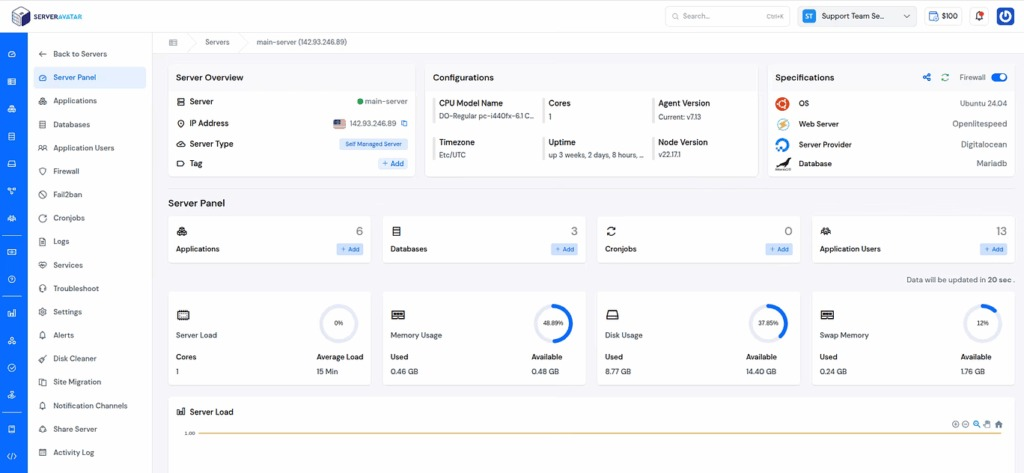
Managing servers often requires handling multiple tools, dashboards, and configurations, especially when using Amazon EC2. Tasks like setting up applications, monitoring performance, securing the server, and creating backups can quickly become time-consuming and complex.
ServerAvatar simplifies server management by bringing essential operations into a single, easy-to-use dashboard. Instead of managing everything manually, users can perform common tasks such as deploying applications, managing databases, monitoring server health, and handling security settings without relying heavily on the command line.
For users running EC2 instances, ServerAvatar reduces the operational workload by automating routine server management tasks. This allows developers and businesses to focus more on building and scaling their applications rather than maintaining infrastructure.
ServerAvatar also supports both managed and self-managed servers, giving users the flexibility to choose how much control they want.
You can easily deploy your AWS Lightsail or Amazon EC2 servers easily with the self-managed server feature. Additionally, you can easily integrate your Amazon Lightsail account with ServerAvatar.
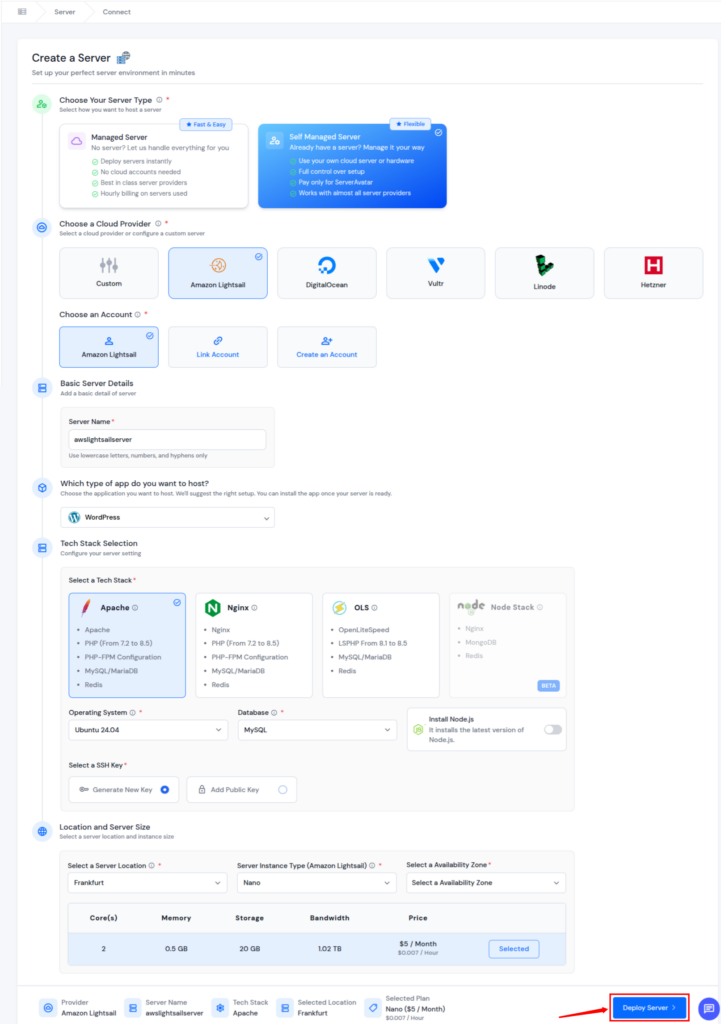
You can directly integrate your AWS Lightsail account to ServerAvatar and then create a server, or you can use the custom method to deploy your AWS Lightsail, Amazon EC2, or any custom server from any cloud provider. ServerAvatar makes the process more organized and easier to maintain.
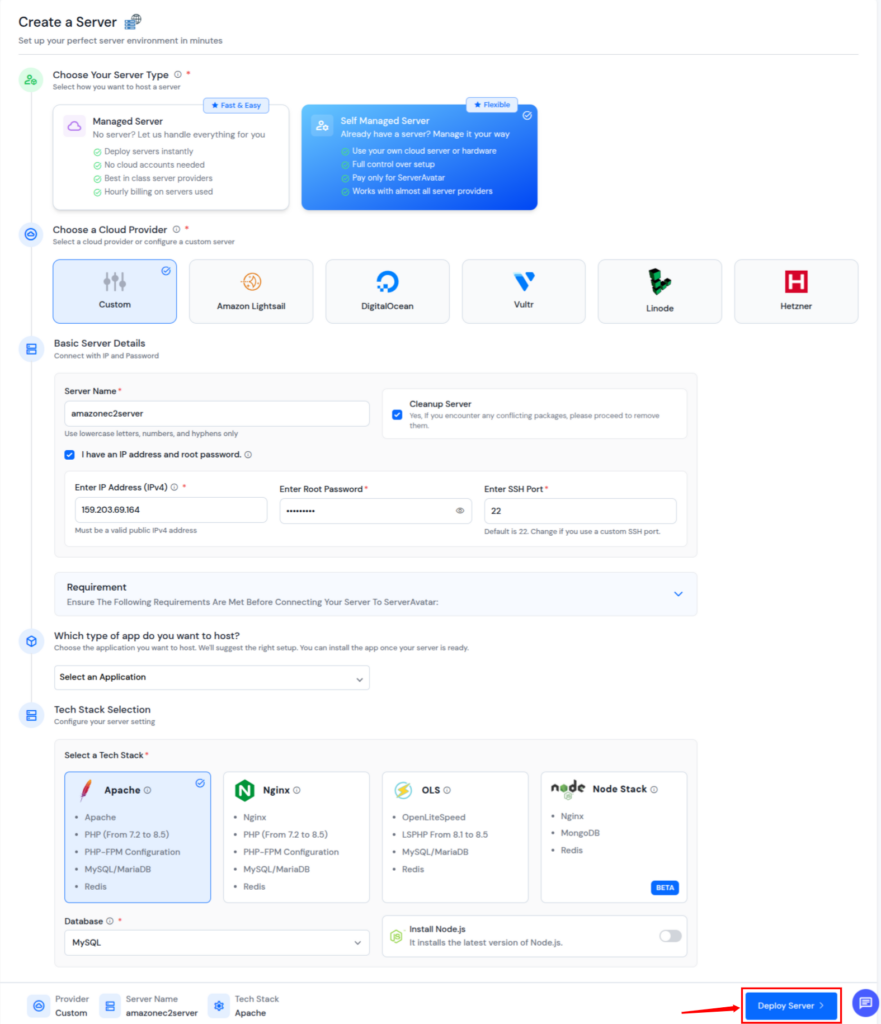
By simplifying day-to-day server management, ServerAvatar helps bridge the gap between the simplicity of AWS Lightsail and the flexibility of Amazon EC2.
Conclusion
Choosing between AWS Lightsail and Amazon EC2 depends on how much simplicity or control your project needs. Lightsail is ideal for beginners and small projects that require quick setup, predictable pricing, and minimal server management, while EC2 is better suited for applications that demand scalability, customization, and long-term growth. If you want the flexibility of EC2 without dealing with its complexity, tools like ServerAvatar can help simplify server management and make running applications easier. In the end, the right choice is the one that aligns with your experience level, project size, and future plans.
FAQs
1. Is AWS Lightsail better than Amazon EC2 for beginners?
AWS Lightsail is generally better for beginners because it offers a simple setup, fixed pricing, and minimal configuration requirements compared to EC2.
2. Can I start with AWS Lightsail and move to EC2 later?
You can start with Lightsail and migrate to EC2 as your project grows. AWS allows exporting snapshots from Lightsail to EC2 when you need more flexibility.
3. Which is more cost-effective, Lightsail or EC2?
Lightsail is more cost-effective for small and predictable workloads due to its fixed pricing, while EC2 can be more economical for large-scale or highly optimized environments.
4. Is Amazon EC2 suitable for hosting WordPress websites?
EC2 can host WordPress websites and offers more customization and scalability, but it requires more setup and management compared to Lightsail.
5. How does ServerAvatar help with AWS Lightsail and EC2 management?
ServerAvatar simplifies server management by providing a single dashboard to deploy applications, monitor performance, manage security, and handle backups for both Lightsail and EC2 servers.