

Securing a website today can feel a bit complicated and complex thing to do. In the online world, Cloudflare Firewall Rules act like smart security guard, checking every visitor before letting them in.
If you run a website, whether it’s a blog, business site, or online store, you’ve probably heard about hacks, bots, and suspicious traffic. The good news? You don’t need to be a security expert to protect your site. In this guide, I’ll walk you through how to use Cloudflare Firewall Rules to secure your website with confidence.
What is Cloudflare?
Cloudflare is a global web infrastructure and security platform that helps websites load faster, stay online, and remain protected from online threats. It works by acting as a layer between a website’s visitors and its hosting server, filtering and optimizing traffic before it reaches the server.
In simple terms, Cloudflare acts as a protective and performance-boosting shield for websites, making them faster, safer, and more reliable for users around the world.
What Are Cloudflare Firewall Rules
Cloudflare Firewall Rules are custom rules that decide who can access your website and who cannot. Think of them as clear instructions for Cloudflare, such as:
- Block visitors from certain countries: Prevents traffic from locations that commonly generate spam or attacks.
- Stop known malicious bots: Automatically blocks bots that are identified as harmful or abusive.
- Allow only trusted IP addresses: Ensures that only approved IPs can access specific parts of your website.
Instead of reacting after an attack happens, firewall rules help you prevent problems before they reach your server.
Why Website Security Matters More Than Ever
Let’s be honest, hackers don’t care if your website is small or big. Automated bots scan the internet day and night, looking for weak spots. Even a simple blog can be targeted.
Without proper security:
- Your site can go offline: Attacks like DDoS can overwhelm your server and make your website unavailable.
- User data can be compromised: Hackers may steal sensitive information such as passwords or emails.
- Search engine rankings can drop: Search engines may penalize hacked or frequently offline websites.
Using Cloudflare Firewall Rules is like installing a strong fence around your digital property. It keeps trouble out and gives you peace of mind.
How Cloudflare Firewall Rules Work
Cloudflare sits between your visitors and your server. When someone tries to access your site, Cloudflare checks the request first.
Here’s what happens:
- A visitor sends a request: Someone tries to access your website through a browser or bot.
- Cloudflare reviews it against your firewall rules: Cloudflare checks the request based on your defined security rules.
- The request is allowed, blocked, or challenged: Cloudflare decides whether to let the request through, stop it, or verify it.
This all happens in milliseconds, so your real visitors never notice a delay.
Getting Started with Cloudflare
Before creating firewall rules, you need:
- A Cloudflare account. Create an account if you don’t have one: You need an active Cloudflare account to manage security and DNS settings.
- Your website has been added to Cloudflare: Your domain must be connected to Cloudflare’s network.
- DNS properly configured: DNS records must point to Cloudflare for traffic to pass through it.
Once Cloudflare is active, traffic starts flowing through its network automatically. From there, you can begin adding firewall rules without touching your server.
Accessing Firewall Rules in Cloudflare Dashboard
To find firewall rules:
- Log in to Cloudflare
- Select your domain
- Go to Security >> Security Rules
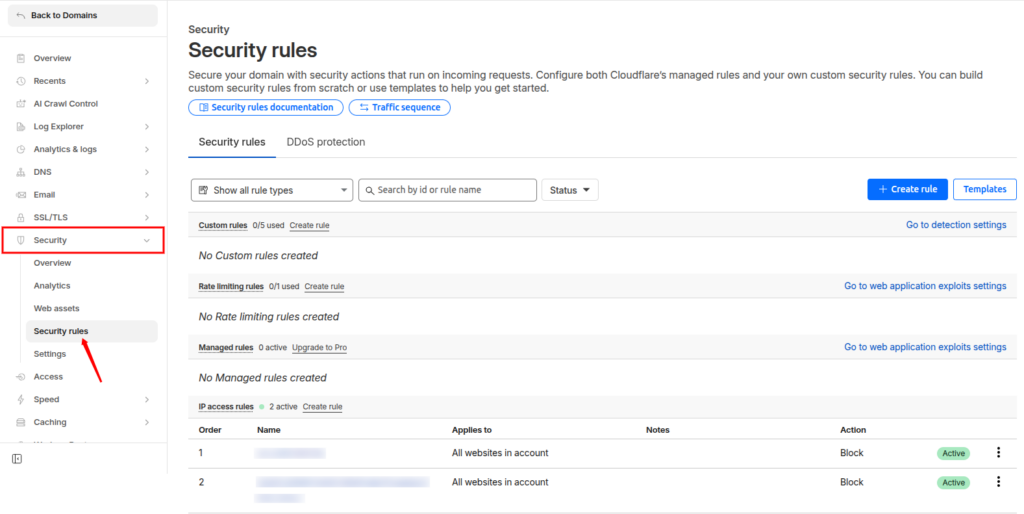
This is your control room. From here, you can create, edit, disable, or delete rules anytime.
Understanding Firewall Rule Components
Each firewall rule has three main parts:
- Field: What you want to check (IP, country, URL, user agent)
- Operator: How you want to compare (equals, contains, does not equal)
- Value: The specific detail (country name, IP address, keyword)
Action options include:
- Block: Completely stops the request from reaching your website.
- Allow: Lets the request pass through without any restriction.
- Challenge (CAPTCHA or browser check): Asks the visitor to complete a CAPTCHA or browser check.
Once you understand these basics, creating rules becomes surprisingly easy.
You can easily create firewall rules to:
- Block a specific IP address: Stops traffic from a known harmful or abusive IP.
- Blocking Suspicious Countries or Regions: Reduces attacks by restricting traffic from high-risk locations.
- Stopping Bad Bots and Crawlers: Prevents automated scripts from scraping or abusing your site.
Cloudflare allows you to:
- Block known bad bots: Automatically denies access to bots flagged by Cloudflare.
- Challenge suspicious user agents: Verifies traffic that looks unusual or suspicious.
- Allow verified search engine bots: Ensures Google and other search engines can crawl your site safely.
Using firewall rules here is like installing a spam filter for your website traffic.
Protecting Login Pages from Attacks
Login pages are prime targets for brute-force attacks. You can:
- Add extra checks for /wp-login.php or /admin URLs
- Challenge visitors trying to access login pages
- Allow only your IP to access admin areas
This simple step can stop thousands of login attempts overnight.
Allowing Trusted Traffic Safely
Sometimes, you want to whitelist trusted users, services, or monitoring tools, including:
- Your office IP address: Ensures internal teams can always access the site without interruption.
- Payment gateway services: Prevent payment failures by allowing trusted third-party services.
- Uptime monitoring tools: Allow monitoring services to check your site’s availability.
By allowing them explicitly, you avoid accidentally blocking important traffic while keeping strict rules for everyone else.
Testing and Monitoring Firewall Rules
After creating rules:
- Monitor Cloudflare security logs: Helps you track blocked and allowed requests.
- Check blocked and challenged requests: Identifies whether legitimate users are being affected.
- Adjust rules if something breaks: Fine-tunes security without harming user experience.
Cloudflare makes it easy to see what’s happening, so you’re never guessing.
Common Mistakes to Avoid
Here are a few mistakes to avoid:
- Blocking entire countries without testing: Can unintentionally block real users.
- Forgetting to allow their own IP: May lock you out of your own website.
- Creating too many overlapping rules: Makes rule management confusing and error-prone.
Start simple. You can always add more rules later.
Best Practices for Long-Term Security
To keep your site secure:
- Review firewall rules monthly: Keeps your security setup relevant and effective.
- Remove outdated or unused rules: Reduces complexity and avoids conflicts.
- Combine firewall rules with Cloudflare WAF and rate limiting: Provides layered and stronger protection.
Security isn’t a one-time setup. It’s more like routine maintenance.

When to Update Firewall Rules
If your website changes, your firewall rules should too.
Update rules when:
- You launch new pages: New URLs may need different security rules.
- Your audience location changes: Traffic patterns evolve over time.
- You notice false positives: Legitimate users may be blocked incorrectly.
A clean, updated rule set works better than a long, outdated one.
How ServerAvatar Integrates with Cloudflare to Boost Security
What is ServerAvatar?
ServerAvatar is a platform to simplify the hosting and management of servers and applications. It simplifies the process of deploying and managing PHP and Node.js based web applications on servers.
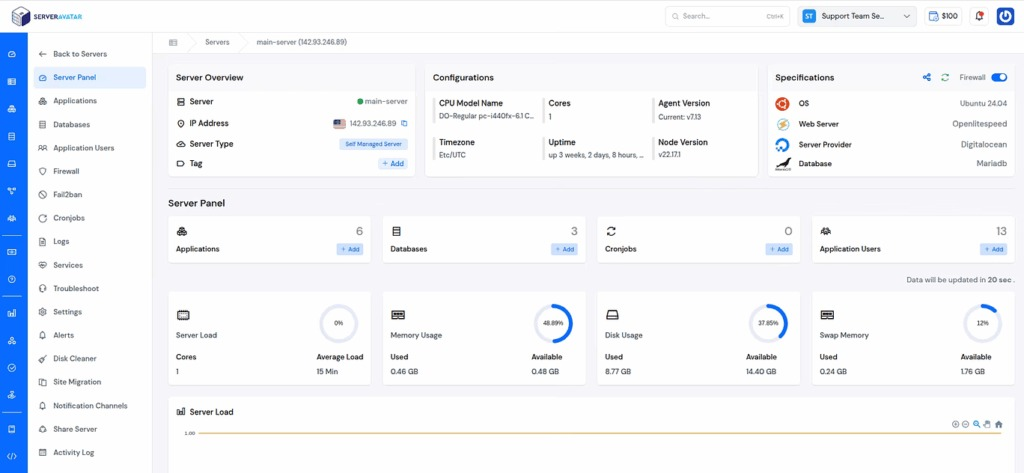
If you’re using ServerAvatar to manage your servers and websites, want even stronger protection with Cloudflare, you’re in luck, ServerAvatar offers a built-in Cloudflare Integration that makes setup easy and smooth.
This means you can connect your Cloudflare account directly from the ServerAvatar dashboard and manage key Cloudflare features without constantly switching between platforms. Here’s how the integration works and why it matters:
What the Integration Does
When you integrate Cloudflare with ServerAvatar:
- Cloudflare’s security and performance services start protecting your site right away, including SQL injection protection and privacy safeguards.
- You can manage DNS records directly from ServerAvatar instead of logging into Cloudflare separately.
- You can update SSL/TLS settings from within ServerAvatar, ensuring your site stays secure and HTTPS-ready.
This integration essentially brings Cloudflare’s powerful edge security and speed boost into your ServerAvatar workflow so you don’t have to juggle multiple dashboards.
How to Connect Cloudflare with ServerAvatar
Here’s a simple breakdown of the steps you’ll follow inside the ServerAvatar panel:
- Create or open your application in ServerAvatar and go to the Cloudflare Integration section.
- Log in to Cloudflare and choose the DNS domain you want to connect.
- Copy your Zone ID from Cloudflare and paste it into the zone field on ServerAvatar.
- Generate a Cloudflare API Token (Bearer Token) with the necessary permissions and paste it into ServerAvatar.
- Refer to the attached link to checkout the detailed step by step process to integrate your cloudflare account with ServerAvatar: https://serveravatar.com/docs/application/cloudflare/integration/
- Click Integrate Now, ServerAvatar will connect to Cloudflare.
- After integration, you can manage DNS records and adjust SSL/TLS settings from within ServerAvatar itself.
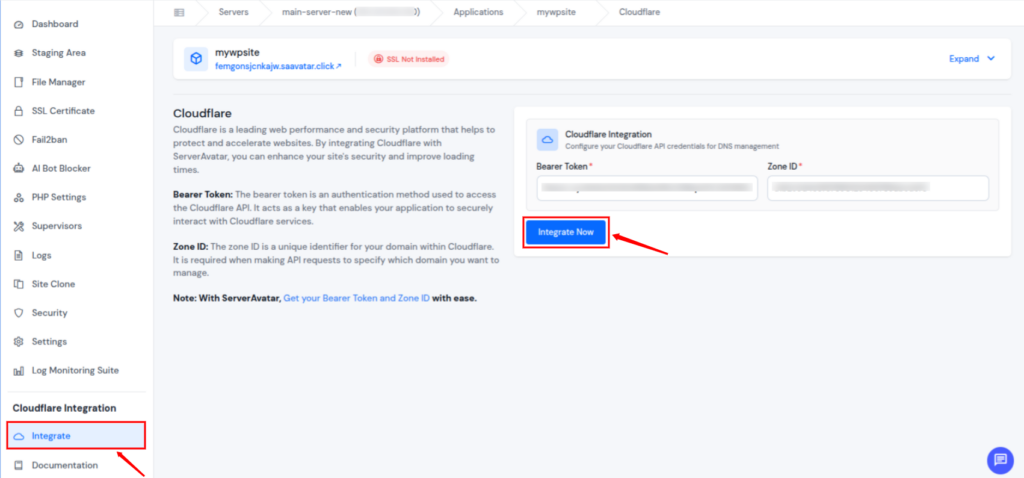
Make sure the Cloudflare domain you select matches your application domain, otherwise the integration won’t work.
Why This Matters for Website Security
With the integration set up:
- Your website benefits from Cloudflare’s firewall and CDN without extra manual steps.
- You get automated handling of DNS and SSL features, which reduces configuration errors.
- It’s easier to combine Cloudflare Firewall Rules with ServerAvatar’s own security tools in a single place.
If you’re already enhancing your site with Cloudflare Firewall Rules, this integration ensures that your entire traffic and DNS workflow stays secure and manageable under one roof, making your website safer, faster, and easier to maintain.
Conclusion
Cloudflare Firewall Rules make website security simple, proactive, and highly effective, even if you’re not a security expert. By filtering traffic before it reaches your server, these rules help block malicious bots, prevent brute-force attacks, and protect sensitive areas like login pages without slowing down real users.
When combined with best practices such as regular rule reviews, careful testing, and layered security, Cloudflare becomes a powerful shield for any website. And if you’re using ServerAvatar, the built-in Cloudflare integration takes things a step further by letting you manage DNS, SSL, and Cloudflare settings from one dashboard. The result is a safer, faster, and more manageable website with less effort and fewer mistakes.
FAQs
1. Can Cloudflare Firewall Rules slow down my website?
Firewall checks happen in milliseconds at Cloudflare’s edge network, so legitimate visitors won’t notice any delay.
2. Is it safe to block traffic from entire countries?
It can be useful, but it should be done carefully. Blocking entire countries without testing may prevent genuine users from accessing your website.
3. Can Firewall Rules protect my login pages?
You can add extra security to login URLs by challenging visitors, limiting access to trusted IPs, or blocking suspicious traffic entirely.
4. How often should I review my Firewall Rules?
Ideally, review them monthly or whenever your website traffic patterns, audience, or structure changes.
5. Are Cloudflare Firewall Rules suitable for small websites and blogs?
Absolutely. Even small websites are frequent targets of bots and automated attacks, making Firewall Rules a smart choice for any site size.