

Have you ever wondered how modern web applications manage requests so smoothly? When you click a button, submit a form, or access a page, there’s a lot happening behind the scenes. Controllers and Middleware in Laravel play a crucial role in making this process clean, organized, and secure. These powerful tools help handle application logic efficiently while ensuring that every request is properly validated and processed.
Think of your Laravel application like a restaurant. Controllers are the chefs preparing your food (handling logic), while middleware acts like the security guard or waiter, ensuring only the right requests get through and everything flows properly.
In this guide, I will break down everything in a simple, beginner-friendly way. No complicated jargon, just clear explanations, practical examples, and useful tips.
What is Laravel?
Laravel is a popular PHP framework used to build web applications quickly and efficiently. It provides a clean structure and ready-made tools so developers don’t have to reinvent the wheel every time.
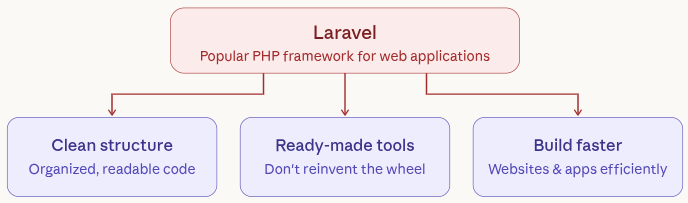
If you’re building a website or app, Laravel helps you stay organized and write cleaner code.
Understanding MVC Architecture
Laravel is built on the MVC (Model-View-Controller) pattern, which helps organize your code into clear sections. This structure separates data handling, user interface, and application logic, making your project easier to manage. Instead of mixing everything together, MVC ensures each part has a specific responsibility. This not only improves clarity but also makes debugging and scaling your application much easier.
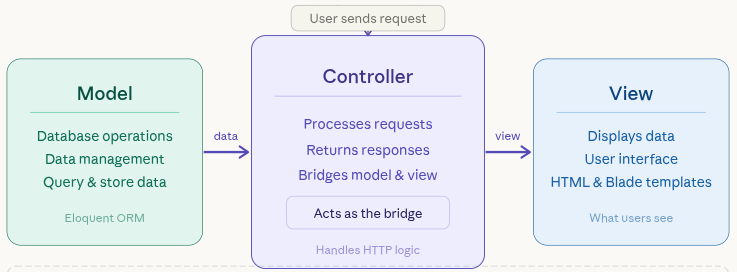
- Model: Handles all database-related operations and data management.
- View: Displays the data to users through the interface.
- Controller: Acts as a bridge, processing requests and returning responses.
Controllers sit right in the middle, acting like a bridge between your data and what users see.
What are Controllers in Laravel?
Controllers in Laravel are responsible for handling the core logic of your application. Instead of writing all logic inside routes, controllers allow you to group related functionality in one place. This keeps your code structured and easy to understand as your application grows. Controllers also make it easier to reuse code and maintain consistency across your project.
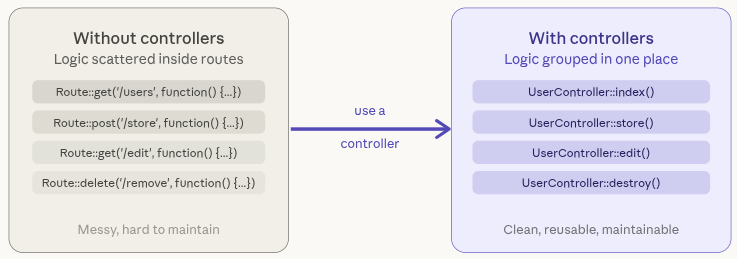
This improves:
- Code readability: Keeps your code clean and easy to follow.
- Maintainability: Makes it easier to update and manage your application.
- Scalability: Allows your application to grow without becoming messy.
For example:
- Handling form submissions: Processes user input from forms.
- Fetching data from the database: Retrieves records when needed.
- Returning views or responses: Sends data back to the user interface.
In simple terms, controllers are like the brain of your application.
Types of Controllers
Laravel provides different types of controllers to suit different use cases. Each type is designed to handle specific tasks, helping you write more structured and reusable code. Choosing the right controller type can save time and reduce complexity in your application.
1. Basic Controllers
Used for simple tasks where you define custom methods based on your needs.
2. Resource Controllers
Designed for handling CRUD operations in a structured and standardized way.
- Create: Adds new records to the database.
- Read: Retrieves and displays data.
- Update: Modifies existing records.
- Delete: Removes records from the database.
3. Single Action Controllers
Used when a controller is focused on performing one specific task only. Each type helps you organize your code depending on the complexity of your application.
Creating a Controller
Creating a controller in Laravel is quick and straightforward using the Artisan command-line tool.
With a single command, Laravel generates a ready-to-use controller file in the correct directory. This saves time and ensures consistency in your project structure. Once created, you can start adding your application logic inside it.
Run the below command:
php artisan make:controller UserControllerThis creates a file inside:
app/Http/Controllers/UserController.phpNow you’re ready to start writing your logic.
Resource Controllers Explained
Resource controllers are built specifically to handle CRUD operations efficiently. Instead of writing separate methods manually, Laravel automatically generates them for you. This not only speeds up development but also keeps your code consistent across projects.
You can create one using below command:
php artisan make:controller BookController --resourceYou can even generate all related routes with a single line of code, making your workflow much smoother.
- index(): Displays a list of all records.
- create(): Shows a form to create new data.
- store(): Saves new data into the database.
- show(): Displays a single record.
- edit(): Shows a form to edit existing data.
- update(): Updates the selected record.
- destroy(): Deletes a record from the database.
Laravel can also auto-generate routes using:
Route::resource('books', BookController::class);This single line creates multiple routes automatically.
Controller-Model Binding
Controller-model binding is a powerful feature in Laravel that automatically connects route parameters to database records. Instead of writing manual queries, Laravel fetches the correct data for you. This reduces code repetition and improves efficiency. It also makes your code cleaner and easier to read, especially in larger applications.
Instead of writing extra queries:
public function show($id) {
    $book = Book::where('id', $id)->get();
}You can simply write:
public function show(Book $book) {
    return view('book', compact('book'));
}Laravel automatically fetches the data for you, reducing code and improving efficiency.
Controller Methods and Routing
Controllers and routes work together to handle user requests efficiently. You define a route and link it to a specific controller method that performs the required action. This approach keeps your routes simple while moving the logic into controllers. As a result, your application becomes more organized and easier to maintain.
Example:
Route::get('/users', [UserController::class, 'index']);Here:
- /users: Represents the URL endpoint accessed by users.
- index: Refers to the method inside the controller that handles the request.
This keeps your routes clean and your logic organized.
Passing Data from Controller to View
Controllers often pass data to views so it can be displayed to users. This allows dynamic content to appear on your web pages based on logic or database results. Laravel makes this process simple using built-in helper functions. It ensures smooth communication between backend logic and frontend display.
Example:
public function index() {
    $users = ['John', 'Jane', 'Doe'];
    return view('users', compact('users'));
}Now your view can display this data easily.
What is Middleware in Laravel?
Middleware acts as a layer between the incoming request and your application. It checks whether a request should proceed further or be blocked. This is useful for handling authentication, permissions, and request validation. In simple terms, middleware ensures that only valid requests reach your controllers.
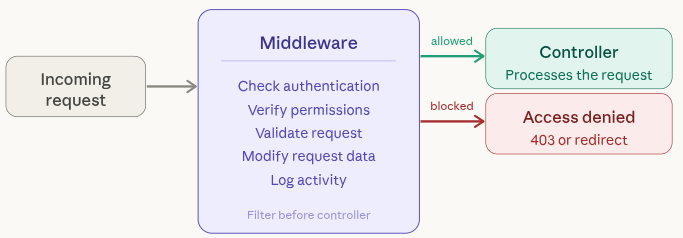
- Checks requests before controller: Ensures conditions are met before processing.
- Allows or blocks access: Controls whether a user can proceed.
- Modifies requests: Can change request data before passing it forward.
- Handles authentication: Verifies if the user is logged in.
- Logs activity: Tracks requests for monitoring or debugging.
For example:
- Authentication: Confirms whether a user is logged in.
- Authorization: It checks permission to access a resource for user.
How Middleware Works
Middleware follows a simple flow that ensures every request is validated before processing. It acts as a checkpoint system that either allows the request to move forward or stops it. This helps maintain security and proper access control in your application.
- User sends a request: A request is initiated by the user.
- Middleware checks it: The request is validated against rules.
- If valid: The request is passed to the controller.
- If not: The request is blocked or redirected.
Laravel includes built-in middleware like:
- auth: Verifies user authentication.
- throttle: Limits the number of requests to prevent abuse.
Types of Middleware
Laravel provides different types of middleware to handle various scenarios. Each type is designed for a specific level of control, whether it’s global or route-specific. Using the right type ensures efficient request handling.
1. Global Middleware
Runs automatically on every request in the application.
2. Route Middleware
Applied only to specific routes where needed.
3. Group Middleware
Used to apply middleware to a group of routes at once.
Each type helps control access in different ways.
Creating Middleware
Creating middleware in Laravel is simple using the Artisan command. Laravel generates a dedicated file where you can define your custom logic. This allows you to control how requests are handled before reaching controllers. It’s especially useful for implementing rules like age checks, authentication, or logging.
You can create middleware using:
php artisan make:middleware CheckAgeThis creates a file in:
app/Http/Middleware/CheckAge.phpInside, you define the logic:
public function handle($request, Closure $next) {
    if ($request->age < 18) {
        return redirect('home');
    }
    return $next($request);
}Registering Middleware
After creating middleware, you need to register it so Laravel can recognize and use it. This is done in the Kernel file, where all middleware are defined. Registration allows you to assign a short name (alias) to your middleware. This makes it easier to apply it across routes and controllers.
Go to:
app/Http/Kernel.phpAdd your middleware:
protected $routeMiddleware = [
    'checkAge' => \App\Http\Middleware\CheckAge::class,
];Applying Middleware to Routes
Once middleware is registered, you can apply it to specific routes or controllers. This ensures only authorized requests can access certain parts of your application. Laravel provides flexible ways to apply middleware depending on your needs. This helps maintain both security and control over your application flow.
To apply middleware to routes:
Route::get('/profile', function () {
    //
})->middleware('checkAge');Or to a controller:
public function __construct() {
    $this->middleware('checkAge');
}Middleware in Controllers
Middleware can also be applied directly inside controllers using constructors. This ensures that all methods within the controller follow the same rules. It’s a clean and efficient way to secure multiple routes at once. Laravel also supports inline middleware, which is useful for small and quick tasks.
Middleware vs Controllers
Middleware and controllers serve different but complementary roles in Laravel. Middleware acts as a filter that checks requests before they are processed. Controllers, on the other hand, handle the actual business logic and return responses. Together, they create a structured and secure workflow.
Let’s clear the confusion:
| Feature | Controller | Middleware |
| Purpose | Handles logic | Filters requests |
| Role | Processes data | Controls access |
| Timing | After request | Before/after request |
Best Practices
Following best practices helps you write clean, efficient, and scalable Laravel applications. Keeping your code organized ensures long-term maintainability and better performance.
- Keep controllers clean: Avoid adding too much logic in one place.
- Use middleware for security checks: Handle validation and access control separately.
- Follow naming conventions: Maintain consistency across your project.
- Use resource controllers: Simplify CRUD operations with standard methods.
- Avoid duplicating code: Reuse logic wherever possible.
Clean code is easier to maintain and scale.
Common Mistakes to Avoid
Avoiding common mistakes can save you time and prevent issues as your application grows. Poor structure and misuse of features can make your code difficult to manage. Staying mindful of these pitfalls helps maintain a clean and efficient codebase.
- Putting too much logic in routes: Makes your code messy and hard to manage.
- Overloading controllers: Reduces readability and maintainability.
- Misusing middleware: Can lead to unnecessary complexity.
- Not organizing files properly: Makes navigation and debugging difficult.
Avoid these, and your Laravel app will stay smooth and manageable.

Deploying Laravel Applications Made Easy with ServerAvatar
While understanding controllers and middleware is essential for building a Laravel application, managing and deploying that application on a live server is equally important. This is where ServerAvatar simplifies the entire process.
Once your Laravel application is ready, ServerAvatar makes it easy to deploy and manage it without worrying about server setup.
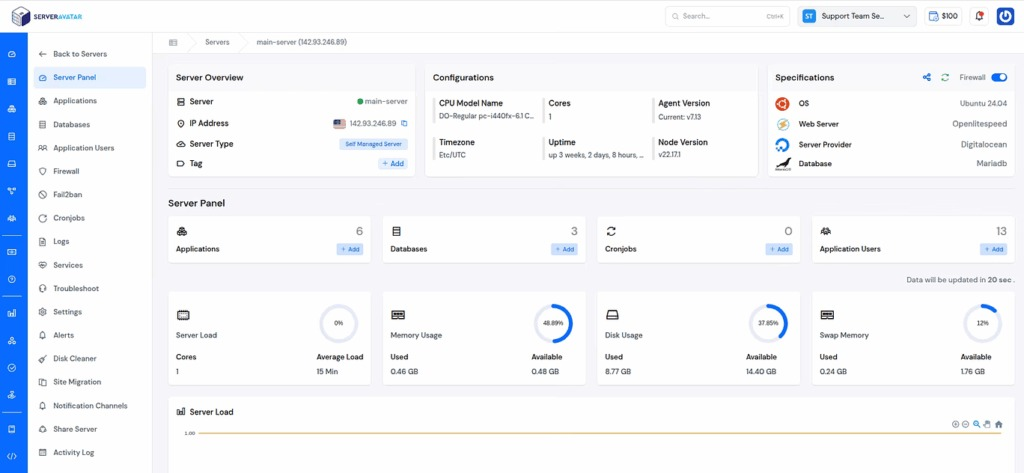
ServerAvatar is a powerful server and application deployment and management platform that allows developers to deploy and manage Laravel applications without dealing with complex server configurations. Instead of manually setting up your environment, you can launch and manage your Laravel projects with just a few clicks.
With ServerAvatar, you can:
- Deploy Laravel, PHP, and Node.js–based applications quickly without manual setup
- Manage servers, applications, databases, security features, server services, and configurations from a single dashboard
- Monitor logs and performance to debug issues efficiently
- Use staging environments to test changes before going live
This means you can focus more on writing clean controllers and middleware while ServerAvatar handles the server-side complexity.
Conclusion
Understanding how controllers and middleware work in Laravel gives you a strong foundation for building well-structured and secure web applications. Controllers help you organize your application logic, while middleware ensures that every request is properly validated before it reaches your core functionality. When used together, they create a clean and efficient workflow that improves both performance and maintainability. As your application grows, having the right tools for deployment also becomes essential, and platforms like ServerAvatar make it easier to manage, deploy, and scale your Laravel projects without dealing with complex server configurations.
FAQs
1. What is the role of a controller in Laravel?
A controller in Laravel handles the application logic by processing user requests, interacting with models, and returning responses such as views or data.
2. What is middleware in Laravel?
Middleware acts as a filter between the request and the application, checking conditions like authentication, permissions, or request validity before allowing access.
3. What is the difference between controllers and middleware?
Controllers manage the business logic of your application, while middleware handles request validation and filtering before the request reaches the controller.
4. When should I use middleware in Laravel?
You should use middleware when you need to control access, validate requests, handle authentication, or apply rules before processing a request.
5. What are resource controllers in Laravel?
Resource controllers provide a structured way to handle CRUD operations using predefined methods like index, create, store, show, update, and destroy.