


Have you ever visited a website that loads instantly, no matter where you are in the world? It almost feels like the page was waiting for you. That smooth and lightning-fast experience is often powered by Edge Page Caching.
As websites grow and attract visitors from different countries, delivering content quickly becomes challenging. Every request going back to a central server can slow things down. This is where Edge Page Caching steps in. Instead of loading a page from the original server every time, the content is stored closer to the user, making it faster and more efficient.
In this guide, I will break down everything you need to know about Edge Page Caching, including how it works, why it matters, and how it can significantly improve website performance.
What Is Edge Page Caching?
Edge Page Caching is a technique used to store copies of web pages on servers located closer to website visitors. These servers, known as edge servers, are part of a distributed network spread across different geographic locations.
Instead of retrieving the page from the main server every time a user visits, the cached version is delivered from the nearest edge server. This significantly reduces loading time.
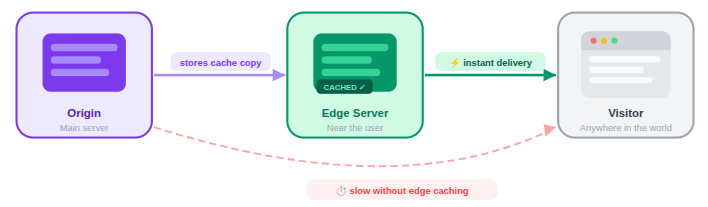
In simple terms, Edge Page Caching allows websites to serve content faster by shortening the distance between the user and the data.
How Edge Page Caching Works
Edge Page caching improves website performance by saving copies of your site’s content on servers that are located closer to visitors. These servers are part of a Content Delivery Network (CDN) that operates across multiple locations around the world. Instead of every request traveling to the main server, the CDN can serve content from a nearby edge server, which significantly reduces loading time. To understand the process better, let’s break it down step by step.

When a user visits a website:
1. User Sends a Request
When someone opens your website, their browser requests the page along with related files like images, stylesheets, or scripts. Instead of going directly to your main hosting server, the request first reaches the CDN network. The CDN then directs the request to the closest edge server based on the visitor’s geographic location.
2. Edge Server Checks Its Cache
Once the request reaches the edge server, it checks whether the requested content is already stored in its cache. If the content is available and still valid, the edge server immediately sends it back to the user. Because the data is served from a nearby location, the page loads much faster, and the origin server does not need to process the request.
3. Request Is Sent to the Origin Server (If Necessary)
If the edge server does not have the requested content, or if the stored version has expired, the request is forwarded to the origin server, which is the main server where your website is hosted. The origin server then sends the latest version of the page or file back to the edge server. The edge server stores this copy so that future visitors requesting the same content can receive it directly from the cache.
4. Content Is Delivered to the User
After the edge server retrieves or confirms the cached content, it delivers the data to the user’s browser. Since the server is geographically closer to the visitor, the content travels a shorter distance across the internet. This results in lower latency and faster page loading times.
Example Scenario
Imagine your website is hosted on a server in New York, but a visitor is accessing it from Tokyo. Without edge caching, every request would need to travel across continents to reach the New York server and then return to the user. This extra distance increases the time it takes for the page to load.
With edge caching enabled, the CDN may store a copy of your website’s content on an edge server located in Tokyo or nearby. When the visitor opens your site, the request is handled by that local edge server, allowing the page to load almost instantly.
It’s similar to downloading a file once and then opening it locally instead of downloading it again every time.
Why Website Speed Matters
Website speed plays a crucial role in how users interact with your site. When pages take too long to load, visitors quickly lose patience and move to another website. A slow website not only frustrates users but also impacts business growth and overall online performance.
Studies consistently show that slow websites lead to:
- Higher bounce rates: Visitors leave the site quickly if pages take too long to load.
- Lower engagement: Slow loading discourages users from exploring multiple pages.
- Reduced conversions: Delays can cause potential customers to abandon purchases or sign-ups.
- Poor user experience: Long loading times create frustration and reduce overall satisfaction.
Even a delay of a few seconds can cause visitors to abandon a page. That’s why technologies like Edge Page Caching have become essential for modern websites.
Edge Caching vs Traditional Caching
Caching helps websites deliver content faster, but different caching methods work in different ways.
Traditional caching typically happens at the browser or server level. The content is stored locally or on the main server.
Edge caching, however, distributes cached content across multiple global servers so users can access it from a nearby location.
This distributed approach significantly reduces loading time and improves website performance for users around the world.
Here’s a simple comparison:
| Feature | Traditional Caching | Edge Page Caching |
| Storage Location | Single server | Multiple global edge servers |
| Speed | Moderate | Very fast |
| Scalability | Limited | Highly scalable |
| User Experience | Depends on location | Consistent globally |
Benefits of Edge Page Caching
Implementing Edge Page Caching provides several important advantages.
- Faster Page Loading: Users receive content from nearby servers, which reduces latency.
- Reduced Server Load: The origin server handles fewer requests because cached versions serve most visitors.
- Better User Experience: Pages load quickly, improving satisfaction and engagement.
- Improved Website Stability: Heavy traffic spikes are easier to manage when requests are distributed.
- Lower Infrastructure Costs: Less traffic hitting the main server means fewer resources are needed.
These benefits make edge caching a powerful tool for websites of all sizes.
How Content Delivery Networks Support Edge Caching
A Content Delivery Network (CDN) is the backbone of Edge Page Caching. Edge caching works because CDNs operate large global networks of edge servers distributed across different regions. These servers store commonly requested files such as HTML pages, images, CSS files, and JavaScript assets. Since these files usually do not change frequently, they can be safely cached and delivered quickly.
Some types of content, particularly dynamic or personalized data, may not always be cached. Instead, they follow specific caching rules or are fetched directly from the origin server when needed.
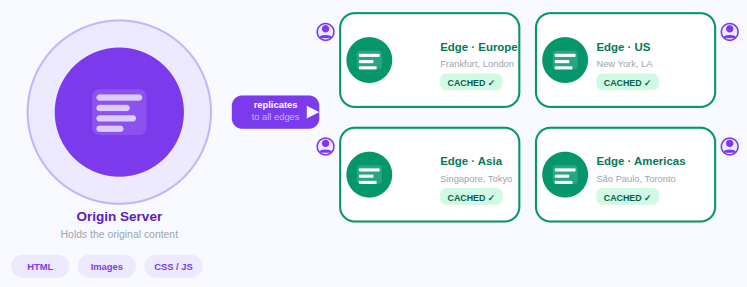
CDNs consist of thousands of edge servers placed in data centers around the world. When a website uses a CDN, its content is automatically replicated across these servers. When users visit the site, they are connected to the closest server instead of the original host.
This process dramatically reduces the time it takes for data to travel across the internet.
Types of Content That Can Be Cached
Not every part of a website changes frequently. Some files remain the same for long periods, which makes them ideal for caching. By storing these files in cache, websites can deliver them much faster without repeatedly requesting them from the main server.
Common cacheable content includes:
- HTML pages: Cached page structures allow websites to load basic layouts quickly.
- Images: Image files can be stored in cache so they don’t need to be downloaded repeatedly.
- CSS files: Stylesheets that control the website design can be served faster from cached storage.
- JavaScript files: Scripts used for website functionality can be cached to reduce loading delays.
- Videos: Frequently accessed video files can be delivered faster when cached on edge servers.
- Fonts: Custom fonts can be stored in cache so text appears instantly when pages load.
These files usually remain unchanged for long periods, making them perfect candidates for caching.
Dynamic vs Static Content in Edge Caching
When using edge page caching, it is important to understand the difference between static and dynamic content.
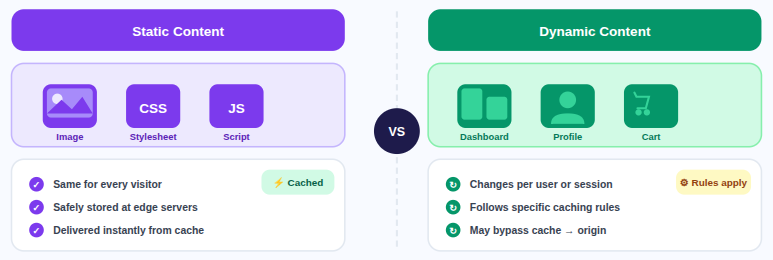
- Static Content: Files such as images, stylesheets, and scripts that remain the same for all users.
- Dynamic Content: Pages like dashboards, profiles, and shopping carts that change based on user activity.
Modern caching technologies allow websites to handle both types efficiently while still maintaining speed and accuracy.
Cache Expiration and Invalidation
Cached content cannot remain stored forever because websites are constantly updated. To make sure users see the latest version of a page, caching systems use expiration and invalidation techniques.
These mechanisms control when cached content should be refreshed or replaced with updated data.
- Time-Based Expiration: Cached content automatically refreshes after a defined period of time.
- Manual Invalidation: Administrators manually clear cached files when major updates occur.
Proper cache management ensures users always receive accurate and up-to-date information.
Security Benefits of Edge Page Caching
Edge page caching does more than improve speed; it also adds an extra layer of protection for websites. Since edge servers handle many incoming requests, they can filter harmful traffic before it reaches the main server. This helps strengthen overall website security and reliability.
Edge caching helps protect websites from:
- Traffic floods: Edge servers absorb large spikes in traffic to prevent server overload.
- Malicious bots: Suspicious automated requests can be blocked before reaching the origin server.
- Large-scale attacks: Distributed edge networks help reduce the impact of potential attacks.
Because of this filtering capability, edge networks act like protective shields around websites.
SEO Advantages of Faster Page Delivery
Search engines give priority to websites which provides smooth and fast user experiences. When pages load quickly, visitors are more likely to stay longer and interact with the content.
Edge page caching helps improve several performance factors that search engines consider when ranking websites.
With edge caching, websites can achieve:
- Faster page load times: Cached content reduces the time needed to deliver pages to users.
- Improved Core Web Vitals: Faster loading improves important performance metrics used by search engines.
- Better search visibility: Faster websites have a higher chance of ranking well in search results.
- Increased organic traffic: Improved rankings can bring more visitors from search engines.
Overall, faster page delivery contributes to better SEO performance and user satisfaction.
Common Challenges with Edge Caching
Although edge caching offers many advantages, it also comes with certain technical challenges. Proper configuration and monitoring are necessary to ensure that cached content remains accurate and up to date.
Understanding these potential issues helps website owners manage caching more effectively. Some common challenges include:
- Cache Consistency: Ensuring all edge servers update their cached content after changes are made.
- Dynamic Content Handling: Preventing personalized data from being incorrectly cached.
- Cache Configuration: Incorrect settings can cause outdated or incorrect content to appear.
Modern CDN platforms offer tools that help manage these challenges efficiently.

When Should You Use Edge Page Caching?
Edge page caching is especially useful for websites that serve users across multiple regions or experience high traffic levels. It helps improve performance, reduce server workload, and ensure faster content delivery.
Many modern websites rely on edge caching to maintain consistent performance worldwide. You should consider edge page caching if:
- Your audience is global: Visitors from different countries benefit from nearby edge servers.
- Your site receives heavy traffic: Cached content reduces the load on the main server.
- Speed is critical for user experience: Faster pages keep visitors engaged.
- You run an e-commerce or content-heavy site: Large amounts of media and pages benefit from caching.
- Your server struggles with peak traffic: Edge servers help distribute traffic during busy periods.
For growing websites and modern web applications, edge page caching often becomes an essential performance strategy.
Implementing Edge Page Caching with ServerAvatar
Setting up Edge Page Caching can sometimes be complicated, especially for users who manage their own cloud servers. Configuring web servers, adjusting cache headers, and integrating CDN services often requires technical knowledge and manual server management. This is where ServerAvatar can make the process much easier.
What is ServerAvatar?
ServerAvatar is a platform to simplify the hosting and management of servers and applications. It simplifies the process of deploying and managing PHP and Node.js based web applications on servers.
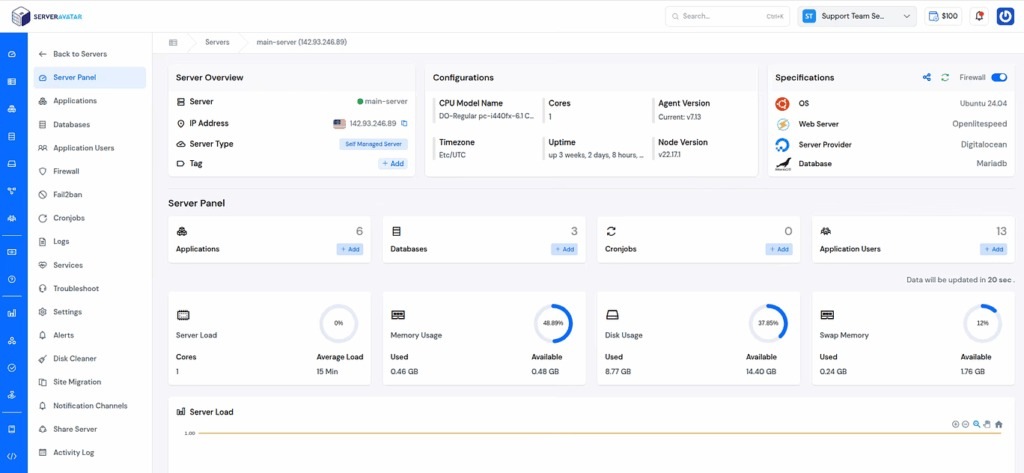
It supports popular web servers like Apache, Nginx, OpenLiteSpeed, and Node Stack, allowing users to run high-performance websites with minimal setup.
When using ServerAvatar, users can optimize their server environment for performance and integrate the Cloudflare CDN provider that supports Edge Page Caching. Proper server configuration, optimized caching headers, and efficient web server stacks ensure that edge caching systems work effectively.

By simplifying server management tasks, ServerAvatar helps website owners focus on performance, scalability, and reliability while ensuring their infrastructure is ready to support advanced caching strategies like Edge Page Caching.
Edge Page Caching is commonly used with CDN platforms like Cloudflare and works best when paired with optimized origin servers managed through platforms such as ServerAvatar.
Best Practices for Implementing Edge Page Caching
To maximize the benefits of edge page caching, websites should follow certain best practices. Proper setup ensures that caching improves speed without causing content delivery issues.
A well-configured caching strategy helps maintain both performance and reliability. Key best practices include:
- Define Clear Cache Rules: Specify which pages and resources should be cached.
- Use Proper Cache Headers: Headers help browsers and servers understand caching behavior.
- Set Reasonable Expiration Times: Balance fast performance with timely content updates.
- Monitor Performance Regularly: Track loading speeds and server responses to ensure optimal performance.
- Optimize Your Origin Server: Even though edge servers handle most content delivery, the origin server still plays a critical role in performance.
Server management platforms like ServerAvatar help streamline server optimization by allowing users to manage services, PHP versions and web server configurations efficiently from a single dashboard.
Following these practices helps websites maintain efficient and reliable caching systems.
Conclusion
Edge Page Caching has become an essential technique for modern websites that want to deliver fast, reliable, and scalable user experiences. By storing copies of web pages on edge servers located closer to visitors, websites can significantly reduce loading times and decrease the workload on their main servers. This not only improves performance but also enhances user satisfaction, search engine rankings, and overall website stability. As internet users expect instant access to information, implementing Edge Page Caching can help websites stay competitive while ensuring smooth performance for audiences across the globe.
When combined with a properly optimized origin server managed through ServerAvatar, edge caching can deliver even better performance and reliability for modern websites.
FAQs
1. What is Edge Page Caching in simple terms?
Edge Page Caching is a method that stores copies of website pages on servers located closer to users, allowing the content to load faster without always contacting the main server.
2. How is Edge Page Caching different from regular caching?
Regular caching usually stores data in a browser or on the main server, while Edge Page Caching distributes cached content across multiple global servers to deliver it faster to users.
3. Does Edge Page Caching work for dynamic websites?
Modern caching systems can handle dynamic websites using advanced rules and technologies that allow certain dynamic elements to remain personalized while still improving performance.
4. Can Edge Page Caching improve SEO?
Faster page loading speeds improve user experience and help websites perform better in search engine rankings, which can lead to increased visibility and traffic.
5. Do all websites need Edge Page Caching?
Not every website requires it, but sites with global audiences, high traffic, or large amounts of content can benefit greatly from implementing Edge Page Caching.