

Have you ever opened a WordPress website and felt like it was thinking way too long before showing anything? We’ve all been there. Slow websites will push your visitors away. The good news? You don’t need to be a developer or spend hours tweaking code to improve WordPress performance quickly and effectively.
One of the fastest and most underrated ways to improve WordPress performance is preloading. Think of it like laying out your clothes the night before a big day, everything is ready when you need it. In this guide, we’ll break down preloading tricks in plain English and show you how to speed up your WordPress site quickly and safely.
How To Install WordPress Easily
If you’re planning to install a WordPress website without any hassles on a reliable server. ServerAvatar makes this process incredibly smooth, even if you’re not very technical. It takes care of the heavy lifting, so you can focus on building your websites rather than fighting with server commands.
What is ServerAvatar?
ServerAvatar is a platform to simplify the hosting and management of servers and applications. It simplifies the process of deploying and managing PHP and Node.js based web applications on servers.
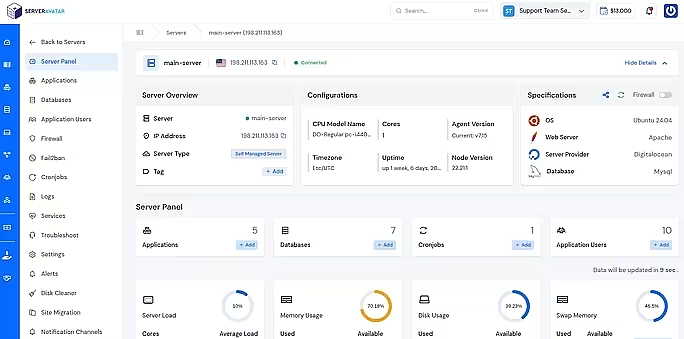
You can easily set up WordPress in just a few minutes using ServerAvatar’s one-click application installer. With ServerAvatar’s one-click application installer, you can easily install WordPress, Mautic, N8N, Uptime Kuma, and many more popular applications within a few minutes.
Follow this step-by-step guide to install WordPress quickly on your VPS: https://serveravatar.com/install-wordpress-quickly-on-vps/
What Does WordPress Performance Really Mean?
WordPress performance is all about how fast and smoothly your website loads and responds. This includes page load time, how quickly content appears, and how responsive your site feels when someone clicks or scrolls.
A high-performing WordPress site feels effortless. Pages open quickly, images appear smoothly, and visitors don’t feel any delay. Preloading plays a key role in making that happen.
Why Website Speed Matters More Than Ever
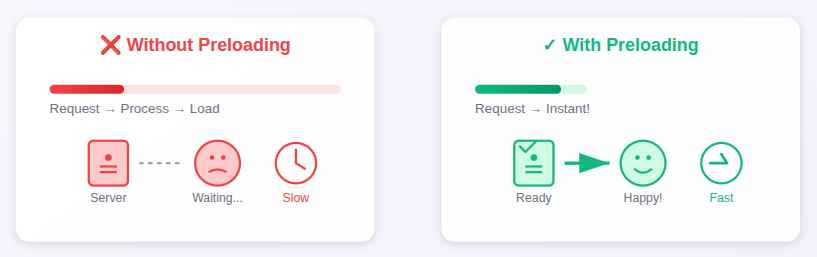
Website speed has become essential, not optional. A fast-loading site keeps visitors engaged, helps search engines rank your pages higher, and increases the chances that users take action instead of leaving. Just like no one waits for a slow store entrance, users won’t wait for a slow website either.
- User experience: Visitors will be happy and kept engaged with Faster pages.
- Search engine rankings: Search engines prefer and rank faster websites higher.
- Conversion rates: Speed makes users to take actions like sign-ups or purchases.
- Bounce rates: Slow loading causes visitors to leave without exploring.
What Is Preloading in WordPress?
Preloading means loading the content before a visitor actually needs it.
Instead of waiting for someone to click a page or scroll down, WordPress preloading prepares pages, images, fonts, or links in advance. So when a visitor asks for something, it’s already waiting, like a hot cup of coffee ready before you wake up.
How Preloading Improves WordPress Performance
Preloading improves WordPress performance by preparing important pages and resources before visitors request them. This reduces waiting time, avoids delays during first visits, and makes your website feel faster and smoother. Even if the actual load time doesn’t change much, users notice the speed instantly.
Preloading helps by:
- Reducing server response time: Pages are served faster because content is already prepared.
- Making pages appear instantly: Visitors see content almost immediately after clicking.
- Preventing delays caused by first-time loading: Resources load in advance instead of at the moment of access.
- Improving perceived speed: The website feels faster and more responsive to users.
Even if your site isn’t technically faster, it feels faster, and that’s what matters to users.
Types of Preloading to Improve WordPress Performance
Preloading comes in different forms, and each one focuses on speeding up a specific part of your website. From loading full pages in advance to preparing images and fonts, these methods work together to reduce delays. When combined correctly, they create a smoother and more seamless browsing experience.
The most common types include:
- Page preloading: Loads entire pages in advance for faster access.
- Link preloading: Prepares linked pages before users click them.
- Font preloading: Making sure that the text styles load quickly.
- Image preloading: Displays important images faster when pages load.
- Cache preloading: Builds cached versions of pages ahead of time.
Each type serves a different purpose, and when used together, they create a smooth browsing experience.
What is Page Preloading?
Page preloading works by saving ready-to-use versions of your website pages before visitors arrive. Instead of building a page at the moment of the request, WordPress instantly serves a cached copy, which reduces load time.
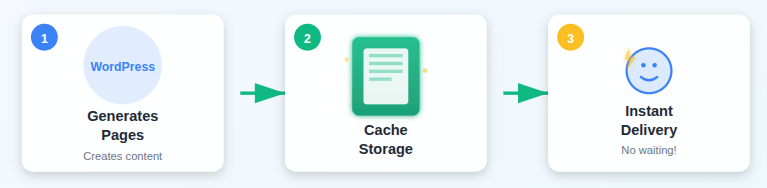
This method is especially useful for pages that get frequent traffic. So instead of generating a page on the spot, WordPress serves a ready-made version. This is especially helpful for:
- Homepages: Loads the main page quickly for first-time visitors.
- Popular blog posts: Deliver fast access to frequently read content.
- Landing pages: Improves speed for conversion-focused pages.
Browser Preloading vs Server-Side Preloading
Let’s keep this simple:
- Browser preloading tells the visitor’s browser what to load early (like links or fonts).
- Server-side preloading prepares cached pages on your server before requests arrive.
Both work together. One helps the browser, the other helps your server. Combined, they make your site feel lightning fast.
Preloading with WordPress Caching Plugins
Browser preloading and server-side preloading focus on speeding up different parts of your website. Browser preloading helps the user’s device load important files earlier, while server-side preloading ensures pages are already prepared on the server.
When used together, they significantly reduce waiting time and improve overall site speed. Most plugins allow you to:
- Preload all pages automatically
- Preload based on sitemap
- Schedule cache preloading
Once enabled, your site quietly works in the background to stay fast.
Understanding Link Preloading
Link preloading works by preparing a page as soon as a user hovers over a link. By the time the link is clicked, much of the page is already loaded, which reduces waiting time. This technique is especially effective for navigation menus and internal links.
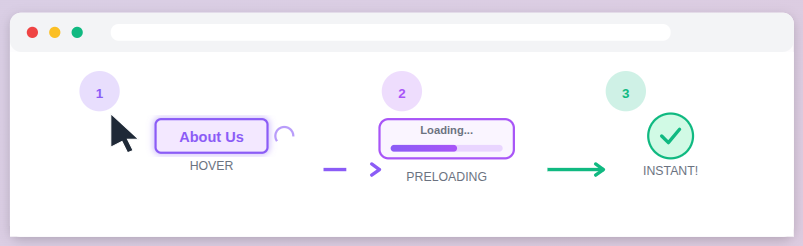
It’s subtle, but powerful. Visitors don’t notice the trick, they just feel the speed.
- Hover-based loading: Starts loading pages before the actual click happens.
- Faster navigation: Makes menus and internal links feel instant.
Image and Font Preloading
Image and font preloading focuses on loading the most important visual elements early so pages appear complete faster. By prioritizing key images and fonts, your website avoids layout shifts and blank spaces during loading. When done carefully, it improves speed without overloading the browser.
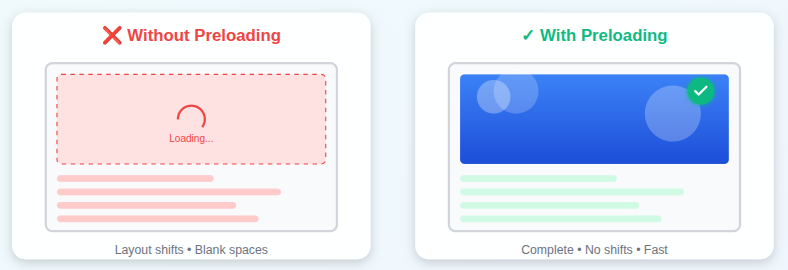
Best practices include:
- Preload only critical images: Loads key visuals like hero images first.
- Preload custom fonts used above the fold: Ensures important text styles appear instantly.
- Avoid preloading too many files at once: Prevents performance issues by avoiding excess files.
Less is more here. Smart preloading beats aggressive preloading every time.
Understanding Cache Preloading
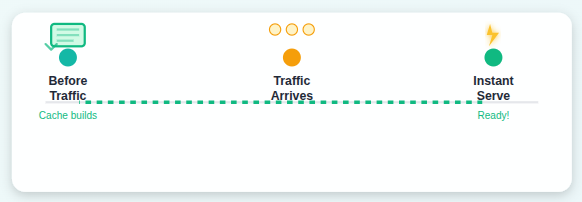
Cache preloading creates ready-made versions of your website pages and stores them before visitors arrive. This allows WordPress to serve pages instantly instead of generating them on demand. As a result, your site stays fast even during high traffic or first-time visits.
- Pre-built cached pages: Pages are generated in advance for quicker delivery.
- Consistent performance: Maintains speed even when traffic increases.
Common Preloading Mistakes to Avoid
Preloading can significantly improve performance, but using it without balance may cause more harm than good. Loading too many resources at once can strain the server and slow down real user requests. Smart, selective preloading always delivers better results than loading everything blindly.
Avoid these mistakes:
- Preloading every single page: Wastes resources on pages users may never visit.
- Preloading heavy images unnecessarily: Increases load time by prioritizing large files unnecessarily.
- Ignoring mobile users: Can hurt performance on slower mobile networks.
- Using multiple plugins that conflict: Multiple tools may clash and reduce overall speed.

How Preloading Affects SEO and Core Web Vitals
Preloading plays an important role in improving SEO by making websites load faster and feel more responsive. By preparing key resources in advance, it helps search engines see your site as user-friendly and performance-focused. A smoother experience often leads to stronger visibility in search results.
Preloading helps improve:
- Largest Contentful Paint (LCP): Helps main page content appear faster.
- First Input Delay (FID): Improves responsiveness when users interact with the page.
- Time to First Byte (TTFB): Reduces the time taken to receive the first server response.
These signals tell search engines your site offers a good experience. Better experience often means better rankings.
Test Performance After Preloading
Once preloading is enabled, testing performance helps confirm whether the changes are actually working. Performance tools show how quickly pages load, how responsive the server is, and whether user experience has improved. Comparing results before and after preloading gives you clear, reliable insights.
Look for:
- Faster load times: Confirms that pages open more quickly for visitors
- Improved performance scores: Reflect better optimization and user experience.
- Reduced server response: Indicates faster delivery of page content.
Always test before and after changes to see the real impact.
When Preloading Is Not a Good Idea
Preloading is useful, but it’s not required for every website. Small or frequently updated sites may not benefit from loading pages in advance, especially if server resources are limited. In such cases, selective preloading provides better control and efficiency.
You may skip it if:
- Your site is very small: Preloading may offer little noticeable benefit.
- Pages change constantly: Cached content may become outdated quickly.
- Server resources are limited: Excess preloading can increase server load.
In these cases, selective preloading works better than full-site preloading.
Final Tips to Improve WordPress Performance Fast
For the best performance, preloading should be combined with other speed optimization practices. A lightweight theme, optimized images, and regular monitoring help maintain consistent results. When used as part of a complete strategy, preloading delivers long-term speed improvements.
To get the best results:
- Combine preloading with caching: Creates faster and more reliable page loading.
- Keep your theme lightweight: Reduces unnecessary load on your site.
- Optimize images regularly: Keeps pages fast and visually clean.
- Monitor performance monthly: Helps catch speed issues early.
Preloading is powerful, but it works best as part of a bigger speed strategy.
FAQs
1. Does preloading really improve WordPress performance?
Preloading reduces waiting time and makes pages feel faster by serving prepared content instead of generating it on demand.
2. Is preloading suitable for beginners?
Absolutely. Most WordPress caching plugins offer preloading options that can be enabled without any technical knowledge.
3. Can preloading negatively affect my website speed?
If overused, preloading can strain server resources. That’s why selective and smart preloading is recommended.
4. Does link preloading work on all browsers?
Most modern browsers support link preloading, but its effectiveness may vary depending on browser behavior and settings.
5. When should I avoid using preloading?
Preloading may not be ideal for very small sites, frequently changing pages, or servers with limited resources.
6. How can ServerAvatar help with WordPress performance?
ServerAvatar simplifies WordPress installation, server management, and performance optimization, making it easier to maintain a fast and reliable website.
Conclusion
Improving WordPress performance doesn’t have to be complicated or technical. Preloading offers a smart and effective way to make your website feel faster by preparing important pages and resources in advance. When combined with caching, image optimization, and a lightweight setup, preloading helps deliver a smoother experience that visitors and search engines both appreciate.
The key is balance, preload what matters most, avoid unnecessary resources, and regularly test performance. With the right approach and tools like ServerAvatar to simplify WordPress setup and server management, you can build a fast, reliable website that keeps users engaged and coming back.