


Website security is a major concern for anyone running an online platform. Whether it is a small blog, a business website, or a large web application, protecting systems from unauthorized access is critical. Attackers, bots, and automated scripts continuously scan servers looking for weaknesses. Without proper protection, these threats can lead to data breaches, service interruptions, or compromised systems. One effective way to strengthen protection is by using IP Whitelisting and Blacklisting, which helps control who can access your server and who should be blocked before any damage can occur.
One effective method for controlling access and reducing security risks is the use of IP whitelisting and blacklisting. These techniques allow administrators to define which IP addresses can interact with their systems and which should be blocked. Instead of allowing unrestricted traffic, servers can filter incoming connections and enforce access rules.
In this guide, we will explore how IP whitelisting and blacklisting work, why they are important for website security, and how they can help strengthen server protection.
Understanding Website Security
Website security refers to the strategies and technologies used to protect servers, applications, and data from unauthorized access or malicious activity. A secure system prevents attackers from exploiting vulnerabilities while ensuring legitimate users can access services safely.
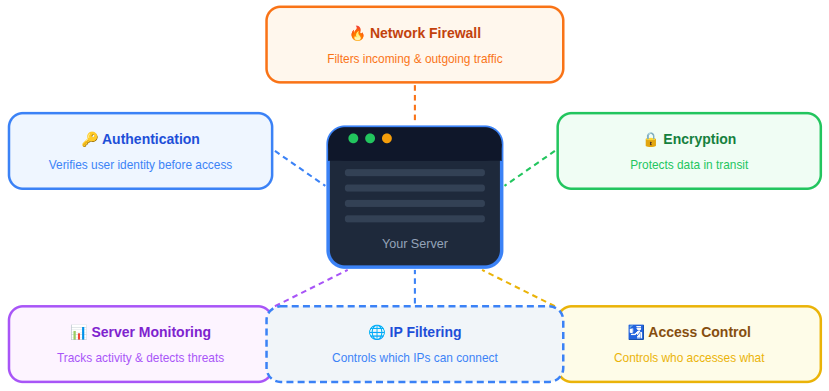
Modern website security depends on multiple defensive layers that work together to detect, prevent, and respond to potential threats.
- Network Firewalls: Firewalls act as the first line of defense by filtering incoming and outgoing network traffic based on predefined security rules, preventing unauthorized connections from reaching the server.
- Authentication Systems: Authentication mechanisms verify the identity of users before granting access, ensuring that only authorized individuals can interact with protected resources.
- Encryption Protocols: Encryption technologies protect data while it is being transmitted across networks, preventing sensitive information from being intercepted or altered.
- Server Monitoring: Continuous monitoring tools track server activity, system performance, and unusual behavior, helping administrators detect potential threats or irregular patterns early.
- Access Control Mechanisms: Access control policies determine which users or systems can access specific resources, reducing the risk of unauthorized actions within the environment.
Among these protective layers, IP filtering plays an important role. By controlling which IP addresses can connect to a system, administrators can limit potential threats and maintain better control over network traffic.
What Is an IP Address
An IP address (Internet Protocol address) is a numerical identifier assigned to devices connected to a network. It allows systems to communicate with each other and exchange data across the internet.
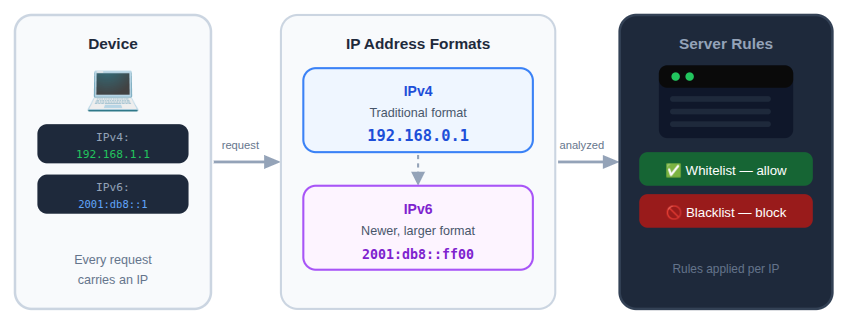
Each request sent to a website contains an IP address that identifies the source of the request. Servers can read this information and apply rules to determine whether the connection should be accepted or rejected.
IP addresses typically exist in two formats:
1. IPv4
A traditional format using numbers separated by periods.
2. IPv6
A newer format designed to support a much larger number of internet-connected devices.
By analyzing these addresses, systems can apply security rules such as whitelisting or blacklisting.
What Is IP Whitelisting
IP whitelisting is a security technique that allows access only to specific IP addresses that have been approved in advance.
When a whitelist rule is applied, the system checks incoming connections against a list of authorized IP addresses. If the IP address is included in the list, the request is permitted. If it is not included, the connection is rejected.
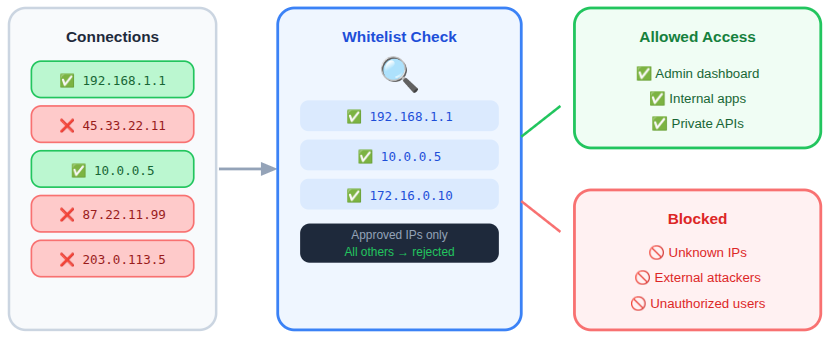
This approach ensures that only trusted sources can interact with sensitive services or systems.
IP whitelisting is often used to restrict access to critical systems by allowing only trusted IP addresses to connect.
- Administrative Dashboards: Restricting access to admin panels helps prevent unauthorized users from attempting to manage or modify system configurations.
- Internal Applications: Applications used within private infrastructure can be protected by allowing access only from approved network addresses.
- Server Management Interfaces: Tools used for server administration can be secured by limiting connections to trusted IP addresses, reducing the risk of external access attempts.
- Private APIs: APIs that handle sensitive operations or internal communication can be protected by allowing requests only from verified sources.
Key Features of IP Whitelisting
IP whitelisting focuses on allowing access only to trusted IP addresses while blocking all other connections by default.
- Restricted Access Control: Only pre-approved IP addresses can access specific systems, applications, or services.
- Improved Security for Sensitive Areas: Critical sections such as admin panels, APIs, and server management tools can be protected from unknown traffic.
- Customizable Access Rules: Administrators can easily add or remove IP addresses depending on changing access requirements.
- Network-Level Protection: Whitelisting can be applied through firewalls, servers, or cloud security settings to filter requests early.
- Reduced Attack Surface: By allowing only trusted connections, the number of potential entry points for attackers is significantly minimized.
How IP Whitelisting Works
The process of IP whitelisting follows a straightforward filtering mechanism.
- A connection request reaches the server.
- The server identifies the IP address of the request.
- The system compares the IP address with the whitelist database.
- If the IP address matches an approved entry, access is granted.
- If no match is found, the connection is denied.
This method significantly reduces the number of potential attack sources because only predefined IP addresses are allowed to access the protected resource.
Advantages of IP Whitelisting
IP whitelisting offers several benefits when protecting sensitive services and applications.
- Strict Access Control: Only approved IP addresses can connect to the system. This limits exposure to unknown or potentially harmful traffic.
- Reduced Attack Surface: By restricting connections, the number of possible attack paths decreases significantly.
- Improved Administrative Security: Administrative interfaces and server control panels become much harder to access without authorization.
- Lower Risk of Unauthorized Access: Even if attackers discover login credentials, access may still be blocked if their IP address is not on the whitelist.
- Better Network Monitoring: With fewer allowed connections, monitoring and analyzing traffic becomes easier and more efficient.
When IP Whitelisting Should Be Used
IP whitelisting is most effective when access needs to be tightly controlled.
Typical use cases include:
- Administrative Systems: Server administration panels and control interfaces benefit from restricted access policies.
- Private APIs: Applications that interact with trusted services may require IP-based authorization.
- Internal Services: Systems that should only be accessed by internal infrastructure can be protected using a whitelist.
- Server Management Tools: Remote server management interfaces can be secured through IP restrictions.
What Is IP Blacklisting
IP blacklisting is a security method used to block specific IP addresses from accessing a system. Instead of defining which addresses are allowed, blacklisting identifies addresses that should be denied access due to suspicious or malicious activity.
Once an IP address is added to a blacklist, the server automatically rejects any requests originating from that address.
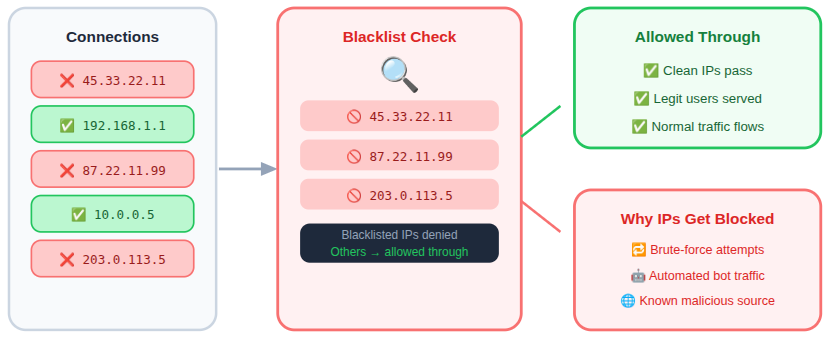
IP blacklisting helps block traffic that displays suspicious or potentially harmful behavior.
- Repeated Failed Login Attempts: IP addresses generating multiple unsuccessful login attempts can be blocked to prevent brute-force access attempts.
- Automated Bots: Bots that send automated requests to exploit vulnerabilities or overload systems can be restricted through blacklist rules.
- Suspicious Traffic Patterns: Traffic that shows abnormal request patterns or irregular behavior can be blocked to reduce the risk of attacks.
- Known Malicious IP Sources: IP addresses identified as sources of harmful activity can be denied access to protect system resources.
Key Features of IP Blacklisting
IP blacklisting works by identifying and blocking IP addresses that show suspicious or harmful activity.
- Targeted Blocking: Specific IP addresses involved in malicious behavior can be denied access immediately.
- Automated Threat Filtering: Security systems can automatically add suspicious IPs to a blacklist after repeated failed actions.
- Flexible Blocking Rules: Administrators can block individual IPs, IP ranges, or locations depending on security needs.
- Integration with Security Tools: Blacklisting often works alongside firewalls, monitoring systems, and intrusion detection tools.
- Traffic Control Mechanism: Blocking unwanted traffic helps prevent servers from being overloaded with harmful requests.
How IP Blacklisting Works
IP blacklisting helps maintain system stability and security by preventing harmful traffic from reaching the application layer.
When an incoming request is received:
- Server checks IP address of the request.
- The system checks the blacklist database.
- If the IP address appears in the blacklist, the request is immediately rejected.
- If the IP address is not listed, the request proceeds normally.
This process filters out many types of automated attacks before they consume server resources.
Advantages of IP Blacklisting
IP blacklisting helps protect websites by stopping known malicious traffic before it can affect the system.
- Prevents Repeated Malicious Attempts: Blocking problematic IP addresses stops attackers from continuing their activity.
- Improves Server Stability: Removing harmful traffic reduces unnecessary load on server resources.
- Helps Mitigate Automated Attacks: Bots and scripts that generate suspicious requests can be restricted effectively.
- Enhances Overall Security Layers: Blacklisting adds another defense mechanism alongside firewalls and authentication systems.
- Easy to Implement and Maintain: Most servers, hosting platforms, and security tools support IP blocking with simple configuration options.
When IP Blacklisting Is Useful
IP blacklisting is commonly used on publicly accessible platforms where traffic comes from many unknown sources.
IP blacklisting strengthens system security by stopping harmful sources from continuing their activity.
- Repeated Malicious Requests: Blocking IP addresses that repeatedly send suspicious requests prevents them from continuing to interact with the system.
- Automated Attack Scripts: Attack scripts that attempt to exploit vulnerabilities can be restricted by blocking the IP addresses they originate from.
- High-Frequency Suspicious Connections: IP addresses generating unusually high volumes of requests can be blocked to prevent service disruption or server overload.
- IP Addresses Linked to Security Incidents: Addresses previously associated with malicious activities can be blacklisted to prevent further interaction with the system.
Because blacklists focus on blocking harmful sources, they allow legitimate traffic to continue flowing normally.
Key Differences Between IP Whitelisting and IP Blacklisting
Although both methods manage network access, they function in different ways.
| Feature | IP Whitelisting | IP Blacklisting |
| Access Strategy | Allow only approved IPs | Block known harmful IPs |
| Security Level | Highly restrictive | Moderately restrictive |
| Traffic Handling | Denies all unknown IPs | Allows most traffic except blocked IPs |
| Management Complexity | Requires careful configuration | Requires ongoing monitoring |
In many environments, these methods are used together to provide balanced protection.
Security Threats Reduced by IP Filtering
IP filtering plays a major role in mitigating several security risks.
- Brute Force Attacks: Attackers repeatedly attempt login combinations to gain unauthorized access. Blocking suspicious IP addresses prevents further attempts.
- Automated Bot Traffic: Bots may send excessive requests or attempt to exploit vulnerabilities. Blacklisting prevents these systems from interacting with the server.
- Unauthorized Server Access: Unauthorized attempts to access server interfaces can be blocked through IP-based restrictions.
- Malicious Network Scanning: Attackers frequently scan systems to identify open services or vulnerabilities. IP filtering can block these scanning attempts.
Methods to Implement IP Whitelisting and Blacklisting
Controlling which IP addresses can access your server is an important part of securing web infrastructure. IP filtering can be applied at different layers of the system, including the network firewall, web server configuration, cloud infrastructure, and application level. Implementing these controls ensures that unauthorized traffic is filtered before it reaches sensitive resources.
Below are some of the most commonly used methods for implementing IP whitelisting and blacklisting.
1. Firewall Configuration
A firewall is one of the most widely used tools for controlling network traffic. It operates at the network layer and allows administrators to define rules that determine which IP addresses are allowed to connect to the server.
Firewall rules can be used to:
- Allow connections only from trusted IP addresses
- Block specific IP addresses or ranges
- Restrict access to certain ports such as SSH, FTP, or database services
- Prevent repeated connection attempts from suspicious sources
Because firewall filtering happens before traffic reaches the server applications, it helps stop malicious requests early and reduces unnecessary server load.
Most operating systems provide firewall tools such as UFW, iptables, or firewalld to manage these rules.
2. Web Server Configuration
Web servers such as Apache and Nginx allow administrators to control access using IP-based rules directly within their configuration files.
These rules operate at the web server level, meaning they filter requests before the application processes them.
Web server IP filtering can be used to:
- Restrict access to administrative panels
- Protect sensitive directories or configuration files
- Allow access to staging environments only from specific IPs
- Block repeated requests from suspicious sources
This approach provides an additional layer of protection on top of firewall rules.
3. Cloud Infrastructure Security Controls
Many websites are hosted on cloud platforms. These environments usually include built-in network security tools that allow administrators to control incoming and outgoing traffic.
Cloud infrastructure security controls typically allow administrators to:
- Allow traffic from approved IP addresses
- Block connections from suspicious IP ranges
- Restrict access to certain services or ports
- Protect internal services that should not be publicly accessible
Applying IP restrictions at the infrastructure level ensures that unauthorized traffic is filtered before it reaches the server instance.
4. Application-Level Access Controls
In some situations, IP filtering can also be implemented within the application itself. Many frameworks and platforms allow developers to restrict certain features or endpoints based on IP address.
Application-level controls can be used to:
- Restrict login pages to trusted IPs
- Limit access to private APIs
- Protect internal tools or dashboards
- Prevent automated requests from unknown sources
While this method can add an extra layer of protection, it is generally recommended to combine it with a firewall and server-level filtering for stronger security.
Implementing IP Whitelisting and Blacklisting with ServerAvatar
Managing IP access rules manually across different server layers can become complex, especially when working with multiple servers or applications. A centralized server management platform can simplify this process and make security configuration easier.
ServerAvatar provides built-in tools that allow users to configure IP access rules directly from a graphical dashboard without needing to manually edit server configuration files.
What is ServerAvatar?
ServerAvatar is a platform to simplify the hosting and management of servers and applications. It simplifies the process of deploying and managing PHP and Node.js based web applications on servers.
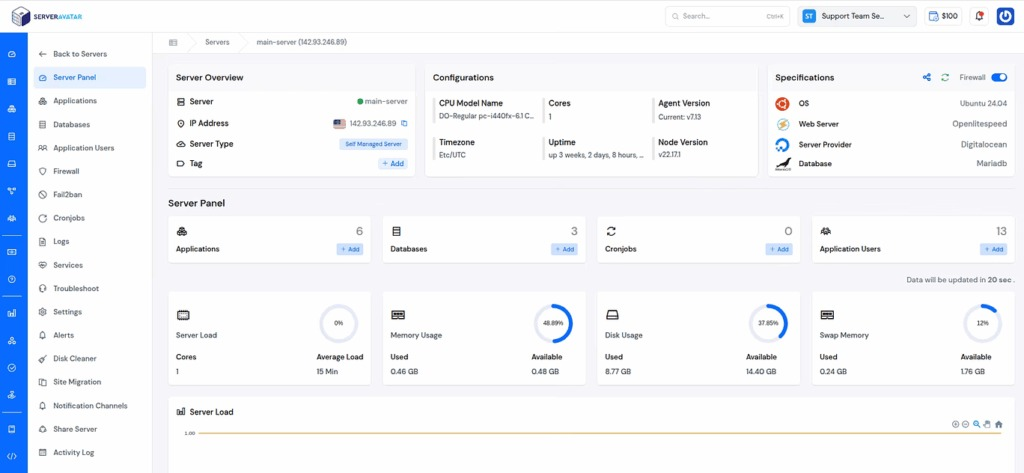
Below are two ways ServerAvatar helps manage IP-based security controls.
1. Managing Firewall IP Rules in ServerAvatar
ServerAvatar allows users to configure firewall rules directly from the platform interface. Instead of using the command line, administrators can manage access policies through a simple dashboard.
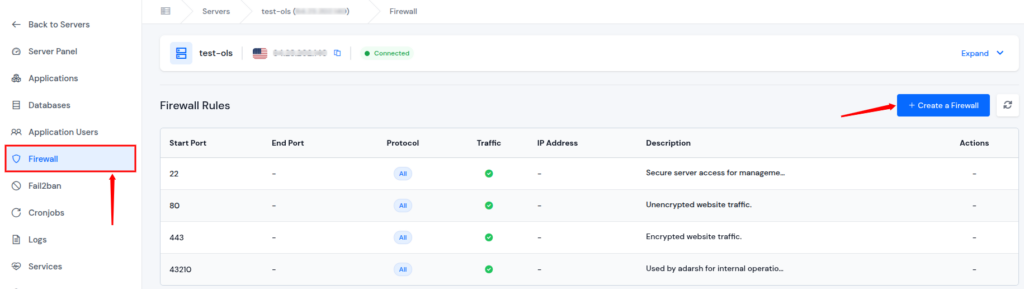
With ServerAvatar firewall controls, users can:
- Allow trusted IP addresses to access the server
- Block suspicious IP addresses using block rules
- Control access to specific ports such as SSH or web services
- Update firewall settings instantly across the server
This simplified firewall management helps users maintain strong access control while reducing the risk of configuration errors.
2. Managing Web Server Security with ServerAvatar
ServerAvatar also helps manage web server environments such as Apache and Nginx, allowing users to apply security configurations without manually editing configuration files using the built-in file manager feature directly from the platform interface.
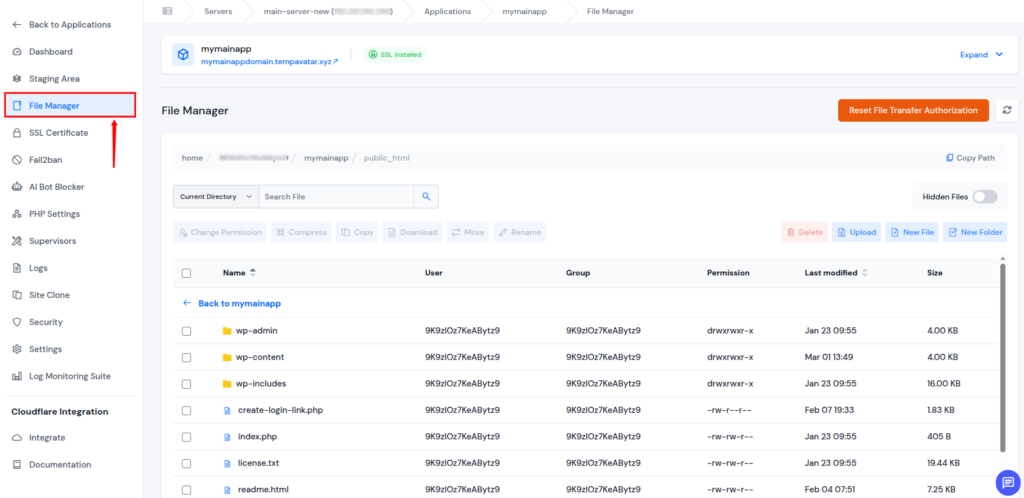
Through the ServerAvatar interface, users can:
- Modify application files using the built-in File Manager
- Manage configurations from a centralized dashboard
- Apply security settings across multiple applications easily
- Monitor server environments and maintain secure hosting setups
By providing centralized server management, ServerAvatar makes it easier to maintain secure configurations while simplifying everyday server administration tasks.

Best Practices for Managing IP Access
Effective management of IP filtering rules requires careful planning and maintenance.
- Regularly Review IP Lists: IP addresses should be periodically reviewed to remove outdated entries and maintain accurate access control.
- Monitor Server Logs: Log analysis helps identify suspicious traffic patterns and potential threats that may require blocking.
- Use Layered Security: IP filtering should be combined with firewalls, authentication systems, and monitoring tools for stronger protection.
- Automate Threat Detection: Automated systems can detect repeated suspicious activity and update blacklists dynamically.
- Document Access Policies: Clear documentation helps maintain consistent security policies across systems and teams.
Common Mistakes To Avoid
Improper configuration or poor management of IP filtering rules can reduce the effectiveness of security controls and may even block legitimate access.
- Blocking Your Own IP Address: One of the most common mistakes is accidentally adding your own IP address to a blacklist or failing to include it in a whitelist, which can immediately prevent administrators from accessing the server.
- Failing to Update IP Lists Regularly: IP addresses used by services, teams, or infrastructure may change over time. If the whitelist or blacklist is not updated regularly, legitimate users may lose access or outdated blocked addresses may remain ineffective.
- Over-Relying on Blacklisting Alone: Blocking suspicious IPs can help stop known threats, but it cannot prevent new or unknown sources from attempting access. Relying only on blacklisting without other security measures leaves systems exposed.
- Ignoring IPv6 Addresses: Many networks now support IPv6 alongside IPv4. If filtering rules are applied only to IPv4 addresses, traffic coming from IPv6 addresses may bypass the intended restrictions.
- Blocking Entire IP Ranges Without Verification: Blocking large IP ranges without careful analysis may unintentionally restrict access for legitimate users who share the same network range.
- Not Monitoring Server Logs: Server logs provide valuable insight into suspicious traffic and connection attempts. Without monitoring logs, administrators may miss patterns that indicate the need for new whitelist or blacklist rules.
- Using Static Rules in Dynamic Environments: In environments where IP addresses frequently change, static filtering rules may become outdated quickly. Without regular review, these rules may no longer reflect the current access requirements.
Conclusion
IP whitelisting and blacklisting are important techniques for controlling network access and strengthening server security. By allowing only trusted IP addresses and blocking suspicious sources, administrators can reduce the risk of unauthorized access, automated attacks, and unnecessary server load. These methods help create a controlled environment where traffic can be filtered before it reaches sensitive systems or applications. When combined with other security layers such as firewalls, authentication systems, monitoring tools, and encryption protocols, IP filtering becomes an effective part of a comprehensive security strategy.
ServerAvatar further simplifies this process by providing centralized features to manage firewall rules and server configurations, making it easier to maintain secure and well-managed server environments.
FAQs
1. What is the difference between IP whitelisting and IP blacklisting?
IP whitelisting allows only specific approved IP addresses to access a system, while IP blacklisting blocks particular IP addresses that are considered suspicious or harmful.
2. Is IP whitelisting more secure than IP blacklisting?
IP whitelisting generally provides stricter security because it allows access only to known and trusted sources. Blacklisting focuses on blocking known threats while allowing other traffic.
3. Can IP whitelisting and blacklisting be used together?
Many security setups combine both techniques. Whitelisting restricts access to trusted sources, while blacklisting blocks IP addresses that show suspicious behavior.
4. At which level can IP filtering be implemented?
IP filtering can be implemented at multiple levels, including network firewalls, web server configurations, cloud infrastructure security controls, and application-level access policies.
5. Why is IP filtering important for server security?
IP filtering helps reduce unauthorized access attempts, prevents repeated malicious requests, and limits unnecessary traffic reaching the server.
6. How does ServerAvatar help manage IP access rules?
ServerAvatar provides a centralized dashboard where users can configure firewall rules, allow or block IP addresses, and manage server security settings without manually editing server configuration files.