

Handling user input is a common part of building web applications. When users submit data through forms, APIs, or other interfaces, the application must ensure that the information meets specific requirements before processing it. This is where Laravel Validation becomes essential, as it helps verify that submitted data follows the expected rules before it is accepted by the system. If invalid data enters the system, it can lead to application errors, inconsistent records, or unexpected behavior.
This is where Laravel Validation Rules play an important role. Validation rules allow developers to define the conditions that input data must satisfy before it is accepted by the application.
Laravel provides a powerful and flexible validation system that makes it easy to enforce these rules. With only a few lines of code, developers can ensure that submitted data follows the expected format, length, or structure.
In this guide, we will explore Laravel Validation Rules, how they work, how to create them, and how to use them effectively in Laravel applications.
Understanding Laravel Validation Rules
Laravel Validation Rules define the conditions that input data must meet before the application processes it. These rules ensure that the submitted data follows the expected format and structure.
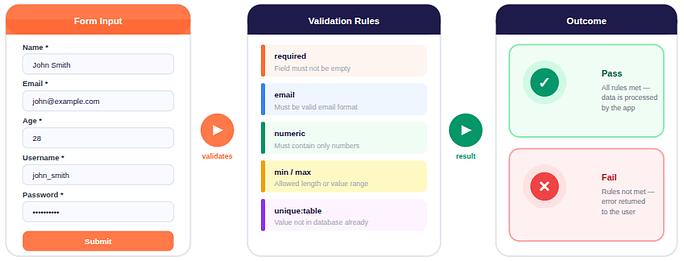
Laravel provides many built-in rules that can validate:
- Required fields: Ensures that a specific field must be present in the request and cannot be left empty.
- Email format: Checks whether the entered value follows the correct structure of an email address.
- Numeric values: Verifies that the input contains only numbers and is treated as a numeric value.
- Minimum or maximum length: Defines the allowed range for the length or value of the input data.
- Unique database values: Confirms that the submitted value does not already exist in a specified database table.
Developers can apply multiple validation rules to a single field to enforce strict data requirements.
Example:
'name' => 'required|string|max:255'This rule means:
- The field must be present
- The value must be a string
- The value must not exceed 255 characters
Laravel automatically evaluates these rules when the request is processed.
Why Validation Is Important in Laravel Applications
Validation is a critical part of application development because it ensures that only valid data is accepted by the system.
Laravel includes a robust validation system that helps developers verify incoming data before it is processed or stored. By defining validation rules, developers can ensure that inputs follow specific requirements such as format, length, or structure.
Without proper validation, applications may encounter issues such as:
- Application errors: Incorrect data types or missing fields can cause logic failures in the application.
- Database inconsistencies: Invalid data stored in the database can affect queries and system functionality.
- Security risks: Unvalidated input may expose the application to malicious or unexpected data.
- Unreliable system behavior: Applications depend on predictable data formats, and validation ensures consistency.
By applying Laravel Validation Rules, developers maintain data quality and system reliability.
How Laravel Validation Works
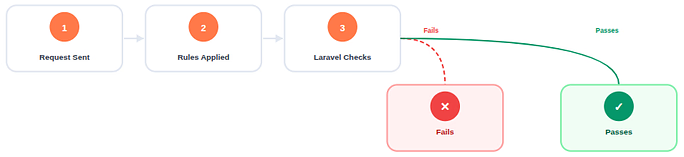
Laravel validation typically follows a straightforward workflow.
- A request containing input data is sent to the application
- Validation rules are applied to the request data
- Laravel checks whether the data satisfies the defined rules
- If validation fails, the application returns error messages
- If validation passes, the request proceeds to the next step
Laravel provides multiple methods for validating data, including:
- Controller validation: Allows validation rules to be defined directly inside controller methods before processing the request.
- Validator facade: Provides a flexible way to create validation instances and manually handle validation results.
- Form request validation: Uses dedicated request classes to organize and manage validation rules separately from controllers.
- Custom validation rules: Allows developers to create their own validation logic when built-in rules do not meet specific requirements.
Each method allows developers to apply validation depending on the complexity of the application.
Basic Laravel Validation Rules
When building applications with Laravel, verifying user input is an essential development step. Laravel simplifies this process by providing a flexible validation system that allows developers to define rules for incoming data.
These validation rules ensure that submitted values match the expected format or conditions before the application processes them. Developers can apply these rules directly in controllers, use dedicated Form Request classes, or define custom rule objects for more complex scenarios.
Each approach allows validation logic to be implemented efficiently while keeping application code clean and structured. Laravel’s validation system supports a wide variety of rules designed to handle common input validation requirements. Some commonly used rules include:
| Rule | Description |
| required | Ensures the field exists in the request data |
| numeric | Validates that the value is a number |
| Checks whether the value follows a valid email format | |
| alpha | Allows only alphabetic characters |
| min | Defines the minimum value or minimum length |
| max | Defines the maximum allowed value or length |
| unique | Ensures that the value does not already exist in a database table |
| confirmed | Requires a matching confirmation field for validation |
1) required: Ensures the field exists and is not empty.
'username' => 'required'2) email: Validates that the value follows the correct email format.
'email' => 'required|email'3) min: Defines the minimum length or numeric value.
'password' => 'required|min:8'4) max: Specifies the maximum allowed length.
'title' => 'required|max:100'5) numeric: Ensures that the value contains only numbers.
'age' => 'required|numeric'Multiple rules can be combined using the pipe (|) separator.
Implementing Validation in Controllers
What Are Controllers in Laravel?
In Laravel, controllers are classes that handle the logic of incoming requests. They act as a middle layer between your application’s routes and the business logic, helping you organize code in a clean and reusable way. Instead of placing all logic in routes, controllers let you keep your application structured.
For example, a UserController could manage user registration, login, and profile updates—all in a single, organized place.
Implementing Validation:
Laravel allows validation directly inside controller methods. This approach is simple and commonly used in smaller applications.
Example:
public function store(Request $request)
{
    $request->validate([
        'name' => 'required|max:255',
        'email' => 'required|email',
        'password' => 'required|min:8'
    ]);

    // Process request
}If validation fails:
- Laravel automatically redirects the request
- Error messages are returned to the session
- The user can correct the input and resubmit the request
This built-in mechanism simplifies input validation significantly.
Implementing Validation Using the Validator Facade
Another method for validation is using Laravel’s Validator facade.
In Laravel, a facade is a class that provides a simple, static interface to a service in the framework’s service container. The Validator facade gives you access to Laravel’s powerful validation functionality without directly relying on controller methods.
Using the Validator facade allows developers to:
- Validate data anywhere in the application, not just in controllers
- Handle validation manually, giving more flexibility over redirects and error messages
- Apply complex or conditional validation logic
Here’s an example of how to use the Validator facade to validate a request:
use Illuminate\Support\Facades\Validator;

$validator = Validator::make($request->all(), [
    'title' => 'required|max:255',
    'content' => 'required'
]);After creating the validator instance, developers can check if validation fails.
if ($validator->fails()) {
    return redirect()->back()->withErrors($validator);
}The Validator facade provides greater control over how validation errors are handled.
Frequently Used Laravel Validation Rules
Laravel includes many validation rules designed for specific scenarios. Some commonly used rules include:
1) unique: Ensures the value does not already exist in a database table.
'email' => 'unique:users'2) confirmed: Validates that two fields contain the same value.
'password' => 'confirmed'This rule expects a corresponding field:
password_confirmation3) date: Ensures the input is a valid date.
'start_date' => 'date'4) url: Ensures the value is a properly formatted URL.
'website' => 'url'These rules help maintain data accuracy within Laravel applications.
Creating Custom Validation Rules
Built-in validation rules handle many common cases, but some applications require additional validation logic.
Laravel allows developers to create custom validation rules using the Artisan command:
php artisan make:rule CustomRuleThis command generates a rule class where custom validation logic can be defined.
Example structure:
public function passes($attribute, $value)
{
    return strlen($value) > 5;
}Custom rules make it possible to implement validation requirements specific to an application.
Form Request Validation in Laravel
As Laravel applications grow, placing validation rules directly in controllers can make the code difficult to maintain. To solve this, Laravel provides Form Request Validation, which allows validation logic to be stored in dedicated classes.
Form Request classes help centralize validation rules for specific HTTP requests. Instead of repeating validation logic across multiple controllers, developers can define the rules once in a request class and reuse them wherever needed.
Laravel provides Form Request Validation to organize validation rules into dedicated request classes.
Generating and Implementing Form Request Classes
Laravel makes it simple to create Form Request classes using the Artisan command-line tool.
Step 1: Generate a Form Request Class
Run the following command:
php artisan make:request MyFormRequestThis command creates a new request class inside the App\Http\Requests directory.
Inside the generated class, Laravel provides a rules() method where validation rules can be defined.
Example:
public function rules()
{
    return [
        'name' => 'required|string|max:255',
        'email' => 'required|email|unique:users'
    ];
}Step 2: Use the Form Request in a Controller
Once the request class is created, it can be used directly in a controller method.
use App\Http\Requests\MyFormRequest;

public function store(MyFormRequest $request)
{
    // Validation has already been applied
}Laravel automatically validates the request before the controller logic executes.
Authorizing Requests in Form Request Classes
Form Request classes also include an authorization mechanism that allows developers to determine whether a request should proceed.
This logic is defined inside the authorize() method.
Example:
public function authorize()
{
    return true;
}If the method returns false, Laravel automatically blocks the request and returns a 403 Forbidden response.
This feature allows validation and authorization checks to be handled within the same request class.
Handling Validation Error Messages
Laravel automatically generates validation error messages when rules fail.
These errors can be accessed in Blade templates.
Example:
@error('email')
    <div>{{ $message }}</div>
@enderrorTo display all errors:
@if ($errors->any())
    <ul>
        @foreach ($errors->all() as $error)
            <li>{{ $error }}</li>
        @endforeach
    </ul>
@endifLaravel also allows developers to define custom error messages for better clarity.
Customizing Validation Error Messages
Laravel automatically generates validation error messages when a rule fails. However, developers may want to define custom messages for better clarity.
Form Request classes allow customization through the messages() method.
Example:
public function messages()
{
    return [
        'name.required' => 'The name field cannot be empty.',
        'email.unique' => 'This email address already exists.'
    ];
}Custom messages help ensure that validation feedback remains clear and consistent.
Handling Validation Failure and Redirect Behavior
When validation fails in a Form Request, Laravel automatically redirects the request back to the previous page.
During this process:
- Validation errors are stored in the session
- The previous input is preserved
- Error messages become available in the view layer
This automatic behavior simplifies error handling and allows the application to provide clear feedback without additional logic.
Validating Files in Laravel
Laravel provides specific validation rules for file uploads.
Example:
'file' => 'required|mimes:pdf,docx|max:2048'This rule checks:
- A file must be present
- Only specific file formats are allowed
- File size must not exceed the defined limit
File validation helps maintain application stability and ensures uploaded content follows defined constraints.
Conditional Validation Rules
Laravel supports conditional validation rules that apply only when certain conditions are met.
Example:
'discount_code' => 'required_if:status,active'This means the field becomes required only if a specific condition is true.
Other useful conditional rules include:
- required_with
- required_without
- sometimes
These rules allow developers to create flexible validation logic.
Best Practices for Laravel Validation
To implement validation effectively, developers should follow several best practices.
- Use Form Request classes: They keep validation logic separate from controllers.
- Apply validation early: Always validate input before processing data.
- Use built-in validation rules: Laravel provides many reliable rules that cover most validation needs.
- Maintain clear validation structure: Organized validation logic improves maintainability and readability.
Following these practices helps maintain clean and stable Laravel applications.

Common Validation Mistakes
Several mistakes can affect the reliability of validation systems.
- Skipping validation: Processing unvalidated input can lead to unpredictable behavior.
- Using overly complex rules: Validation logic should remain simple and clear.
- Ignoring validation errors: Applications should properly handle and display validation errors.
- Mixing validation with business logic: Keeping validation separate improves code clarity and maintainability.
Avoiding these mistakes helps maintain consistent validation behavior.
Conclusion
Laravel provides a structured and efficient way to validate incoming data through its built-in validation system. By defining validation rules, developers can ensure that submitted data follows the required format, structure, and constraints before it is processed by the application. Whether validation is implemented directly in controllers, through the Validator facade, or by using Form Request classes, Laravel offers flexible options that help keep code organized and maintainable. Features such as custom validation rules, conditional validation, and customizable error messages further enhance the ability to handle complex validation scenarios. By understanding and properly applying Laravel Validation Rules, developers can maintain clean data, improve application reliability, and build more stable and maintainable Laravel applications.
FAQs
1. What are Laravel Validation Rules?
Laravel Validation Rules are predefined or custom conditions that verify whether input data meets specific requirements before it is processed by the application.
2. Where can validation rules be defined in Laravel?
Validation rules can be defined inside controllers, through the Validator facade, within Form Request classes, or by creating custom validation rule objects.
3. What is the purpose of Form Request Validation in Laravel?
Form Request Validation helps organize validation logic in separate request classes, making controllers cleaner and the codebase easier to maintain.
4. Can developers create custom validation rules in Laravel?
Laravel allows developers to generate custom validation rule classes using the Artisan command and implement specific validation logic when built-in rules are not sufficient.
5. What happens when validation fails in Laravel?
When validation fails, Laravel automatically redirects the request back to the previous page and provides error messages that can be displayed in the application’s views.