


Have you ever opened your analytics dashboard and thought, “Wait… why are so many people here right now?” That sudden rush of visitors feels exciting, until your website slows down, pages stop loading, or worse, the server crashes, leaving you wondering how to manage traffic spikes on your server without disrupting user experience.
Traffic spikes are a good problem to have, but only if your server is ready for them. Otherwise, it’s like inviting hundreds of guests into a house built for ten. The doors jam, the lights flicker, and chaos follows.
In this guide, I will walk you through traffic spikes, how to manage them on your server without panic, complex tech talk, or sleepless nights. Whether you run a blog, an online store, or a business website, this article will help you stay online when it matters most.
What Is a Traffic Spike?
A traffic spike occurs when a website receives a significantly higher number of requests than its normal traffic levels within a short period. These spikes can be temporary or sustained, depending on the source and purpose of the traffic.
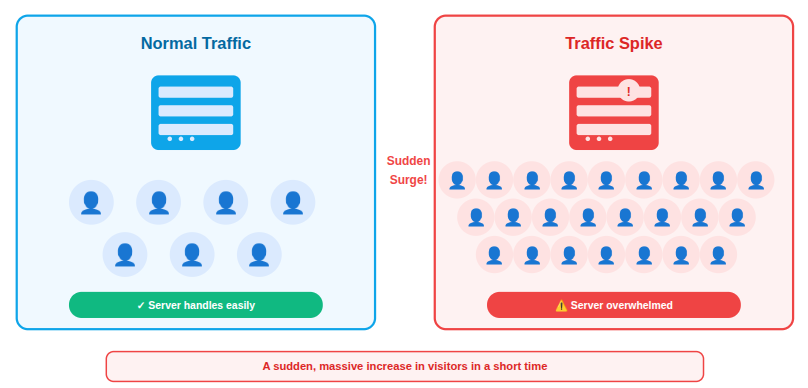
Servers must process each request, and when requests exceed available resources, performance issues begin to appear.
How Traffic Spikes Affect Server Performance
Traffic spikes place sudden pressure on server resources, pushing them beyond normal operating limits. When too many requests arrive at the same time, the server struggles to process them efficiently, which impacts speed and availability.
- CPU power: High request volumes force the processor to handle more tasks at once
- Memory (RAM): Active processes consume more memory, reducing available space for new requests.
- Bandwidth: Increased data transfer can exceed network capacity and slow responses.
When resource limits are reached, websites may slow down or become unreachable. During traffic spikes, servers often experience:
- Increased CPU usage: The server works harder to process simultaneous requests.
- High memory consumption: More active users require additional memory allocation.
- Slower database queries: Databases take longer to respond under heavy load.
- Network bandwidth saturation: Data transfer limits are reached, causing delays.
If these resource limits are reached, the server may respond slowly or fail to respond entirely. Managing these limits effectively is critical for maintaining service availability.
The scary part? Visitors won’t wait. They leave, and often don’t come back.
Common Causes of Sudden Traffic Spikes
Traffic spikes usually occur due to specific activities or events that attract a large number of users in a short period. Understanding these causes helps in planning and resource allocation.
- A post going viral on social media: Rapid sharing drives a surge of visitors.
- Marketing campaigns: Promotions increase user interest and site visits.
- Sales, discounts, or flash deals: Limited-time offers create high demand.
- Feature announcements: New updates encourage users to visit immediately.
- API usage increases: Applications send more requests to the server.
- TV, news, or influencer mentions: Public exposure results in sudden traffic growth.
- Product launches: Users access the site to explore new offerings.
- Seasonal events or festivals: Time-based demand leads to predictable spikes.
- Search engine ranking jumps: Higher visibility brings more organic traffic.
Good or bad, every spike needs preparation. Identifying the source of traffic helps determine the best way to manage it.
Early Warning Signs of Server Overload
Servers typically show performance issues before a complete failure occurs. Identifying these signs early allows timely action to prevent downtime.
- Slow page loading: Pages take longer to respond due to resource strain.
- Frequent 500 or timeout errors: The server fails to process requests in time.
- High CPU or memory usage: Resource consumption remains near maximum limits.
- Dropped database connections: Active connections are closed unexpectedly.
- Slow database response times: Queries take longer to execute.
- Unresponsive admin panels: Management interfaces fail to load properly.
- Increased page load time: Overall site performance becomes inconsistent.
Monitoring these signals allows early action before users are affected.
Why Preparing for Traffic Spikes Is Important
Preparation ensures that increased traffic does not disrupt website availability or performance. Planning ahead allows servers to handle demand smoothly without affecting users.
- Fewer outages: Proper setup reduces unexpected downtime.
- Improved uptime: Servers remain accessible during high traffic.
- Happier visitors: Users experience faster and reliable performance.
- Consistent performance: Site speed remains stable under load.
- Better search rankings: Reliable performance supports SEO metrics.
- Better user experience: Visitors can navigate without delays or errors.
- More conversions: Smooth performance encourages user actions.
- Reduced recovery time: Issues are resolved faster when prepared.
Preparation is more effective and less costly than reacting after issues occur.
Choose the Right Hosting Environment
The hosting environment plays a major role in traffic handling capacity. Not all hosting is built for traffic spikes.
- Shared hosting has limited resources and is less suitable for traffic spikes.
- Cloud hosting allows flexible resource allocation.
- Managed servers provide optimized performance with automated resource handling.
Choosing the correct hosting setup reduces the risk of overload during high traffic periods. If your site matters to your business, your hosting choice matters too.
How ServerAvatar Supports Different Hosting Needs
What is ServerAvatar?
ServerAvatar is a platform to simplify the hosting and management of servers and applications. It simplifies the process of deploying and managing PHP and Node.js based web applications on servers.
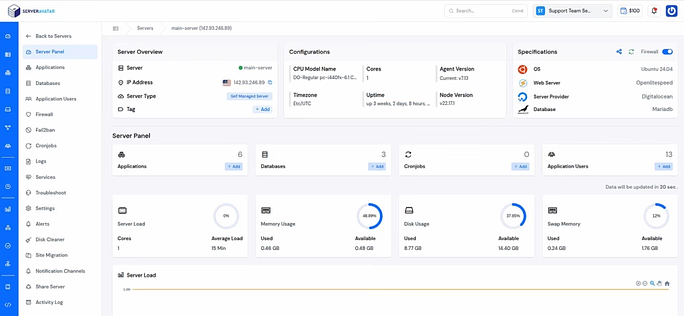
ServerAvatar is designed to support both managed and self-managed server environments, making it easier to choose the right setup based on your business requirements. Users can deploy servers and applications, manage resources, and monitor performance from a centralized dashboard without dealing with complex manual configurations.
By providing flexibility in server provisioning and management, ServerAvatar helps ensure that hosting environments are better prepared to handle sudden traffic increases while maintaining stability and control.
Use Server Scaling to Handle Load
Server scaling adjusts resources to match traffic demand. Server scaling means adjusting resources when traffic increases. There are two main types:
Vertical Scaling
Increases CPU, RAM, or storage on a single server. This method is effective for short-term traffic increases.
Horizontal Scaling
Distributes traffic across multiple servers. This approach is more suitable for sustained or unpredictable traffic growth.
Scaling keeps your site steady when traffic floods in. Both scaling methods help maintain stability during spikes.
Server Scaling with ServerAvatar for Managed Servers
ServerAvatar’s managed servers provide built-in support for both vertical and horizontal scaling directly from the ServerAvatar dashboard. This allows users to adjust server resources quickly based on traffic demand, without requiring complex manual configurations or external tools.
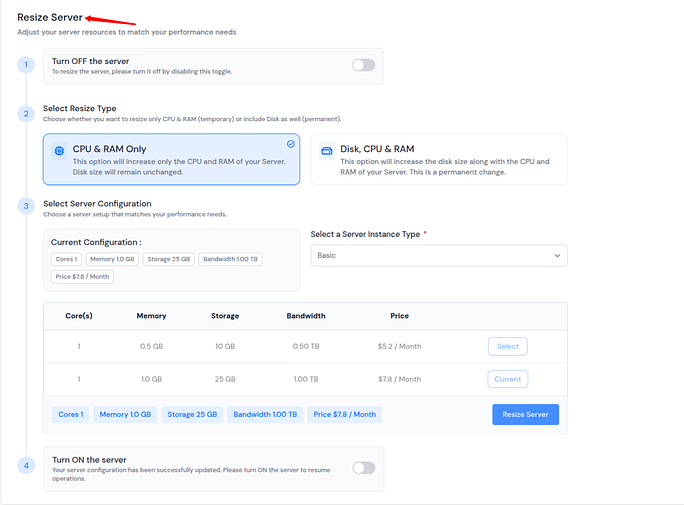
With vertical scaling, server resources such as CPU, RAM, and storage can be resized seamlessly to handle short-term traffic spikes.
For workloads that require higher availability or long-term growth, horizontal scaling enables the distribution of traffic across multiple servers, improving stability and load handling.
By offering both scaling options in a centralized interface, ServerAvatar helps ensure servers remain responsive and reliable during sudden or sustained traffic increases.
Optimize Website Performance
Website optimization reduces server workload by improving efficiency. A well-optimized site processes requests faster and uses fewer resources.
- Compress images: Smaller image sizes reduce load time and bandwidth use.
- Reducing file sizes: Lightweight files require less processing power.
- Remove unused plugins: Fewer plugins lower background resource usage.
- Removing unnecessary scripts: Eliminates extra processing tasks.
- Optimizing database queries: Faster queries improve response times.
- Minify CSS and JavaScript: Reduces file size and execution time.
- Use lightweight themes: Simple designs require fewer resources.
- Using efficient frameworks: Optimized frameworks handle requests better.
It’s like cleaning clutter from a room, suddenly, everything moves faster.
Reducing Load with Server-Side Caching
Server-side caching minimizes repeated processing by storing previously generated data. This allows servers to respond faster during high traffic.
- Browser caching: Stores files locally to avoid repeated downloads.
- Page caching: Saves complete pages for faster delivery.
- Object caching: Stores database query results to reduce processing.
Caching significantly reduces server workload during traffic spikes. Caching is one of the easiest ways to survive traffic spikes.
Using Redis Caching with ServerAvatar
ServerAvatar supports Redis as a server-side caching solution to help reduce database load and improve application performance during high traffic periods. Redis stores frequently accessed data in memory, allowing applications to retrieve information faster without repeatedly querying the database.
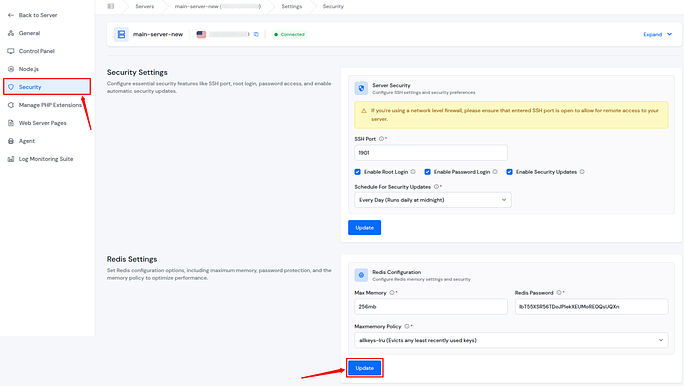
This improves response times, lowers server resource usage, and helps maintain stable performance when traffic increases.
Using a Content Delivery Network (CDN)
A Content Delivery Network (CDN) distributes static content across multiple locations
reducing the load on the main server. Requests are handled more efficiently by delivering data from nearby locations. You can use any third-party CDN.
- Faster load times: Content is delivered with lower latency.
- Reduced server load: Fewer requests reach the primary server.
- Better global performance: Users receive consistent speed worldwide.
This results in faster page delivery, lower server load, and more consistent performance across different geographic regions, especially during traffic spikes.
Monitor Traffic and Server Metrics
Monitoring provides visibility into server behavior during traffic changes. Real-time data helps detect issues before they escalate.
- Traffic levels: Shows how many users are accessing the site.
- CPU and RAM usage: Indicates resource consumption.
- Network throughput: Measures data transfer efficiency.
- Disk and bandwidth: Tracks storage and data limits.
- Error rates: Highlights request failures or server issues.
Real-time monitoring lets you act before small issues become big problems. It helps identify issues early and support quick decision-making.
Using ServerAvatar for Real-Time Server Monitoring
ServerAvatar includes built-in monitoring that provide real-time visibility into server performance and insights. Key metrics such as CPU usage, memory consumption, disk activity, and network usage are available in a single interface, allowing faster identification of performance issues during traffic spikes.
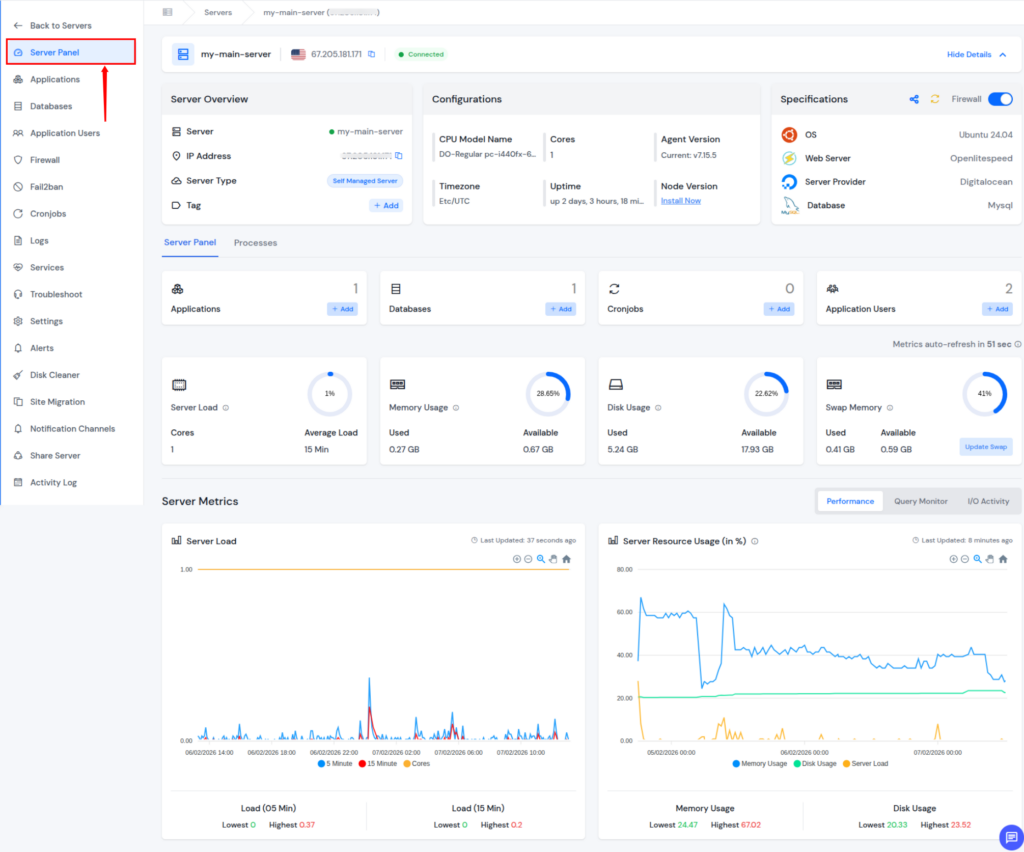
With centralized monitoring, users can quickly check abnormal usage patterns and take preventive action before service disruption occurs.
Protecting Servers from Malicious Traffic
Not all traffic is legitimate. Automated bots and malicious requests can overload servers.
Not all traffic represents real users, and harmful requests can overload servers. Security measures help block unwanted activity.
- Firewalls: Filter incoming requests based on rules.
- Rate limit: Control number of requests every user.
- Bot filtering: Blocks automated and harmful bots.
- Security rules: Prevent suspicious or abusive traffic patterns.
Security controls help ensure that server resources are used only by valid requests.
Real visitors are great. Fake ones are just noise.

Security Features with ServerAvatar
ServerAvatar provides multiple built-in security features that help protect servers from malicious traffic and abuse during high traffic periods. These controls are designed to reduce unnecessary load on server resources while allowing legitimate traffic to pass through without disruption.
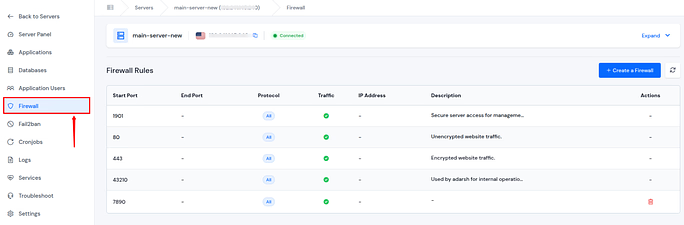
Firewall allows users to define access rules that control incoming and outgoing connections at the server level. This helps block unauthorized access and restrict unwanted traffic before it reaches applications.
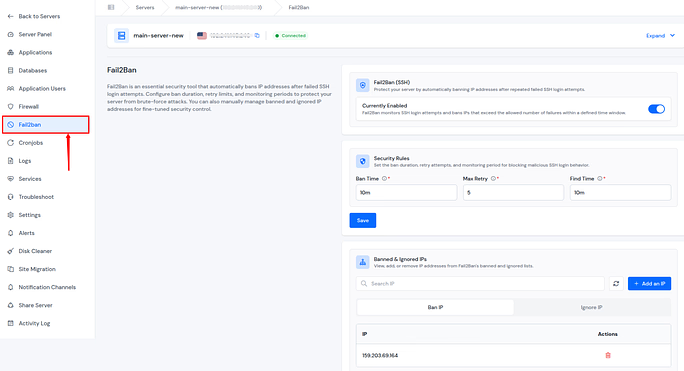
Fail2Ban automatically detects suspicious login attempts and abusive behavior by monitoring server logs. When repeated failures are detected, offending IP addresses are temporarily blocked, reducing the risk of brute-force attacks and resource exhaustion.
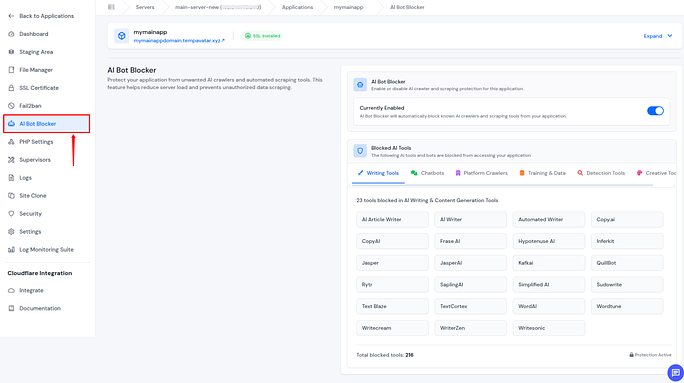
AI Bot Blocker operates at the application level to identify and block non-human or harmful bot traffic. Filtering automated requests, it helps prevent artificial traffic spikes that can degrade performance and consume server resources unnecessarily.
8G Firewall feature provides comprehensive protection for your application through advanced firewall rules and security protocols. Configure and oversee security measures, intrusion detection systems, and threat mitigation strategies to ensure your application’s resilience against cyber threats.
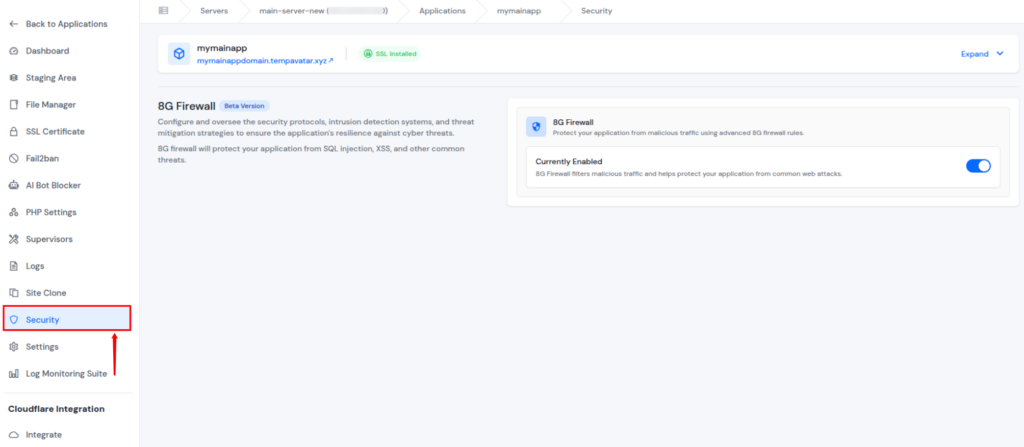
Together, these security features help maintain server stability, improve performance under load, and ensure that resources are reserved for legitimate users.
Backup and Recovery Planning
Backups are a critical part of traffic spikes and disaster preparedness, ensuring your data remains safe even if something goes wrong. Backups protect data and ensure quick restoration after failures. A reliable recovery plan reduces business risk.
- Fast recovery: Restores services quickly after issues.
- Data protection: Prevents loss of critical information.
- No data loss: Ensures content remains intact.
- Peace of mind: Reduces stress during incidents.
- Reduced downtime: Shortens service interruptions.
Automated backups are your safety net when everything else fails.
Backup and Recovery Planning with ServerAvatar
ServerAvatar provides a complete backup system that includes instant backups, scheduled backups, and archive backups, giving you full control over how and when your data is protected.
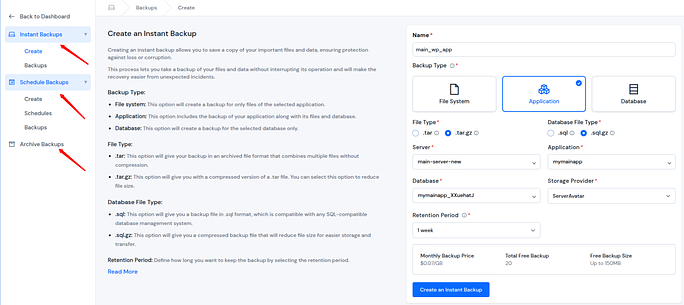
- Instant backups: Manually create backups before major changes or updates to reduce the risk of accidental data loss.
- Scheduled backups: Automatically run backups at defined intervals to keep servers and applications consistently protected without manual effort.
- Archive backups: Securely store older backups for long-term safety, making it easy to restore data from earlier points in time when needed.
- One-click recovery: Restore backed-up data instantly with a single click, ensuring quick recovery after issues.
This multi-layered backup approach enables fast recovery, minimizes downtime, and protects critical data during unexpected failures or traffic-related issues. By automating backups and offering flexible recovery options, ServerAvatar helps you maintain business continuity and peace of mind when it matters most.
ServerAvatar Support to Handle Issues Without Delays
Server performance issues during traffic spikes often require immediate attention. ServerAvatar’s technical team is available 24/7 to assist you with your queries and issues, ensuring help is always available whenever unexpected challenges arise.
Whether you are dealing with sudden load increases, performance concerns, configuration questions, or recovery assistance, the ServerAvatar support team is accessible at all times.
This continuous availability helps reduce downtime, resolve issues faster, and maintain service stability during critical traffic periods.
Having round-the-clock support ensures that technical problems do not turn into prolonged outages.
With ServerAvatar, expert assistance is always within reach, allowing you to focus on your application while server concerns are handled efficiently.
Load Testing Before the Spike Happens
Load testing evaluates how servers perform under heavy traffic. It identifies weak points before real users are affected.
- How many users your server can handle: Determines maximum capacity.
- Where performance breaks: Highlights resource bottlenecks.
- What needs improvement: Guides optimization efforts.
Think of it like a fire drill, you don’t want the first test during a real emergency. Testing allows improvements before real traffic spikes occur.
Building a Long-Term Traffic Management Strategy
Long-term planning focuses on scalability and sustained performance. A structured approach ensures servers remain reliable as traffic grows.
- Upgrading hosting as you grow: Adds capacity to support demand.
- Periodic performance reviews: Identifies areas for improvement.
- Improving site efficiency: Reduces ongoing resource usage.
- Automating scaling: Adjusts resources automatically.
- Infrastructure upgrades: Enhances server capability.
- Resource optimization: Uses available resources efficiently.
- Reviewing performance regularly: Maintains long-term stability.
Planning for growth ensures continued stability as traffic increases over time.
How ServerAvatar Helps Manage Traffic Spikes
Managing traffic spikes requires visibility, scalability, and control over server resources. ServerAvatar simplifies this process by offering tools for server monitoring, performance optimization, and resource management from a single platform.
With support for scaling, automation, and ongoing performance tracking, ServerAvatar enables teams to prepare their servers for sudden traffic increases while maintaining uptime and consistent performance over time.
Conclusion
Traffic spikes don’t have to be stressful or dangerous for your website if your server is prepared in advance. By choosing the right hosting environment, optimizing performance, using caching and CDN, monitoring resources in real time, and securing your server against malicious traffic, you can handle sudden surges with confidence.
ServerAvatar simplifies this entire process by combining scaling, monitoring, caching, CDN integration, and security features into one centralized platform. With proper planning and the right setup, traffic spikes become an opportunity for growth rather than a risk to your uptime.
FAQs
1. What is the best way to prepare a server for traffic spikes?
The best approach is to plan ahead by optimizing your website, enabling caching, using scalable hosting, monitoring server performance, and applying security measures. Preparation reduces the risk of slowdowns or downtime during sudden traffic increases.
2. Can server scaling prevent website crashes during high traffic?
Server scaling helps prevent crashes by adjusting resources based on traffic demand. Vertical scaling increases server capacity, while horizontal scaling distributes traffic across multiple servers to improve stability.
3. How does caching help during traffic spikes?
Caching reduces server workload by serving previously generated content instead of processing the same requests repeatedly. This improves response times and allows the server to handle more users efficiently.
4. Why is monitoring important during traffic spikes?
Monitoring provides real-time visibility into server performance, allowing early detection of high resource usage or errors. This enables quick action before small issues turn into outages.
5. How do security features help manage traffic spikes?
Security features block malicious requests, bots, and abusive behavior that can overload servers. By filtering unwanted traffic, server resources remain available for legitimate users during high traffic periods.