

Ever felt your website slow down even when your VPS should handle the traffic? You’re not alone. Many site owners and developers face this issue, and often the culprit isn’t the CPU or disk speed, it’s swap memory scaling and inefficient memory management.
Today, we’ll unlock a simple but powerful idea: Smart Swap Memory Scaling, and how it can dramatically boost the performance of your VPS, especially when managed with ServerAvatar.
No intimidating technical complexes. Just clear explanations, relatable analogies, and practical guidance you can apply today, even if you’re new to VPS hosting. Let’s dive in.
What Is VPS Memory and Why Swap Memory Scalling Matters
A VPS (Virtual Private Server) behaves a lot like your personal computer, just hosted on the cloud. It has CPU, storage, and memory.
Memory, especially, plays a huge role in keeping everything running smoothly. When a VPS runs out of memory, it starts struggling, loading becomes slow, services lag, and sometimes your site simply stops responding.
That’s where smart memory management comes in.
The Basics: What Is RAM?
Think of RAM as your desk surface.
- A big desk: You can spread out files and work fast.
- A small desk: You stack papers, move things around, or worse… stuff falls off.
In VPS terms:
- RAM stores active processes, the parts of your website and server that are “working right now”.
- When you have enough RAM, everything stays fast and snappy.
But when RAM fills up? That’s when swap steps in.
What Is Swap Memory?
Swap memory is like a temporary filing cabinet beside your desk.
When RAM is full, the server moves less active data into swap. This frees up RAM for things that need instant attention.
The trade-off? Swap is slower than RAM, because it lives on disk, not in super-fast memory. Still, having swap is better than running out of RAM completely.
Why Traditional Swap Isn’t Enough
Traditional swap setups are rigid. They:
- Have a fixed size you define once: Once set, the swap size stays the same and cannot automatically adapt to changing server needs.
- Don’t adjust if your workload suddenly increases: Traditional swap does not respond when traffic or resource usage spikes unexpectedly.
- Can slow things down if overused: If too much data is pushed into swap, server performance may drop because disk access is slower than RAM.
It’s like having a one-size-fits-all drawer next to your desk, sometimes it’s too small, other times too big and useless. That’s where Smart Swap steps in.
Smart Swap Memory Scaling Explained
Smart Swap Memory Scaling is an intelligent approach to swap management. Instead of a fixed space, the swap can expand and contract based on actual needs.
Imagine working on a big project and needing more desk space for a while, smart swap is like magically expanding your desk only when you need it.
This helps your VPS handle bursts of activity without crashing while still staying efficient and responsive.
How Smart Swap Works
Behind the scenes, smart swap watches how the server uses memory. When RAM starts to fill up, it:
- Moves only the least important data into swap: Smart swap shifts low-priority tasks out of RAM while keeping critical processes active.
- Frees up precious RAM for high-priority tasks: By clearing unnecessary memory usage, RAM remains available for important applications.
- Brings data back from swap when RAM becomes available: When memory pressure reduces, smart swap automatically restores data from disk to RAM.
All of this happens automatically, you do not have to make any efforts.
Regular Swap Memory vs Smart Swap Memory
Let’s compare the Smart Swap with the Regular Swap:
| Feature | Regular Swap | Smart Swap |
| Size | Fixed | Dynamic |
| Performance | Can lag under pressure | Smooth transitions |
| Efficiency | Often over or under-utilized | Matches real usage |
| Stability | Risk of slowdowns | Helps stability |
Smart Swap almost always wins in real-world situations.
Real-World Benefits of Swap Memory Scaling for VPS Performance
Here’s how Smart Swap helps your server right away:
- Prevents sudden crashes when memory fills up: Smart swap acts as a buffer that stops the server from failing due to memory overload.
- Keeps services responsive under load: Applications continue running smoothly even when the server is handling heavy traffic.
- Helps the system stay stable during traffic spikes: Temporary increases in visitors are managed without disrupting server performance.
- Avoids the dreaded “out of memory” errors: Proper swap handling ensures the server doesn’t run out of usable memory unexpectedly.
In short, it makes your VPS feel faster and more reliable.
How Swap Memory Scaling Helps Your Website Stay Responsive
When users visit your site, every click triggers server work. If memory runs low, the server slows down, just like how you slow down when your desk gets messy.
By using swap intelligently, your server always has a safety net. It’s not a magic bullet for speed, but it’s like an insurance policy against slowdowns and crashes.
Smart Swap Memory Scaling with ServerAvatar
What is ServerAvatar?
ServerAvatar is a platform to simplify the hosting and management of servers and applications. It simplifies the process of deploying and managing PHP and Node.js based web applications on servers.
If you manage your server with ServerAvatar, handling swap becomes simple and efficient.
ServerAvatar’s platform supports easy updating of swap memory directly from the dashboard, no command line needed.
Whether you have a self-managed VPS or a fully managed server via ServerAvatar’s hybrid cloud platform, managing swap memory is part of the server tools available to you.
This means smart memory scaling isn’t just conceptual; you can actually implement it easily without stress and a command line.

Step-by-Step: Updating Swap Memory with ServerAvatar
Here’s how ServerAvatar lets you scale swap memory easily:
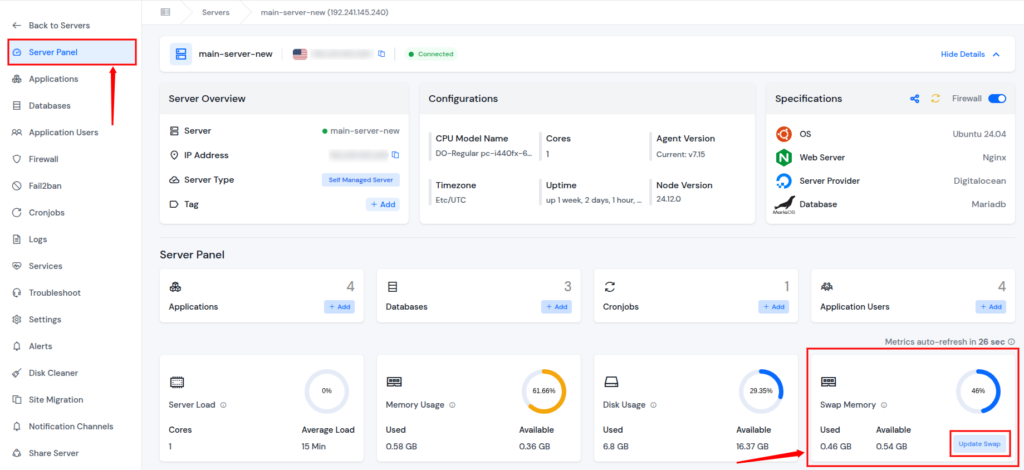
- Log in to your ServerAvatar account, navigate to the Servers section from the sidebar, and open the server panel by clicking on the dashboard icon next to your server.

- Find the Swap Memory card from the server panel, and click on the Update Swap button.
- Enter the new swap size you want and click on the Update button.
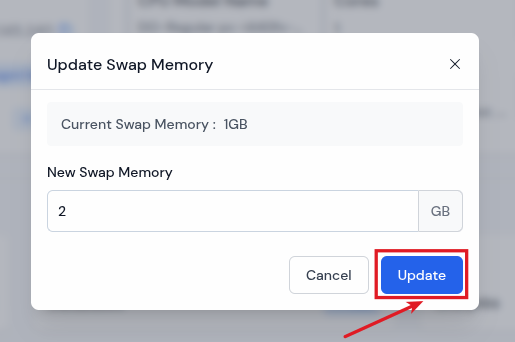
Within minutes, ServerAvatar will apply the change and reflect the new swap size in your dashboard. No scripts. No manual editing, and no command line. Just point and click simplicity.
Swap Memory Scaling for Traffic Spikes and Big Loads
Swap becomes especially useful when:
- Your server handles sudden traffic surges: Swap memory helps your server stay stable when many users visit at the same time.
- You run multiple applications at once: Swap allows different apps to share memory smoothly without slowing each other down.
- Memory needs change day to day: Swap adapts to varying workloads, ensuring your server performs well even as usage fluctuates.
Instead of hiring extra hardware or upgrading plans prematurely, smart swap gives you buffer space when needed and retracts when not.
If your CPU is the engine and RAM is the fuel, swap is your emergency reserve tank, not meant for regular use but lifesaving when you need it.
Who Should Care About Swap Memory Scaling?
Almost anyone using a VPS can benefit:
- Bloggers with unpredictable visitors: Swap memory helps keep the blog online even when traffic suddenly increases.
- eCommerce stores during promotions: Swap prevents slowdowns or crashes when many shoppers visit at the same time.
- Developers testing resource-heavy applications: Swap provides extra memory support while running demanding tests or tools.
- Agencies managing multiple client sites: Swap helps balance memory usage across many websites on a single VPS.
- New VPS users without deep system knowledge: Swap acts as a safety net, keeping the server stable without complex setup.
The beauty of smart swap is its adaptability for all skill levels, whether you’re new to servers or an experienced engineer.
Common Misconceptions About Swap Memory Scaling
Let’s clear a few:
Myth: Swap always slows down your site
Truth: Badly configured swap can hurt performance, but smart, dynamic swap helps prevent slowdowns.
Myth: Swap means your VPS has low RAM
Truth: Even large-RAM servers can run better with smart swap when unexpected peaks occur.
Myth: You need command-line skills to manage swap
Truth: With ServerAvatar, you don’t.
Conclusion
Smart Swap Memory Scaling isn’t just a buzzword; it’s a practical, real-world way to make your VPS more reliable, responsive, and forgiving under stress.
When you use a server management dashboard like ServerAvatar, managing swap stops being a system admin’s chore, it becomes a few clicks in your dashboard.
Think of Smart Swap as your VPS’s safety net, silently working behind the scenes to keep your sites running smoothly, even when things get busy.
It’s like giving your server a flexible memory buffer that shows up only when it’s needed most.
FAQs
1. What exactly is smart swap memory scaling?
Smart swap memory scaling is an intelligent method of adjusting swap usage dynamically based on RAM needs to prevent slowdowns and crashes.
2. How does ServerAvatar make swap management easier?
ServerAvatar provides a graphical control panel where you can update or scale swap memory without command-line commands.
3. Is swap memory only for low-end servers?
No, even powerful servers benefit from swap when handling unexpected peaks.
4. Can Smart Swap replace adding more RAM?
No, but it helps you delay unnecessary upgrades by managing memory more efficiently.
5. Will Smart Swap slow down my server?
If used moderately, no. It only moves low-priority data into swap when necessary to keep your primary memory free.