

Imagine clicking a harmless “Play” button on a video… but instead, you unknowingly approve a payment or give access to your account. Sounds scary, right? That’s exactly how clickjacking works. If you’re wondering what is clickjacking, it’s a deceptive technique where users are tricked into clicking something different from what they see. Clickjacking is like a digital trap where what you see isn’t what you actually click. It manipulates users into taking actions they never intended. And if you run a WordPress website, this is something you simply can’t ignore.
In this guide, we’ll break down what clickjacking is, show real-world examples, explain the risks, and most importantly, show you how to protect your site from it.
What Is Clickjacking?
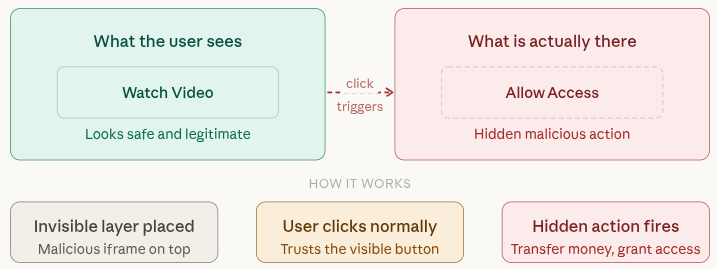
Clickjacking, also known as “UI redressing”, is a cyberattack where users are tricked into clicking something different from what they perceive. Think of it like placing an invisible button on top of a visible one. You think you clicked on “Watch Video” button, however, you actually clicked on “Allow Access” or “Transfer Money” button.
Key Point:
It manipulates user trust by hiding malicious actions behind legitimate-looking elements.
How Clickjacking Works
Clickjacking works by visually tricking users into clicking something different from what they think they’re interacting with. Attackers carefully design a fake page that hides the real action underneath, making it almost impossible for users to notice the deception.
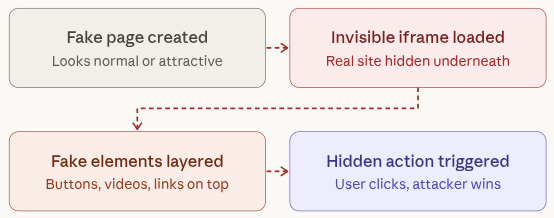
Here’s a simple breakdown:
- A hacker creates a malicious webpage that looks normal or attractive to users
- Hacker loads your website in invisible or transparent iframe
- Fake buttons, videos, or links are placed on top of the hidden content
- When a user clicks, they unknowingly perform a hidden action on the actual site
Key Features:
- Uses invisible layers (iframes) to hide real actions
- Relies heavily on user trust and visual deception
- Requires no malware installation to work
- Can trigger actions like login approvals, payments, or permissions
- Often goes unnoticed until damage is done
Analogy:
It’s like someone placing a glass door in front of a real door, you think you’re opening the right one, but you hit something invisible instead.
Types of Clickjacking Attacks
1. Likejacking
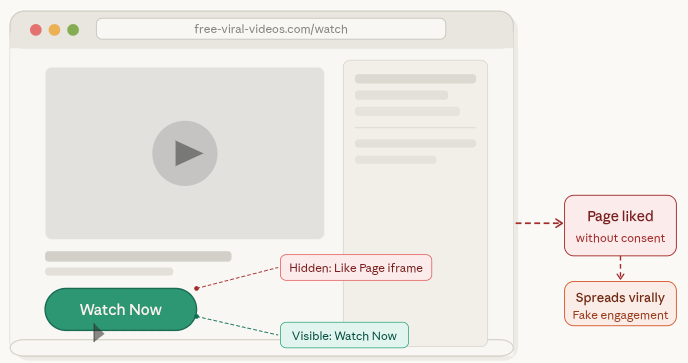
Likejacking is a social media-based attack where users are unknowingly forced to “like” or share content. The action happens in the background while the user thinks they are clicking something harmless.
Key Features:
- Hidden social media buttons layered under visible content
- Boosts fake engagement and page popularity
- Often spreads quickly through viral content
- Targets platforms like Facebook or Instagram
2. Cursorjacking
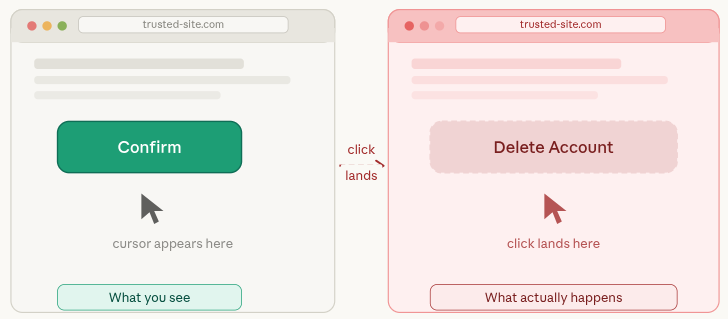
Cursorjacking tricks users by visually shifting the cursor position. What you see is not where your click actually lands, leading to unintended actions.
Key Features:
- Misaligned or invisible cursor positioning
- Users click one thing but trigger another action
- Exploits browser rendering behavior
- Difficult for users to detect visually
3. File Download Clickjacking
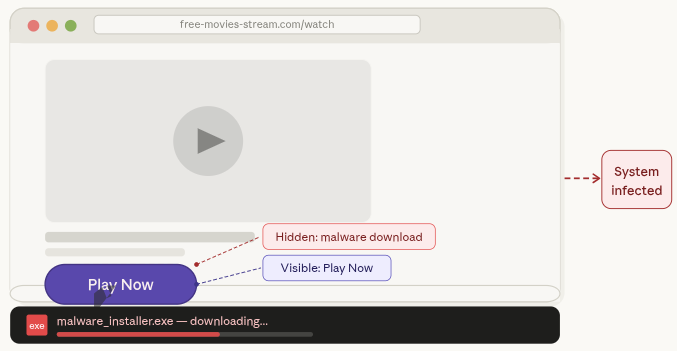
This type of attack silently initiates file downloads when users click on something that appears safe, like a button or link.
Key Features:
- Triggers automatic or hidden downloads
- Often installs malicious files or software
- Disguised as legitimate buttons (e.g., “Play” or “Download”)
- Can compromise system security quickly
4. Credential Theft
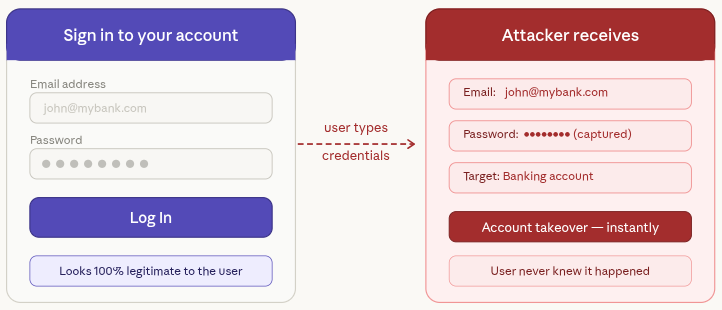
In this attack, users are presented with fake login forms layered over real pages. When they enter their details, the information is captured by attackers.
Key Features:
- Fake login forms that look real
- Steals usernames, passwords, or sensitive data
- Often targets banking or admin accounts
- Can lead to account takeover
Real-Life Clickjacking Examples
Facebook Likejacking (Early 2010s)
In this case, users were unknowingly clicking hidden “Like” buttons while interacting with normal-looking content. This helped attackers artificially grow page likes and reach.
Key Features:
- Invisible “Like” buttons placed under clickable elements
- Rapid spread through user interactions
- Increased fake engagement metrics
- Exploited user trust in familiar interfaces
Adobe Flash Exploit
Users believed they were clicking to play a video, but instead they unknowingly allowed access to their webcam or microphone.
Key Features:
- Disguised permission prompts
- Used outdated Flash technology vulnerabilities
- Gained access to user hardware (camera/mic)
- Took advantage of user curiosity
PayPal Transfer Trick
Attackers placed invisible payment authorization buttons under normal webpage elements. When users clicked, they unknowingly approved transactions.
Key Features:
- Hidden transaction approval buttons
- Financial loss without user awareness
- Targets online payment platforms
- Extremely dangerous for e-commerce users
Lesson: Even well-known platforms have faced clickjacking attacks in the past. This shows that no website is completely safe unless proper security measures are in place.
Key Takeaway:
- Every website is a potential target
- Security must be proactive, not reactive
- Users and site owners both share responsibility
- Prevention is always easier than recovery
Why Clickjacking Is Dangerous
Clickjacking is more than just a minor security issue, it can lead to serious consequences without the user even realizing it. Since the attack happens behind the scenes, victims often don’t know what went wrong until it’s too late.
- Exploits user trust through hidden actions
- Works silently without obvious signs
- Can cause financial and data loss
- Damages credibility of websites
- Hard to detect until harm is done
Here’s what can happen:
- Unauthorized transactions
- Account hijacking
- Malware installation
- Data theft
- Reputation damage
A single incident can break user trust and impact your brand reputation almost instantly.
Who Is at Risk?
The simple answer is, almost everyone online. However, some platforms are more attractive targets because of the sensitive actions they handle.
Especially vulnerable:
- WordPress site owners
- E-commerce websites
- Membership platforms
- Admin dashboards
If your website includes buttons like “Login”, “Pay”, or “Submit”, attackers can try to exploit them through clickjacking.
Key Features:
- Targets sites with user interaction elements
- Focuses on platforms handling sensitive data
- Affects both users and administrators
- No website is completely immune
- Higher risk for sites with weak security settings
Signs Your Site Might Be Vulnerable
Clickjacking attacks are designed to stay hidden, but there are still some warning signs that something might be wrong. Paying attention to user feedback can help you spot issues early.
- Often detected through user reports
- No visible changes on the website itself
- Requires technical checks to confirm
- Linked to missing security protections
- Early detection can prevent major damage
Common warning signs:
- Unusual user complaints
- Reports of actions users didn’t perform
- Suspicious iframe usage
- Missing or misconfigured security headers
If users start saying, “I didn’t click that”, it’s a strong signal that something needs immediate attention.
How Clickjacking Affects WordPress Sites
Since WordPress is one of the most widely used platforms, it naturally becomes a popular target for attackers. Without proper safeguards, attackers can exploit its interface and trick users into performing unintended actions.
Common risks include:
- Admin panel actions being triggered unknowingly
- Plugin or theme settings being altered
- Unauthorized content changes
- Misuse of payment gateways
If your site isn’t protected, it can be embedded into malicious pages and used as part of an attack without your knowledge.
Key Security Headers Explained
Security headers act like protective shields for your website. They tell browsers how your site should behave, helping block attacks like clickjacking before they even begin.
X-Frame-Options
The X-Frame-Options header prevents your website from being loaded inside an iframe on another site. This is one of the simplest and most effective ways to stop clickjacking attacks.
Options include:
- DENY: Completely blocks your site from being embedded anywhere
- SAMEORIGIN: Allows embedding only within the same domain
Content Security Policy (CSP)
The Content Security Policy (CSP) is a more advanced security header that gives you greater control over how your website content is loaded and displayed. It allows you to define exactly which sources are allowed to interact with your site.
Example:
Content-Security-Policy: frame-ancestors 'self';
Key Point:
Both headers work like a “Do Not Enter” sign for attackers. They stop malicious websites from framing your content and tricking users into unintended actions.
How to Prevent Clickjacking in WordPress
Protecting your WordPress site from clickjacking doesn’t have to be complicated. With a few smart configurations, you can block most attacks before they even start.
1. Enable X-Frame-Options
This header prevents your website from being embedded inside unauthorized iframes, which is the main technique used in clickjacking.
Add this to your server configuration:
Header always append X-Frame-Options SAMEORIGINKey Features:
- Blocks external websites from framing your content
- Simple and quick to implement
- Works on most servers
- Ideal for login and admin pages
2. Use Content Security Policy
CSP gives you more control by allowing only trusted domains to embed your site.
Restrict iframe usage by adding below:
Header set Content-Security-Policy "frame-ancestors 'self';"Key Features:
- Advanced protection against clickjacking
- Restricts iframe usage to trusted sources
- Helps prevent multiple types of attacks
- Highly customizable
3. Keep WordPress Updated
Running outdated versions of WordPress, themes, or plugins can expose your site to known vulnerabilities.
Key Features:
- Fixes known security issues
- Improves overall site performance
- Reduces risk of exploitation
- Ensures compatibility with security tools
4. Use HTTPS
HTTPS encrypts the data between your website and users, making it harder for attackers to manipulate interactions.
Key Features:
- Secures data transmission
- Builds user trust
- Prevents man-in-the-middle attacks
- Essential for modern websites
Use WordPress Plugins to Protect Against Clickjacking Attacks
If your website runs on WordPress, you don’t need to handle everything manually to stay secure. Security plugins can add strong protection against clickjacking attacks without requiring deep technical knowledge. They simplify complex configurations and help you secure your site in just a few clicks.
Here are some reliable plugins you can consider:
1. iThemes Security
iThemes Security offers a wide range of tools designed to strengthen your website’s overall defense. It includes multiple security layers that protect your site from common vulnerabilities.
One of its useful features is the ability to add X-Frame-Options headers, which helps block clickjacking attempts. It also provides additional hardening options to improve site security.
Key Features:
- Multiple security configurations in one plugin
- Protection against unauthorized access
- Easy setup for security headers
- Login protection features
- Regular security checks
2. Wordfence Security
Wordfence is known for its powerful firewall and malware scanner. It actively blocks suspicious traffic and helps prevent malicious activities before they reach your site.
For clickjacking protection, Wordfence supports implementing security headers and strengthening your website’s defense through its firewall settings.
Key Features:
- Advanced firewall protection
- Real-time threat detection
- Malware scanning and removal
- Login security features
- Traffic monitoring and blocking
3. Sucuri Security
Sucuri is a widely trusted security solution that helps monitor and protect your website from different types of threats. It keeps track of site activity, scans for malware, and checks file integrity.
When it comes to clickjacking, Sucuri allows you to configure important security headers like X-Frame-Options and Content Security Policy (CSP) directly from its dashboard, helping prevent unauthorized framing of your site.
Key Features:
- Security activity monitoring
- Malware detection and cleanup
- Easy implementation of security headers
- Website firewall protection
- Regular security alerts
4. BulletProof Security
BulletProof Security provides a complete set of tools to secure your WordPress site, including database protection, firewall setup, and login security.
It also allows you to add security headers that help defend against clickjacking attacks and other browser-based threats.
Key Features:
- Strong firewall protection
- Database security tools
- Login and file protection
- Security header support
- Automated security features
5. All In One WP Security & Firewall
This plugin is a great option for beginners who want strong security without complexity. It offers a user-friendly interface and step-by-step guidance to improve your website’s protection.
It also includes features that help prevent clickjacking by allowing you to apply security headers easily.
Key Features:
- Beginner-friendly dashboard
- Security grading system
- Easy header configuration
- Firewall and login protection
- Lightweight and efficient
Manual Methods to Block Clickjacking
For those who want full control, manual configuration is a reliable option.
1. Edit .htaccess File
Add below:
Header always set X-Frame-Options "SAMEORIGIN"2. Nginx Configuration
add_header X-Frame-Options "SAMEORIGIN";3. Use functions.php
header('X-Frame-Options: SAMEORIGIN');Testing Your Website for Clickjacking
It’s important to verify whether your site is protected or not.
Method 1: Online Tools
You can use various online security testing tools to check for clickjacking vulnerabilities.
Method 2: Manual Test
Try embedding your site in an iframe:
<iframe src="yourwebsite.com"></iframe>If your site loads successfully inside the iframe, it means protection is missing.
Best Practices to Stay Secure
Website security is a continuous process, not a one-time fix. Following best practices can significantly reduce your risk.
Follow these best practices:
- Regularly update WordPress core, themes, and plugins
- Use strong admin passwords
- Limit login attempts
- Enable two-factor authentication
- Monitor user activity
- Use a web application firewall (WAF)
Pro Tip:
Think of website security like locking your house. You wouldn’t leave your doors and windows open, so don’t leave your website unprotected either.

Stay Aware of Clickjacking Attacks
Clickjacking attacks are designed to trick users into performing actions they never intended, like clicking hidden buttons, allowing permissions, or downloading harmful files.
While these attacks can be dangerous, the good news is that they are preventable. By understanding how they work and using the right tools, you can protect both your website and your visitors.
Key Takeaway:
- Awareness is your first line of defense
- Use security tools and best practices
- Keep your website regularly updated
- Always monitor unusual activity
Staying informed and proactive will help you maintain a safe and secure online presence for your users.
Conclusion
Clickjacking may operate quietly in the background, but its impact can be serious for both users and website owners. From unauthorized actions to data theft, the risks are real, but the solution is well within your control. By understanding how clickjacking works and applying the right protections like security headers, trusted plugins, and regular updates, you can significantly reduce your exposure to such attacks. Pairing these practices with a reliable platform that simplifies server and WordPress management makes the process even smoother. In the end, staying informed and proactive is the key to building a secure and trustworthy website experience.
FAQs
1. What is clickjacking in simple terms?
Clickjacking is a technique where users are tricked into clicking something different from what they see, often leading to unintended actions like sharing data or approving requests.
2. How can I protect my WordPress site from clickjacking?
You can protect your site by adding security headers like X-Frame-Options and Content Security Policy, using security plugins, and keeping your WordPress installation updated.
3. Is clickjacking still a threat today?
Clickjacking is still relevant, especially for websites that handle logins, payments, or sensitive user actions.
4. Do I need technical knowledge to prevent clickjacking?
Many WordPress security plugins make it easy to enable protection without coding, although manual methods are also available for advanced users.
5. How do I check if my website is vulnerable to clickjacking?
You can test your site by trying to load it inside an iframe or by using online security testing tools to detect missing protection headers.