

A website should be easy to use for everyone, regardless of how visitors read, navigate, or interact with its content. However, many WordPress websites unintentionally create barriers that make pages harder to understand or use. This is where the WordPress accessibility score becomes important.
A WordPress accessibility score helps evaluate how well your website follows accessibility best practices. It highlights usability issues that may affect content clarity, navigation, or interaction and shows where improvements are needed. The good news is that improving accessibility does not require advanced technical skills or complex changes, small adjustments can make a meaningful difference.
In this guide, you’ll learn what a WordPress accessibility score is, why it matters, how to test it, and practical ways to improve it so your website remains clear, usable, and easy to navigate for all visitors.
What Is WordPress?
WordPress is the world’s most popular open-source content management system (CMS), used to build websites, blogs, and e-commerce stores. It offers flexibility through themes and plugins, making it suitable for beginners, developers, and businesses of all sizes.
How ServerAvatar Simplifies WordPress Deployment & Management
What is ServerAvatar?
ServerAvatar is a platform to simplify the hosting and management of servers and applications. It simplifies the process of deploying and managing PHP and Node.js based web applications on servers.
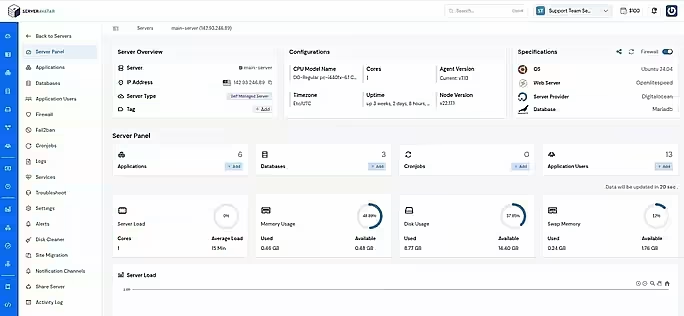
ServerAvatar makes WordPress and other popular applications, such as Mautic, N8N, UptimeKuma, etc, deployment effortless with its one-click WordPress application installer, allowing you to launch a fully configured WordPress site in minutes. It removes the complexity of server setup by providing an intuitive dashboard to manage servers, applications, databases, PHP versions, SSL, and performance settings from one place.
ServerAvatar supports multiple cloud providers and gives users full control over their infrastructure while eliminating the need for deep server administration knowledge. You can refer to the ServerAvatar documentation and the detailed blog to install WordPress effortlessly.
ServerAvatar does not directly provide WordPress Multisite, but our technical experts can help you set up a WordPress Multisite environment.
The ServerAvatar support team is available 24/7 to assist you with any issues or questions you may have.
Key Benefits of Using ServerAvatar for WordPress
- One-click Application installer: Deploy WordPress and many popular applications instantly without manual configuration.
- Unified management panel: Manage servers and WordPress applications from a single dashboard.
- Performance optimization: Easily configure services, PHP, and server resources.
- Redis caching support: ServerAvatar comes with built-in Redis integration that helps speed up WordPress by storing frequently accessed data in memory.
- Enhanced security: Includes firewall, SSL management, and secure access controls.
- Easy scalability: Upgrade server resources as your WordPress site grows.
ServerAvatar is an ideal solution for users who want the power of cloud servers without the operational complexity. It simplifies WordPress hosting by automating server setup, streamlining application management, and providing performance and security optimizations out of the box.
Whether you’re a developer, agency, or business owner, ServerAvatar allows you to deploy, manage, and scale WordPress websites confidently while focusing on growth instead of infrastructure management.
What Is WordPress Accessibility?
WordPress accessibility refers to building and maintaining a website in a way that allows all users to access and use its content smoothly. It focuses on removing barriers that may limit interaction, understanding, or navigation for different users.
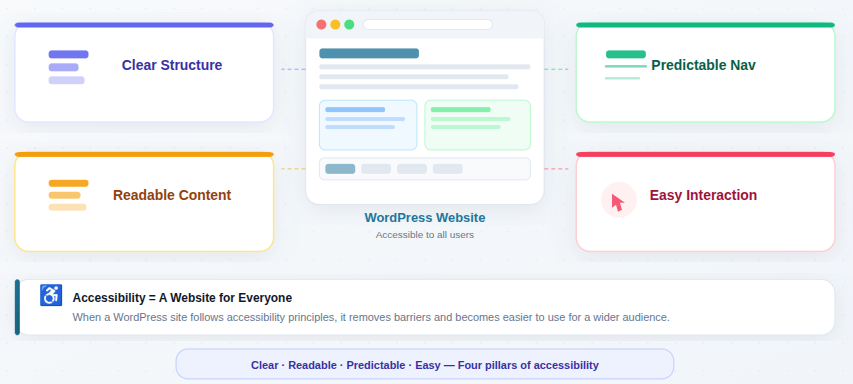
Accessibility focuses on
- Clear structure: Content is organized logically so users can easily follow and understand page layout.
- Readable content: Text is written and styled in a way that is easy to read and process.
- Predictable navigation: Menus and links behave consistently across the website.
- Easy interaction: Users can interact with elements without unnecessary effort or complexity.
When a website built on WordPress follows accessibility principles, it becomes easier to use for a wider audience.
What Is a WordPress Accessibility Score?
A WordPress accessibility score shows how well a website follows accessibility guidelines. It provides a quick overview of areas that meet standards and areas that may need improvement.
A higher score means
- Fewer accessibility issues: The website has fewer elements that may block user access.
- Better structure and clarity: Pages are organized in a way that is easier to understand.
- Improved usability: Users can navigate and interact with content more comfortably.
A lower score indicates areas that may create difficulties for users.
Why Accessibility Is Important for Websites
Accessibility ensures that website content can be accessed, understood, and used without difficulty. When accessibility is ignored, users may struggle to interact with essential information.
Key reasons accessibility matters
- It improves clarity and organization: Content becomes easier to scan and understand.
- It reduces confusion for users: Clear layouts and instructions prevent misunderstandings.
- It supports consistent website interaction: Users experience predictable behavior across pages.
Accessibility is a fundamental part of responsible website management.
How Accessibility Improves Overall Usability
Accessibility and usability work closely together. When accessibility principles are applied, websites naturally become simpler and more efficient to use.
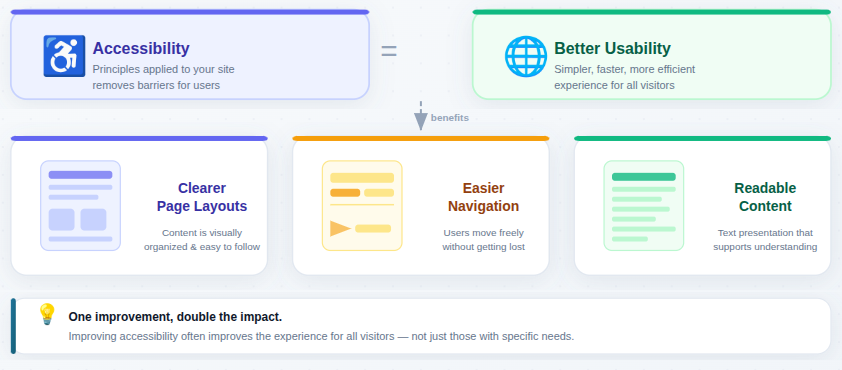
Benefits include
- Clearer page layouts: Content is easier to follow and visually organized.
- Easier navigation: Users can move through pages without getting lost.
- More readable content: Text presentation supports better understanding.
Improving accessibility often improves the experience for all visitors.
Common Accessibility Problems in WordPress
Accessibility issues often appear repeatedly due to inconsistent design or content practices.
Common problems include
- Missing headings or improper heading order: Content structure becomes unclear.
- Poor text contrast: Text is difficult to read against its background.
- Images without descriptions: Visual content lacks alternative explanations.
- Links that lack clear meaning: Users cannot easily understand where links lead.
These issues can be corrected with small but consistent changes.
How Accessibility Scores Are Measured
Accessibility scores are calculated by checking a website against a set of predefined accessibility rules. These checks focus on how content is structured and how users interact with it.
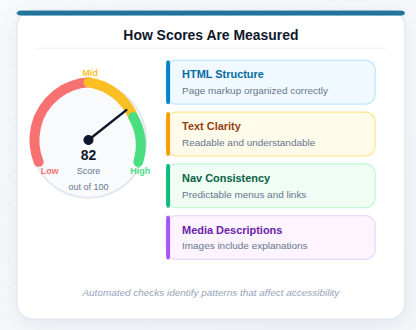
They usually evaluate
- HTML structure: Page markup is organized correctly.
- Text clarity: Content is readable and understandable.
- Navigation consistency: Menus and links follow predictable patterns.
- Media descriptions: Images and media include necessary explanations.
Automated checks help identify patterns that may affect accessibility.
WCAG Guidelines
Accessibility standards define the basic rules that help websites remain usable for a wide range of users. These standards act as a reference point for evaluating whether a website meets accessibility expectations or needs improvement.
One widely followed framework for accessibility focuses on four core ideas: content should be perceivable, operable, understandable, and robust. These principles guide how text, navigation, and interactive elements should behave on a website.
Accessibility scoring tools often use these principles to check website structure, content clarity, and user interaction patterns. For example, they review whether text can be read clearly, whether navigation works without restrictions, and whether instructions are easy to understand.
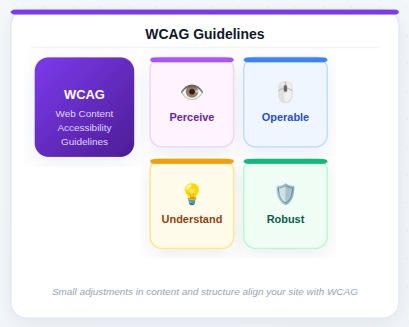
Following these standards does not require advanced technical skills. Small adjustments in content structure, design consistency, and navigation logic can help align a website with accessibility requirements. Over time, these improvements contribute to better accessibility scores and a more consistent user experience.
Ways to Test Accessibility on a WordPress Website
Testing is an essential step in improving accessibility on a WordPress website. It helps uncover issues that may not be visible at first glance and ensures that the website works smoothly for different types of users. A complete accessibility review usually combines manual checks with automated testing tools to get more accurate results.
Using both methods together allows you to identify structural issues, content clarity problems, and interaction limitations more effectively.
Manual Accessibility Review Methods
Automated tools are useful, but they cannot fully understand context or user interaction. Manual testing helps identify issues that tools may overlook and provides a deeper understanding of how accessible a website truly is.
Below are several manual checks you can perform to evaluate accessibility.
Keyboard-Only Navigation Check
Try navigating through the entire website using only the keyboard. All menus, links, buttons, and form fields should be reachable and usable without relying on a mouse. This check helps confirm whether interactive elements are accessible through keyboard controls.
Screen Reader Compatibility Review
Use a screen reader to listen to how your website content is presented. The content should be read in a clear and logical order. Images, buttons, and links should include meaningful descriptions so the information remains understandable when read aloud.
Content Clarity Assessment
Review your written content carefully. Avoid unnecessary complexity, long sentences, or technical terms that could reduce comprehension for some users.
Text and Background Contrast Check
Make sure the text should be clear as per its background. Adequate contrast improves readability and helps users distinguish content without strain.
Logical Focus Order Test
Move through the website using the tab key. The focus should follow a logical sequence and allow users to interact with elements in a predictable order. Any skipped or inaccessible elements should be addressed.
Using these manual checks alongside automated testing provides a clearer picture of overall accessibility quality.
Automated Accessibility Scanning
Automated tools help identify accessibility issues quickly by scanning web pages against predefined rules. These tools can detect problems such as missing image descriptions, unclear heading structure, and contrast issues.
Popular tools used for accessibility scanning include;
- WAVE: visual issue detection
- Axe: developer-focused auditing
- Contrast Checker: color readability testing
These tools save time and help focus manual testing on areas that need closer attention.
Checking Accessibility Scores
Online accessibility checkers provide a quick overview of how well a website aligns with accessibility standards. One commonly used option is Accessibility Checker, which reviews a webpage and highlights potential issues.
How to Use an Online Accessibility Checker
- Go to the official accessibility checker website, or you can use the mentioned link: https://www.accessibilitychecker.org/
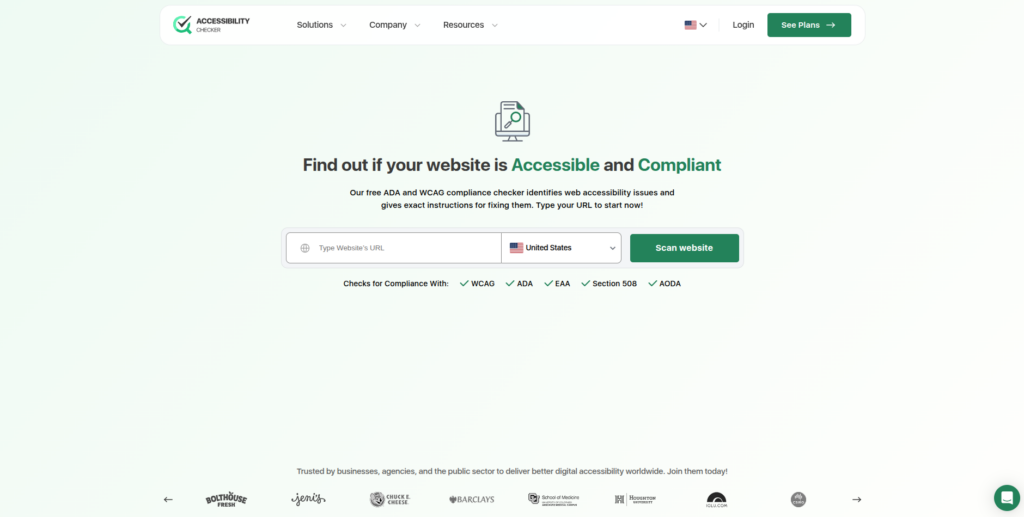
- Paste your WordPress website URL in the provided field and click on the Scan website button to start the scan.
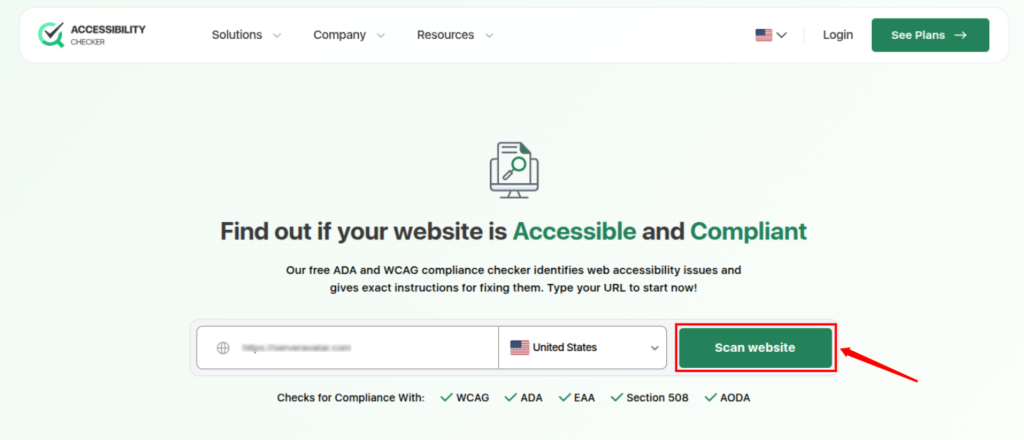
- Once the scan is completed, it will display an accessibility score along with a list of identified issues. Each issue usually includes a short explanation to help guide improvements.
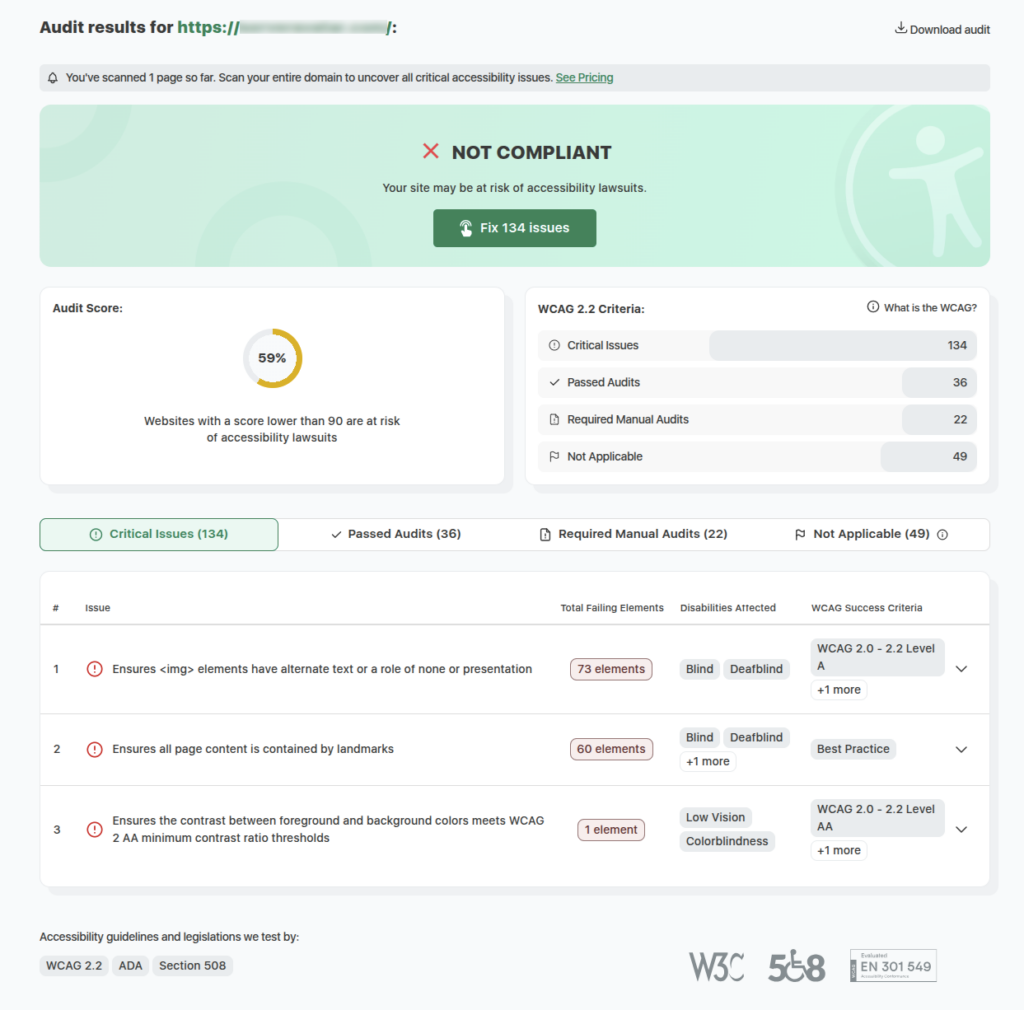
Automated results should be treated as a starting point, not a final judgment. Use them to prioritize fixes and support manual testing efforts.
Understanding Accessibility Test Results
Accessibility test results highlight how well a website meets accessibility guidelines. These results help prioritize what needs attention first.
Test results usually include
- Errors: Issues that should be fixed immediately.
- Warnings: Potential problems that may need review.
- Passed checks: Elements that meet accessibility standards.
Reviewing these results carefully helps guide improvement efforts.
Improving Accessibility
Practical Ways to Improve Your WordPress Accessibility Score
Improving your WordPress accessibility score involves applying consistent best practices across design, content, and functionality. Small changes, when applied correctly, can significantly enhance usability and accessibility.
Choosing Accessibility-Friendly Themes and Plugins
The foundation of an accessible website starts with selecting themes and plugins that support accessibility features. These tools are built with usability and structure in mind, helping reduce common accessibility barriers.
Before adding any theme or plugin, review its accessibility support to ensure it aligns with accessibility guidelines and provides a smooth user experience.
Making Images and Media Accessible
Images and media must be usable by all visitors. Add meaningful alternative text to images so their purpose is clearly communicated. File names should also be descriptive and easy to understand.
For video content, include captions or text-based explanations to ensure the information is accessible in multiple formats.
Using Clear Headings and Page Structure
A well-organized heading structure helps users understand content flow and navigate pages more easily. Headings should follow a logical order and clearly represent the content beneath them.
Proper structure improves readability and supports assistive technologies in interpreting page layout.
Writing Accessible and Easy-to-Read Content
Content should be written with clarity and simplicity in mind. Short paragraphs, clear wording, and consistent formatting make information easier to process.
Providing information in a straightforward manner improves understanding and reduces confusion for users.
Creating Accessible Links and Buttons
Links and buttons should clearly explain their purpose. Avoid vague labels and ensure interactive elements can be accessed using a keyboard.
Well-labeled links and keyboard-friendly buttons improve navigation and overall usability across the website.
Using Accessibility Plugins Wisely
Accessibility plugins can assist with identifying issues and applying basic improvements, such as checking headings or highlighting missing image descriptions. However, plugins should support accessibility efforts, not replace good design and content practices.
Accessibility is most effective when plugins are combined with thoughtful manual improvements.
Enhancing Accessibility Through Design
Design choices directly influence how users view and interact with content. Accessible design focuses on clarity, balance, and readability.
Accessible design focuses on
- Readable fonts: Text styles that are easy to recognize and read.
- Adequate spacing: Proper spacing that prevents visual clutter.
- Strong contrast between text and background: Clear separation for better readability.
Small design adjustments can lead to noticeable accessibility improvements.
Improving Accessibility Through Navigation
Navigation plays a key role in helping users move through a website efficiently. Clear navigation reduces confusion and improves overall usability.
Best practices include
- Logical menu structure: Menus follow a clear and organized order.
- Keyboard-friendly navigation: Users can navigate without relying on a mouse.
- Clear labels: Menu items and links explain their purpose.
Well-structured navigation helps users find content easily.

Maintaining Accessibility Over Time
Accessibility must be maintained consistently as websites evolve. Updates, new content, and design changes can all impact usability.
Regular checks help
- Identify new issues: Catch accessibility problems early.
- Maintain consistency: Keep design and content aligned with standards.
- Improve long-term quality: Ensure continued usability over time.
Ongoing maintenance helps keep accessibility scores stable.
Best Practices to Keep Accessibility Consistent
Consistency makes accessibility easier to manage across a website. Following repeatable practices reduces the risk of new issues.
Good habits include
- Reviewing content before publishing: Catch potential problems early.
- Using consistent layouts: Maintain uniform structure across pages.
- Following the same heading structure: Ensure clear content hierarchy.
These habits help prevent future accessibility challenges.
Quick Accessibility Improvement Checklist
A simple checklist can help ensure accessibility before publishing content.
Before publishing, confirm
- Text is easy to read: Content is clear and legible.
- Headings are structured correctly: Information follows a logical order.
- Images include descriptions: Visual content has proper explanations.
- Navigation works without a mouse: All elements are keyboard accessible.
This checklist supports consistent accessibility standards.
Conclusion
Improving a WordPress accessibility score is not about making complex technical changes, but about building websites with clarity, consistency, and usability in mind. By understanding accessibility principles, testing websites regularly, and applying practical improvements across content, design, and navigation, website owners can create experiences that are easier to use and maintain over time. When accessibility is treated as an ongoing practice rather than a one-time task, it naturally leads to better usability, stronger structure, and a more reliable WordPress website overall.
FAQs
1. What is a WordPress accessibility score?
A WordPress accessibility score indicates how well a website follows accessibility guidelines and best practices, highlighting areas that are accessible and areas that need improvement.
2. Can beginners improve WordPress accessibility without technical skills?
Many accessibility improvements involve simple changes such as clear headings, readable content, proper image descriptions, and consistent navigation.
3. How often should WordPress accessibility be tested?
Accessibility should be reviewed regularly, especially after adding new content, updating themes, or making design changes.
4. Are automated accessibility tools enough on their own?
Automated tools are helpful for identifying common issues, but they should be combined with manual testing for better accuracy and understanding.
5. Why is accessibility important for long-term website management?
Accessibility helps maintain consistent usability, reduces user confusion, and ensures that websites remain easy to navigate as they grow and evolve.