

Have you ever wished you could manage multiple WordPress websites from one single dashboard? Maybe you run several blogs, client sites, or regional versions of the same website. Logging into each site separately can feel like juggling too many balls at once. This is where WordPress Multisite quietly steps in and changes the game.
Think of WordPress Multisite like an apartment building. Each apartment is a separate home with its own furniture and style, but they all share the same foundation, utilities, and main entrance. In simple terms, WordPress Multisite allows you to run multiple websites from one WordPress installation, saving time, effort, and resources.
In this guide, we will walk through everything you need to know about WordPress Multisite, using clear language, real-world examples, and practical tips. No confusing jargon. No tech overload. Just honest, human-friendly explanations.
What Is WordPress?
WordPress is the world’s most popular open-source content management system (CMS), used to build websites, blogs, and e-commerce stores. It offers flexibility through themes and plugins, making it suitable for beginners, developers, and businesses of all sizes.
How ServerAvatar Simplifies WordPress Deployment & Management
What is ServerAvatar?
ServerAvatar is a platform to simplify the hosting and management of servers and applications. It simplifies the process of deploying and managing PHP and Node.js based web applications on servers.
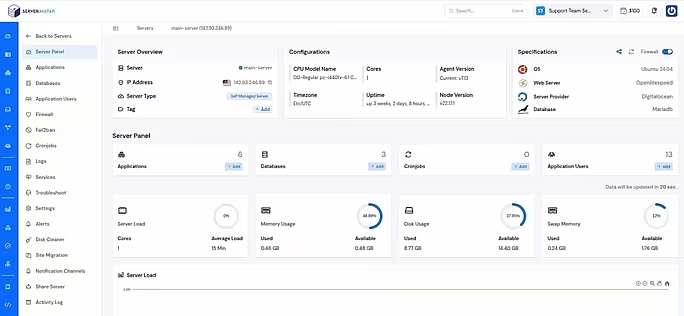
ServerAvatar makes WordPress and other popular applications, such as Mautic, N8N, UptimeKuma, etc, deployment effortless with its one-click WordPress application installer, allowing you to launch a fully configured WordPress site in minutes. It removes the complexity of server setup by providing an intuitive dashboard to manage servers, applications, databases, PHP versions, SSL, and performance settings from one place.
ServerAvatar supports multiple cloud providers and gives users full control over their infrastructure while eliminating the need for deep server administration knowledge. You can refer to the ServerAvatar documentation and the detailed blog to install WordPress effortlessly.
ServerAvatar does not directly provide WordPress Multisite, but our technical experts can help you set up a WordPress Multisite environment
The ServerAvatar support team is available 24/7 to assist you with any issues or questions you may have.
Key Benefits of Using ServerAvatar for WordPress
- One-click WordPress installer: Deploy WordPress instantly without manual configuration.
- Unified management panel: Manage servers and WordPress applications from a single dashboard.
- Performance optimization: Easily configure caching, PHP, and server resources.
- Enhanced security: Includes firewall, SSL management, and secure access controls.
- Easy scalability: Upgrade server resources as your WordPress site grows.
ServerAvatar is an ideal solution for users who want the power of cloud servers without the operational complexity. It simplifies WordPress hosting by automating server setup, streamlining application management, and providing performance and security optimizations out of the box.
Whether you’re a developer, agency, or business owner, ServerAvatar allows you to deploy, manage, and scale WordPress websites confidently while focusing on growth instead of infrastructure management.
What Is WordPress Multisite?
WordPress Multisite is a built-in feature of WordPress that lets you create and manage multiple websites using one WordPress installation. Each site has its own content, users, and settings, but they all share the same core files, plugins, and themes.
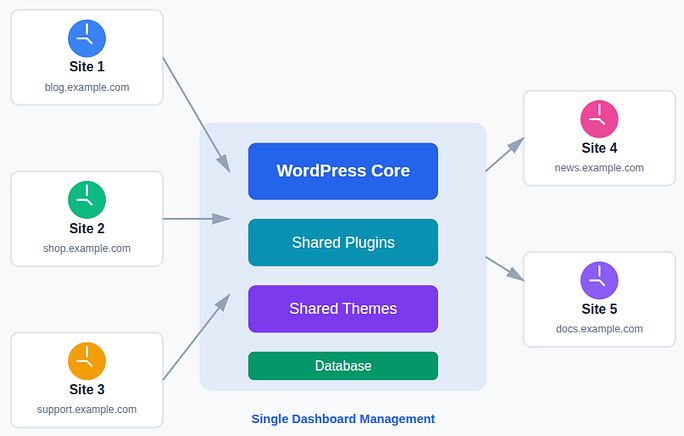
Instead of installing WordPress again and again, you manage everything from a single dashboard. This makes updates, maintenance, and user management much easier.
How WordPress Multisite Works
WordPress Multisite operates on a simple yet powerful idea: one WordPress installation managing multiple websites from a single place. Instead of handling each site separately, everything is organized under one central system, making administration faster and more efficient.
At the core of WordPress Multisite is a network, which works as the main control center. This network is managed by a Super Admin, who has complete authority over all sites in the setup. From this central dashboard, the Super Admin can:
- Create or remove sites: Easily add new websites to the network or delete existing ones as your needs change.
- Install themes and plugins: Install and control themes and plugins once, then make them available across multiple sites.
- Manage users across all sites: Add users, assign roles, and control access without repeating the process for each website.
Each site in the network functions independently on the front end, with its own content, settings, and users. However, behind the scenes, all sites are connected to the same WordPress core files and database structure, allowing smooth and centralized management.
Common Use Cases for WordPress Multisite
WordPress Multisite may not be the perfect solution for every website owner, but when used in the right scenarios, it can be incredibly effective. It is especially useful when multiple websites are related and can benefit from centralized management.
Popular use cases include:
- Businesses managing multiple brand sites: Ideal for companies running separate websites for different products, services, or sub-brands under one system.
- Universities running sites for departments or students: Allows institutions to manage department pages, faculty sites, or student blogs from a single network.
- News networks with regional editions: Perfect for publishing the same type of content across different locations while maintaining local customization.
- Agencies hosting client websites: Makes it easier for agencies to manage and maintain multiple client sites without separate installations.
- Blogs with language-based versions: Helpful for running multilingual blogs where each language has its own site but shares the same structure.
If your websites follow a similar structure or use the same tools and features, WordPress Multisite can be a smart and efficient choice for long-term management.
WordPress Single Site vs Multisite
Let’s keep this simple and easy to understand. The main difference lies in how many websites you manage and how you manage them.
A single-site WordPress setup is like owning one shop. You focus on just one website, with its own dashboard, plugins, and updates. Everything is separate and straightforward.
On the other hand, WordPress Multisite is like running a shopping mall. You manage multiple websites from one central dashboard, sharing the same core system while allowing each site to operate independently.
With a single site, all settings, updates, plugins, and themes are isolated to that one website. With Multisite, updates, plugins, and themes can be managed once and applied across multiple sites, saving time and effort.
However, it is important to remember that with more power comes more responsibility. A Multisite network requires careful planning, stronger security practices, and better performance management to keep everything running smoothly.
Advantages of Using WordPress Multisite
WordPress Multisite is popular because it simplifies the way multiple websites are managed. When used correctly, it can save time, effort, and resources, especially for growing projects.
Here’s why many people like WordPress Multisite:
- Centralized Management: Update WordPress core files, plugins, and themes once, and the changes apply across all sites in the network.
- Time-Saving: Manage multiple websites from a single dashboard without repeatedly logging into different admin panels.
- Shared Resources: All sites use the same core files and server resources, which helps reduce storage usage and improves efficiency.
- Scalable Structure: Add new sites to the network in just a few minutes as your business or content network grows.
Limitations and Drawbacks
While WordPress Multisite offers many benefits, it is not a perfect solution for every use case. Understanding its limitations helps you decide whether it is the right fit.
Key drawbacks include:
- More complex setup: Initial configuration requires technical knowledge compared to a standard WordPress installation.
- Plugin compatibility issues: Some plugins are not designed to work properly in a Multisite environment.
- Shared resources can affect performance: Heavy traffic or issues on one site may impact others in the network.
- Not ideal for completely unrelated websites: Sites with different purposes and requirements may be better off as separate installations.
If one site in the network faces serious technical issues, it can potentially affect other sites as well, making careful management essential.
Who Should Use WordPress Multisite?
Before choosing WordPress Multisite, it helps to pause and ask one simple question:
Do my websites share similar features, themes, or goals?
If the answer is yes, WordPress Multisite could be a great fit for your needs. It works best for users who manage related websites and want centralized control.
WordPress Multisite is ideal for:
- Organizations with structured websites: Perfect for companies or institutions managing multiple sections, departments, or branches under one system.
- Developers and agencies: Makes it easier to build, manage, and maintain multiple client sites from a single dashboard.
- Large content networks: Useful for blogs, publications, or media networks running multiple content-driven websites.
If each website is completely unique and unrelated, using separate WordPress installations may offer more flexibility and fewer complications.
Types of WordPress Multisite Networks
WordPress Multisite supports two main network structures, allowing you to choose what best fits your website strategy.
- Subdomain-based network: Sites are created as subdomains, such as site1.example.com and site2.example.com, which works well for larger or clearly separated sites.
- Subdirectory-based network: Sites appear as folders, like example.com/site1 and example.com/site2, making it suitable for closely related content.
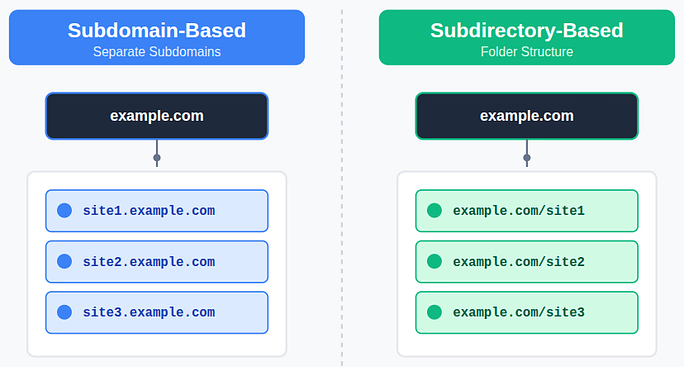
Your hosting environment, SEO strategy, and long-term growth plans usually determine which structure is the right choice.
How to Set Up WordPress Multisite
Setting up WordPress Multisite may look technical at first, but if you follow each step carefully, it is completely manageable. Before you begin, make sure you have administrator access, FTP or file manager access, and a full website backup.
Basic steps include:
- Enable Multisite in wp-config.php: Activates the Multisite feature within your WordPress installation.
- Configure network settings: Choose your network type and set basic details such as site titles and admin email.
- Update the .htaccess file: Ensures proper URL handling for all sites in the network.
- Log in as Super Admin: Access the Network Dashboard to manage the entire setup.
Most modern hosting providers fully support WordPress Multisite, making the setup smoother and more reliable.
Managing Sites in a Multisite Network
Once WordPress Multisite is set up, managing multiple websites becomes simple and organized.
From the Network Dashboard, you can:
- Add or remove sites: Create new websites or delete existing ones in just a few clicks.
- Assign administrators: Control who manages each site by assigning proper roles.
- Control updates: Handle WordPress core, theme, and plugin updates centrally.
Each site administrator focuses on content and day-to-day tasks, while the Super Admin oversees the entire network.

Themes and Plugins in WordPress Multisite
Themes and plugins behave slightly differently in a Multisite environment to maintain control and stability.
Important points to understand:
- Only Super Admins can install plugins: This prevents unverified plugins from affecting the entire network.
- Plugins can be network-activated or site-specific: Choose whether a plugin applies to all sites or only selected ones.
- Themes must be enabled before site admins can use them: Keeps design options consistent and manageable.
This structured approach helps keep the network secure, organized, and efficient.
User Roles and Permissions
WordPress Multisite introduces a powerful role known as the Super Admin, designed to manage the entire network.
A Super Admin can:
- Control the entire network: Oversee all websites from one central dashboard.
- Manage users and sites: Add users, assign roles, and manage site access.
- Install themes and plugins: Control what tools are available across the network.
Site admins, on the other hand, only manage their individual websites. This clear separation of roles improves security and operational control.
SEO Considerations for WordPress Multisite
SEO in WordPress Multisite works much like SEO for a single WordPress site, with a few extra considerations.
Best practices include:
- Use SEO plugins that support Multisite: Ensure your chosen plugin works well in a network setup.
- Optimize each site individually: Treat every site as its own SEO project with unique content and keywords.
- Avoid duplicate content across sites: Prevent search engine confusion and ranking issues.
- Set clear site structures: Maintain logical URLs and navigation for better indexing.
Each site in a Multisite network can rank independently in search engines when optimized correctly.
Security and Performance Tips
Since all sites in a Multisite network share resources, strong security and performance practices are essential.
Key tips include:
- Use strong passwords: Protect all admin accounts, especially Super Admin access.
- Limit Super Admin access: Reduce risk by granting full control only to trusted users.
- Choose reliable hosting: Good hosting ensures stability, speed, and scalability.
- Monitor performance regularly: Identify and fix issues before they affect multiple sites.
With proper care, a WordPress Multisite network can be just as secure and fast as a single-site setup.
Is WordPress Multisite Right for You?
WordPress Multisite is not a one-size-fits-all solution. It works best when websites are connected by purpose, structure, or functionality.
If you value centralized control, scalability, and efficiency, WordPress Multisite can be a powerful long-term solution. However, if flexibility and complete independence matter more, a single-site WordPress setup may feel like a safer choice.
Conclusion
WordPress Multisite is a powerful solution for managing multiple related websites from a single installation, helping reduce management effort while offering centralized control over users, themes, and plugins. It works best for businesses, agencies, and organizations with similar site structures, but it requires careful planning due to shared resources and added complexity. With tools like ServerAvatar simplifying server management, performance, and security, Multisite becomes easier to handle. Ultimately, the right choice depends on your needs, Multisite for scalability and efficiency, or a single-site setup for greater independence and flexibility.
FAQs
1. Is WordPress Multisite free to use?
Yes, WordPress Multisite is a built-in feature of WordPress and does not require any additional cost. You only need suitable hosting to support it.
2. Can I convert an existing WordPress site into a Multisite network?
Yes, an existing WordPress site can be converted into a Multisite network, but it is strongly recommended to take a full backup before making any changes.
3. Does WordPress Multisite affect website performance?
It can if not managed properly. Since all sites share server resources, heavy traffic or issues on one site may impact others. Using optimized hosting and performance tools helps prevent this.
4. Can each site in a Multisite network have its own domain?
Yes, WordPress Multisite supports domain mapping, allowing each site to use a completely different domain if needed.
5. Is WordPress Multisite suitable for beginners?
WordPress Multisite is better suited for users with some technical knowledge. Beginners can still use it, especially with platforms like ServerAvatar, but should be prepared for a learning curve.