


If you’ve been working with Laravel Octane for a while, you’ve probably noticed something: every time a user hits your site, Laravel has to boot itself from scratch. Service providers load, the container registers, middleware fires, all for a single request that might take 50 milliseconds. Multiply that by a thousand concurrent users, and you’re asking PHP to do an enormous amount of repeated work. Laravel Octane addresses this bottleneck by keeping your application in memory between requests, reducing repeated bootstrapping and helping improve application performance.
That’s the exact problem Laravel Octane was built to solve.
In this guide, I’m going to walk you through what Laravel Octane is, how it changes the way your PHP application handles requests, which server options you have, and whether it’s worth adding to your stack. I’ve been running Laravel applications for a few years now, and I’ve tested Octane on both small side projects and production apps handling real traffic. I’ll share what actually matters, not just the marketing version.
TL;DR
- Laravel Octane keeps the framework booted in memory, eliminating 30–100ms of boot overhead on every request
- Traditional Laravel handles 300–600 requests/second; Octane pushes 1,800–3,000+ requests/second on the same hardware
- Choose RoadRunner for easy setup and broad compatibility, or Swoole for maximum performance and advanced features
- Key features include persistent workers, concurrent task processing (Swoole), ticks/intervals (Swoole), Octane cache, and Octane tables
- Requires PHP 8.0+ and a server where you control the PHP environment
- Not suitable for shared hosting or teams unfamiliar with stateful PHP patterns
- Test thoroughly before production deployment, particularly around memory usage and global state
What Laravel Octane Actually Is
Laravel Octane is an official Laravel package (created by Taylor Otwell) that dramatically speeds up your Laravel application by keeping the framework booted in memory between requests.
Think of it like this: a traditional Laravel app is like a restaurant where the kitchen staff has to set up all their ingredients, turn on every burner, and prep every dish from zero every time someone orders. Laravel Octane is like a kitchen where everything stays hot and ready, you just plate and serve.
Technically, Octane runs your Laravel app on top of a high-performance PHP server, either Swoole or RoadRunner, instead of the traditional PHP-FPM approach. This lets PHP hold the framework in memory across multiple requests, eliminating the boot-time overhead that happens on every single page load.
One important thing to know: Octane requires PHP 8.0 or higher. If you’re on an older version, that’s the first thing to sort out before even thinking about Octane.
The Performance Problem with Traditional Laravel
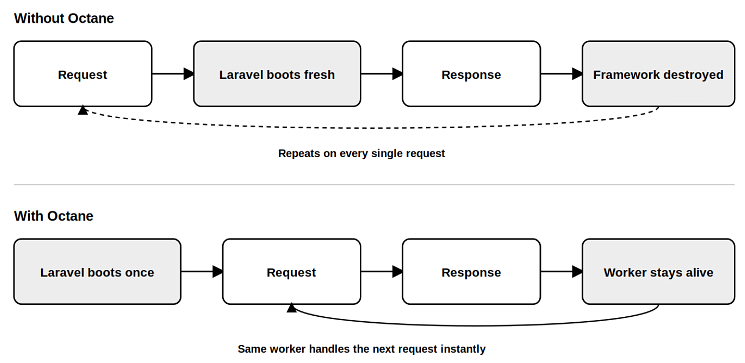
Here’s what actually happens when a request hits a standard Laravel app running on Nginx and PHP-FPM:
- PHP-FPM spins up a worker process
- That worker loads your Laravel app
- All service providers register themselves
- The framework boots
- Middleware runs
- Your controller does its work
- A response goes back
- The worker sits idle or gets recycled
This cycle repeats for every single request. On a low-traffic site, you won’t notice. But when you’re handling even a few hundred requests per second, you’re wasting server resources booting the same framework over and over instead of doing actual work.
The numbers add up fast. A typical Laravel app spends 30–100ms just on framework boot, before your controller even runs. That’s a massive tax on every request.
How Octane Fixes It
Instead of booting fresh for each request, Octane boots the framework once and keeps it in memory. When a request comes in, a worker picks it up, runs it through the already-booted framework, and sends the response back, without ever re-booting.
The result? Your application spends its CPU cycles on your code, not on Laravel’s boot process. For I/O-heavy applications, API endpoints hitting databases, external APIs, and queue workers, this is a game-changer.
Understanding Stateful vs Stateless PHP
This is where most developers get confused, so let me make it concrete.
PHP is naturally stateless. Every request starts with a blank slate. The server does not retain information from previous requests, so each request starts with a fresh application state. That’s fine for most use cases, but it means PHP has to rebuild everything from scratch each time.
Laravel Octane makes PHP partially stateful. The framework stays booted in memory, so subsequent requests don’t pay the boot tax. Your application code is still stateless in the sense that each request is independent, but the infrastructure around it isn’t constantly rebuilding itself.
This is a meaningful shift in how you think about PHP applications. If you’re new to stateful programming, you’ll need to adjust how you write certain parts of your app. Global state that mutates between requests can cause subtle bugs in Octane if you’re not careful.
A Simple Analogy
Picture a library with a librarian who resets the entire library, shelves, card catalog, everything, every single time someone walks in to ask a question. That’s stateless PHP. The librarian spends more time resetting than answering questions.
Now picture a library where the librarian keeps everything set up, remembers your name, and can answer follow-up questions immediately without resetting. That’s stateful PHP with Octane. The work of setting up only happens once; after that, everything is fast.
Why This Matters for Laravel
If you’ve ever looked at New Relic or Clockwork profiling data on a Laravel app, you know that framework boot time is often the single largest time sink. Cutting that out doesn’t just make individual requests faster, it means your server can handle significantly more traffic with the same resources.
For a server, moving from 200 requests/second to 2,000 requests/second isn’t an exaggeration. That’s the difference between needing three servers and needing one.
Laravel Octane vs Traditional Laravel: The Numbers
I want to be honest about where these numbers come from. Laravel’s own benchmarks and community testing consistently show Octane outperforming traditional Laravel by a wide margin, but the exact numbers vary based on your application, server specs, and what you’re measuring. Here’s the general picture:
| Metric | Traditional Laravel (PHP-FPM) | Laravel Octane |
|---|---|---|
| Requests per second | 300–600 | 1,800–3,000+ |
| Memory per request | 15–30 MB allocated | ~2 MB delta per request |
| Framework boot time | 30–100ms | 0ms (booted once) |
| Cold start | Every request | Once on startup |
The key insight isn’t just raw speed, it’s consistency. Traditional Laravel has a wide variance in response times because some requests hit freshly-booted workers and others hit workers that have been sitting. Octane workers are always warm.
One caveat worth noting: if your application makes heavy use of global mutable state or relies on PHP superglobals in non-standard ways, you may hit edge cases in Octane that you didn’t have with PHP-FPM. Test thoroughly before going to production.
Swoole vs RoadRunner
When you install Laravel Octane, you choose between two high-performance servers to power it. Neither is objectively “better”, the right choice depends on your setup, your team, and your needs.
                     Laravel Octane
                            │
                 ┌──────────┴────────┐
                 ↓                   ↓
              Swoole              RoadRunner
           PHP Extension           Go Binary
           Maximum Speed          Easier Setup
Advanced Features CompatibilitySwoole: Best For Maximum Performance
Swoole is a PHP extension, which means it compiles directly into your PHP binary. Once installed, it’s part of your PHP environment.
The upside: Swoole is fast. Genuinely fast. It also adds some Laravel-specific features that RoadRunner doesn’t have, concurrent task processing, tick/interval timers, and an in-memory cache driver that can handle millions of operations per second.
The downside: it’s a compiled extension, which means installation is more involved. You need to compile it or use a PHP build that includes it. It also doesn’t play well with Xdebug, which is the most widely-used PHP debugging tool. Some APM tools like New Relic and Datadog have compatibility issues with Swoole’s coroutine model.
Choose Swoole if you:
- Need the highest possible performance from Octane
- Want concurrent task processing
- Need ticks, intervals, or Octane tables
- Have full control over your server and PHP environment
- Are comfortable managing PHP extensions
If you’re comfortable with server administration and want the maximum performance possible, Swoole is the choice.
RoadRunner: Best For Simpler Deployment
RoadRunner is a high-performance application server written in Go that works alongside PHP. Unlike Swoole, it doesn’t compile directly into PHP. Instead, it runs as a separate process and communicates with your Laravel application.
The upside: RoadRunner is easier to install and deploy. You don’t need to compile a PHP extension or modify your PHP build. You can install the RoadRunner binary, configure it for your application, and start using it with Laravel Octane. It also works well with standard PHP debugging tools and avoids many of the PHP extension compatibility concerns that can come with Swoole.
The downside: RoadRunner doesn’t provide some of Swoole’s Octane-specific features, such as concurrent task processing, ticks and intervals, and Swoole-based in-memory features. While RoadRunner offers excellent performance, Swoole may be a better choice when you need the maximum performance or those additional capabilities.
Choose RoadRunner if you:
- Want an easier Octane installation and deployment
- Prefer not to compile or manage additional PHP extensions
- Need compatibility with your existing PHP debugging tools
- Are getting started with Laravel Octane
- Don’t need Swoole-specific features
If you want the performance benefits of Laravel Octane without adding complexity to your PHP environment, RoadRunner is a practical choice.
RoadRunner is what I’d recommend if you’re just getting started with Octane, if you’re on a shared or semi-managed server, or if you need maximum compatibility with your existing PHP tooling.
Side-by-Side Comparison
| Feature | Swoole | RoadRunner |
|---|---|---|
| Installation | PHP extension (compile required) | Binary (drop-in) |
| Performance | Highest | Very good |
| Xdebug compatibility | ❌ | ✅ |
| APM tool compatibility | Partial | Full |
| Concurrent tasks | ✅ | ❌ |
| Ticks and intervals | ✅ | ❌ |
| In-memory cache driver | ✅ | ❌ |
| Learning curve | Steeper | Gentle |
So, Which One Should You Choose?
If you’re still unsure, use this simple rule:
- Choose Swoole when performance and advanced Octane features are your priority.
- hoose RoadRunner when simplicity, compatibility, and easier deployment matter more.
For a typical Laravel application, you don’t need to overthink the decision. RoadRunner is a sensible starting point if you’re new to Octane. If your application has demanding performance requirements or you specifically need Swoole’s concurrency and in-memory features, Swoole is the better fit.
And remember: the server you choose doesn’t replace good application optimization. Database queries, caching, external API calls, inefficient code, and insufficient server resources can still become bottlenecks even after moving to Octane.
Key Features That Make Octane Worth It
Beyond raw speed, Octane introduces some features that have no equivalent in traditional Laravel. Here’s what I find most useful in practice.
Persistent Workers
Instead of PHP-FPM spinning up a new worker per request (or per small pool), Octane lets you configure multiple workers that stay alive and handle requests continuously. You can specify how many workers to start based on your CPU cores:
php artisan octane:start --workers=4The key benefit: if one worker is busy processing a heavy request, other workers immediately start handling incoming traffic. No request queue backing up behind one slow operation. Under PHP-FPM, a single slow request could tie up a significant portion of your worker pool.
One thing I’ve learned the hard way: more workers isn’t always better. Each worker uses memory. If your app is memory-heavy or you’re on a limited VPS, 2 workers might outperform 8. Test with your actual traffic patterns.
Concurrent Tasks
This one is Swoole-only, and it’s genuinely powerful. Laravel Octane lets you defer heavy operations to background task workers so your web workers stay free to handle incoming requests:
php artisan octane:start --workers=4 --task-workers=6Task workers are completely separate from web workers. You can push CPU-intensive or I/O-heavy work to them without blocking the request that triggered it. Think of it like a poor-man’s queue system without needing a separate Redis or RabbitMQ setup.
I’ve used this for things like generating reports, processing file uploads, and calling third-party APIs that have slow response times. The web endpoint returns immediately, and the task runs in the background.
Ticks and Intervals
Also Swoole-only. Ticks let you run code on a recurring schedule, like a setInterval in JavaScript. This is useful for maintenance tasks that need to run in your application layer:
Octane::tick('cleanup-temp', fn () => TempFile::pruneOld())
->seconds(60);The catch: there’s no built-in command to stop ticks at the time of writing. That means they’re tied to the worker lifecycle. In production, I’ve found ticks useful for lightweight scheduled work, but anything critical should still use proper cron or queue workers.
Octane Cache
Laravel Octane ships with a cache driver backed by Swoole’s in-memory table storage. It can handle up to 2 million read/write operations per second, far faster than file-based or even Redis-based caching for some use cases:
Cache::store('octane')->put('api-response', $data, 30);The trade-off: this cache lives in worker memory. It wipes when the server restarts. For genuinely ephemeral data, rate limiting, session flags, temporary computation caches, this is excellent. For persistent data that needs to survive restarts, use Redis or database-backed caching.
You can also set up cache intervals that automatically refresh:
Cache::store('octane')->interval('metrics', function () {
    return Metrics::pull();
}, seconds: 10);This is useful when you have expensive computations that need to be fast but refreshed regularly.
Octane Tables
Swoole tables are shared-memory data structures accessible by all workers simultaneously. They’re incredibly fast because there’s no inter-process communication overhead, every worker reads and writes to the same memory space:
Octane::table('sessions')->set($uuid, [
    'user_id' => $userId,
    'last_active' => time(),
]);

return Octane::table('sessions')->get($uuid);The column types supported are string, int, and float. Data is lost on restart, treat these as ephemeral scratch space, not persistent storage. I’ve used Octane tables for things like rate limiting counters and temporary session state that didn’t warrant a full database write.
Is Laravel Octane Right for Your Project?
Here’s my honest take, based on running it in production:
Use Octane if:
- Your Laravel app handles significant traffic, and you’re noticing slow response times
- You’re running on a VPS or dedicated server where you control the PHP version
- You’re comfortable troubleshooting PHP extension or binary deployment issues
- Your application doesn’t rely heavily on global mutable state
- You want meaningful performance gains without changing your application code
Probably skip Octane if:
- Your app runs on shared hosting without SSH access or custom PHP builds
- You’re on an older PHP version, and upgrading isn’t straightforward
- Your team isn’t familiar with stateful PHP programming and the transition would cause more problems than it solves
- You have a small, low-traffic site where the performance gains won’t matter
The learning curve is real, but not steep. If you understand how Laravel’s service container works, you’ll figure out Octane’s nuances within a few days of testing.
How to Install Laravel Octane (Step-by-Step)
Installation is straightforward since Octane is just a Composer package. Here’s the workflow:
Step 1: Confirm PHP 8.0+
Check your PHP version before doing anything:
php -vIf you’re below 8.0, upgrade PHP first. On Ubuntu, that’s typically:
sudo apt update && sudo apt upgrade phpStep 2: Install the package
Use the command below to install the Laravel Octane package:
composer require laravel/octaneStep 3: Install Octane
Use the command below to install Octane:
php artisan octane:installThis creates a configuration file at config/octane.php where you control server settings.
Step 4: Choose your server
Open config/octane.php and set your server preference. For RoadRunner (easier setup):
'server' => 'roadrunner',Then install the RoadRunner binary via Composer:
composer require spiral/roadrunnerFor Swoole (maximum performance):
pecl install swooleSwoole installation will ask about various compile-time options. Default values are fine for most use cases.
Step 5: Start Octane
php artisan octane:startBy default, Octane runs on port 8000. You’ll need to point Nginx or another reverse proxy at it:
location / {
    proxy_pass http://127.0.0.1:8000;
    # ... standard proxy headers
}Step 6: Manage workers in production
For a production server, you’ll want a process manager to keep Octane running. RoadRunner ships with its own process manager.
For Swoole, you might use Supervisor or systemd to ensure the process stays up and restarts on failure.

Common Pitfalls and How to Avoid Them
After running Octane in a few different environments, here are the mistakes I see most often:
1. Forgetting that state persists between requests
Global variables, static properties, and singleton bindings that mutate can cause hard-to-debug issues.
If you have a singleton that stores user-specific data, that data could leak between requests in Octane. Audit your service providers and avoid storing request-specific data in shared state.
2. Memory leaks
Since the framework stays booted, any memory your app allocates per request stays allocated unless you explicitly release it. Watch for things like event listeners that accumulate, logger buffers, or cache stores that grow unbounded.
Use php artisan octane:status to monitor worker memory in production.
3. Not testing with realistic traffic
Octane’s benefits only show up under load. A single-user local test won’t tell you much.
Use tools like wrk or k6 to simulate concurrent traffic and see the actual difference.
4. Ignoring worker configuration
Starting 10 workers on a 2GB RAM VPS will swap your server to death. Start conservatively (1–2 workers), measure memory usage, and scale up gradually.
Key Takeaways
- Laravel Octane is an official package that keeps your Laravel framework booted in memory, dramatically reducing per-request overhead
- It runs on top of Swoole or RoadRunner, high-performance servers that replace PHP-FPM for Laravel applications
- Octane can handle 3–10x more requests per second than traditional Laravel on the same server
- RoadRunner is easier to install and broadly compatible; Swoole is faster and has more features but requires a PHP extension
- Key features include persistent workers, concurrent tasks (Swoole), ticks/intervals (Swoole), Octane cache, and Octane tables
- Not a fit for shared hosting or projects where you can’t upgrade to PHP 8.0+
- Thoroughly test your application, especially around global state and memory usage, before going to production
Conclusion
Laravel Octane can significantly improve Laravel performance by keeping the framework booted in memory and reducing repeated startup overhead. With Swoole or RoadRunner, persistent workers, and features like caching and concurrent tasks, it can help applications handle more traffic efficiently.
However, Octane also requires careful attention to memory usage, global state, and worker configuration. If your Laravel application is running on a VPS or dedicated server and needs better performance, Octane is worth testing before moving it into production.
FAQs
Does Laravel Octane replace PHP-FPM completely?
Yes, in the sense that Octane runs your Laravel app without PHP-FPM. However, you’ll still need a web server (Nginx or Apache) as a reverse proxy to handle things like SSL termination and static file serving. Octane replaces the PHP-FPM layer for dynamic request handling.
Can I use Octane on shared hosting?
Probably not, Octane requires either compiling a PHP extension (Swoole) or running a custom binary (RoadRunner), and it needs SSH access to manage the server process. Most shared hosting environments don’t allow either. VPS or dedicated servers are the practical choice.
How much faster is Laravel Octane in real-world use?
Community benchmarks and Laravel’s own testing show 3–10x throughput improvements depending on application complexity. Applications with heavier framework boot times see the biggest gains. The improvement is most noticeable under concurrent load, a single-request test won’t show much difference.
Is Laravel Octane production-ready?
Yes, many Laravel applications run Octane in production today. That said, it introduces complexity around worker management, memory monitoring, and debugging that PHP-FPM doesn’t have. Make sure your team is comfortable with the operational requirements before deploying.
Do all Laravel packages work with Octane?
Most do, but not all. Packages that rely on PHP superglobals in unusual ways, or that expect the request lifecycle to fully reset between calls, may behave unexpectedly. The Laravel Octane documentation maintains a list of known incompatible packages. Always test your specific stack.
Next Steps
If you found this guide useful, you might also find these helpful:
- Laravel for Beginners: Easy Explanation You Can Understand
- How to Check Installed Laravel Version
- What Is Laravel Livewire? Complete Beginner’s Guide for 2026
- Top 7 Best Laravel Hosting Providers in 2025
- How to Optimize Laravel Performance in 2026 (Complete Guide)
About the Author
Meghna Meghwani is a technical writer focused on Linux, Ubuntu, VPS hosting, server management, WordPress, PHP, Node.js, cloud hosting, and DevOps. She creates beginner-friendly tutorials, practical hosting guides, troubleshooting articles, and server security content designed to help developers and businesses manage applications and servers more efficiently.