

You’ve decided to build a website using PHP, great choice! But now comes the tricky part: setting up your hosting environment. If you’re feeling overwhelmed, don’t worry, you’re not alone. This PHP hosting setup checklist will help you understand that hosting is more than just writing code, you also need the right tools, services, and configurations to keep everything running efficiently. Missing even one element can make the entire setup complicated and messy.
This PHP hosting setup checklist is designed to walk you through everything step by step, no technical background required. By the end of this guide, you’ll have a solid foundation to launch your PHP website confidently.
Understanding PHP Hosting
Before diving into the setup, let’s get the basics clear. PHP hosting simply means a server environment that supports PHP scripts. Since PHP works behind the scenes, your server needs to be properly configured to execute it efficiently.
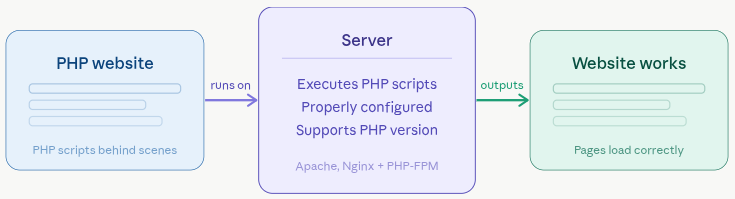
Key takeaway: Without proper PHP hosting, your website simply won’t work.
PHP Hosting Setup Checklist
Setting up a PHP hosting environment involves multiple steps, and missing even one can lead to performance or security issues. To make things easier, we’ve put together a simple and beginner-friendly PHP hosting setup checklist. Here are the essential checklist points you should follow to get your PHP website up and running smoothly.
Choosing the Right Hosting Type
Selecting the right hosting type is the foundation of your PHP website. Different hosting options offer varying levels of performance, control, and scalability. Making the right choice early can save you from future limitations and unnecessary upgrades.
- Shared Hosting: Perfect for beginners. It’s affordable, but resources are shared.
- VPS Hosting: More control and better performance.
- Cloud Hosting: Highly scalable and reliable.
- Dedicated Hosting: Best for large websites with heavy traffic.
Why it matters:
- Affects your website speed and uptime
- Determines how much control you have over the server
- Impacts your ability to scale as traffic grows
Key features:
- Shared, VPS, Cloud, and Dedicated hosting options
- Resource allocation (CPU, RAM, storage)
- Scalability and flexibility
If you’re just starting, cloud or managed hosting (such as ServerAvatar’s managed servers) gives you the best balance of simplicity and power.
Selecting a Reliable Hosting Provider
Your hosting provider plays a major role in your website’s overall performance and reliability. A trustworthy provider ensures your site stays online and runs smoothly without interruptions.
Why it matters:
- Reduces downtime and performance issues
- Ensures better customer support when needed
- Improves user experience and SEO rankings
Key features:
- High uptime guarantee
- Responsive customer support
- Easy scalability options
Checking PHP Version Compatibility
Not all PHP versions behave the same, and using the right one is crucial for your website. Compatibility ensures your application runs smoothly without errors or security risks.
Why it matters:
- Improves website performance and speed
- Ensures compatibility with modern applications
- Reduces security vulnerabilities
Key features:
- Support for PHP 8.x or latest versions
- Ability to switch PHP versions
- Backward compatibility options
Always choose a host that supports PHP 8.x or above. Using outdated versions can expose your website to vulnerabilities and performance issues.
Setting Up Your Domain Name
Your domain name is your website’s identity on the internet. It should be simple, memorable, and relevant to your brand or purpose.
Why it matters:
- Helps users find and remember your site
- Builds brand credibility
- Impacts SEO and visibility
Key features:
- Easy domain registration and linking
- Custom domain support
- Domain management tools
Keep it simple, memorable, and relevant to your niche.
Configuring DNS Settings
DNS setting connect your hosting server to your domain. Without proper configuration, your website won’t be accessible to users.
Why it matters:
- Ensures your domain points to the correct server
- Affects website accessibility
- Impacts loading time and reliability
Key features:
- Nameserver configuration
- DNS record management (A, CNAME, etc.)
- Fast propagation support
It’s like telling the internet where your website lives.
Setting Up an Ideal Web Stack
A web stack is the combination of technologies that power your website. Choosing the right stack ensures better performance and compatibility.
Why it matters:
- Affects website speed and efficiency
- Determines how well your app performs under load
- Impacts server resource usage
Key features:
- LAMP or LEMP stack options
- Support for PHP, databases, and web servers
- Optimized configurations
Common choices:
- LEMP (Linux, NGINX, MySQL, PHP)
- LAMP (Linux, Apache, MySQL, PHP)
Both support PHP, but:
- Apache is beginner-friendly
- Nginx is faster for high traffic
Setting Up Your Web Server
Your web server handles incoming requests and delivers your website to users. Proper setup ensures fast and reliable performance.
Why it matters:
- Directly impacts page loading speed
- Handles traffic efficiently
- Ensures stable website delivery
Key features:
- Apache or NGINX support
- Easy configuration options
- Performance tuning capabilities
Popular choices:
- Apache
- NGINX
Configuring Database
Databases store and manage your website’s data. A well-configured database ensures your dynamic content loads quickly and reliably.
Why it matters:
- Powers dynamic websites
- Affects data retrieval speed
- Impacts overall performance
Key features:
- MySQL or MariaDB support
- Database creation and management
- Optimization tools
Common options:
- MySQL
- MariaDB
Without a database, dynamic websites won’t work. A slow database is equal to a slow website.
Managing Files and Deployment
Efficient file management is essential for maintaining your website. A proper deployment process ensures smooth updates and organization.
Why it matters:
- Keeps your project organized
- Simplifies updates and maintenance
- Reduces errors during deployment
Key features:
- File manager access
- FTP/SFTP support
- Git-based deployment
Configuring PHP Settings for Performance
Optimizing how PHP processes requests can significantly improve performance. Tools like PHP-FPM help manage multiple requests efficiently.
Why it matters:
- Improves response time
- Handles high traffic better
- Enhances stability
Key features:
- PHP-FPM support
- Process and memory tuning
- Performance optimization options
Even basic configuration can significantly boost performance.
Installing SSL Certificate
An SSL certificate secures data exchanged between users and your website. It’s essential for trust and modern web standards.
Why it matters:
- Protects sensitive information
- Builds user trust
- Improves SEO rankings
Key features:
- Free SSL (Let’s Encrypt) support
- Custom SSL installation
- Automatic renewal
Optimizing PHP Settings
Fine-tuning PHP settings helps your application run more efficiently. Even small changes can improve performance significantly.
Why it matters:
- Prevents resource overuse
- Improves speed and execution
- Reduces server load
Key features:
- Adjustable memory limits
- Execution time settings
- File upload limits
Important settings:
- memory_limit
- max_execution_time
- upload_max_filesize
Setting File Permissions
Correct file permissions are essential for both security and functionality. Incorrect settings can expose your site or break features.
Why it matters:
- Protects files from unauthorized access
- Ensures proper functionality
- Prevents security risks
Key features:
- Standard permission settings (644, 755)
- Access control management
- Secure configuration options
Recommended settings
- Files: 644
- Folders: 755
This ensures security while keeping your site functional.
Enabling Caching for Speed
Caching stores ready-to-serve versions of your content, reducing load time. It’s one of the easiest ways to boost performance.
Why it matters:
- Speeds up website loading
- Reduces server load
- Improves user experience
Types of caching:
- Page caching
- Object caching (Redis)
- Opcode caching (OPcache)
Enabling caching can dramatically improve loading speed and reduce server load.
Securing Your PHP Application
Security should be a priority from the start. Protecting your application helps prevent attacks and data breaches.
Why it matters:
- Safeguards user data
- Prevents unauthorized access
- Maintains website integrity
Key features:
- Firewalls and access controls
- Secure login protection
- Regular updates and patches
A secure setup protects both your data and your users.
Setting Up Backups and Recovery
Backups ensure you can restore your website in case of failure or data loss. It’s your safety net against unexpected issues.
Why it matters:
- Prevents data loss
- Enables quick recovery
- Protects business continuity
Key features:
- Automated backups
- Off-site storage options
- Easy restoration process
Monitoring and Logging
Monitoring tools help you track performance and detect issues early. Logs provide detailed insights into what’s happening on your server.
Why it matters:
- Identifies problems quickly
- Improves performance tracking
- Enhances security monitoring
Key features:
- Real-time monitoring
- Error and access logs
- Alert systems
Regular monitoring helps prevent major issues.
Testing Your Website
Testing ensures everything works as expected before going live. It helps you catch issues early and deliver a smooth user experience.
Why it matters:
- Prevents broken features
- Improves user experience
- Ensures reliability
Key features:
- Performance testing
- Functionality checks
- Error detection
It’s like a final inspection before opening your store.

Regular Maintenance
Launching your website is just the beginning. Regular maintenance keeps everything updated, secure, and running efficiently.
Why it matters:
- Prevents performance issues
- Keeps your site secure
- Ensures long-term stability
Key features:
- Regular updates
- Performance checks
- Security monitoring
Think of it as routine servicing to keep everything running smoothly.
Staging Environment (Recommended Practice)
A staging environment allows you to test changes, updates, or new features before applying them to your live website. It acts as a safe copy of your site where you can experiment without affecting real users.
Why it matters:
- Prevents breaking your live website
- Helps test updates safely
- Improves development workflow
Key features:
- Safe testing environment
- Easy push from staging to live
How ServerAvatar Simplifies PHP Hosting Setup
Setting up a PHP hosting environment manually can feel overwhelming, especially for beginners. From configuring servers and installing web stacks to managing security and performance, each step requires time and technical knowledge. This is where ServerAvatar makes things much easier.
ServerAvatar is a platform to simplify the hosting and management of servers and applications. It simplifies the process of deploying and managing PHP and Node.js based web applications on servers.
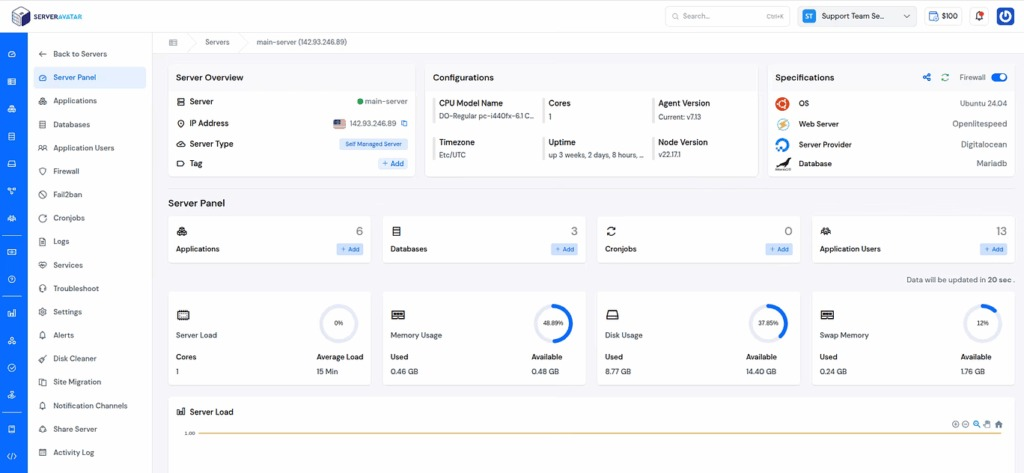
Instead of handling everything manually, you can manage your entire server environment from a clean and intuitive dashboard. For beginners, this removes the confusion of server-level configurations. For developers, it saves time and improves efficiency.
In short, ServerAvatar helps you focus more on building your PHP application while it handles the heavy lifting of server management in the background.
How ServerAvatar Handles These Steps
Managing all aspects of PHP hosting manually can be time-consuming. ServerAvatar simplifies most of these steps through an easy-to-use dashboard. Here’s how it helps you handle key parts of the setup:
1. Launching and Managing Servers
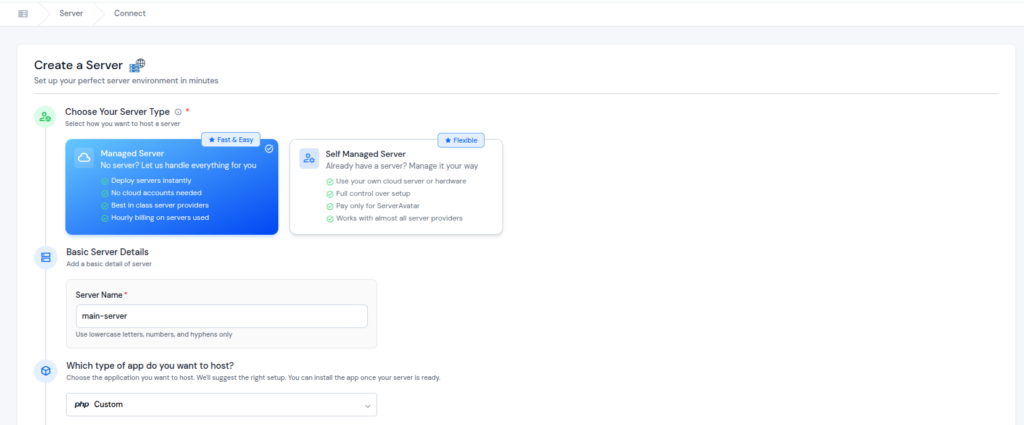
ServerAvatar offers fully managed servers, so you don’t need to rely on a third-party cloud provider account.
In addition, it also supports self-managed servers, allowing you to connect and manage servers from any cloud provider with ease, without complex setup, making it ideal for beginners.
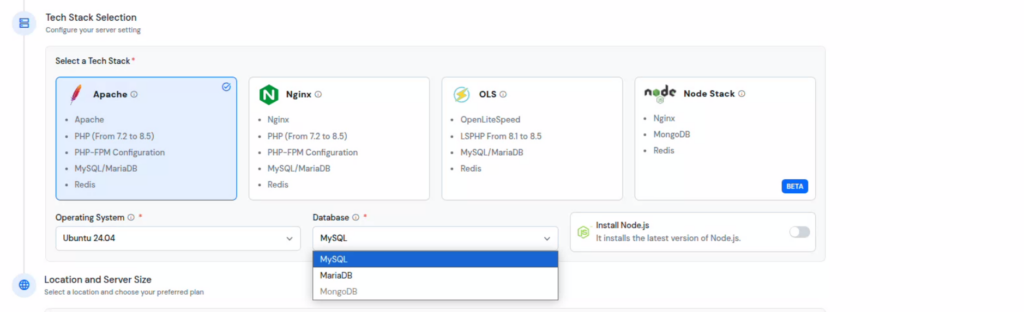
2. Choosing the Optimized Web Stack
ServerAvatar comes with pre-configured stacks like Apache, NGINX, and OpenLiteSpeed, all optimized for PHP applications using PHP-FPM. This eliminates the need for manual setup.
You can also choose your preferred operating system and easily set up databases like MySQL or MariaDB through a simple interface.
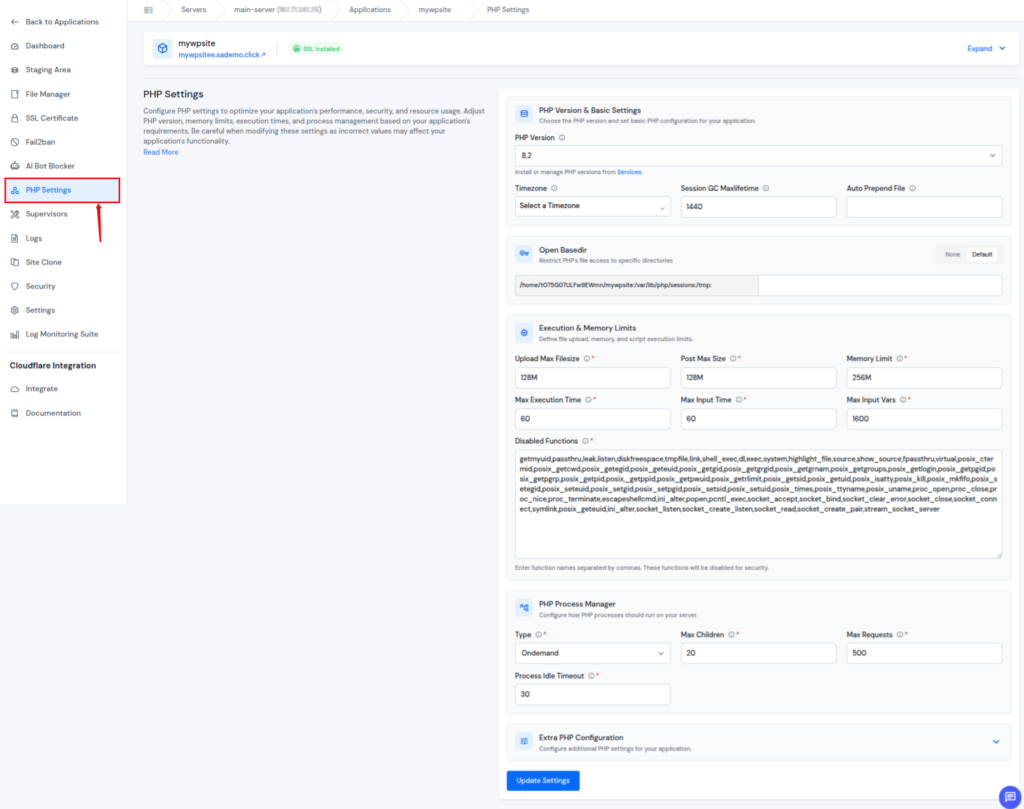
3. Managing PHP Settings
You can switch between multiple PHP versions and adjust PHP settings with just a few clicks, without affecting your application.
It also allows you to assign different PHP versions to individual applications for better flexibility.
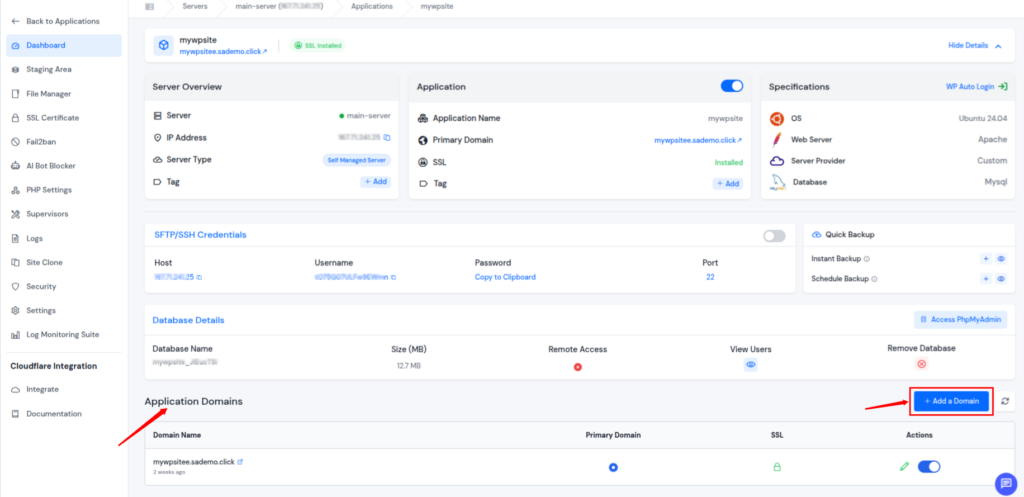
4. Domain Management
Adding or updating a domain is straightforward with ServerAvatar. You can connect your domain to your application without dealing with complicated configurations.
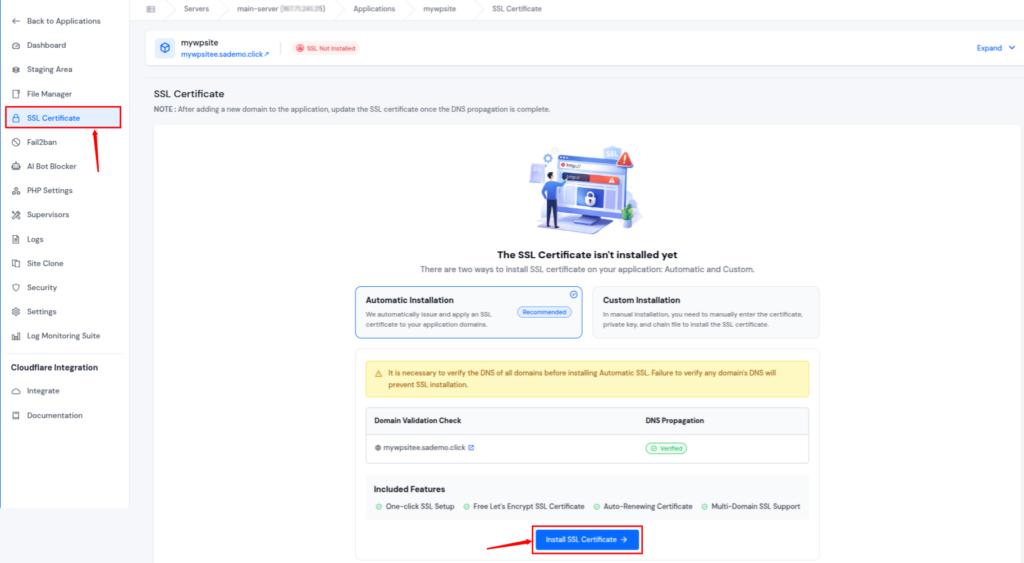
5. SSL Certificate Installation
Secure your website easily by installing free SSL certificates automatically or by adding a custom SSL certificate whenever needed.
6. File Management & Deployment
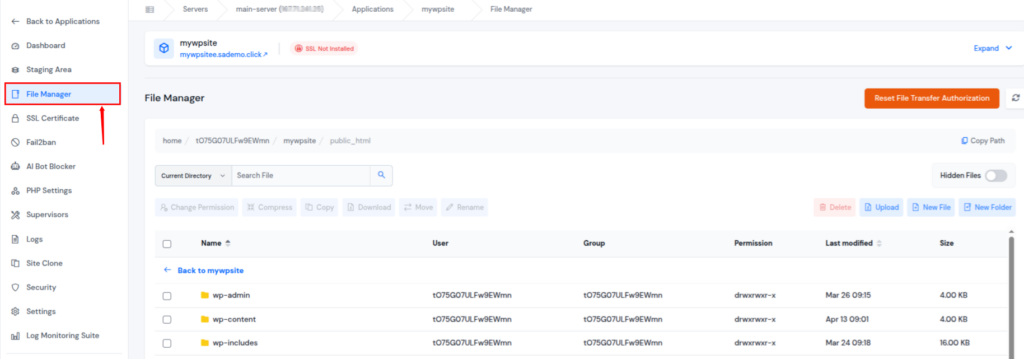
Manage your files effortlessly from a single dashboard. You can upload, download, copy, move, rename, delete files, set permissions, and even create new files or folders without hassle.
7. Performance Optimization
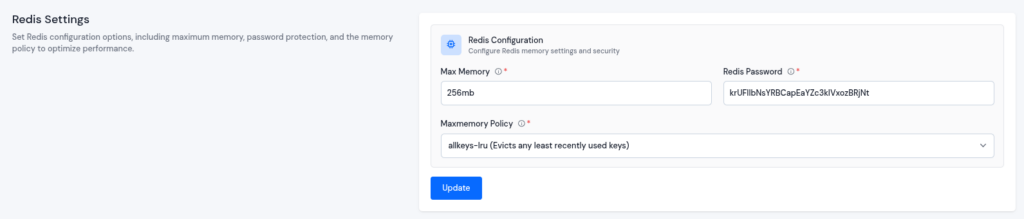
ServerAvatar includes optimized PHP configurations and supports performance-enhancing tools like Redis caching settings to improve your website’s speed and efficiency.
8. Backups
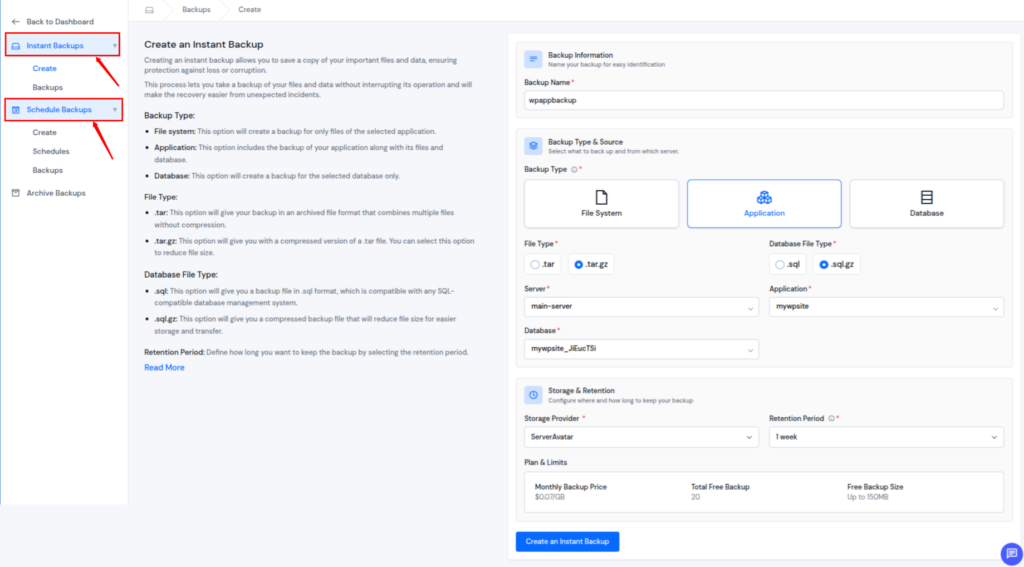
ServerAvatar makes it easy to protect your data by allowing you to create backups whenever needed or automate the process on a schedule. You can choose to store backups using your own connected storage provider or use the storage options available within ServerAvatar itself.
9. Monitoring and logs
Keeping track of your server’s health is simple with real-time monitoring. It helps you stay aware of performance and ensures your system runs smoothly.
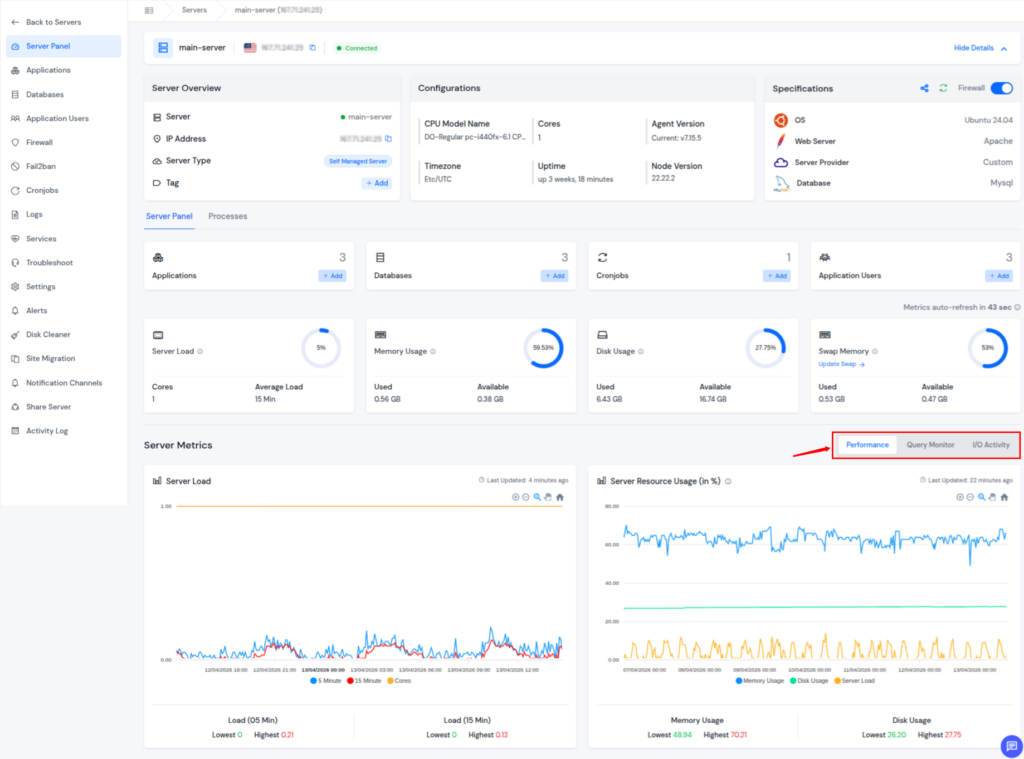
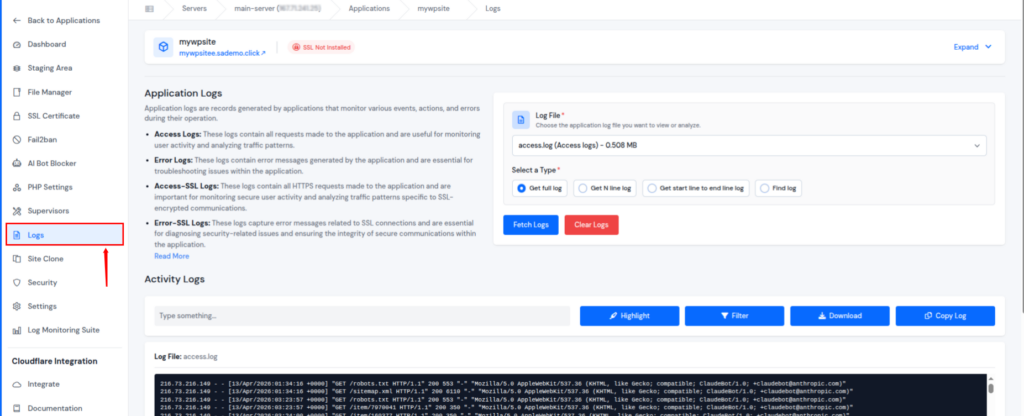
You can also view access logs and error logs for both your server and applications directly from the dashboard. This makes troubleshooting faster and helps you quickly identify any issues.
10. Security Features
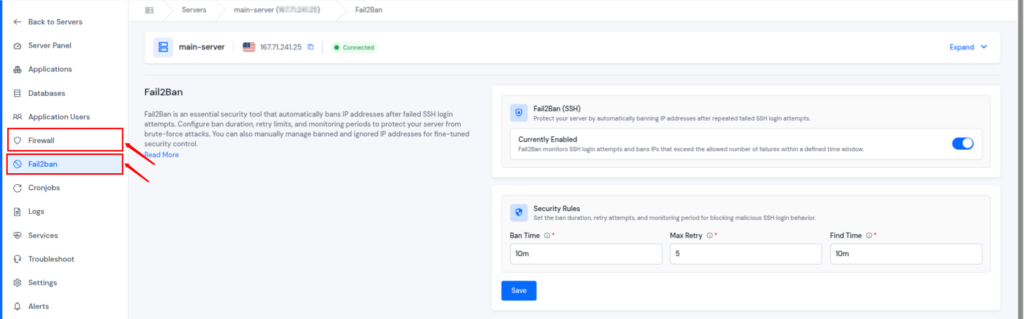
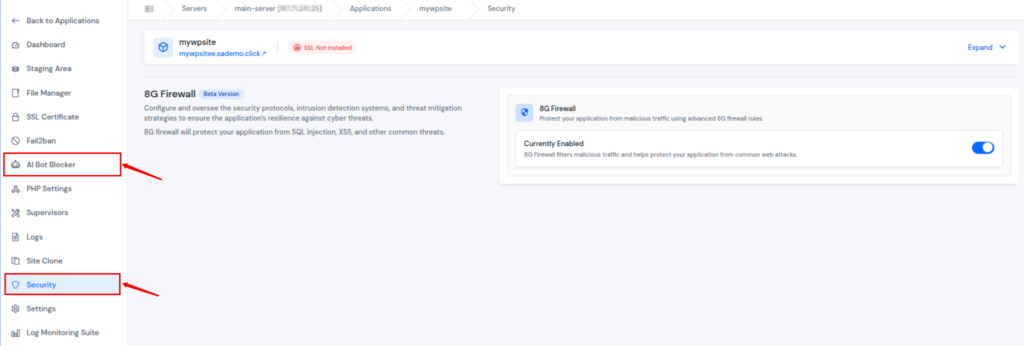
ServerAvatar comes equipped with multiple built-in security layers, including a Firewall, Fail2Ban protection, AI bot blocker, and 8G firewall rules. These tools work together to secure your server and applications without requiring manual setup.
11. Staging Environment
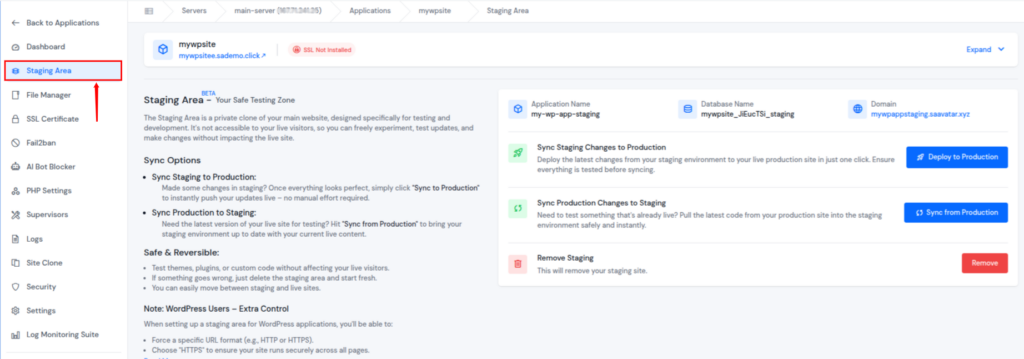
ServerAvatar provides a staging area feature that allows you to create a separate copy of your application for testing purposes. You can try out updates, changes, or new features without affecting your live website.
Once you’re ready, you can push changes from staging to live or sync live data back to staging with just a few clicks. This reduces the chances of errors and makes deployment much safer.
With ServerAvatar, you don’t have to manage every configuration step manually. It brings all essential tools together in one place, helping you set up and manage your PHP hosting environment quickly and without unnecessary complexity.
Conclusion
Building a PHP hosting setup may feel challenging in the beginning, but following a step-by-step approach makes the process much simpler. Each part of the setup, from choosing the right hosting to handling performance, security, and backups, contributes to the overall stability of your website. Instead of dealing with everything manually, using a platform like ServerAvatar can streamline the entire process. It allows you to focus more on your application while reducing the effort required to manage the server side efficiently.
FAQs
1. What does PHP hosting mean?
PHP hosting refers to a server setup that is designed to run websites and applications built using PHP. It includes all the necessary components required to process and execute PHP code properly.
2. Which hosting option is suitable for beginners?
For beginners, shared hosting or managed cloud hosting is often the easiest choice. These options are user-friendly, require minimal technical knowledge, and offer a good starting point.
3. Why is selecting the correct PHP version important?
Using the right PHP version helps your website perform better and stay secure. Newer versions are generally faster and safer, while older ones may lead to compatibility issues or risks.
4. What is staging environment?
A staging environment is a test version of your website where you can safely experiment with changes before applying them to your live site. This helps avoid unexpected issues.
5. Is SSL necessary for a PHP website?
SSL is important for securing user data and building trust. It also plays a role in improving your website’s visibility in search engines.
6. How often should website backups be taken?
It depends on how frequently your website changes, but setting up daily or weekly backups is a good practice. Backups ensure you can recover your data anytime if anything goes wrong.